File Details |
|
| File Size | 1.0 MB |
|---|---|
| License | Freeware |
| Operating System | Windows 2000/Server 2003/Server 2008/Vista/XP |
| Date Added | October 21, 2013 |
| Total Downloads | 8,046 |
| Publisher | Martin Bresson |
| Homepage | Executor |
Publisher's Description
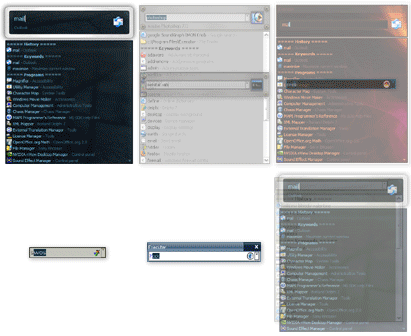
Executor is a multi purpose launcher and a more advanced and customizable version of windows run. Many features like: customizable keywords, history, auto-completion (keywords, history, file system), drop-down or vista like list, each keyword can be assigned a hotkey. Besides keywords Executor can automatically match start-menu items, control panel items, user defined paths and other handy items, start-menu importer, a "Find [text]" keyword that uses Windows Instant Search (Vista) or Windows Desktop Search (XP etc). skinable, very customizable, url and email detection, one keyword can launch multiple keywords/files/urls/programs etc, optional icon and program title display, customizable hotkey, a number of special commands and parameters, filesystem autocompletion, list and select clipboard text history, list running applications and manipulate them, list all recent documents, optional sounds, intergrated calculator and more.
Latest Reviews

sweathog reviewed v0.99.12b on Feb 7, 2014
I've switched to Run-Command 2.12
http://www.softwareok.co...e=Microsoft/Run-Command

Wallax reviewed v0.99.12b on Feb 7, 2014
It is much faster than Find and Run Robot (FARR).

jotte_ct reviewed v0.99.11b on Jan 20, 2012
Portable version crashes on Windows 7 x64 after you type 2 letters in the search box

Ain Soph Aur reviewed v0.99 on May 25, 2009
i use it really every day and i love it!!! works fine and has a lot of options
sweathog reviewed v0.98 Beta on Aug 24, 2008
The criticism about lack of configuration window adjustment for 120 DPI is valid and I don't know why the developer can't fix a simple glitch like that. But otherwise Executor is better than the competition.

why hello there reviewed v0.97 on Dec 24, 2007
Looks terrible and is scarcely usable/configurable when using 120 DPI.
Let the ad-hominem attacks begin.

Nighted reviewed v0.96.6b on Dec 19, 2007
This is freaking awesome. I thought I'd never need to replace SlickRun then I found this. With skepticism I downloaded it and was immediately blown away. I wasn't just ready to give up on SlickRun right away, but with the friendly nature of Martin, the creator and his diligent work of squashing bugs, improvements and new features, SlickRun was soon history. R.I.P. SlickRun, you got Executed! :D

daddi reviewed v0.96.6b on Oct 30, 2007
This is just a wonderfull piece of work!!
I'm using it for a couple of days now.
Enjoying it very much.
Designed to make life easier, and with SUCCES.
No more searching, the search is really over.
I created shortcuts to all my frequently used tools / maps / websites etc.
I have access to all of my tools / maps / websites / etc, by just a single click (hotkey). No more need to search for my goodies on my "well filled" desktop and/or "massive" start menu and/or 1.2TB files system.
It really makes my life easier!
The program runs like sunshine on my XP SP2 system.
Couldn't detect any bugs, the program seems to be stable.
Props to the creator of this masterpiece.

aepasa reviewed v0.96.6b on Oct 21, 2007
Nice work!
![[deXter]](https://www.gravatar.com/avatar/228cde722f0fa085f3ff9a4709a93060?s=16)
[deXter] reviewed v0.94.3b on Aug 13, 2007
Top notch program! Finally my search for a complete run replacement has ended!
You can customize this program in many, many ways - working, behaviour, appearance, skins, fonts, colors..
I used to use "SlickRun" earlier, but my biggest issue with SlickRun was that it wouldn't provide a dropdown list, making it inconvenient to browse a filesystem (unless you know exactly what you're looking for). Executor not only offers a drop-down list like Run does, it tremendously enhances it with features like icons, fuzzy search (Try typing C:\Windows\*.exe), and many more enhancements.
The only bug I found with Executor was that the program priority feature doesn't work.
A few improvements I'd like to see in Executor are:
1) Feature to quickly jot down notes. (Slickrun has it)
2) Right-clicking on an item in the drop-down list should open its context menu.
3) The drop-down list should support multiple selections (with shift and ctrl) so that file operations (cut/copy/paste) can be performed.
Overall, it would be safe to say that Executor is the best of its class.
Keyboard junkies and minimalists will love simply love this program!

sweathog reviewed v0.99.12b on Feb 7, 2014
I've switched to Run-Command 2.12
http://www.softwareok.co...e=Microsoft/Run-Command
Wallax reviewed v0.99.12b on Feb 7, 2014
It is much faster than Find and Run Robot (FARR).
jotte_ct reviewed v0.99.11b on Jan 20, 2012
Portable version crashes on Windows 7 x64 after you type 2 letters in the search box
Ain Soph Aur reviewed v0.99 on May 25, 2009
i use it really every day and i love it!!! works fine and has a lot of options
sweathog reviewed v0.98 Beta on Aug 24, 2008
The criticism about lack of configuration window adjustment for 120 DPI is valid and I don't know why the developer can't fix a simple glitch like that. But otherwise Executor is better than the competition.
why hello there reviewed v0.97 on Dec 24, 2007
Looks terrible and is scarcely usable/configurable when using 120 DPI.
Let the ad-hominem attacks begin.
Nighted reviewed v0.96.6b on Dec 19, 2007
This is freaking awesome. I thought I'd never need to replace SlickRun then I found this. With skepticism I downloaded it and was immediately blown away. I wasn't just ready to give up on SlickRun right away, but with the friendly nature of Martin, the creator and his diligent work of squashing bugs, improvements and new features, SlickRun was soon history. R.I.P. SlickRun, you got Executed! :D
daddi reviewed v0.96.6b on Oct 30, 2007
This is just a wonderfull piece of work!!
I'm using it for a couple of days now.
Enjoying it very much.
Designed to make life easier, and with SUCCES.
No more searching, the search is really over.
I created shortcuts to all my frequently used tools / maps / websites etc.
I have access to all of my tools / maps / websites / etc, by just a single click (hotkey). No more need to search for my goodies on my "well filled" desktop and/or "massive" start menu and/or 1.2TB files system.
It really makes my life easier!
The program runs like sunshine on my XP SP2 system.
Couldn't detect any bugs, the program seems to be stable.
Props to the creator of this masterpiece.
aepasa reviewed v0.96.6b on Oct 21, 2007
Nice work!
[deXter] reviewed v0.94.3b on Aug 13, 2007
Top notch program! Finally my search for a complete run replacement has ended!
You can customize this program in many, many ways - working, behaviour, appearance, skins, fonts, colors..
I used to use "SlickRun" earlier, but my biggest issue with SlickRun was that it wouldn't provide a dropdown list, making it inconvenient to browse a filesystem (unless you know exactly what you're looking for). Executor not only offers a drop-down list like Run does, it tremendously enhances it with features like icons, fuzzy search (Try typing C:\Windows\*.exe), and many more enhancements.
The only bug I found with Executor was that the program priority feature doesn't work.
A few improvements I'd like to see in Executor are:
1) Feature to quickly jot down notes. (Slickrun has it)
2) Right-clicking on an item in the drop-down list should open its context menu.
3) The drop-down list should support multiple selections (with shift and ctrl) so that file operations (cut/copy/paste) can be performed.
Overall, it would be safe to say that Executor is the best of its class.
Keyboard junkies and minimalists will love simply love this program!

CyberDoc999 reviewed v0.91b on May 31, 2007
Nice try but it needs more work....
why do I need to press enter when I have a
mouse in my hand ready to click?
Ain Soph Aur reviewed v0.91b on May 30, 2007
hell yeah! that's what i'm looking for!! :)

tarrith reviewed v0.90b on May 17, 2007
GhoS,
Right click on the program, click on More, Click on Autohide so it is no longer ticked. you can also make it Atay On Top.
Anyway, I tink this a cool app, like the Start, Run box on steroids.
In fact thsi is what the Start, Run box SHOULD have been like.
Tarrith