File Details |
|
| File Size | 99.3 MB |
|---|---|
| License | Freeware |
| Operating System | Unix, Windows (All) |
| Date Added | January 10, 2024 |
| Total Downloads | 5,597 |
| Publisher | Miray Software |
| Homepage | HDClone |
Publisher's Description
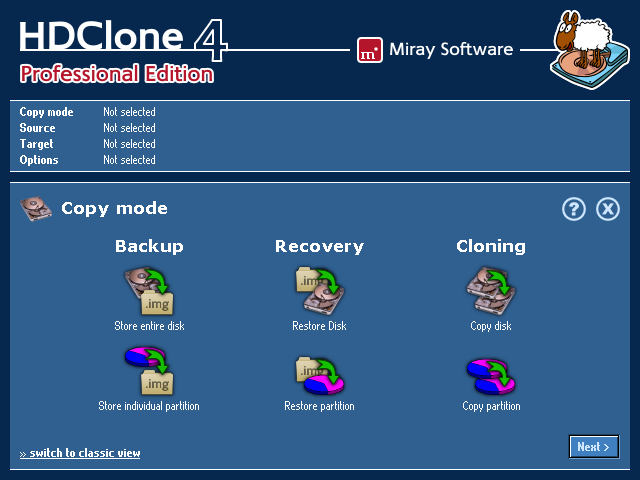
HDClone is the ideal tool for moving or cloning contents of entire hard disks. Since it works on physical level it can be used with any operating system and any filesystem. HDClone copies the data for you. This allows you to transfer entire system installations to a newer hard disk quickly and easily (hard disk migration). It also adds the additional disk space automatically if desired. Since HDClone has its own operating system and is self-booting, it can be used even if the installed operating system is damaged. Therefore HDClone is also a great solution for data rescue on damaged hard disks or system installations. The commercial versions HDClone Basic Edition, HDClone Standard Edition, HDClone Professional Edition, and HDClone Enterprise Edition offer extended features.
The Free Edition allows cloning ATA/SATA/USB media with up to 300 MB/min.
Latest Reviews

onlinetimesheet reviewed v7.0.1 on Oct 12, 2017
Best of its kind! Thanks to author for the freeware version! It definitely saved my day once already.

CyberDoc999 reviewed v4.3.2 on May 4, 2013
good program
I have seen O&O DiskImage Pro fail more than one time

Music4Ever reviewed v4.2.1 on Sep 20, 2012
The free edition is basically useless if you have any partitions, there are is an array of alternatives that you pay for but I feel you can do far better than any of them.

DudeBoyz reviewed v4.2.1 on Sep 19, 2012
Just disregard this hobbled junk and go buy O&O DiskImage Pro for $30 and you are set. That program gets it done - seriously well.

asaenz reviewed v4.1.3 on Feb 3, 2012
LOL ... 83 Euros for Pro Edition illustrated ... low rating for low value.

sdmunoz reviewed v3.8.2 on Oct 2, 2009
There're better free software that do the same and more that this...

reddy.shyam reviewed v3.7.1 on Nov 25, 2008
Best of its kind! Thanks to author for the freeware version! It definitely saved my day once already.

onlinetimesheet reviewed v7.0.1 on Oct 12, 2017
Pros: yes its is much better than other software
Cons: yes its is much better than other software
Bottom Line: Best of its kind! Thanks to author for the freeware version! It definitely saved my day once already.
CyberDoc999 reviewed v4.3.2 on May 4, 2013
good program
I have seen O&O DiskImage Pro fail more than one time
Music4Ever reviewed v4.2.1 on Sep 20, 2012
The free edition is basically useless if you have any partitions, there are is an array of alternatives that you pay for but I feel you can do far better than any of them.
DudeBoyz reviewed v4.2.1 on Sep 19, 2012
Just disregard this hobbled junk and go buy O&O DiskImage Pro for $30 and you are set. That program gets it done - seriously well.
asaenz reviewed v4.1.3 on Feb 3, 2012
LOL ... 83 Euros for Pro Edition illustrated ... low rating for low value.
sdmunoz reviewed v3.8.2 on Oct 2, 2009
There're better free software that do the same and more that this...
reddy.shyam reviewed v3.7.1 on Nov 25, 2008
Best of its kind! Thanks to author for the freeware version! It definitely saved my day once already.