File Details |
|
| File Size | 8.1 MB |
|---|---|
| License | Freeware |
| Operating System | Windows (All) |
| Date Added | April 8, 2021 |
| Total Downloads | 73,449 |
| Publisher | Jan Fiala |
| Homepage | PSPad |
Publisher's Description
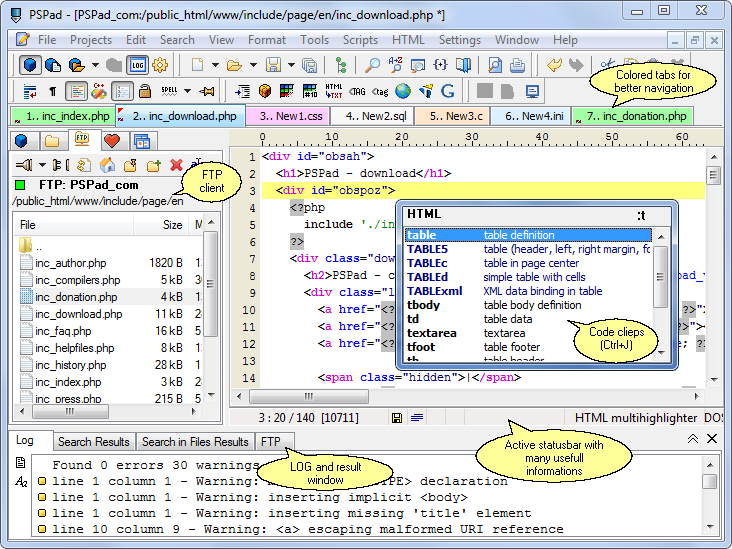
PSPad is a universal freeware editor. There is no complex install process; the program is ready to work immediately, without requiring customization. It supports many file types and languages, with syntax highlighting. There are macros, clip files and templates to automate repetitive activities. An integrated HEX Editor, Project support, FTP Client, Macro Recorder, File Search/Replace, Code Explorer, code page conversion, are just some of the many possibilities that PSPad can offer you.
Latest Reviews

PSPad reviewed v4.5.9.2600 on Mar 3, 2015
I can declare that PSPad installer from the 4.5.9 version (March 1ts 2015), downloaded from PSPad pages links doesn't contain any bundled software.
PSPad and installers are signed with code signing certificate, issued by COMODO.
PSPad reviewed v4.5.8.2500 Beta on Sep 4, 2014
Sorry ROY, but you lie.
There is NO SILENT install in case you use as source of your installer PSPad page. If you download PSPad from any software server, they wrap PSpad installer into they own downloader. In this case I can't be responsible of it.
Jan

roj reviewed v4.5.7.2450 on Jan 24, 2014
The new installer includes KNOWN MALWARE (specifically Conduit) that SILENTLY INSTALLS even if you choose "No" to the install options. I tracked this on a firewall with content filtering that blocks known malware purveyors. You will get a popup that says the installer is unable to download content and an option to continue. If you continue, the editor itself installs.
This app and author should be blacklisted until the malware is removed from the install.
ONE star for knowingly infecting users with malware.

Karol Mily reviewed v4.5.7.2450 on Feb 22, 2013
From author's page you can update/upgrade to - PSPad editor 4.5.8 (2453).
Slow development.

dhry reviewed v4.5.7.2447 Beta on Jun 7, 2012
This is still an excellent editor, but unfortunately it doesn't come anywhere near Notepad++. My main problem is that it is STILL designed as a coder's editor with monospaced font capability only. I write code in Notepad++ using Verdana 9. If you need monospaced fonts to line stuff up, fine, allow that as an option - don't force it on your users. Still, 5 stars for being free and having lots of features.

SuzzyWoozy reviewed v4.5.7.2441 Beta on Mar 17, 2012
so we are rating the package/installer or the application itself.
Go to their site and get the .cab file insteat, open it with 7zip and get the (portable) content out and you have it free of "spyware" as you call it.
Enjoy this free, wonderful, software!

jcollake reviewed v4.5.7.2441 Beta on Mar 16, 2012
@roj: Sadly, this is what 'freeware' has become. People want everything for free, BUT at some point a price is paid. Whether it is in the security and integrity of your PC (or the PC's of others that fall for bundle tricks), or support, or whatever... The 'snake' finally wandered into the garden, and that snake was in the form of bundles. Now they are everywhere, and NOT coming just from vendors. Thanks to CNET, the practice of download sites wrapping downloads in bundles is now common-place. I have the philosophical view that all these type bundles are deceptive in nature because they hope, rely, and encourage the user to accidentally install whatever the bundle is. Meanwhile, the user has no intent to download or install anything but the application in question. If they wanted whatever the bundle was, they'd go get it. Just my two cents.
roj reviewed v4.5.7.2433 Beta on Dec 19, 2011
MALWARE VECTOR!!!!
The RECOMMENDED Quick Install option wil SILENTLY install the BABYLON TOOLBAR into IE and Firefox. The installer is specifically tailored to do a SILENT install.
If you choose the CUSTOM install, you will find three options to disable this intrusion.
CHEAP TRICK Mr. Author.
ONE star until you get rid of this or PROMINENTLY inform users of your deception in the install prompts.

WascallyWabbit reviewed v4.5.5.2370 Beta on Sep 28, 2009
There is only one problem I have with the current 4.5.5 release. For some reason, in my dual-monitor setup, it will not load onto the secondary monitor. Never had the problem with 4.5.4 and I am hoping it's just a temporary proble. Otherwise, it is by far the best "notepad" replacement out there.
dhry reviewed v4.5.5.2357 Beta on Aug 17, 2009
Absolutely fantastic text editor. The only dealbreaker to using this (if you care) is the fact that you are forced to use fixed-width fonts as its geared towards coding. Frankly, even when I'm writing PHP I prefer using Verdana 9, but whatever. Still gets 5 stars for its capabilities and for being free.

PSPad reviewed v4.5.9.2600 on Mar 3, 2015
I can declare that PSPad installer from the 4.5.9 version (March 1ts 2015), downloaded from PSPad pages links doesn't contain any bundled software.
PSPad and installers are signed with code signing certificate, issued by COMODO.
PSPad reviewed v4.5.8.2500 Beta on Sep 4, 2014
Sorry ROY, but you lie.
There is NO SILENT install in case you use as source of your installer PSPad page. If you download PSPad from any software server, they wrap PSpad installer into they own downloader. In this case I can't be responsible of it.
Jan
roj reviewed v4.5.7.2450 on Jan 24, 2014
The new installer includes KNOWN MALWARE (specifically Conduit) that SILENTLY INSTALLS even if you choose "No" to the install options. I tracked this on a firewall with content filtering that blocks known malware purveyors. You will get a popup that says the installer is unable to download content and an option to continue. If you continue, the editor itself installs.
This app and author should be blacklisted until the malware is removed from the install.
ONE star for knowingly infecting users with malware.
Karol Mily reviewed v4.5.7.2450 on Feb 22, 2013
From author's page you can update/upgrade to - PSPad editor 4.5.8 (2453).
Slow development.
dhry reviewed v4.5.7.2447 Beta on Jun 7, 2012
This is still an excellent editor, but unfortunately it doesn't come anywhere near Notepad++. My main problem is that it is STILL designed as a coder's editor with monospaced font capability only. I write code in Notepad++ using Verdana 9. If you need monospaced fonts to line stuff up, fine, allow that as an option - don't force it on your users. Still, 5 stars for being free and having lots of features.
SuzzyWoozy reviewed v4.5.7.2441 Beta on Mar 17, 2012
so we are rating the package/installer or the application itself.
Go to their site and get the .cab file insteat, open it with 7zip and get the (portable) content out and you have it free of "spyware" as you call it.
Enjoy this free, wonderful, software!
jcollake reviewed v4.5.7.2441 Beta on Mar 16, 2012
@roj: Sadly, this is what 'freeware' has become. People want everything for free, BUT at some point a price is paid. Whether it is in the security and integrity of your PC (or the PC's of others that fall for bundle tricks), or support, or whatever... The 'snake' finally wandered into the garden, and that snake was in the form of bundles. Now they are everywhere, and NOT coming just from vendors. Thanks to CNET, the practice of download sites wrapping downloads in bundles is now common-place. I have the philosophical view that all these type bundles are deceptive in nature because they hope, rely, and encourage the user to accidentally install whatever the bundle is. Meanwhile, the user has no intent to download or install anything but the application in question. If they wanted whatever the bundle was, they'd go get it. Just my two cents.
roj reviewed v4.5.7.2433 Beta on Dec 19, 2011
MALWARE VECTOR!!!!
The RECOMMENDED Quick Install option wil SILENTLY install the BABYLON TOOLBAR into IE and Firefox. The installer is specifically tailored to do a SILENT install.
If you choose the CUSTOM install, you will find three options to disable this intrusion.
CHEAP TRICK Mr. Author.
ONE star until you get rid of this or PROMINENTLY inform users of your deception in the install prompts.
WascallyWabbit reviewed v4.5.5.2370 Beta on Sep 28, 2009
There is only one problem I have with the current 4.5.5 release. For some reason, in my dual-monitor setup, it will not load onto the secondary monitor. Never had the problem with 4.5.4 and I am hoping it's just a temporary proble. Otherwise, it is by far the best "notepad" replacement out there.
dhry reviewed v4.5.5.2357 Beta on Aug 17, 2009
Absolutely fantastic text editor. The only dealbreaker to using this (if you care) is the fact that you are forced to use fixed-width fonts as its geared towards coding. Frankly, even when I'm writing PHP I prefer using Verdana 9, but whatever. Still gets 5 stars for its capabilities and for being free.
roj reviewed v4.5.4.2356 on Jul 15, 2009
This release finally weaned me off of CONText editor (I jumped off the bloated UltraEdit bandwagon years ago). The final addresses all my issues including 64bit integration and I'm very satisfied.
FIVE stars for excellence.

gdoodle reviewed v4.5.4.2356 on Jul 13, 2009
This is my favorite text editor

Lesmo16 reviewed v4.5.4.2356 on Jul 13, 2009
Simply the best full blown text editor.