
File Details |
|
| File Size | 2.3 MB |
|---|---|
| License | Shareware, $32.95 |
| Operating System | Windows 7/8/10/Vista/XP |
| Date Added | May 9, 2022 |
| Total Downloads | 57,332 |
| Publisher | Bitsum LLC |
| Homepage | Process Lasso |
Publisher's Description
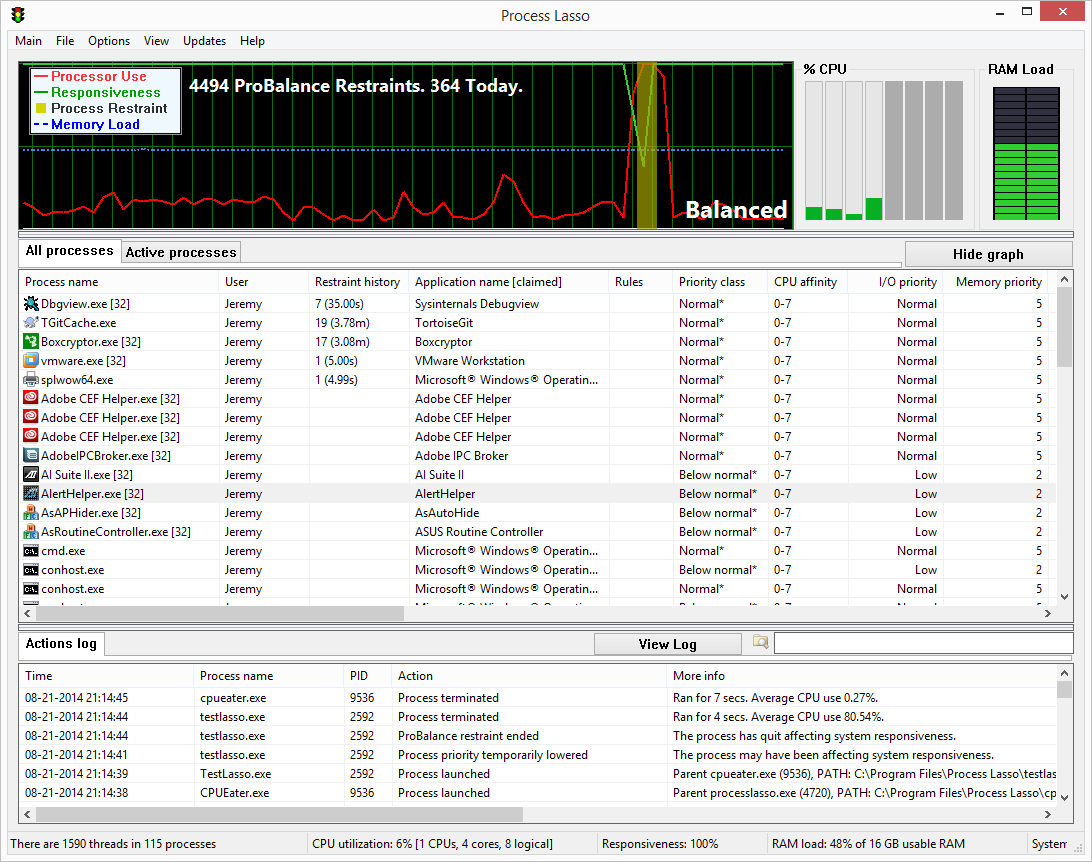
Process Lasso is a unique new technology that improves PC responsiveness during high CPU loads. It does this through dynamic adjustments to process priorities. This feature is called ProBalance, dynamic priority optimization. Instead of boosting foreground priorities, which is ineffective and potentially detrimental, Process Lasso temporary lowers the priorities of select background processes when they may be interfering with system responsiveness. A graphical demo is available on Bitsum's site that demonstrates how this feature can save you from a total PC stall in a worst case scenario.
For more advanced users, Process Lasso allows automation and persistence of various process settings. One can set save CPU affinities, process priority classes, I/O priority, memory priorities, and application power profiles. These settings get re-applied each time the process is run. Users can also limit the number of instances an application can have, or disallow processes from running entirely. More advanced watchdog rules can be created to take any number of actions based on quotas and thresholds. For instance, trim the working set when a process's working set exceeds a specified amount, or lower the process priority class when an application exceeds a particular amount of CPU utilization for a specific duration.
This is a semi-free build. It never expires, and core functions such as ProBalance, default priorities, and default affinities work indefinitely. With this semi-free edition, you may have to tolerate some non-intrusive nags, and advanced features may be disabled over time.
Latest Reviews

legion reviewed v8.9.6.8 on Feb 25, 2016
Im useing full version on W10x64 and W8.1x32. Both works well :)

jcollake reviewed v8.2.0.1 Beta on Jun 25, 2015
We would like to thank our loyal supporters of Process Lasso. As some may have noticed, we have been very active in 2014-2015.
Some new things: Gaming Mode 2.0, ParkControl 2.0, SmartTrim, ProBalance Insights, and lots of general product refinement... just to name a few.
If you've tried Process Lasso in the past, but it wasn't for you at the time - give it a new try. We think you'll be pleased, and welcome your feedback!
It's as applicable for new PCs as it is old - if not MORE SO.
We've got even more coming down the pipe, so hope you'll join us as we make a difference in the world of PCs.
And, as always, Bitsum *never* uses installer bundles. That is why we do have to charge for a PRO version of the software, but we believe that's far preferable to ruining the integrity of your PC by tricking you into installing crap via deceitful installer bundles.
DISCLAIMER: I am the author. My rating does not affect the overall product score here (I don't think). It's hard for me to give my own software less than 5/5 stars ;).

Music4Ever reviewed v7.8 on Jan 14, 2015
I recently upgraded one of the PC's I have PL on to a latest chip with 16 GIG of DDR3 memory, I was thinking PL probably wouldn't be needed but after some experimentation I found it's still useful esp. for example when transferring multiple & large amounts of files onto external drives or over a network - PL keeps everything running smoothly & I really missed it when it wasn't installed - A worthy 5 stars - Use the 64 Bit version with 64 bit Windows.
Music4Ever reviewed v6.6.0.12 on Jun 13, 2013
Great program, I'm using this on a new PC & it still makes a difference - No problems at all ~
Music4Ever reviewed v6.0.1.96 on Dec 5, 2012
Makes quite a difference even on fast PC's - Well worth buying the full edition.
One small annoyance is on boot the entire UI screen flashes up for a second or so, but the program works OK though.
Music4Ever reviewed v6.0.0.96 on Sep 12, 2012
Well worth buying esp. the family edition for 5PC's ($34.95 = £21 to me) which I'm going to invest in - It does make a difference even on a fast PC.
@jcollake - My review below was OTT - Sorry about that, it didn't come out the way I meant it - The point I was trying to make was just if you like Process Lasso buy it you won't regret the purchase & it's not expensive.

Tallpaultn reviewed v6.0.0.41 Beta on Jul 13, 2012
I use Process Lasso Pro (purchased a few mos. ago) & used the regular version for a long time prior to that. I run WinVista SP2 on a Dell Duo-core computer & Process Lasso Pro does a good job for me without problems. I have ran almost every version of process Lasso since I began using it (alphas, betas, etc.) without problems & the program has helped me have a much more pleasant computer experience. My experience has been that Process Lasso does what it says it will do, nothing more or less, without creating problems & I couldn't ask for more than that. Keep up the good work--kudos!!

DKDude reviewed v6.0.0.41 Beta on Jul 13, 2012
@jcollake
No problem, I'm not the fastest to answer my self ;)
Still like your program :)
I'll pop by your forum, and say hi.
Take care and have a nice weekend.
Music4Ever reviewed v6.0.0.41 Beta on Jul 13, 2012
No problems so far with V6, good software though I use the paid edition.
jcollake reviewed v6.0.0.33 Alpha on Jul 13, 2012
I apologize if the below seemed defensive, I just like to make it clear that I try to do my best to walk the fine line between supporting my family and giving my product away as freely as I'm able to. Like I said, that is why it is labelled Shareware. I thank all users who use ANY version of my software, paid or not. It is an honor for me and my small company.

legion reviewed v8.9.6.8 on Feb 25, 2016
Im useing full version on W10x64 and W8.1x32. Both works well :)
jcollake reviewed v8.2.0.1 Beta on Jun 25, 2015
We would like to thank our loyal supporters of Process Lasso. As some may have noticed, we have been very active in 2014-2015.
Some new things: Gaming Mode 2.0, ParkControl 2.0, SmartTrim, ProBalance Insights, and lots of general product refinement... just to name a few.
If you've tried Process Lasso in the past, but it wasn't for you at the time - give it a new try. We think you'll be pleased, and welcome your feedback!
It's as applicable for new PCs as it is old - if not MORE SO.
We've got even more coming down the pipe, so hope you'll join us as we make a difference in the world of PCs.
And, as always, Bitsum *never* uses installer bundles. That is why we do have to charge for a PRO version of the software, but we believe that's far preferable to ruining the integrity of your PC by tricking you into installing crap via deceitful installer bundles.
DISCLAIMER: I am the author. My rating does not affect the overall product score here (I don't think). It's hard for me to give my own software less than 5/5 stars ;).
Music4Ever reviewed v7.8 on Jan 14, 2015
I recently upgraded one of the PC's I have PL on to a latest chip with 16 GIG of DDR3 memory, I was thinking PL probably wouldn't be needed but after some experimentation I found it's still useful esp. for example when transferring multiple & large amounts of files onto external drives or over a network - PL keeps everything running smoothly & I really missed it when it wasn't installed - A worthy 5 stars - Use the 64 Bit version with 64 bit Windows.
Music4Ever reviewed v6.6.0.12 on Jun 13, 2013
Great program, I'm using this on a new PC & it still makes a difference - No problems at all ~
Music4Ever reviewed v6.0.1.96 on Dec 5, 2012
Makes quite a difference even on fast PC's - Well worth buying the full edition.
One small annoyance is on boot the entire UI screen flashes up for a second or so, but the program works OK though.
Music4Ever reviewed v6.0.0.96 on Sep 12, 2012
Well worth buying esp. the family edition for 5PC's ($34.95 = £21 to me) which I'm going to invest in - It does make a difference even on a fast PC.
@jcollake - My review below was OTT - Sorry about that, it didn't come out the way I meant it - The point I was trying to make was just if you like Process Lasso buy it you won't regret the purchase & it's not expensive.
Tallpaultn reviewed v6.0.0.41 Beta on Jul 13, 2012
I use Process Lasso Pro (purchased a few mos. ago) & used the regular version for a long time prior to that. I run WinVista SP2 on a Dell Duo-core computer & Process Lasso Pro does a good job for me without problems. I have ran almost every version of process Lasso since I began using it (alphas, betas, etc.) without problems & the program has helped me have a much more pleasant computer experience. My experience has been that Process Lasso does what it says it will do, nothing more or less, without creating problems & I couldn't ask for more than that. Keep up the good work--kudos!!
DKDude reviewed v6.0.0.41 Beta on Jul 13, 2012
@jcollake
No problem, I'm not the fastest to answer my self ;)
Still like your program :)
I'll pop by your forum, and say hi.
Take care and have a nice weekend.
Music4Ever reviewed v6.0.0.41 Beta on Jul 13, 2012
No problems so far with V6, good software though I use the paid edition.
jcollake reviewed v6.0.0.33 Alpha on Jul 13, 2012
I apologize if the below seemed defensive, I just like to make it clear that I try to do my best to walk the fine line between supporting my family and giving my product away as freely as I'm able to. Like I said, that is why it is labelled Shareware. I thank all users who use ANY version of my software, paid or not. It is an honor for me and my small company.
jcollake reviewed v5.1.0.88 on Jul 3, 2012
@Music4Ever, that is why I clearly label it Shareware here and at other download sites. SHAREWARE. Even though it NEVER EXPIRES, I get your argument, which is why I DO NOT put it in the FREEWARE category ... This cost me lots of exposure, but it is fair enough. I would also like to add that Bitsum does NOT use deceptive bundles in its installers, FWIW.
How annoying are the 'nags'? Well, you see ONE when the program starts (usually only at boot). It has NO TIMER. Click right on past. That is ALL.
How restrictive are the features? MOST ALL the popular features NEVER EXPIRE, including ProBalance and Default Priorities and CPU Affinities. The full list is disclosed at http://bitsum.com/howfree.php .
So, there is no subterfuge, and in this day and age - I think that counts for something. Yes, sometimes you must pay for software. I simply must pay my rent. That's all there is to it. I'd rather be up front and honest, than tricky and deceitful.
Music4Ever reviewed v5.1.0.88 on Jun 13, 2012
Use the pro version & a though this is a pretty good PC I do feel it's well worth buying & using ~ (Looking forward to version 6, didn't know it was on the cards)
I suspect 'reviewer' has never reviewed it ~
Music4Ever reviewed v5.1.0.80 on May 15, 2012
Nag-Ware unless you buy it then it's updated often & good, not worth the grief it gives you as so called free-ware which it's not. It is well worth buying though but as this is the free edition 2 stars, if you buy it 5 stars.
Either buy it or don't bother.
'However, after the product has been installed a while, a couple features are disabled and some nags are shown to encourage the user to upgrade to Process Lasso Pro. These nags are tolerable, as they are meant to be reminders, not to annoy.'
Sorry but they do annoy, either do a demo & release it as a commercial demo or cripple it as true free-ware & yes I am one of your customers.