
File Details |
|
| File Size | 11.0 MB |
|---|---|
| License | Freeware |
| Operating System | Windows 7/8/10/Vista/XP |
| Date Added | June 15, 2022 |
| Total Downloads | 48,405 |
| Publisher | Piriform Software Ltd. |
| Homepage | Recuva |
Publisher's Description
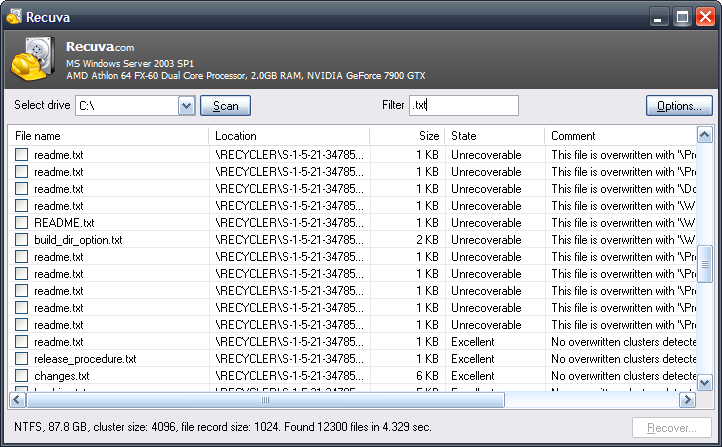
Recuva (pronounced "recover") is a freeware Windows utility to restore files that have been accidentally deleted from your computer. This includes files emptied from the Recycle bin as well as images and other files that have been deleted by user error from digital camera memory cards or MP3 players. It will even bring back files that have been deleted by bugs, crashes and viruses.
Latest Reviews

tomkelly reviewed v1.48.980 on Aug 22, 2013
recuva rocks

Darrien Gordon reviewed v1.48.980 on Aug 16, 2013
Wonderful utility! It will be very supportive to the people who lost their files. 2 days before I lost some of my pictures from hard drive and I want to get them back. Will your software support me to recover my pictures? I heard about Remo Recover tool also and it is also a perfect tool to recover deleted data.

-Lord- reviewed v1.45.858 on Feb 15, 2013
Nice little utility, but limited in ability.

areef shah reviewed v1.42.544 on Dec 17, 2011
i recover many videos file with recuva but it doesn't work................... can anybody help me the information of error is-"VLC can't recognize the input's format:
The format of 'C:\Documents and Settings\Raman Sharma\My Documents\Downloads\Temp\Girls` Generation(____) _ Gee _ MusicVideo.avi' cannot be detected. Have a look the log for details." this

cricri_pingouin reviewed v1.42.544 on Dec 13, 2011
Just tried it, v1.42. Copied an executable on a drive, deleted it (shift+delete), run Recuva, select *.exe as filter, scan took 10 seconds, found the file I just deleted, highlights it with a green icon (it found really old files as well, but highlighted them red as I'd expect), click on it, recover to my C drive, I'm told the file is recovered successfully, run the exe from the C drive and it works.
So works as advertised, nice easy interface, quick scan, and reliable colouring of the recoverable files.
I can't think of any reason to deduce any points, so it gets a 5.

eek-1 reviewed v1.41.537 on Nov 16, 2011
Pros: Nice UI. Pretty quick scan (except deep scan). I think it works like most other free recovery software.
Cons: First of all, you can't alter and save filter presets. In case for example you're looking for document files but the document file type is not included in the preset, you have to append it in filter box. And then the filtering process can be TERRIBLY SLOW. Moreover, you can't save the list of files found in case you need to resume work later. You have to redo the scan again.
Overall: OK if your hard drive isn't too big.

mrainey reviewed v1.38.504 on Jul 16, 2010
It has worked fine the few times I've used it.

gawd21 reviewed v1.37.488 on Jun 16, 2010
This doesn't work at all, anymore. It shows NOTHING. I just delete some pics and took the card to a Vista 32 bit system, ran the deep scan and nothing shows up!
Freaking junk! I used to love this program!

pjb reviewed v1.37.488 on Apr 15, 2010
I have never had much success with this. Seems to find the file but has issues restoring them.

Protocal reviewed v1.36.479 on Mar 1, 2010
it does what it says ... and it's free!

tomkelly reviewed v1.48.980 on Aug 22, 2013
recuva rocks
Darrien Gordon reviewed v1.48.980 on Aug 16, 2013
Wonderful utility! It will be very supportive to the people who lost their files. 2 days before I lost some of my pictures from hard drive and I want to get them back. Will your software support me to recover my pictures? I heard about Remo Recover tool also and it is also a perfect tool to recover deleted data.
-Lord- reviewed v1.45.858 on Feb 15, 2013
Nice little utility, but limited in ability.
areef shah reviewed v1.42.544 on Dec 17, 2011
i recover many videos file with recuva but it doesn't work................... can anybody help me the information of error is-"VLC can't recognize the input's format:
The format of 'C:\Documents and Settings\Raman Sharma\My Documents\Downloads\Temp\Girls` Generation(____) _ Gee _ MusicVideo.avi' cannot be detected. Have a look the log for details." this
cricri_pingouin reviewed v1.42.544 on Dec 13, 2011
Just tried it, v1.42. Copied an executable on a drive, deleted it (shift+delete), run Recuva, select *.exe as filter, scan took 10 seconds, found the file I just deleted, highlights it with a green icon (it found really old files as well, but highlighted them red as I'd expect), click on it, recover to my C drive, I'm told the file is recovered successfully, run the exe from the C drive and it works.
So works as advertised, nice easy interface, quick scan, and reliable colouring of the recoverable files.
I can't think of any reason to deduce any points, so it gets a 5.
eek-1 reviewed v1.41.537 on Nov 16, 2011
Pros: Nice UI. Pretty quick scan (except deep scan). I think it works like most other free recovery software.
Cons: First of all, you can't alter and save filter presets. In case for example you're looking for document files but the document file type is not included in the preset, you have to append it in filter box. And then the filtering process can be TERRIBLY SLOW. Moreover, you can't save the list of files found in case you need to resume work later. You have to redo the scan again.
Overall: OK if your hard drive isn't too big.
mrainey reviewed v1.38.504 on Jul 16, 2010
It has worked fine the few times I've used it.
gawd21 reviewed v1.37.488 on Jun 16, 2010
This doesn't work at all, anymore. It shows NOTHING. I just delete some pics and took the card to a Vista 32 bit system, ran the deep scan and nothing shows up!
Freaking junk! I used to love this program!
pjb reviewed v1.37.488 on Apr 15, 2010
I have never had much success with this. Seems to find the file but has issues restoring them.
Protocal reviewed v1.36.479 on Mar 1, 2010
it does what it says ... and it's free!

anomoly reviewed v1.34.460 on Dec 24, 2009
Never really needed it (r-studio never failed me when I did) but any time I have tried to recover files deleted moments before, it never found them. Practically worthless from my experience.
gawd21 reviewed v1.32.444 on Nov 22, 2009
I have been using this for a while, and it has never failed me. However, this version is not working to recover anything on a simple sd card. I don't know why.
W7 64 bit

shakur aboud reviewed v1.27.419 on Jun 9, 2009
It worked great at the first go but when I looked at the file nothing was there. and has failed to recover my pictures for the flash disc.