File Details |
|
| File Size | 8.3 MB |
|---|---|
| License | Freeware |
| Operating System | Windows 7/8/10/Vista/XP |
| Date Added | February 7, 2020 |
| Total Downloads | 37,529 |
| Publisher | DonationCoder.com |
| Homepage | Screenshot Captor |
Publisher's Description
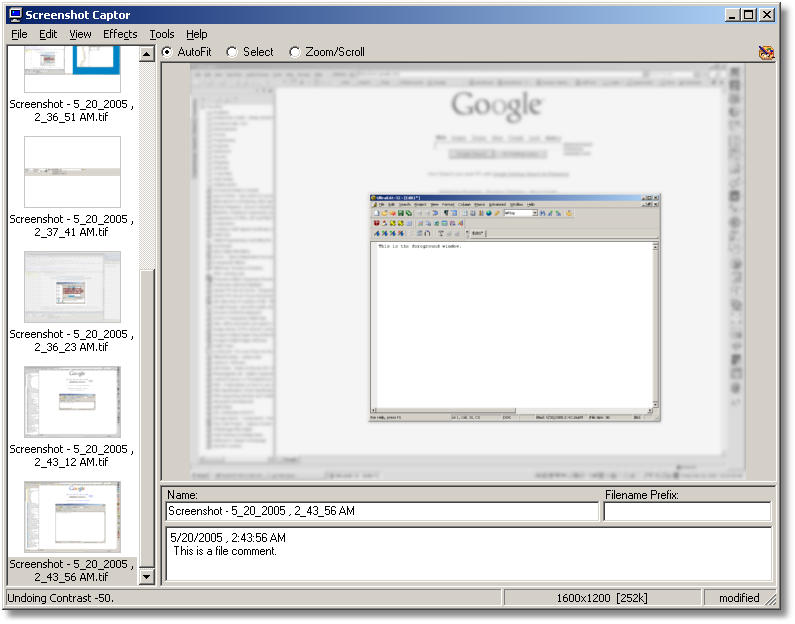
Screenshot Captor is designed for grabbing lots of screenshots with minimal intervention. It has multi monitor support and includes a full image explorer with full shell functionality and unsurpassed integration with external tools like graphic editors, watermarkers, etc. It also supports unique effects not seen in other capture tools including the ability to automatically locate and enhance the active window.
Latest Reviews

leewal reviewed v4.36.2 on May 7, 2020
I think it's the best screen shot app on the market.

cmpm reviewed v4.7 on Sep 12, 2013
Most if not all other Screenshot programs have already chosen most of the options for you, and they are not changeable. Mouser's Screenshot Capture has many options to choose from, which means mouser's Screenshot Capture will do exactly what you want it to do.
Yes, you will have to learn what you want Screenshot Capture to do. It's not hard and worth the effort of the user.
A new feature of Screenshot Capture is the Caption section of mouser's program. It's in it's infancy, and as more is added to this feature, I'm quite certain that Captions will have plenty of sub-features to choose from (it already has a few). And, yes, you might have to learn a little about captions, but it will be worth it.
One of the major benefits of mouser's Screenshot Capture is it's low resource usage while idling and in use. It does what you tell it to do and then gets out of the way, sitting in the tray, not burning needed resources, ready to be called on without having to load anything else.

Kosmot reviewed v4.7 on Sep 12, 2013
I've been using it a few years now, it's *hugely* customisable (to the extent it can be a bit of a pain to find stuff in the preferences--best just go through the whole lot to check out the possibilities). Lots of improvements/fixes in yesterday's update, developer is very responsive. Has been top of Gizmo's "Best Free Screen Capture Tool" for the last couple of years. Note: I guess it's not really freeware - it's donationware - you get asked to register (site/forum). I donated anyway, as I also use the auther's clipboard manager.

crosseyedlemon reviewed v4.5 on Aug 18, 2013
The average user doesn't need a program as overblown as this for simple screen captors but the real deal breaker for me was that this thing nags worse than my mother-in-law.

smfranzen reviewed v4.5 on Jul 8, 2013
I've tried a ton of different programs in this category and the two standouts so fat are Snagit and Fastone Capture. Neither is free, I think I prefer Fastone a little more because it's much lighter weight. Tell me another product that handles scrolling windows capture better than Faststone. This one doesn't stand out to me. Try them both and see the difference.

netean reviewed v2.101.01 on Sep 21, 2011
I've got to be honest, I like it, but don't love it. I use to lightscreen for basic screen capture, and it did the job, much like this does, but I would often spend ages captioning the shots and open up image editors to highlight bits or remove personal info. This does the basic welll, but then so do 1001 other screen capture tools. What I found I needed was good screen capture, with mouse cursor capture, and basic editing and annotation option. Which I found in Greenshot (free). But there are so many of these tools around, everyone will have a favourite. Not knocking this, it's a solid tool that does the job well, but doesn't stand above the others either.

jcollake reviewed v2.96.02 on Aug 2, 2011
Superior to Windows 7 built-in Snip tool, that's for sure. I don't know if there are better ones around, but I've always found Screenshot Captor meets my needs very well. It has the perfect compliment of image manipulation tools that a person would need when creating screenshots.

RitoSwan reviewed v2.93.01 on Mar 24, 2011
U like the way of free, bu the cluky UI ans messy options screen and desciptions, no.....
There are much better around, and REALLY free.

Joco reviewed v2.90.01 on Feb 22, 2011
Wow PicPick !!! Thanks BoBad for your suggestion. I was using SSC but find its GUI not very convenient. With SSC, when the arrows & text are blend into the screenshot, the colors become washed out. Just tried PicPick, it's GUI, functions and image quality are better.

mynamehere reviewed v2.89.01 on Nov 23, 2010
If you go to the site there's a video that shows you how to get a free license key.
Go here:
http://www.donationcoder.com/Keys/index.php
So far it looks pretty impressive, I don't think I've seen so many options in other SS software I've tried.

leewal reviewed v4.36.2 on May 7, 2020
Pros: Screenshot Captor is easy to get started using, although there are a lot of features and some take a little trial and error it well worth the time it take to master the more robust features. Simple screen shot, resizing, highlighting areas, are just a few of the easy to use out of the box tasks. It's a donation application. You can get a free copy just by registering, I try to donate something every year. I've used the app since 2006 - still the best.
Cons: Not many - there is a learning curve for some of the more difficult tasks. Support is through the free to join forum.
Bottom Line: I think it's the best screen shot app on the market.
cmpm reviewed v4.7 on Sep 12, 2013
Most if not all other Screenshot programs have already chosen most of the options for you, and they are not changeable. Mouser's Screenshot Capture has many options to choose from, which means mouser's Screenshot Capture will do exactly what you want it to do.
Yes, you will have to learn what you want Screenshot Capture to do. It's not hard and worth the effort of the user.
A new feature of Screenshot Capture is the Caption section of mouser's program. It's in it's infancy, and as more is added to this feature, I'm quite certain that Captions will have plenty of sub-features to choose from (it already has a few). And, yes, you might have to learn a little about captions, but it will be worth it.
One of the major benefits of mouser's Screenshot Capture is it's low resource usage while idling and in use. It does what you tell it to do and then gets out of the way, sitting in the tray, not burning needed resources, ready to be called on without having to load anything else.
Kosmot reviewed v4.7 on Sep 12, 2013
I've been using it a few years now, it's *hugely* customisable (to the extent it can be a bit of a pain to find stuff in the preferences--best just go through the whole lot to check out the possibilities). Lots of improvements/fixes in yesterday's update, developer is very responsive. Has been top of Gizmo's "Best Free Screen Capture Tool" for the last couple of years. Note: I guess it's not really freeware - it's donationware - you get asked to register (site/forum). I donated anyway, as I also use the auther's clipboard manager.
crosseyedlemon reviewed v4.5 on Aug 18, 2013
The average user doesn't need a program as overblown as this for simple screen captors but the real deal breaker for me was that this thing nags worse than my mother-in-law.
smfranzen reviewed v4.5 on Jul 8, 2013
I've tried a ton of different programs in this category and the two standouts so fat are Snagit and Fastone Capture. Neither is free, I think I prefer Fastone a little more because it's much lighter weight. Tell me another product that handles scrolling windows capture better than Faststone. This one doesn't stand out to me. Try them both and see the difference.
netean reviewed v2.101.01 on Sep 21, 2011
I've got to be honest, I like it, but don't love it. I use to lightscreen for basic screen capture, and it did the job, much like this does, but I would often spend ages captioning the shots and open up image editors to highlight bits or remove personal info. This does the basic welll, but then so do 1001 other screen capture tools. What I found I needed was good screen capture, with mouse cursor capture, and basic editing and annotation option. Which I found in Greenshot (free). But there are so many of these tools around, everyone will have a favourite. Not knocking this, it's a solid tool that does the job well, but doesn't stand above the others either.
jcollake reviewed v2.96.02 on Aug 2, 2011
Superior to Windows 7 built-in Snip tool, that's for sure. I don't know if there are better ones around, but I've always found Screenshot Captor meets my needs very well. It has the perfect compliment of image manipulation tools that a person would need when creating screenshots.
RitoSwan reviewed v2.93.01 on Mar 24, 2011
U like the way of free, bu the cluky UI ans messy options screen and desciptions, no.....
There are much better around, and REALLY free.
Joco reviewed v2.90.01 on Feb 22, 2011
Wow PicPick !!! Thanks BoBad for your suggestion. I was using SSC but find its GUI not very convenient. With SSC, when the arrows & text are blend into the screenshot, the colors become washed out. Just tried PicPick, it's GUI, functions and image quality are better.
mynamehere reviewed v2.89.01 on Nov 23, 2010
If you go to the site there's a video that shows you how to get a free license key.
Go here:
http://www.donationcoder.com/Keys/index.php
So far it looks pretty impressive, I don't think I've seen so many options in other SS software I've tried.

bobad reviewed v2.88.01 on Oct 9, 2010
I see that Mouser finally removed the "Freeware" designation from the program. Good! It wasn't and isn't "Freeware" in an honest sense of the term. It really is a great screen capture program. There are still a couple of SC programs I prefer to SSC. I can think of 2 right off the top, PicPick 2.03, and WinSnap 1.1.10.0. Both are Freeware, capture difficult objects such as alpha blended objects, and both auto save to a folder of your choice. I recommend SSC is you like to pay, the other 2 if you don't.

spiked reviewed v2.83.01 on Aug 9, 2010
There are a ton of screen capture utilities out there, and if there are only 3-4 specific features you need, you're better off with something else because it can be tedious to configure the many options in Screenshot Captor to match a simple set of needs. But if you're dealing with multiple scenarios where you need different features in each scenario (perhaps today you need one-key screen printing, tomorrow you need to capture non-rectangular windows and quickly annotate them before saving in a variety of graphic formats, next week you need timed captures which include the mouse pointer and automatically generate filenames using flexible patterns, and later you need to capture scrolling regions like entire web pages that don't fit on your physical screen) then Screenshot Captor's incredible depth of options comes in very handy. A small donation gives you a lifetime of free no-nag upgrades with the low-hassle license key, and the program is portable if you want to simply unzip the self-extracting exe instead of running it as a setup. Works great on Windows 95 thru Windows 7, including x64, and the author has demonstrated a never-ending commitment to continued development unlike other tools which hit a dead end and start to stagnate. I keep looking for better alternatives, but I never find any.

mjm01010101 reviewed v2.77.01 on Dec 1, 2009
Changes:
[MinorFeature] In addition to existing commandline options, you can now just pass filename or directory name on commandline to open that file or directory, which makes SC suitable for using as an "Open With" program (also unminimizes from tray when launched in this way, even if already running).
[MinorFeature] You can pass "-scan" commandline option to initiate a scan -- note that you can do this even if Screenshot Captor is already running -- it will trigger a scan in the existing running instance.
[Feature] When you rename a file using the "Name:" box, SC no longer forces a resave of the file, which could result in image degradation and an updated file date; it now does a pure file rename (object file as well) if nothing but filename has changed (and extension is unchanged of course). If you change the file extension from the "Name:" box, a new file will be created.
[MinorFeature] Added bottom+right border effect
[Feature] You can now cancel an autoscroll capture by hitting the escape key.