
File Details |
|
| File Size | 600.6 MB |
|---|---|
| License | Commercial Demo, $189.00 |
| Operating System | Windows (All) |
| Date Added | November 4, 2021 |
| Total Downloads | 354,577 |
| Publisher | VMware, Inc. |
| Homepage | VMware Workstation |
Publisher's Description
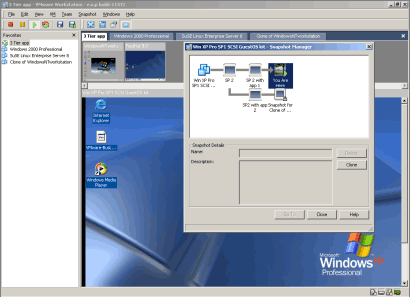
VMware Workstation features the ability to run multiple operating systems on the same PC without the need to partition the hard drive, or rebooting. Users can isolate and protect each operating environment, and the applications and data that are running in it. It allows users to interoperate among each of these operating systems, including full networking, device and file sharing, and cut-and-paste capabilities, and undo changes made in a given session. It allows operators to encapsulate and manipulate each operating environment, and have the ability to roll back and restart an application, or move an environment among differently configured machines.
Latest Reviews

Artem S. Tashkinov reviewed v10.0.1 on Oct 27, 2013
Unfortunately this application has become a bloatware.
On my linux box vmware service takes four seconds to run. Then vmware itself starts in approximately 12 seconds. Then in order to run my VM it does something for several seconds.
I.e. over 25 seconds for nothing. Meanwhile VBox does that all in mere 3 seconds and my VM is ready in just 8 seconds.
Thank you but no thank you. I stopped using VMWare WS five years ago and never looked back.

Dakm4 reviewed v9.0.1 on Apr 3, 2013
I have tried to eval workstation and it seems to have issue getting a virtual computer os installed I have run into bios errors about what i have turned on or not turned on. I then install oracle virtual box that is free and install the same OS with no problems. Maybe they are trying too hard with workstation. Needs to be free

fmontanoxp reviewed v9.0.1 on Feb 19, 2013
me parece una excelente herramiento para el area de infraestructuras
Artem S. Tashkinov reviewed v9.0 on Aug 23, 2012
It's a perfect virtualization platform, but recent workstation releases have become kinda bloated.
VMWare is slow to start, the installer thrashes you system for minutes before VMWare gets installed.

euukoo reviewed v8.0.2 on Jan 25, 2012
it's a great software

jenusi reviewed v8.0.1 on Nov 25, 2011
Used workstation since 5.5 and loving it and upgraded to 8 using some discount code found at http://www.davidtan.org/...count-coupon-code-promo/
virtualbox works fine too but preferred to stick with workstation

jcollake reviewed v8.0.1 on Nov 21, 2011
Still the best. Although VMWare Player is now free, to compete with other virtualization applications, VMWare Workstation has awesome capabilities that make it well worth the reasonable price they charge for it.

antriu reviewed v7.1.4 Build 385536 on Aug 7, 2011
good programm

asaenz reviewed v7.1.4 Build 385536 on Mar 30, 2011
Plus: it runs every application I need to run without difficulty and plays music clients better than virtualbox. Drag-and-drop is convenient (when it works properly).
Minus: eats up a lot of my memory on my 2 GB system so it is more difficult to multitask when I have a browser and other applications running along with it and usually eventually have to reboot to get all my performance back. I plan on getting a 4 GB system soon but it is a shame 2 GB isn't enough anymore unless you only run 1 or 2 sizable applications.
jcollake reviewed v7.1.3 Build 324285 on Nov 21, 2010
I've always stuck with VMware Workstation. Now that the VMWare Player is free and can now create VMs, is is tempting to switch to it, but I do love the snapshot and clone features.
I tried VirtualBox, but it wasn't for me. In all benchmarks I've seen the two are comparable enough for it to not make a difference. However, I'd be VMWare's experience has its benefits in real performance.

Artem S. Tashkinov reviewed v10.0.1 on Oct 27, 2013
Unfortunately this application has become a bloatware.
On my linux box vmware service takes four seconds to run. Then vmware itself starts in approximately 12 seconds. Then in order to run my VM it does something for several seconds.
I.e. over 25 seconds for nothing. Meanwhile VBox does that all in mere 3 seconds and my VM is ready in just 8 seconds.
Thank you but no thank you. I stopped using VMWare WS five years ago and never looked back.
Dakm4 reviewed v9.0.1 on Apr 3, 2013
I have tried to eval workstation and it seems to have issue getting a virtual computer os installed I have run into bios errors about what i have turned on or not turned on. I then install oracle virtual box that is free and install the same OS with no problems. Maybe they are trying too hard with workstation. Needs to be free
fmontanoxp reviewed v9.0.1 on Feb 19, 2013
me parece una excelente herramiento para el area de infraestructuras
Artem S. Tashkinov reviewed v9.0 on Aug 23, 2012
It's a perfect virtualization platform, but recent workstation releases have become kinda bloated.
VMWare is slow to start, the installer thrashes you system for minutes before VMWare gets installed.
euukoo reviewed v8.0.2 on Jan 25, 2012
it's a great software
jenusi reviewed v8.0.1 on Nov 25, 2011
Used workstation since 5.5 and loving it and upgraded to 8 using some discount code found at http://www.davidtan.org/...count-coupon-code-promo/
virtualbox works fine too but preferred to stick with workstation
jcollake reviewed v8.0.1 on Nov 21, 2011
Still the best. Although VMWare Player is now free, to compete with other virtualization applications, VMWare Workstation has awesome capabilities that make it well worth the reasonable price they charge for it.
antriu reviewed v7.1.4 Build 385536 on Aug 7, 2011
good programm
asaenz reviewed v7.1.4 Build 385536 on Mar 30, 2011
Plus: it runs every application I need to run without difficulty and plays music clients better than virtualbox. Drag-and-drop is convenient (when it works properly).
Minus: eats up a lot of my memory on my 2 GB system so it is more difficult to multitask when I have a browser and other applications running along with it and usually eventually have to reboot to get all my performance back. I plan on getting a 4 GB system soon but it is a shame 2 GB isn't enough anymore unless you only run 1 or 2 sizable applications.
jcollake reviewed v7.1.3 Build 324285 on Nov 21, 2010
I've always stuck with VMware Workstation. Now that the VMWare Player is free and can now create VMs, is is tempting to switch to it, but I do love the snapshot and clone features.
I tried VirtualBox, but it wasn't for me. In all benchmarks I've seen the two are comparable enough for it to not make a difference. However, I'd be VMWare's experience has its benefits in real performance.

man friday reviewed v7.1.3 Build 324285 on Nov 21, 2010
confused by rojs' review. Have you used VMW or listened to someone who was paid to use it? In a 14k sized co. why Workstation and not ESX?
Artem S. Tashkinov reviewed v7.1.3 Build 324285 on Nov 20, 2010
A paragon of virtualization.

soldier1st reviewed v7.1.2-301548 on Oct 4, 2010
Virtualbox has now matured into something useable while VMWare continues to be a bloated VM solution and it often complains about errors.