File Details |
|
| File Size | 35.1 MB |
|---|---|
| License | Shareware |
| Operating System | Windows (All) |
| Date Added | January 25, 2012 |
| Total Downloads | 104,384 |
| Publisher | URSoft, Inc. |
| Homepage | Your Uninstaller! |
Publisher's Description
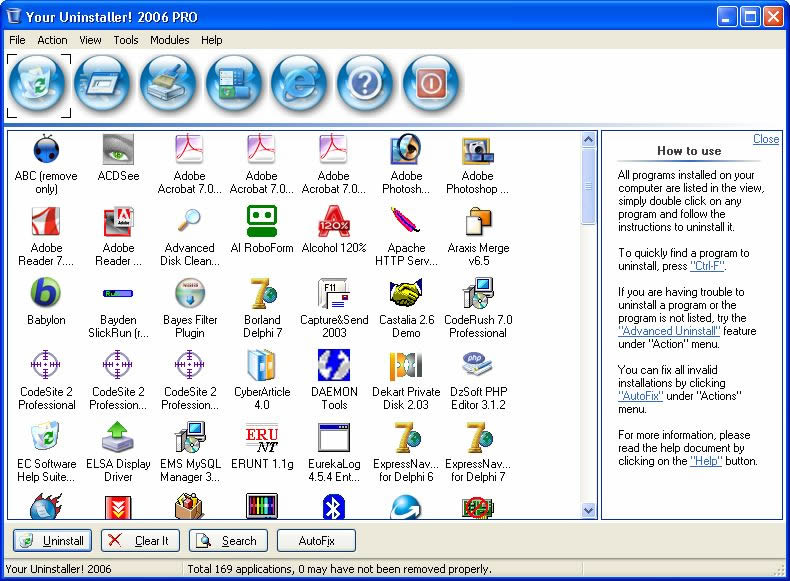
Your Uninstaller! provides a total solution for the uninstalling task It is the replacement of the original Windows Add/Remove program, offers a much user-friendly way to remove unneeded applications on your computer. It starts up about 5-10 times faster than Add/Remove program. Also, it can display appropriate icons of the application, so that you can easily find out the application you want to uninstall. You may also look up the application you want through a handy function. It can automatically detect rubbish registry keys and entirely delete them with your permission. All these can be done with few simple clicks under step by step instruction.
Latest Reviews

Input Overload reviewed v7.4.2011.15 on Dec 6, 2011
Far better to use imaging software on a regular basis & a decent free registry search than having this garbage ruining in the background.
Getting your memory footprint down regardless of how much RAM you have is number one to a mean machine.

AleeJay reviewed v7.4.2011.11 on Oct 27, 2011
Yeah, support still haven't gotten back to me.
This did get rid of some hairy stuff, but still won't uninstall dragon dictate 10. it's not harmful (so far as I can tell). for an initial trial its not bad. I will say that the "download" advertising banner was a bit misleading - do NOT click on the green download button. the blue button saying "Download Now" is what you should be looking for.

pjb reviewed v7.3.2011.04 on Sep 9, 2011
Great programme, however with support seeming non existent, that marks it down drastically. Shame really, other than no support it is good.

dhry reviewed v6.3.2009.12 on Nov 23, 2009
I disagree. This IS the best uninstaller. Revo's good (and free, that's always a bonus) but this one has a better flow of uninstallation after the target program's built-in uninstall routine is over. Revo makes you click next before it scans for leftovers, then you have to manually select everything you want to blow away - reg first, then files. Y.U. displays then autoselects everything - reg and files - on the same screen, ready for you to get rid of it. Minor, I know, and not worth paying for, but definitely worth at least thirty days of use before your trial's up.

xsnred reviewed v6.3.2009.12 on Nov 21, 2009
Total? Nothing totally uninstalls software in the registry. Some even leave traces in your Programs folder. I use Revo, CCleaner, MS RegClean, RegSeeker and PowerTools Lite, and still can go into the registry and find traces of programs I have uninstalled. Yep, I'm anal, but the best uninstaller is "You".

Lsavagejt reviewed v6.2.2009.10 on Oct 8, 2009
I used to use this, then switched to Total Uninstall. I like "Monitor" mode.
Anyway, whatever.

davidtb reviewed vChristmas Edition 6.2.1343 on Dec 23, 2008
I've used this only in a shareware mode. I owned older versions and it worked fine.
But I gotta tellya, I like Revo, it's free and it runs sweet.
YU has hung on me in the past, and wreaked havoc with it's junk cleaner. I liked it, but it is bigger than revo.
Smaller and does the same job, works for me.

Lawrence01 reviewed vChristmas Edition 6.2.1267 on Dec 10, 2008
I had bought the previous versions of this program, however I hated paying for the yearly update costs to keep it current. I switched to Total Uninstall 4, and when they released version 5 of total uninstall, it was a free upgrade. It works alot better than your uninstaller.

T_LOKZz reviewed vChristmas Edition 6.2.1262 on Dec 8, 2008
" Your Uninstalelr! " ?
haha that was a good laugh you think they would check there window titles before packaging. If you want to know what I'm talking about try out the new 1 click disk cleaner shortcut. They should release another update tomarrow :)

Blaxima reviewed v6.1.1252 on Jun 24, 2008
I have to agree with the review below. I was a long time user of this software and used other things to remove the stuff this left behind but just recently I tried removing something and it would just make this crash. Run Total Uninstall and it removed it with no problems and got rid of everything

Input Overload reviewed v7.4.2011.15 on Dec 6, 2011
Far better to use imaging software on a regular basis & a decent free registry search than having this garbage ruining in the background.
Getting your memory footprint down regardless of how much RAM you have is number one to a mean machine.
AleeJay reviewed v7.4.2011.11 on Oct 27, 2011
Yeah, support still haven't gotten back to me.
This did get rid of some hairy stuff, but still won't uninstall dragon dictate 10. it's not harmful (so far as I can tell). for an initial trial its not bad. I will say that the "download" advertising banner was a bit misleading - do NOT click on the green download button. the blue button saying "Download Now" is what you should be looking for.
pjb reviewed v7.3.2011.04 on Sep 9, 2011
Great programme, however with support seeming non existent, that marks it down drastically. Shame really, other than no support it is good.
dhry reviewed v6.3.2009.12 on Nov 23, 2009
I disagree. This IS the best uninstaller. Revo's good (and free, that's always a bonus) but this one has a better flow of uninstallation after the target program's built-in uninstall routine is over. Revo makes you click next before it scans for leftovers, then you have to manually select everything you want to blow away - reg first, then files. Y.U. displays then autoselects everything - reg and files - on the same screen, ready for you to get rid of it. Minor, I know, and not worth paying for, but definitely worth at least thirty days of use before your trial's up.
xsnred reviewed v6.3.2009.12 on Nov 21, 2009
Total? Nothing totally uninstalls software in the registry. Some even leave traces in your Programs folder. I use Revo, CCleaner, MS RegClean, RegSeeker and PowerTools Lite, and still can go into the registry and find traces of programs I have uninstalled. Yep, I'm anal, but the best uninstaller is "You".
Lsavagejt reviewed v6.2.2009.10 on Oct 8, 2009
I used to use this, then switched to Total Uninstall. I like "Monitor" mode.
Anyway, whatever.
davidtb reviewed vChristmas Edition 6.2.1343 on Dec 23, 2008
I've used this only in a shareware mode. I owned older versions and it worked fine.
But I gotta tellya, I like Revo, it's free and it runs sweet.
YU has hung on me in the past, and wreaked havoc with it's junk cleaner. I liked it, but it is bigger than revo.
Smaller and does the same job, works for me.
Lawrence01 reviewed vChristmas Edition 6.2.1267 on Dec 10, 2008
I had bought the previous versions of this program, however I hated paying for the yearly update costs to keep it current. I switched to Total Uninstall 4, and when they released version 5 of total uninstall, it was a free upgrade. It works alot better than your uninstaller.
T_LOKZz reviewed vChristmas Edition 6.2.1262 on Dec 8, 2008
" Your Uninstalelr! " ?
haha that was a good laugh you think they would check there window titles before packaging. If you want to know what I'm talking about try out the new 1 click disk cleaner shortcut. They should release another update tomarrow :)
Blaxima reviewed v6.1.1252 on Jun 24, 2008
I have to agree with the review below. I was a long time user of this software and used other things to remove the stuff this left behind but just recently I tried removing something and it would just make this crash. Run Total Uninstall and it removed it with no problems and got rid of everything

frites reviewed v6.1.1250 on Jun 8, 2008
Awful. Leaves loads of stuff behind.
I logged an installation with total uninstall ans then used this to uninstall an app, it left so much behind. Its claim to totally remove apps is rubbish.

Tao2005 reviewed v6.1.1246 on May 7, 2008
Good Program, heavily over rated. May do what it says, but upon purchasing it, it asks for more money. Bad for business, when you sell your product to some one, then refuse purchase if you don't by a bundle pack. May cost you $40 for purchase, but for the low end bundle pack is $45. By the time you are done with your purchase, you almost spent $100.
Program got a 5 star rating
Purchasing is 4 star rating
Bundle package -2 star rating
Oh BTW there is no way around this bundle package option. Another -2 stars
Have a nice day, and thank you for the review.

hitbit reviewed v6.1.1236 on Feb 12, 2008
Don't know what the fuss is. Tried the trial version of 2006 and was so impressed I decided to purchase. Have upgraded to 2008 for free. bought the lifetime upgrades for all 3 Your Uninstaller, Start Up Faster and Capture and Send. All are working fine and Your Uninstaller is most certainly removing everything when instructed to Uninstall a program. Perhaps some users have other security programs installed which are stopping changes to the registry???. Many programs uninstallers leave the c program files folder.
Happy user here but like all programs Your Uninstaller will have to be reviewed on an ongoing basis. You only have to look at Windows to confirm this.
hitbit