
File Details |
|
| File Size | 6.6 MB |
|---|---|
| License | Shareware, $29.95 |
| Operating System | Windows (All) |
| Date Added | May 22, 2021 |
| Total Downloads | 8,843 |
| Publisher | Acelogix Software |
| Homepage | Ace Utilities |
Publisher's Description
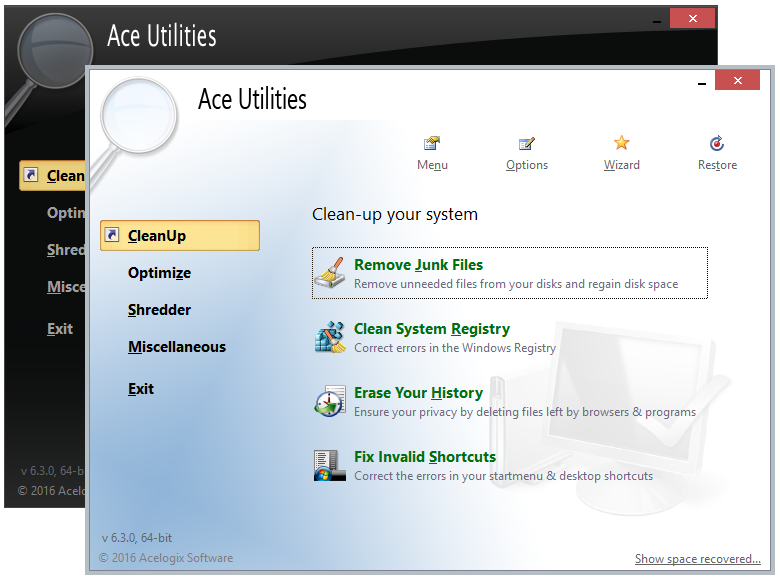
Ace Utilities is a collection of system maintenance utilities to keep your system in good shape. Your computer will boot faster, and run applications smoothly. It helps you delete internet cache, cookies, temp files, visited page history, and all other recent document info.
Latest Reviews

Music4Ever reviewed v6.3.0 RC1 on Sep 18, 2016
Another fix all program - Unneeded & has the ability to really, really mess a PC up, & eventually will - CCleaner does all you want & use that with care too.

fredreed reviewed v6.0.0 on Aug 27, 2015
I would stay away from using this crap because all It will do is mess up your system. This is just another piece of garbage that developers are trying to rip people off and take your money.

smaragdus reviewed v5.6.1 on Oct 8, 2014
The developer is selling the x32 and x64 builds as separate products, amazing greed indeed!

CyberDoc999 reviewed v5.6.0 Beta on Sep 26, 2014
30 bucks .... the download link takes you to a spyware web site.. just another reg cleaner..... they install adware

Bala7 reviewed v5.2.5.475 on Feb 13, 2012
@ baki_princ
that was funny, if you prefer the more progress FF or Chrome versioning:
simply add 10 bringing this version to 15.20.50.475000
otherwise, a good utility properly priced although you can find free apps doing much the same tweaks.

baki_princ reviewed v5.2.4.474 on Jul 8, 2011
I remember as a child i installed version 4. Good to kow that they hv come to version 5.2 after a decade

Blaxima reviewed v5.0 Beta on Oct 10, 2008
still works flawlessly even in beta. The new GUI is ok for the main window (the white had a cleaner look) but I'm not into the office 07 look for the sub windows, this is a small complaint for a program that has been and continues to be one of the best apps for safely cleaning your system of useless files and controling certain aspects of your system like start up items

bellgamin reviewed v5.0 Beta on Oct 9, 2008
I have used Ace Utilities for several years. I am VERY satified with its performance. Stable as a rock. Easy to use. Superb support (seldom needed). A good support forum, populated by the program's developer and a large community of friendly, helpful fellow-users.
In all these years, AU has never fouled up my computer by its cleaning operations. I recommend it highly. (It's a 1-time payment, by the way.)
Blaxima reviewed v4.1 on Dec 3, 2007
Why are change logs so hard to come by?!?!
I found this in their forums for the betas
+Updated ignore lists
!Minor bugfixes
!Fixed some minor glitches in wipe code (Vista related)
+Opera history of all user profiles are now cleared
+Added Cookie Manager for Opera !
+Minor update to regcleaner ; scans some more areas
+A few new plug-ins
+Added Ignore-List for shortcut cleaner
This app has been and stil is great
Blaxima reviewed v3.3.1 on May 16, 2007
This I have found to be one of the best apps for what it does. I have used it for years without any problems.

Music4Ever reviewed v6.3.0 RC1 on Sep 18, 2016
Another fix all program - Unneeded & has the ability to really, really mess a PC up, & eventually will - CCleaner does all you want & use that with care too.
fredreed reviewed v6.0.0 on Aug 27, 2015
I would stay away from using this crap because all It will do is mess up your system. This is just another piece of garbage that developers are trying to rip people off and take your money.
smaragdus reviewed v5.6.1 on Oct 8, 2014
The developer is selling the x32 and x64 builds as separate products, amazing greed indeed!
CyberDoc999 reviewed v5.6.0 Beta on Sep 26, 2014
30 bucks .... the download link takes you to a spyware web site.. just another reg cleaner..... they install adware
Bala7 reviewed v5.2.5.475 on Feb 13, 2012
@ baki_princ
that was funny, if you prefer the more progress FF or Chrome versioning:
simply add 10 bringing this version to 15.20.50.475000
otherwise, a good utility properly priced although you can find free apps doing much the same tweaks.
baki_princ reviewed v5.2.4.474 on Jul 8, 2011
I remember as a child i installed version 4. Good to kow that they hv come to version 5.2 after a decade
Blaxima reviewed v5.0 Beta on Oct 10, 2008
still works flawlessly even in beta. The new GUI is ok for the main window (the white had a cleaner look) but I'm not into the office 07 look for the sub windows, this is a small complaint for a program that has been and continues to be one of the best apps for safely cleaning your system of useless files and controling certain aspects of your system like start up items
bellgamin reviewed v5.0 Beta on Oct 9, 2008
I have used Ace Utilities for several years. I am VERY satified with its performance. Stable as a rock. Easy to use. Superb support (seldom needed). A good support forum, populated by the program's developer and a large community of friendly, helpful fellow-users.
In all these years, AU has never fouled up my computer by its cleaning operations. I recommend it highly. (It's a 1-time payment, by the way.)
Blaxima reviewed v4.1 on Dec 3, 2007
Why are change logs so hard to come by?!?!
I found this in their forums for the betas
+Updated ignore lists
!Minor bugfixes
!Fixed some minor glitches in wipe code (Vista related)
+Opera history of all user profiles are now cleared
+Added Cookie Manager for Opera !
+Minor update to regcleaner ; scans some more areas
+A few new plug-ins
+Added Ignore-List for shortcut cleaner
This app has been and stil is great
Blaxima reviewed v3.3.1 on May 16, 2007
This I have found to be one of the best apps for what it does. I have used it for years without any problems.

Letterman reviewed v3.3.0 on May 11, 2007
Ace Utilities Version History
============================
Note:
'+' means a new feature
'!' means a bug-fix
'-' means a feature removal
3.3.0 May 2007
+Duplicate file finder now uses pages to show groups of files.
+Added option to use MD5 in Duplicate finder
-Removed restriction on scanning "all files" with "CRC/MD5" option
+Added a modified date column in Junk Cleaner
+Cookie Manager now shows complete list of protected cookies . Previously it did not show an entry if the corresponding cookie was absent in the system.
+Updated ignore lists
+Modified a few plugins
+Minor GUI improvements, like using Vista fonts, vista listcontrol styles, etc
+Modifed ignore list handling by junk cleaner. the 'do not use ignore list for temp folder' option has been removed. Temp files should have a /T flag at the end in the ignore list.
!Fixed a bug in showing unprotected cookies in Cookie Manager
!Fixed a bug in Duplicate finder related to group view that was causing it to crash
!Fixed a bug in Registry cleaner related to ActiveX cleaning in Vista
+64 bit version is now Vista x64 ready.
+Added option to clear outlook express's email autocomplete list
+Added option to check mark files with wildcards (* and ?) in Duplicate finder
bellgamin reviewed v3.0 on Nov 15, 2005
I have used Ace Utilities for over 2 years. It is superb. Absolutely safe (if you tell it you are a *neophyte*). Keeps my computer clean & speedy. Stringently maintained up-to-date & bug free by Ace Utilities. A favorite at Wilders & CastleCops forums.
HIGHLY recommended!

CGA reviewed v3.0 on Nov 15, 2005
This is the cleaner I always keep coming back to. Tried many others but this beats them all when it comes to stability, ui, speed and ease of use. Never caused XP to crash on me and I use it almost daily for a couple of years.