File Details |
|
| File Size | 0.4 MB |
|---|---|
| License | Freeware |
| Operating System | Windows (All) |
| Date Added | July 9, 2012 |
| Total Downloads | 56,001 |
| Publisher | ProfessorCPU |
| Homepage | DriverGrabber |
Publisher's Description
DriverGrabber will grab all third party drivers from your system and stick them into a 'Drivers' directory.
Latest Reviews

wlan reviewed v2.0 Beta 7 on Jun 14, 2014
Reviewing DriverGrabber 2.0 Beta 7
It is reported as virus Win32/Packed.Autoit by NOD32 v7.x.
I disabled antivirus in order to download it.
I hope it is not a virus.
Seems to be working fine.
Windows drivers are excluded from export
Still investigating

jacobjackson reviewed v1.0 RC4 on Aug 24, 2013
good stuff

-Lord- reviewed v1.0 RC4 on Jun 5, 2012
This program went directly into my portable toolbox. NUMEROUS are the time where I've had to wipe a machine clean and hunt down replacement drivers for a new install. This thing makes the process much simpler.
This is a must have tool for admins.

Fanny99 reviewed v0.5.1 Beta on Apr 30, 2009
hello

vcc reviewed v0.5.1 Beta on Oct 1, 2008
I don't care what anyone else says! Free, when a program works well, is AWESOME!!! Thanks goes to Siginet Software for the developement of it.
Tried it and it works great.

Second Shadow reviewed v0.5.1 Beta on Apr 28, 2008
I won't be so generous as poster stisev below :D, but I'm really grateful for this great app.
Simple, efficient, free
Just a simple correction: "It's 'its'" :)
See: www.cgl.uwaterloo.ca/~csk/its.html

ProfessorCPU reviewed v0.5.1 Beta on Jan 5, 2008
@leejjcn
I agree DriverMagician has other features. That is because it serves a different type of user. DriverGrabber is meant to simplify the process of collecting the driver files so that they can be added to a windows install disk. It is meant as a one click quick and simple way for IT Techs to gather drivers.
A later release will allow options to open a gui for other features simular to drivermagician... but that isn't the main purpose of DriverGrabber.
For users who want a gui interface I actually reccommend another utility called SmartDriverBackup. Which is not made by me.

leejjcn reviewed v0.5.1 Beta on Jun 24, 2007
It seems a bit useful, but I prefered Driver Magician, it has device drivers backup, restoration, update and removel functions. Its homepage is http://www.drivermagician.com.

saadsaleem reviewed v0.5.1 Beta on Jun 23, 2007
Beautiful application! ease of use and does what it says.

robertguda reviewed v0.5.1 Beta on Apr 6, 2007
Unpack to its own directory (create before unpacking ...DriverGrabber) create shortcut, run...drivers available in its own directory...
simple
Outstanding

wlan reviewed v2.0 Beta 7 on Jun 14, 2014
Reviewing DriverGrabber 2.0 Beta 7
It is reported as virus Win32/Packed.Autoit by NOD32 v7.x.
I disabled antivirus in order to download it.
I hope it is not a virus.
Seems to be working fine.
Windows drivers are excluded from export
Still investigating
jacobjackson reviewed v1.0 RC4 on Aug 24, 2013
good stuff
-Lord- reviewed v1.0 RC4 on Jun 5, 2012
This program went directly into my portable toolbox. NUMEROUS are the time where I've had to wipe a machine clean and hunt down replacement drivers for a new install. This thing makes the process much simpler.
This is a must have tool for admins.
Fanny99 reviewed v0.5.1 Beta on Apr 30, 2009
hello
vcc reviewed v0.5.1 Beta on Oct 1, 2008
I don't care what anyone else says! Free, when a program works well, is AWESOME!!! Thanks goes to Siginet Software for the developement of it.
Tried it and it works great.
Second Shadow reviewed v0.5.1 Beta on Apr 28, 2008
I won't be so generous as poster stisev below :D, but I'm really grateful for this great app.
Simple, efficient, free
Just a simple correction: "It's 'its'" :)
See: www.cgl.uwaterloo.ca/~csk/its.html
ProfessorCPU reviewed v0.5.1 Beta on Jan 5, 2008
@leejjcn
I agree DriverMagician has other features. That is because it serves a different type of user. DriverGrabber is meant to simplify the process of collecting the driver files so that they can be added to a windows install disk. It is meant as a one click quick and simple way for IT Techs to gather drivers.
A later release will allow options to open a gui for other features simular to drivermagician... but that isn't the main purpose of DriverGrabber.
For users who want a gui interface I actually reccommend another utility called SmartDriverBackup. Which is not made by me.
leejjcn reviewed v0.5.1 Beta on Jun 24, 2007
It seems a bit useful, but I prefered Driver Magician, it has device drivers backup, restoration, update and removel functions. Its homepage is http://www.drivermagician.com.
saadsaleem reviewed v0.5.1 Beta on Jun 23, 2007
Beautiful application! ease of use and does what it says.
robertguda reviewed v0.5.1 Beta on Apr 6, 2007
Unpack to its own directory (create before unpacking ...DriverGrabber) create shortcut, run...drivers available in its own directory...
simple
Outstanding

horsecharles reviewed v0.5.1 Beta on Apr 6, 2007
I have some suggestions, but let me preface that i realize that:
1. This app is geared toward techies.
2. Its author did not mean for it to be listed here, and
3. Re any queries we're supposed to go to its forums, so
4. I remain very grateful for this very valuable and free utility...esp. in light of how its author is busy with simultaneous projects.
And I'd like to correct previous reviewers as to location of Drivers folder-- mine wound up in windows\system32
So i would add maybe a simple readme citing examples of how to bypass specific drivers, where logfile(& how named?) winds up, etc.
Kudos to the author for beacoup contributions.

stisev reviewed v0.4 Beta on Mar 15, 2007
ProfessorCPU -- if you're ever in the San Francisco area, I'm buying you a hooker.
This is the greatest (payware or free) driver recoverer hands down.
I just saved a crapload of time by integrating all of my drivers in my XP install w/ nlite =D
ProfessorCPU reviewed v0.4 Beta on Feb 7, 2007
I just notice this was here. :D I am Siginet... the one who wrote this small tool.
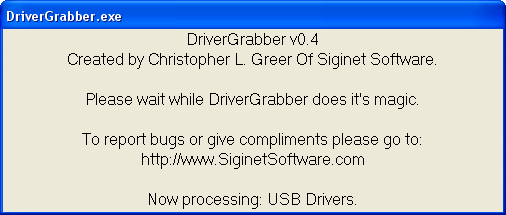
In my experiance with it... it seems to work very well on x86 systems so far. v0.4 fixed a lot of path bugs that were causeing people to not get all of their drivers backed up. Now it seems to work very well. I have even had people tell me it works great in Vista as well. :) It doesn't currently work on x64 systems though. But v0.5 should. I also plan on adding a log file so that you can see a lot more information on what is going on. I may add a progressbar in the future as well... but I don't see much of a need for it. It doesn't take that long to backup a driver and the splash screen tells you what driver(s) it is backing up. Adding a progressbar may slow it down a bit because then it has to calculate filesizes and stuff.
Enjoy! And keep the feedback comming! I need feedback to help me make it better.
And if you want to make a donation please do so at:
http://support.siginetsoftware.com

flibberyGiveIt reviewed v0.4 Beta on Feb 5, 2007
Extract the executable to a folder, run it.
DriverGrabber will copy the drivers from your hard
drive to a new .../drivers in that folder.
Do not run DriverGrabber from within winrar.

eyedrop reviewed v0.4 Beta on Feb 5, 2007
Great application. Downloaded all the drivers needed for my computer in no time. I give it a 4 because there is no information on the time left for downloads and no info on where it downloads the drivers. Keep up the good work.