
File Details |
|
| File Size | 4.8 MB |
|---|---|
| License | Shareware, $39.95 |
| Operating System | Windows (All) |
| Date Added | March 7, 2020 |
| Total Downloads | 17,636 |
| Publisher | FSPro Labs |
| Homepage | Hide Folders |
Publisher's Description
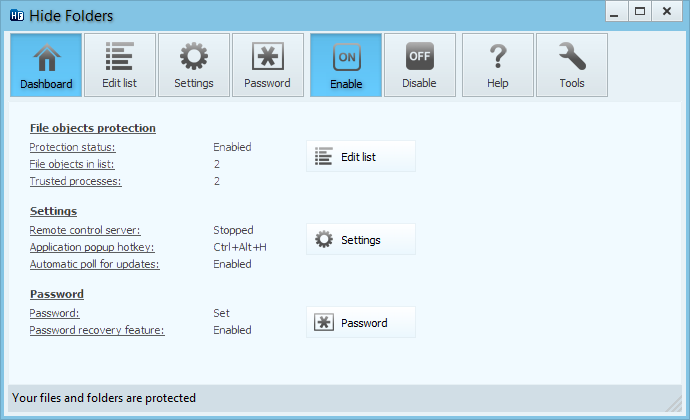
Hide Folders is an innovative software application which enables you to password protect all the private information on your hard drive. You can swiftly make your files and folders inaccessible, invisible or protect them from modification or removal. The protected folders or files are not accessible by users - no matter how they are trying to get in - locally or from the net. Effective protection mechanism, intuitive user interface, and set of fine-tuning options will suit the needs of everyone from novice Windows users to computer experts. Since 2001, our Hide Folders software products help our users to hide private files and folders from prying eyes.
Latest Reviews

shodan816 reviewed v5.1 Beta 1 on Dec 4, 2014
I have been using Hide Folder by FSPro Labs for years now. It just keeps getting better and better with each release. It's ease of installation, simplicity of use and load of options make it the best in my opinion, and I've tested a lot of them. Give this one a try. You won't be sorry!

sceptic14 reviewed v5.0.2 Beta 2 on Oct 2, 2014
Sometimes I need just to hide files on my home PC to protect them from
damage or leak - household bills, wife's bday present ideas, pron...
Using encryption to protect unclassified data is just a waste of CPU.

brad.weyand reviewed v2.9.8 on Mar 15, 2012
Folder Lock is a great software for Encryption Data. Encryption. I have used it, tried it for a day and bought it as it worked for my needs.
shodan816 reviewed v3.2 Beta on Aug 25, 2009
I have tried many different utilities for hiding sensitive information, but this is the best of all that I have seen. There is nothing about this software that I would change. Try it - you'll like it !

ark2000 reviewed v2.9.8 on Sep 12, 2008
this software is a joke, so easily defeated it's a shame to ask money for it...

Adrian79 reviewed v2.9 on Sep 27, 2007
"I have NO programming or OS knowledge and defeated the utility easily with no tool."
ya buddy, ummm my girlfriend wont figure out all that cmd, z/xc crap u mention... so dont be a nerd and try to show off how ur a "hacker" by mentioning your having no knowledge, when OBVIOUSLY u have some!
keeps harrasing gf's w/ NO pc skills off ur exgirlz pics :p

darkxiii_ndp reviewed v2.5 Beta 2 on Oct 2, 2006
Last time I use this program is 2 year ago. Hide, scan disk (Error checking in Windows XP) then boom. It's unhide. You may want to check it.
NTFS is better.
Adrian79 reviewed v2.4 Beta 1 on Jun 26, 2006
gonna try it again :-)
Adrian79 reviewed v2.3 Beta 2 on Apr 11, 2006
i use "lock folder xp 3.6", but this looks the same...and has better(more) options...
gonna give it a try!

dstacey1308 reviewed v2.0 RC on Oct 20, 2004
It's obvious the people knocking this program have never used it. What this program does is give you an interface to easily designate the folders you want hidden and options to allow you to hide and unide all of them with a simple hot-key press, enter a password before allowing unhide etc. For instance, on boot, all of my designated folders are hidden, I press Ctrl-Shift-U and all are instantly unhidden once I enter a password. I press Ctrl-Shift-H and all of my designated folders are instantly hidden again. Yes, you can hide folders with NTFS, but this makes it a hell of a lot easier. It's like the difference between using Tweak-XP to tweak XP or going in and hacking the registry manually, which would you rather do? I've been using this program for a number of years, it's fairly frequently updated with bug fixes and new options free to exiting users (seems to be about every 4 months or so), and I can honestly say I feel this program is worth what I paid for it considering the use I've gotten out of it. It just works and works very well.

shodan816 reviewed v5.1 Beta 1 on Dec 4, 2014
I have been using Hide Folder by FSPro Labs for years now. It just keeps getting better and better with each release. It's ease of installation, simplicity of use and load of options make it the best in my opinion, and I've tested a lot of them. Give this one a try. You won't be sorry!
sceptic14 reviewed v5.0.2 Beta 2 on Oct 2, 2014
Sometimes I need just to hide files on my home PC to protect them from
damage or leak - household bills, wife's bday present ideas, pron...
Using encryption to protect unclassified data is just a waste of CPU.
brad.weyand reviewed v2.9.8 on Mar 15, 2012
Folder Lock is a great software for Encryption Data. Encryption. I have used it, tried it for a day and bought it as it worked for my needs.
shodan816 reviewed v3.2 Beta on Aug 25, 2009
I have tried many different utilities for hiding sensitive information, but this is the best of all that I have seen. There is nothing about this software that I would change. Try it - you'll like it !
ark2000 reviewed v2.9.8 on Sep 12, 2008
this software is a joke, so easily defeated it's a shame to ask money for it...
Adrian79 reviewed v2.9 on Sep 27, 2007
"I have NO programming or OS knowledge and defeated the utility easily with no tool."
ya buddy, ummm my girlfriend wont figure out all that cmd, z/xc crap u mention... so dont be a nerd and try to show off how ur a "hacker" by mentioning your having no knowledge, when OBVIOUSLY u have some!
keeps harrasing gf's w/ NO pc skills off ur exgirlz pics :p
darkxiii_ndp reviewed v2.5 Beta 2 on Oct 2, 2006
Last time I use this program is 2 year ago. Hide, scan disk (Error checking in Windows XP) then boom. It's unhide. You may want to check it.
NTFS is better.
Adrian79 reviewed v2.4 Beta 1 on Jun 26, 2006
gonna try it again :-)
Adrian79 reviewed v2.3 Beta 2 on Apr 11, 2006
i use "lock folder xp 3.6", but this looks the same...and has better(more) options...
gonna give it a try!
dstacey1308 reviewed v2.0 RC on Oct 20, 2004
It's obvious the people knocking this program have never used it. What this program does is give you an interface to easily designate the folders you want hidden and options to allow you to hide and unide all of them with a simple hot-key press, enter a password before allowing unhide etc. For instance, on boot, all of my designated folders are hidden, I press Ctrl-Shift-U and all are instantly unhidden once I enter a password. I press Ctrl-Shift-H and all of my designated folders are instantly hidden again. Yes, you can hide folders with NTFS, but this makes it a hell of a lot easier. It's like the difference between using Tweak-XP to tweak XP or going in and hacking the registry manually, which would you rather do? I've been using this program for a number of years, it's fairly frequently updated with bug fixes and new options free to exiting users (seems to be about every 4 months or so), and I can honestly say I feel this program is worth what I paid for it considering the use I've gotten out of it. It just works and works very well.

ptolemy reviewed v2.0 RC on Oct 19, 2004
The program does what it says - it "hides" folders and it's easy to use. However, as the other posters have mentioned, the way that it hides folders isn't particularly sophisticated. Most users could easily uncovered the hidden folders without much effort. There are various applications on the market which are more secure (however the trade-off is usually ease-of-use), and Windows XP does have NT permissions and strong encryption. For novice users though, Hide Folders XP is probably okay. For anyone else, don't go near it. One final note; in my opinion, this software should be donationware - it certainly doesn't justify more than $5.

foobah reviewed v2.0 Beta 4 on Oct 6, 2004
Pretty good.
Note to other posters about XP's build in folder/file protection: This is _only_ in XP Pro. The millions of Home users do not have this option, nor do they want the extra cr@p that comes with it I should think.
Sure, you can restart in Safe Mode to use it, but isnt that just a little inconvenient :P
Unless anyone can post an article on XP Home's folder protection, this seems to have my vote.

L4zy1 reviewed v2.0 Beta 4 on Oct 5, 2004
don't listen to the other poster he is a competitor who doesn't want real competition. this program does what it says it hides folders and files, so others can't see them even if they have access to your account. you might be able to restrict access to folders on a domain with windows, but if they are useing your desktop in your account
then this program hides whatever it's hiding perfectly.