
File Details |
|
| File Size | 13.0 MB |
|---|---|
| License | Shareware, $49.99 |
| Operating System | Windows 7/8/Vista/XP |
| Date Added | April 15, 2020 |
| Total Downloads | 8,200 |
| Publisher | Attila Kovrig |
| Homepage | IcoFX |
Publisher's Description
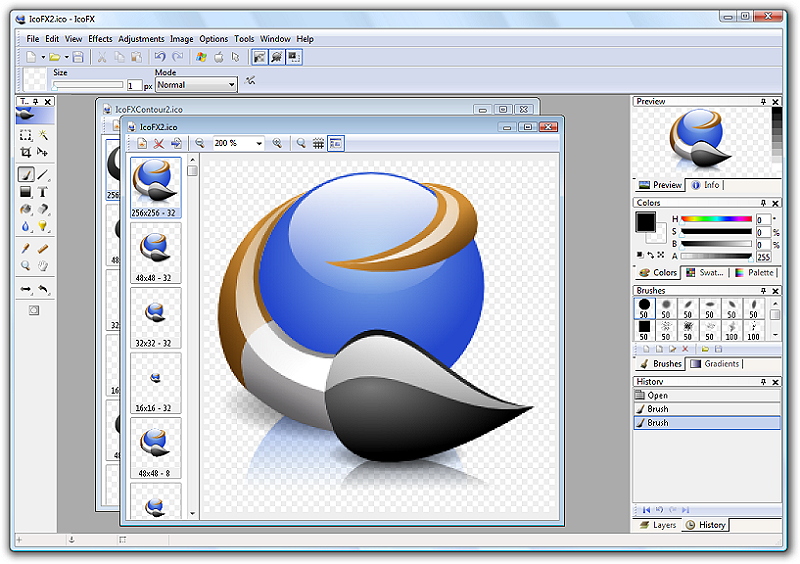
IcoFX is an all-in-one solution for icon creation, extraction and editing. It is designed to work with Windows XP, Windows Vista and Macintosh icons supporting transparency. With a wealth of tools and more than 40 effects at your fingertips, there is virtually no limit to the icons you can create. You can easily convert your favorite images into icons, or icons into images. It gives you the possibility to create icon libraries or change icons inside exe files. Create a favicon for your website or blog. Convert your Macintosh icons to Windows icons and vice versa. With IcoFX you can extract icons from other files, including Windows Vista and Macintosh files. You can easily work with multiple files using the batch processing capability of IcoFX.
Latest Reviews

tongzhengshijie1 reviewed v3.2.1 on Jan 16, 2019
Is there a preferred solution?
Preferred solution
The era of blockchain has realized the era of "freedom of trading assets." Only decentralized transactions have the possibility to achieve this freedom. “This is indeed an interesting solution to reach the future.” And many projects have begun to try this direction. Under the background of such a great era, AtoX, a public-chain system jointly researched and developed by technical experts from the United States, Japan, South Korea, Russia, and Switzerland, was conceived and developed, and its technical indicators exceed the current leader in the cross-border payment industry- Ripple.
Based on blockchain 4.0 technology, AtoX adopts AI technology to solve cross-chain technology. Through a centralized, distributed and artificial intelligence service sharing platform, it overcomes the problem of decentralized efficiency. Users can simultaneously put multiple tokens into a wallet. This is which many token asset wallets fail to do. The innovation of AtoX technology is convenient for many users. It does not need to download two token asset wallet apps or even more. You only need to use AtoX to achieve multi-coin coexistence. Users do not need to monitor and use multiple “wallets” at the same time. The innovation of technology brings about efficiency and convenience.
In the era of block chain, all remaining token assets should ultimately have the properties of application and circulation, but due to the limitations of the underlying protocol of the blockchain and the delay of the block nodes, the transfer can be paid for several hours or even tens of hours without being able to arrive in time. AtoX's lightning payment specifically solves this delay problem. When a transaction is initiated, it is completed in 3 seconds, avoiding too many operations and cumbersome processes, allowing you to make payments easily, at anytime and anywhere and promote the value application and circulation of the token assets.
The road to the future
Atox has long been aiming to become the world's fastest and most scalable first brand of cross-border settlement, enabling real-time cross-border settlement services anywhere in the world.
In terms of time, the AtoX network shortens the cross-border transfer time that takes one day or longer to the second level; In terms of transfer fee, it avoids the need to pay large fees for large transfers - it is reported that at present, about 2.5 to 3 trillion US dollars of cross-border payment settlement in the world, it involves a transfer fee of 10 to 15 billion US dollars.
The emergence of AtoX will improve the efficiency of cross-border payment, change the overall pattern and appearance of international settlement, and save a lot of cost. At present, AtoX focuses on providing a cross-border payment solution for large financial institutions, and is supported by many commercial organizations and banks with broad market prospects.
The evolution from centralization to decentralization is overwhelming. A completely decentralized trading platform, AtoX, is about to be born. What kind of "bloody war" will the coin circle meet? From the body of the AtoX, we can see again that the biggest pain point of the blockchain is the landing. How to combine with the traditional industry to solve the pain points can make the blockchain bloom with the energy it deserves.
www.atox.io

CyberDoc999 reviewed v2.10 on Jan 12, 2015
Greenfish Icon Editor Pro is pure spyware and adware

Karol Mily reviewed v2.2 on Apr 17, 2012
Not bad at all, but still buggy and needs some work.
If you want free icon editor with similar capabilities try - Greenfish Icon Editor Pro 3.0.

Hall9000 reviewed v2.0.1 on Sep 15, 2011
(September 13, 2011)
Windows 2000/9x/XP / Shareware; $59.00 / 6,398 downloads
IcoFX is a freeware icon editor.
______________________________________
So, freeware or shareware? How about icons for Win7?

Android reviewed v1.6.4 on Aug 4, 2010
I've been using IcoFX for maybe 2 years now?. It's refreshingly simple to use and the results always pass my expectations! I've never come close to needing it's help program so I'm not even sure if it has one at the moment..sorry..
The pc I originally installed it on(is still on) runs XP Pro and I was worried it wouldn't make the transition when I built a new pc and installed Win 7 Ultimate ..I use a 1T USB storage drive which I now use with this new pc.. It has copies of the program files off the xp computer so I opened the IcoFX folder and dragged the exe to my taskbar and selected create shortcut here..and that was that.. it works even better with WIN 7! and screaming fast.. Special thanks to the developer(s).
'droid

DudeBoyz reviewed v1.6.3 on Aug 18, 2008
Something is not right with this program.
I installed it and extracted an icon from an EXE file. I chose 32x32 at 8 bit and saved it to an ICO file.
It created a 16x16 at 32 bit color that is 25,214 bytes at 96 dpi.
In order to get a workable graphic, I had to EXPORT the original 48x48 32 bit file to a BMP, open it in Paint Shop Pro 7.04, manually reduce the size to 32x32 then manually reduce the color depth to 8 bit (256 color) with the following settings chosen:
Optimized Median Cut
Nearest Color
Include Windows Colors
Then I saved that as a BMP file that turned out to be only 2,102 bytes.
I go back into IcoFX and open the file, and it gives me a "NEW IMAGE" dialog that defaults to 32 bit color. I had to manually check 256 colors under the Colors section and 32x32 under the Size section then click OK then do a FILE SAVE AS to an ICO file that ended up being 2,238 bytes.
Only then was I able to load that ICO file into the application that I needed it loaded in.
I'm giving it one extra point just because the thing can successfully save in the ICO format.
It should not have to be like this, should it?

doubleaught reviewed v1.6.1 on Jul 11, 2008
I really hate to do this...
This program lacks the FUNDAMENTAL ability
to RESIZE a selection. it doesn't matter what size the imported image is...it can be a billion pixels by a billion pixels, this program will scale it to the dimension IT wants to and that's that. I really wanted to like this app, but the inabililty to resize a selection gets it a 1.

spacemarine reviewed v1.6.1 on May 13, 2008
This is the Crown Jewel of free icon editors.
It is small yet powerful, has a VERY clean UI design
and is simply a breeze to use.
I have used Microangelo and others in the past, but
this one really takes the cake.
This is the BEST free icon editor, and is even
better than most of the commercial ones.
So If you are looking for an Icon Editor -
look no further ;)
Thank You Attila Kovrig for this little gem.

seier reviewed v1.6.1 on May 13, 2008
Hi Gang,
I still like Microangelo better, but this is 90% of that and is free vs. $40-60. I did find a minor bug where the color turns to black after you hit Ctrl+Z though. Also why doesn't the 256-color palette contain different shades of gray?
Thanks,
Christian Blackburn

wet reviewed v1.6.1 on May 12, 2008
perfect. most commercial softwares are far for this result :)

tongzhengshijie1 reviewed v3.2.1 on Jan 16, 2019
Pros: Atox - passport to future finance
Cons: How crazy is the token economic market? From almost nothing at the beginning of 2014 to the peak of 2018, the total market value exceeded $810 billion, which is about 50% of the world's gold value and 25% of the total value of the world's banknotes. The entire industry chain of the token economics includes, but is not limited to, digital currency projects, exchanges, wallets, media services, mines, payments, and so on.
Along with the rise of the industry, Token ushered in the era of “hundred schools of thought contends”. As a large number of heroes all rise, the token economic transactions were in full swing. However, with the prosperity of the blockchain ecosystem, the transaction requirements of token assets were higher. Centralized token asset transaction may soon become obsolete as they lose the opportunity to use blockchain technology to improve capacity and efficiency. The decentralized transactions have become a trend.
The ultimate torture of the coin circle
In early July 2018, the founder of Ethereum, V God bluntly stated at the TechCrunch blockchain theme salon, "I hope the centralized exchange will die."
The problems of centralized exchange have already made the whole coin circle count it as a personal favour. Centralized trading has become a “leek harvester” and the security problem is extremely serious. In addition, the centralized exchange is still a land of corruption and infighting. This is a world completely contrary to the spirit of the blockchain, centralized concentration, monopoly and corruption, all of these crises, making V God ran out of patience.
Is the future world of block-chain, centralization or decentralization? This is becoming the ultimate torture of the coin circle.
Almost everyone believes that decentralization is the right way to arrive in the future. However, decentralization also has its own drawbacks. The big problem with decentralized exchanges is that the efficiency is too slow and the user experience is not too good. That is to say, there is a problem with centralization. We all know that we have to change, but the road to “decentralization” is extremely rough and tortuous.
Bottom Line: Is there a preferred solution?
Preferred solution
The era of blockchain has realized the era of "freedom of trading assets." Only decentralized transactions have the possibility to achieve this freedom. “This is indeed an interesting solution to reach the future.” And many projects have begun to try this direction. Under the background of such a great era, AtoX, a public-chain system jointly researched and developed by technical experts from the United States, Japan, South Korea, Russia, and Switzerland, was conceived and developed, and its technical indicators exceed the current leader in the cross-border payment industry- Ripple.
Based on blockchain 4.0 technology, AtoX adopts AI technology to solve cross-chain technology. Through a centralized, distributed and artificial intelligence service sharing platform, it overcomes the problem of decentralized efficiency. Users can simultaneously put multiple tokens into a wallet. This is which many token asset wallets fail to do. The innovation of AtoX technology is convenient for many users. It does not need to download two token asset wallet apps or even more. You only need to use AtoX to achieve multi-coin coexistence. Users do not need to monitor and use multiple “wallets” at the same time. The innovation of technology brings about efficiency and convenience.
In the era of block chain, all remaining token assets should ultimately have the properties of application and circulation, but due to the limitations of the underlying protocol of the blockchain and the delay of the block nodes, the transfer can be paid for several hours or even tens of hours without being able to arrive in time. AtoX's lightning payment specifically solves this delay problem. When a transaction is initiated, it is completed in 3 seconds, avoiding too many operations and cumbersome processes, allowing you to make payments easily, at anytime and anywhere and promote the value application and circulation of the token assets.
The road to the future
Atox has long been aiming to become the world's fastest and most scalable first brand of cross-border settlement, enabling real-time cross-border settlement services anywhere in the world.
In terms of time, the AtoX network shortens the cross-border transfer time that takes one day or longer to the second level; In terms of transfer fee, it avoids the need to pay large fees for large transfers - it is reported that at present, about 2.5 to 3 trillion US dollars of cross-border payment settlement in the world, it involves a transfer fee of 10 to 15 billion US dollars.
The emergence of AtoX will improve the efficiency of cross-border payment, change the overall pattern and appearance of international settlement, and save a lot of cost. At present, AtoX focuses on providing a cross-border payment solution for large financial institutions, and is supported by many commercial organizations and banks with broad market prospects.
The evolution from centralization to decentralization is overwhelming. A completely decentralized trading platform, AtoX, is about to be born. What kind of "bloody war" will the coin circle meet? From the body of the AtoX, we can see again that the biggest pain point of the blockchain is the landing. How to combine with the traditional industry to solve the pain points can make the blockchain bloom with the energy it deserves.
www.atox.io
CyberDoc999 reviewed v2.10 on Jan 12, 2015
Greenfish Icon Editor Pro is pure spyware and adware
Karol Mily reviewed v2.2 on Apr 17, 2012
Not bad at all, but still buggy and needs some work.
If you want free icon editor with similar capabilities try - Greenfish Icon Editor Pro 3.0.
Hall9000 reviewed v2.0.1 on Sep 15, 2011
(September 13, 2011)
Windows 2000/9x/XP / Shareware; $59.00 / 6,398 downloads
IcoFX is a freeware icon editor.
______________________________________
So, freeware or shareware? How about icons for Win7?
Android reviewed v1.6.4 on Aug 4, 2010
I've been using IcoFX for maybe 2 years now?. It's refreshingly simple to use and the results always pass my expectations! I've never come close to needing it's help program so I'm not even sure if it has one at the moment..sorry..
The pc I originally installed it on(is still on) runs XP Pro and I was worried it wouldn't make the transition when I built a new pc and installed Win 7 Ultimate ..I use a 1T USB storage drive which I now use with this new pc.. It has copies of the program files off the xp computer so I opened the IcoFX folder and dragged the exe to my taskbar and selected create shortcut here..and that was that.. it works even better with WIN 7! and screaming fast.. Special thanks to the developer(s).
'droid
DudeBoyz reviewed v1.6.3 on Aug 18, 2008
Something is not right with this program.
I installed it and extracted an icon from an EXE file. I chose 32x32 at 8 bit and saved it to an ICO file.
It created a 16x16 at 32 bit color that is 25,214 bytes at 96 dpi.
In order to get a workable graphic, I had to EXPORT the original 48x48 32 bit file to a BMP, open it in Paint Shop Pro 7.04, manually reduce the size to 32x32 then manually reduce the color depth to 8 bit (256 color) with the following settings chosen:
Optimized Median Cut
Nearest Color
Include Windows Colors
Then I saved that as a BMP file that turned out to be only 2,102 bytes.
I go back into IcoFX and open the file, and it gives me a "NEW IMAGE" dialog that defaults to 32 bit color. I had to manually check 256 colors under the Colors section and 32x32 under the Size section then click OK then do a FILE SAVE AS to an ICO file that ended up being 2,238 bytes.
Only then was I able to load that ICO file into the application that I needed it loaded in.
I'm giving it one extra point just because the thing can successfully save in the ICO format.
It should not have to be like this, should it?
doubleaught reviewed v1.6.1 on Jul 11, 2008
I really hate to do this...
This program lacks the FUNDAMENTAL ability
to RESIZE a selection. it doesn't matter what size the imported image is...it can be a billion pixels by a billion pixels, this program will scale it to the dimension IT wants to and that's that. I really wanted to like this app, but the inabililty to resize a selection gets it a 1.
spacemarine reviewed v1.6.1 on May 13, 2008
This is the Crown Jewel of free icon editors.
It is small yet powerful, has a VERY clean UI design
and is simply a breeze to use.
I have used Microangelo and others in the past, but
this one really takes the cake.
This is the BEST free icon editor, and is even
better than most of the commercial ones.
So If you are looking for an Icon Editor -
look no further ;)
Thank You Attila Kovrig for this little gem.
seier reviewed v1.6.1 on May 13, 2008
Hi Gang,
I still like Microangelo better, but this is 90% of that and is free vs. $40-60. I did find a minor bug where the color turns to black after you hit Ctrl+Z though. Also why doesn't the 256-color palette contain different shades of gray?
Thanks,
Christian Blackburn
wet reviewed v1.6.1 on May 12, 2008
perfect. most commercial softwares are far for this result :)

Andy Dean reviewed v1.6.1 on May 12, 2008
Never tried this before and I must say I've been missing out.
This is one great icon making app.

argybee reviewed v1.6 on Apr 1, 2008
Brilliant.
Does what it says beautifully.
All kudos Attila Kovrig.

Chocobito reviewed v1.6 on Mar 31, 2008
Excellent freeware I'dont find other so good.