
File Details |
|
| File Size | 3.5 MB |
|---|---|
| License | Freeware |
| Operating System | Windows (All) |
| Date Added | December 20, 2020 |
| Total Downloads | 23,719 |
| Publisher | Michael Scrivo |
| Homepage | Outlook on the Desktop |
Publisher's Description
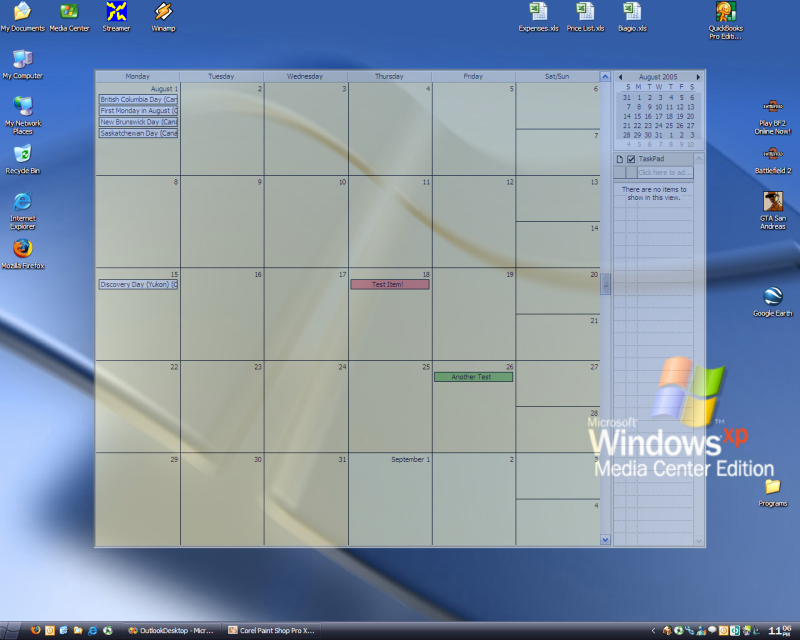
Put the Microsoft Outlook calendar right on your desktop so that it's visible and usable all the time without actually having to open Outlook.
Latest Reviews

humbleuser reviewed v3.2.6 on Sep 23, 2015
My anti virus reported a trojan in this????

Aegis69 reviewed v3.2.3 on Jul 27, 2015
gawd that looks awful, the sooner you all abandon microsh!t the sooner we can live in a more interoperable world

agronkosova reviewed v1.5.2 on Jul 26, 2009
Awsome aplication very easy to use and very handy. Strongly recommand for all outlook fans. Even if you don't use outlook you still could use this aplication. Has great featuries...

eosrob reviewed v1.5.2 on Jun 17, 2009
Please note this requires .NET 3.5 so windows 2000 users are a bit stuck. workaround here.
http://rainstorms.me.uk/...work-35-in-windows-2000/

Diam0nd reviewed v1.5.0 on Dec 14, 2008
One of the best Outlook add-ins around! This one is REALLY helpful!!!
My wallpaper now is my Outlook calendar!!! :D

driver8 reviewed v1.5.0 on Dec 12, 2008
I've been using this for about a year - very useful. Works fine on XP/sp3.
A few more shortcuts would be useful, eg: to switch views.
Very handy to display calendar on desktop, you can also add calender entries directly.

raccoonist reviewed v1.5.0 on Dec 11, 2008
Great Idea and I really want to use this app...
ended up being a flaming pile of dog poo on my computer. Vista 64bit w/ Office 2003. many many error messages on everything i tried to do and I had to use task mgr to get out of it.
I see that it has worked for several people, and it is a great idea, so I give it 3 stars. and will keep an eye out for future releases.
Diam0nd reviewed v1.4.5 on Dec 8, 2008
Excellent. This is VERY, VERY, VERY useful. NET sucks, but this add-in totaly rocks!

Mike reviewed v1.4.5 on Aug 25, 2008
dhry, what exactly is wrong with the execution? .NET is not a language btw, it's a platform. The language it's written in is C#.

dhry reviewed v1.4.5 on Aug 24, 2008
Great idea, terrible execution. Learn a better language than .net, programmer.

humbleuser reviewed v3.2.6 on Sep 23, 2015
My anti virus reported a trojan in this????
Aegis69 reviewed v3.2.3 on Jul 27, 2015
gawd that looks awful, the sooner you all abandon microsh!t the sooner we can live in a more interoperable world
agronkosova reviewed v1.5.2 on Jul 26, 2009
Awsome aplication very easy to use and very handy. Strongly recommand for all outlook fans. Even if you don't use outlook you still could use this aplication. Has great featuries...
eosrob reviewed v1.5.2 on Jun 17, 2009
Please note this requires .NET 3.5 so windows 2000 users are a bit stuck. workaround here.
http://rainstorms.me.uk/...work-35-in-windows-2000/
Diam0nd reviewed v1.5.0 on Dec 14, 2008
One of the best Outlook add-ins around! This one is REALLY helpful!!!
My wallpaper now is my Outlook calendar!!! :D
driver8 reviewed v1.5.0 on Dec 12, 2008
I've been using this for about a year - very useful. Works fine on XP/sp3.
A few more shortcuts would be useful, eg: to switch views.
Very handy to display calendar on desktop, you can also add calender entries directly.
raccoonist reviewed v1.5.0 on Dec 11, 2008
Great Idea and I really want to use this app...
ended up being a flaming pile of dog poo on my computer. Vista 64bit w/ Office 2003. many many error messages on everything i tried to do and I had to use task mgr to get out of it.
I see that it has worked for several people, and it is a great idea, so I give it 3 stars. and will keep an eye out for future releases.
Diam0nd reviewed v1.4.5 on Dec 8, 2008
Excellent. This is VERY, VERY, VERY useful. NET sucks, but this add-in totaly rocks!
Mike reviewed v1.4.5 on Aug 25, 2008
dhry, what exactly is wrong with the execution? .NET is not a language btw, it's a platform. The language it's written in is C#.
dhry reviewed v1.4.5 on Aug 24, 2008
Great idea, terrible execution. Learn a better language than .net, programmer.

andrewtheart reviewed v1.4.5 on Aug 22, 2008
This program didn't seem to show a calendar on my XP Professional SP3 desktop when I first installed/ran it, even when I confirmed it was running in the background (I also saw that Outlook 2007 was running in the background, which was somewhat of a good sign). There is no debugging output and no help file, so I was stuck for a bit (I understand the lack of these two things, by the way - those are the last things a developer wants to add in a beta). Eventually I noticed there was a icon in the system tray. I clicked on it, got a .NET exception, and the calendar popped up!
In spite of that initial but daunting roadblock, this seems like a great app. I have no other complaints. I have a feeling this will become very popular as it's incredibly useful.
Here's the exception text -
http://andrewthreart.pastebin.com/m5a951ae
Just throw in some more try{} and catch{} statements (= Regardless whether I caused the exception by doing something weird, they should be handled appropriately.

darthbeads reviewed v1.4.5 on Aug 22, 2008
Great app for keeping your Outlook calendar always visible. What better wallpaper than my weekly agenda?

Captain Hook reviewed v1.3.5 on Dec 6, 2007
Version 1.3.3 was very nice.
This version... It just won't run on any of my computers.
Crasching directly whan starting stating that my may have been lost!
Outlook On the Desktop has found an unknown problem and have to quit.
Very nice indeed.... :-(