File Details |
|
| File Size | 0.5 MB |
|---|---|
| License | Freeware |
| Operating System | Windows Vista/XP |
| Date Added | January 15, 2009 |
| Total Downloads | 5,990 |
| Publisher | Quizo's Software |
| Homepage | QT TabBar |
Publisher's Description
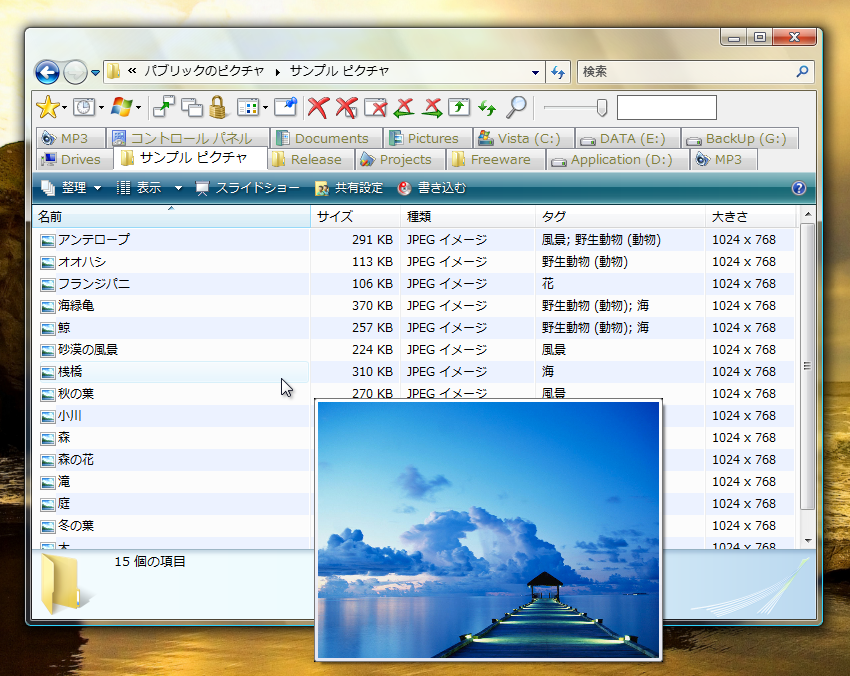
QT TabBar is a tab bar for Windows Explorer. It allows you to operates files and folders like tabbed browser: folder grouping, histories, etc.
Latest Reviews

Blaxima reviewed v1.2.3 Beta 5 on Jan 28, 2009
This app adds the functionality that should have been in windows explorer.
Its seamlessly integrates with no slowdown and I've never had a problem because of it.
I highly recommend this one

chinobis reviewed v1.2.3 Beta 5 on Jan 28, 2009
This is a true 'WOW". Add QT adress bar and spend 5 minutes to configure it and you'll end up with most of the best of added functionality other Windows Explorer replacements offer. I'm amazed at how much customization is being squeezed out of Windows Explorer. I now have a breadcrumb adressbar, gridlines in the main window, fully configurable tabs, a wonderfull subdir tool and more all within xp's own explorer. Oh, as a finishing touch, add foldersize 2.4 to top it off. Last but not least, Quizo is constantly developing his apps and he takes (feature) requests too! P.S other that the initial slowdown by foldersize's calculation, the QT has not slowed down explorer a bit. Stability is top too.

gawd21 reviewed v1.2.3 Beta 5 on Jan 28, 2009
I don't know how I have lived without this. It is simply the best add-on one could have!

DudeBoyz reviewed v1.2.3 Beta 5 on Jan 27, 2009
Hey - this thing is pretty cool. I hope they get it working with Windows 7 soon.
I would also like the ability to locate the controls for this ABOVE the address bar in Windows Vista and Windows 7.
It just doesn't look right to have the address bar Above the Button Bar, you know?
In fact, I wish these folks would expand the app so that it lets you customize all the dialogs and folders in the OS so that every time you open Windows Explorer or do a File Save or Save As, these options would all be right there by default. Saving configurations and layouts and such.
Very cool concept. Hope they keep improving it.

Nighted reviewed v1.2.3 Beta 5 on Jan 27, 2009
Lots of beta goodness minus the quirky funkiness of the shrinking search box. :P
Quizo...the toasty software developer. ;)

raveren reviewed v1.2.3 Beta 2 on Dec 16, 2008
The perfect explorer replacement replacement! (I meant it that way!)

TGB72 reviewed v1.2.3 Beta 2 on Dec 15, 2008
The performance improvement in this beta version is really noticeable, mainly in context menus & tab handling.

horsecharles reviewed v1.2.3 Beta 1 on Dec 8, 2008
Have used in BOTH xp and vista for years...with never a problem...
this is a can't do without app.
TGB72 reviewed v1.2.3 Beta 1 on Dec 8, 2008
Glad to see the project is alive. Somehow the problem mentioned below disappeared after install this new version :D.
Thanks a lot for your work Quizo.
TGB72 reviewed v1.2.2.1 on Mar 29, 2008
Crash when you jump from one tab to another if one of the folders is located 1 level deep or more in a removable device.
C:\data => X:\files\docs = crash
I reported this bug in the author's forum, not answer or fix till now.
Otherwise, yes, it's a little bit slow because of .NET.

Blaxima reviewed v1.2.3 Beta 5 on Jan 28, 2009
This app adds the functionality that should have been in windows explorer.
Its seamlessly integrates with no slowdown and I've never had a problem because of it.
I highly recommend this one
chinobis reviewed v1.2.3 Beta 5 on Jan 28, 2009
This is a true 'WOW". Add QT adress bar and spend 5 minutes to configure it and you'll end up with most of the best of added functionality other Windows Explorer replacements offer. I'm amazed at how much customization is being squeezed out of Windows Explorer. I now have a breadcrumb adressbar, gridlines in the main window, fully configurable tabs, a wonderfull subdir tool and more all within xp's own explorer. Oh, as a finishing touch, add foldersize 2.4 to top it off. Last but not least, Quizo is constantly developing his apps and he takes (feature) requests too! P.S other that the initial slowdown by foldersize's calculation, the QT has not slowed down explorer a bit. Stability is top too.
gawd21 reviewed v1.2.3 Beta 5 on Jan 28, 2009
I don't know how I have lived without this. It is simply the best add-on one could have!
DudeBoyz reviewed v1.2.3 Beta 5 on Jan 27, 2009
Hey - this thing is pretty cool. I hope they get it working with Windows 7 soon.
I would also like the ability to locate the controls for this ABOVE the address bar in Windows Vista and Windows 7.
It just doesn't look right to have the address bar Above the Button Bar, you know?
In fact, I wish these folks would expand the app so that it lets you customize all the dialogs and folders in the OS so that every time you open Windows Explorer or do a File Save or Save As, these options would all be right there by default. Saving configurations and layouts and such.
Very cool concept. Hope they keep improving it.
Nighted reviewed v1.2.3 Beta 5 on Jan 27, 2009
Lots of beta goodness minus the quirky funkiness of the shrinking search box. :P
Quizo...the toasty software developer. ;)
raveren reviewed v1.2.3 Beta 2 on Dec 16, 2008
The perfect explorer replacement replacement! (I meant it that way!)
TGB72 reviewed v1.2.3 Beta 2 on Dec 15, 2008
The performance improvement in this beta version is really noticeable, mainly in context menus & tab handling.
horsecharles reviewed v1.2.3 Beta 1 on Dec 8, 2008
Have used in BOTH xp and vista for years...with never a problem...
this is a can't do without app.
TGB72 reviewed v1.2.3 Beta 1 on Dec 8, 2008
Glad to see the project is alive. Somehow the problem mentioned below disappeared after install this new version :D.
Thanks a lot for your work Quizo.
TGB72 reviewed v1.2.2.1 on Mar 29, 2008
Crash when you jump from one tab to another if one of the folders is located 1 level deep or more in a removable device.
C:\data => X:\files\docs = crash
I reported this bug in the author's forum, not answer or fix till now.
Otherwise, yes, it's a little bit slow because of .NET.

GrantTLC reviewed v1.2.2 on Feb 6, 2008
After using an old build for a while (.06?) I recently upgraded to 1.2.13 and was deeply impressed by the improvements the author had made in the meantime. I prefer this little utility to full-on Explorer replacements like X2 and Totalcommander purely because of its tight integration into the existing Explorer.
QT TabBAr's added functionality is very welcome, and all without any noticeable reduction in speed on my Athlon XP 300+ system.
The author also has a companion utility to spruce up Explorer's Address bar too, giving it the 'breadcrumb' ability used in other OS' - using that with QT TabBar is *highly* recommended.

gate1975mlm reviewed v1.2.1.3 on Jan 14, 2008
Great handy add on for Vista!

anomoly reviewed v1.2 on Dec 26, 2007
Very cool. Except I use freecommander's dual pane explorer. If explorer had a proper dual pane i would ceratainly install this. BUT, freecommander has way more power than explorer so kinda moot point.