
File Details |
|
| File Size | 0.8 MB |
|---|---|
| License | Freeware |
| Operating System | Windows 7/8/10/11/Vista/XP |
| Date Added | November 22, 2023 |
| Total Downloads | 13,799 |
| Publisher | Northglide |
| Homepage | SideSlide |
Publisher's Description
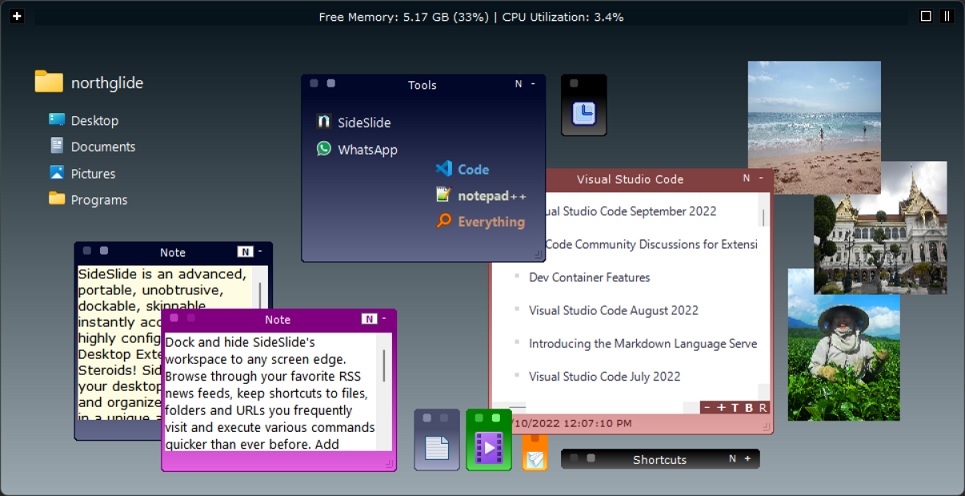
Dock and hide SideSlide to any screen edge. Browse through your favorite RSS news feeds, keep shortcuts to files, folders and URLs you frequently visit and execute various commands quicker than ever. Add multiple notes and picture slideshows, schedule reminders, save web snippets and more. Customize it to emphasize the things you use the most and make more information accessible without occupying precious screen space. By using containers you can shrink and fold to organize your projects, downloading ready-made containers from an online library, linking containers to actual folders on disk, detaching containers from the workspace to claim additional space, various ways of launching multiple shortcuts at once, shortcut tags, zooming in and out of shortcuts, news feed reader, keyboard navigation and launcher, different skins, different size pictures, picture containers and colored notes; SideSlide is designed to make a great deal of content instantly accessible and neatly organized.
Latest Reviews

DavidGreen reviewed v3.0.00 Beta 2 on Aug 5, 2008
To the reviewer below: I'm keeping it at the bottom of my screen and I can see none of the problems you mention...The previous version couldn't stay there at all, but with the latest I have no problem.
It is a very interesting app. I really like the concept of keeping everything inside containers. Also, that I can double-click a container and start all of the shortcuts inside together. It has many features and not that great of a help file (at least for now) so it takes a bit of learning to figure it out.

argybee reviewed v3.0.00 Beta 2 on Aug 4, 2008
Seems to work ok but I fail to see much functional advantage.
Also it does some weird (and annoying) things such as assumes windows taskbar at bottom and jumps out of the tray every time the screen gets a refresh, etc. etc. These things alone were enough to make me remove it after 10 mins.
Like the others said... if you use sTabLauncher, Winbar, ObjectDesk, Aston, Talisman this seems totally pointless (and looks ordinary compared to some of those).

robmanic44 reviewed v2.4.00b on Apr 19, 2008
If you use Stardock Object Desktop leave this alone. It has a great deal of options and is very flexable. With Stardock it's redundent.

TGB72 reviewed v2.3.00b on Mar 11, 2008
Nice prog, does what it claims very well, just would wish that the RSS feature came as an optional component in the setup, I don't like to much RSS, instead I would prefer some hardware monitors.

anomoly reviewed v2.2.00b on Oct 29, 2007
Tried this before and seems bloatware and pretty much a waste of time unless u really need it.
I use pstart portable for the most part.
Nice looking anyways

RWW reviewed v2.2.00b on Oct 29, 2007
I give it a five, is an accessory I have looked for. I use it and Rocketdock. A strange thing though.......on my second machine all the containers I had loaded dissappeared upon startup one day.

Elanessé reviewed v2.1.05b on Oct 22, 2007
Highly interesting app.

godzila reviewed v2.1.00b on Apr 18, 2007

CyberDoc999 reviewed v1.7.00b on Mar 29, 2007
Does a good job
the reminders do not do anything
I will keep this one.

Loopism reviewed v0.0.6a on May 3, 2006
Neat effort, but is it just me or does the screenshot above look vaguely like Windows 3.1 with its nested groups ;)

DavidGreen reviewed v3.0.00 Beta 2 on Aug 5, 2008
To the reviewer below: I'm keeping it at the bottom of my screen and I can see none of the problems you mention...The previous version couldn't stay there at all, but with the latest I have no problem.
It is a very interesting app. I really like the concept of keeping everything inside containers. Also, that I can double-click a container and start all of the shortcuts inside together. It has many features and not that great of a help file (at least for now) so it takes a bit of learning to figure it out.
argybee reviewed v3.0.00 Beta 2 on Aug 4, 2008
Seems to work ok but I fail to see much functional advantage.
Also it does some weird (and annoying) things such as assumes windows taskbar at bottom and jumps out of the tray every time the screen gets a refresh, etc. etc. These things alone were enough to make me remove it after 10 mins.
Like the others said... if you use sTabLauncher, Winbar, ObjectDesk, Aston, Talisman this seems totally pointless (and looks ordinary compared to some of those).
robmanic44 reviewed v2.4.00b on Apr 19, 2008
If you use Stardock Object Desktop leave this alone. It has a great deal of options and is very flexable. With Stardock it's redundent.
TGB72 reviewed v2.3.00b on Mar 11, 2008
Nice prog, does what it claims very well, just would wish that the RSS feature came as an optional component in the setup, I don't like to much RSS, instead I would prefer some hardware monitors.
anomoly reviewed v2.2.00b on Oct 29, 2007
Tried this before and seems bloatware and pretty much a waste of time unless u really need it.
I use pstart portable for the most part.
Nice looking anyways
RWW reviewed v2.2.00b on Oct 29, 2007
I give it a five, is an accessory I have looked for. I use it and Rocketdock. A strange thing though.......on my second machine all the containers I had loaded dissappeared upon startup one day.
Elanessé reviewed v2.1.05b on Oct 22, 2007
Highly interesting app.
godzila reviewed v2.1.00b on Apr 18, 2007
CyberDoc999 reviewed v1.7.00b on Mar 29, 2007
Does a good job
the reminders do not do anything
I will keep this one.
Loopism reviewed v0.0.6a on May 3, 2006
Neat effort, but is it just me or does the screenshot above look vaguely like Windows 3.1 with its nested groups ;)

guitardave78 reviewed v0.0.6a on Apr 6, 2006
Interesting concept. It seems to work fine.
It look nice with a little set up and I can see where they are going with it. Needs a bit more functionality before it becomes an essential. But for such an early verison it is very good at what it does, just not sure I need what it can do!
Take a look though, it is like a big post it note desktop but the post its can have anything in them from images to urls.

Isys reviewed v0.0.5a on Apr 3, 2006
Neat app with low cpu usage. Ignore the screenshots, everything is highly customizable.
Link folders, create menus, freestanding urls, pictures, drag and drop support. The way I like to work, this is'nt for me but for those of you who like to use the whole desktop, rather than just the edges, this has some nice options and anyway is fun to play with.
Please don't post reviews if you have'nt tried it, your just wasting space.

pleionis reviewed v0.0.5a on Apr 3, 2006
Yes,the screenshots are very ugly but the application itself is very configurable. Very good organizer!!!!TRY IT!!!