
File Details |
|
| File Size | 83.0 MB |
|---|---|
| License | Freeware |
| Operating System | Windows 7/8/10/Vista/XP |
| Date Added | December 13, 2022 |
| Total Downloads | 806,045 |
| Publisher | Skype Ltd. |
| Homepage | Skype |
Publisher's Description
Skype is software that enables the world's conversations. Millions of individuals and businesses use Skype to make free video and voice calls, send instant messages and share files with other people. You can use Skype on whatever works best for you - on your mobile, computer or a TV with Skype on it. If you pay a little, you can do more â?? like call phones, access WiFi, send SMS and make group video calls. You can pay as you go or buy a subscription, whatever works for you. And in the world of business, this means you can bring your entire ecosystem of workers, partners and customers together to get things done.
Latest Reviews

JohnOhan reviewed v8.46.0.60 on May 29, 2019
Hey deaf Microsoft: Bring back the "Compact View" option.
We miss it and want it back.
Otherwise, we will not use this terrible program ever again.

rebradley reviewed v8.41.0.54 on Mar 20, 2019
Skype at one time was great software. Microsoft has turned it into a tool to collect users personal information for sale to the highest bidder.

Music4Ever reviewed v8.30.0.50 on Sep 13, 2018
Not as good as it was, I really dislike the recent changes.

Yakumo reviewed v8.21.0.10 on May 16, 2018
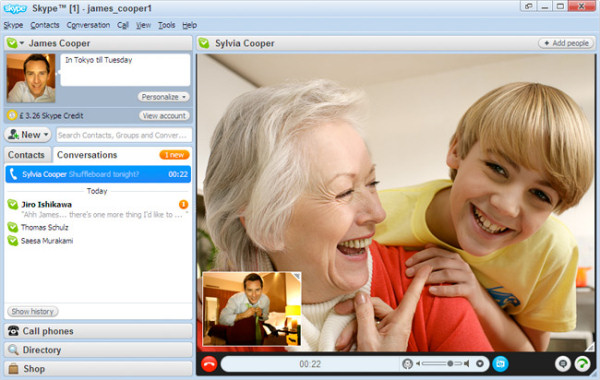
The preview image for this page needs to be updated, that is no longer how skype looks since version 8, I was accidentally thought this was an update to the last good versions of skype (7.4.0.xxx)

tim_tester reviewed v7.29.0.102 on Oct 21, 2016
crapware !

some guy reviewed v7.29.0.102 on Oct 21, 2016
Hangouts is a much better cross platform program no ADDS !

Alex20 reviewed v7.27.0.101 on Sep 16, 2016
Another incredible post, I value all the work you put into this site, assisting others with your fun and inventive works.
Hong Kong: A Concise Profile, 2014 Case Solution

beingdinu reviewed v7.27.0.101 on Aug 31, 2016
Official Skype for Windows desktop application alows you to stay in touch anytime and anywhere - whether on your phone or computer at home or work. The app itself is quite similar to Skype Web that was meant to be an extension of your phone: the app mirrors conversations and messages from your mobile device.
Skype for Windows is available for Windows 8 and later and is synced with your mobile device. Because the app runs natively on your desktop, you'll have support for native desktop notifications and better keyboard shortcuts.
Dinu
https://www.o365cloudexperts.com/
A powerful mind can bring in Peace or Destruction.

maianh04 reviewed v7.25.0.106 on Jul 5, 2016
Eu adoraria usar este software, além Eu também uso http://www.facebookbaixargratis.com.br/

CyberDoc999 reviewed v7.25.0.106 on Jul 1, 2016
Viber is better and free also

JohnOhan reviewed v8.46.0.60 on May 29, 2019
Pros: Used to be a decent program till Microsoft started to mess with it.
Cons: Microsoft stupidly messed up this program.
This dumb company inexplicably removed the very practical and useful "Compact Mode" and they now force the user to use this program in full and very large window mode which takes a huge space on our monitors.
This was a moronic change and if Microsoft is smart and caring they will bring back the "Compact View".
But somehow I doubt that they will do this as they are not smart.
Bottom Line: Hey deaf Microsoft: Bring back the "Compact View" option.
We miss it and want it back.
Otherwise, we will not use this terrible program ever again.
rebradley reviewed v8.41.0.54 on Mar 20, 2019
Pros: It used to be good.
Cons: A Microsoft tool to track users and sell for advertising purposes.
Bottom Line: Skype at one time was great software. Microsoft has turned it into a tool to collect users personal information for sale to the highest bidder.
Music4Ever reviewed v8.30.0.50 on Sep 13, 2018
Pros: Was really good isn't now.
Cons: Really gone downhill.
Bottom Line: Not as good as it was, I really dislike the recent changes.
Yakumo reviewed v8.21.0.10 on May 16, 2018
Pros: It still connects I guess.
Cons: Many missing features / settings.
Bottom Line: The preview image for this page needs to be updated, that is no longer how skype looks since version 8, I was accidentally thought this was an update to the last good versions of skype (7.4.0.xxx)
tim_tester reviewed v7.29.0.102 on Oct 21, 2016
crapware !
some guy reviewed v7.29.0.102 on Oct 21, 2016
Hangouts is a much better cross platform program no ADDS !
Alex20 reviewed v7.27.0.101 on Sep 16, 2016
Another incredible post, I value all the work you put into this site, assisting others with your fun and inventive works.
Hong Kong: A Concise Profile, 2014 Case Solution
beingdinu reviewed v7.27.0.101 on Aug 31, 2016
Official Skype for Windows desktop application alows you to stay in touch anytime and anywhere - whether on your phone or computer at home or work. The app itself is quite similar to Skype Web that was meant to be an extension of your phone: the app mirrors conversations and messages from your mobile device.
Skype for Windows is available for Windows 8 and later and is synced with your mobile device. Because the app runs natively on your desktop, you'll have support for native desktop notifications and better keyboard shortcuts.
Dinu
https://www.o365cloudexperts.com/
A powerful mind can bring in Peace or Destruction.
maianh04 reviewed v7.25.0.106 on Jul 5, 2016
Eu adoraria usar este software, além Eu também uso http://www.facebookbaixargratis.com.br/
CyberDoc999 reviewed v7.25.0.106 on Jul 1, 2016
Viber is better and free also

newbizk9 reviewed v7.25.0.103 on Jun 18, 2016
Skype is now worldwide famous software i think its best until the world ends

Uriel reviewed v7.21.0.100 on Mar 13, 2016
I haven't used Skype for three years. Last week I had two automatic withdrawals from my PayPal account in which I did not know I had agreed to automatic renewals in the small print of the agreement for a phone number that I signed up for for business use. Of course PayPal sided with Microsoft when I opened a dispute. I have since cancelled the reoccurring charges and Microsoft can go fu*k themselves for their sneaky tactics.
some guy reviewed v7.18.0.122 on Feb 11, 2016
was good back in the day but today their are to many alternatives like google hangouts that work better cross platformed and do a better job with no advertisement