
File Details |
|
| File Size | 7.4 MB |
|---|---|
| License | Freeware |
| Operating System | Windows 7/8/10/Vista |
| Date Added | March 5, 2021 |
| Total Downloads | 33,416 |
| Publisher | Code Sector |
| Homepage | TeraCopy |
Publisher's Description
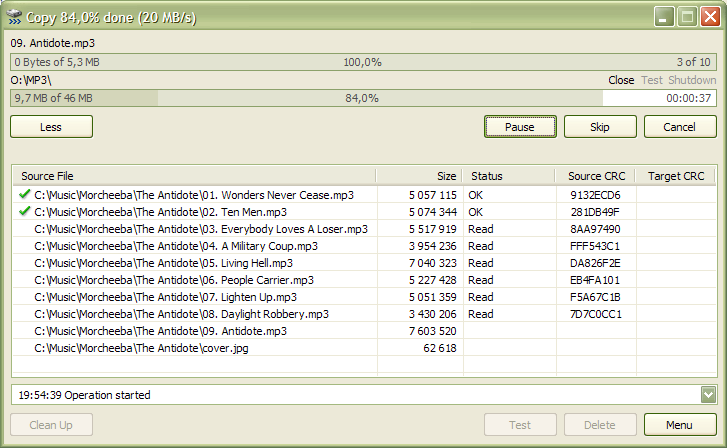
TeraCopy is a compact program designed to copy and move files at the maximum possible speed, also providing you with a lot of features. It uses dynamically adjusted buffers to reduce seek times. Asynchronous copy speeds up file transfer between two physical hard drives. Pause and resume file transfers. In case of copy error, it will try several times and in the worse case just skips the file, not terminating the entire transfer. It can completely replace Explorer copy and move functions, allowing you work with files as usual.
Latest Reviews

Moler_Stagi reviewed v3.7 on Jul 18, 2021
I like the older version of Teracopy but Gs Richcopy 360 and Fastcopy are faster and more flexible

CyberDoc999 reviewed v3.0 Beta 1 on May 29, 2016
the older version 2.27 is better

marty reviewed v3.0 Beta 1 on May 28, 2016
Glad its finally moved from Alpha to Beta. Excellent replacement for Windows Explorer copy (although there is an option to use that for copy/move operations if you really want to) Works great on Windows 10
CyberDoc999 reviewed v3.0 Alpha 4 on Oct 18, 2015
lot of options gone from 2.7 like skip older

Investigator reviewed v2.27 on Nov 29, 2011
Since mid 2010 TeraCopy V 2.12 works great within my Windows XP Home Sp3 pc.
Recently, I installed V 2.27 on an other machine with Windows XP Prof Sp3, but there was already a problem during install : machine hangs.
After reboot I reïnstalled TeraCopy and tried to copy a few files. Again the machine freezes.
After rebooting I deïnstalled V2.27 and switched over to V 2.12. Now the old version works smoothly.
What causes the problem ?

bobad reviewed v2.27 on Nov 20, 2011
Teracopy works great. I love the way it integrates into the shell, enabling "Teracopy" and "Teramove". Granted, it slows down copying, but is actually faster if you run into errors that Windows Explorer can not handle. You can skip over the bad file and keep going. I tried the other copy programs. FastCopy is pretty good, offering a portable version that can add and remove shell extensions. It may be out of development, no updates since Feb '11. Extremecopy is pretty useless for Explorer shell (right mouse click) users. I simply can't use it without shell extensions.
Give Teracopy a 4.5, it isn't quite perfect.

anomoly reviewed v2.22 on Oct 27, 2011
Thanks. I just tested tera against extreme and extreme gave me a 30 mb/s boost between two hd's. Tera maxed out at 60 taking 25s for a large video file and extreme took around 14s. Only slight improvement to flash which is to be expected.

eMWu reviewed v2.22 on Oct 27, 2011
Currently ExtremeCopy and FastCopy are the fastest, both free. ExtremeCopy's GUI is better though and it integrates in Windows, so that's the best one.

nilst2006 reviewed v2.2 on Jul 19, 2011
Tried it. Thanks, but NO thanks. Windows XP manage it all far better itself.

dhry reviewed v2.2 on Jul 18, 2011
1) Teracopy is free. 2) It works perfectly. 3) FastCopy's GUI looks like Jackson Pollock threw up all over it.

Moler_Stagi reviewed v3.7 on Jul 18, 2021
Pros: easy and robust
Cons: the older version is better
Bottom Line: I like the older version of Teracopy but Gs Richcopy 360 and Fastcopy are faster and more flexible
CyberDoc999 reviewed v3.0 Beta 1 on May 29, 2016
the older version 2.27 is better
marty reviewed v3.0 Beta 1 on May 28, 2016
Glad its finally moved from Alpha to Beta. Excellent replacement for Windows Explorer copy (although there is an option to use that for copy/move operations if you really want to) Works great on Windows 10
CyberDoc999 reviewed v3.0 Alpha 4 on Oct 18, 2015
lot of options gone from 2.7 like skip older
Investigator reviewed v2.27 on Nov 29, 2011
Since mid 2010 TeraCopy V 2.12 works great within my Windows XP Home Sp3 pc.
Recently, I installed V 2.27 on an other machine with Windows XP Prof Sp3, but there was already a problem during install : machine hangs.
After reboot I reïnstalled TeraCopy and tried to copy a few files. Again the machine freezes.
After rebooting I deïnstalled V2.27 and switched over to V 2.12. Now the old version works smoothly.
What causes the problem ?
bobad reviewed v2.27 on Nov 20, 2011
Teracopy works great. I love the way it integrates into the shell, enabling "Teracopy" and "Teramove". Granted, it slows down copying, but is actually faster if you run into errors that Windows Explorer can not handle. You can skip over the bad file and keep going. I tried the other copy programs. FastCopy is pretty good, offering a portable version that can add and remove shell extensions. It may be out of development, no updates since Feb '11. Extremecopy is pretty useless for Explorer shell (right mouse click) users. I simply can't use it without shell extensions.
Give Teracopy a 4.5, it isn't quite perfect.
anomoly reviewed v2.22 on Oct 27, 2011
Thanks. I just tested tera against extreme and extreme gave me a 30 mb/s boost between two hd's. Tera maxed out at 60 taking 25s for a large video file and extreme took around 14s. Only slight improvement to flash which is to be expected.
eMWu reviewed v2.22 on Oct 27, 2011
Currently ExtremeCopy and FastCopy are the fastest, both free. ExtremeCopy's GUI is better though and it integrates in Windows, so that's the best one.
nilst2006 reviewed v2.2 on Jul 19, 2011
Tried it. Thanks, but NO thanks. Windows XP manage it all far better itself.
dhry reviewed v2.2 on Jul 18, 2011
1) Teracopy is free. 2) It works perfectly. 3) FastCopy's GUI looks like Jackson Pollock threw up all over it.

Sativarg reviewed v2.2 on Jul 18, 2011
Here is the latest: from the Installer Change Log
-------------
TeraCopy Change Log
Version 2.2 RC
Fixed: mounted volumes detection when choosing same/different devices mode.
Version 2.2 beta 3
Added: Option 'CardReader' to ini file.
Specify a device name to unmount volumes instead of ejecting card reader.
Added: Better USB devices ejection.
Added: Option 'ForceSameDriveMode' to ini file.
Fixed: Crush when testing md5 files.
Fixed: Always test target folder and request admin privileges if needed.
-------------
I do not copy over LAN or to fancy devices like USB drives so I can not really test that but when I tell windows to copy m user files to a folder and come back half an hour later to find nothing done and a stupid Error about a locked file sitting there I know I like this applications features. So I will keep my 5 stars.... Plenty of others here voted 1 star and this application seems to always be rated above 4.

gurgle reviewed v2.2 Beta 3 on Apr 12, 2011
I cant find what this application does that any good file commander like Total Commander or Speedcommander would not do as well or better.

rasi5050 reviewed v2.2 Beta 3 on Dec 13, 2010
these type of softwares like teracopy or supercopier have additional functions .other than that it has no difference no increase in speed or transfer rate .but we feel it it is more faster .i have tried both but i couldnt find any difference in speed .thats all the same