
File Details |
|
| File Size | 8.8 MB |
|---|---|
| License | Freeware |
| Operating System | Windows 8/10/11 |
| Date Added | December 1, 2022 |
| Total Downloads | 11,713 |
| Publisher | Tordex |
| Homepage | True Launch Bar |
Publisher's Description
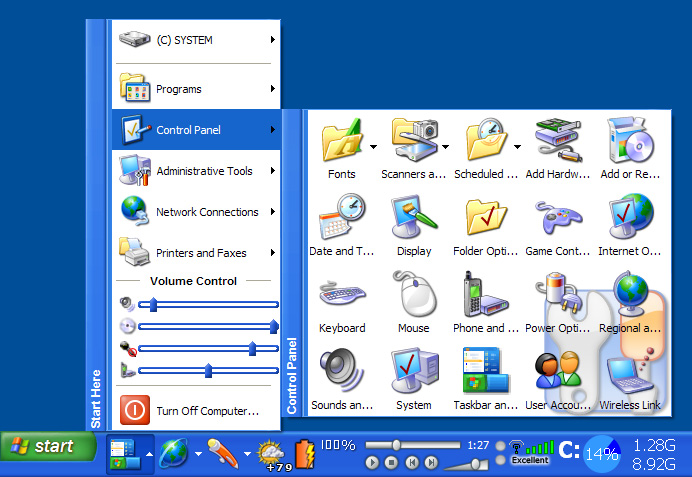
True Launch Bar is a superior replacement for the standard Quick Launch bar. All functions presented in Quick Launch are also in True Launch Bar. However, the True Launch Bar is fully compatible with Quick Launch because it uses the same folder for shortcuts. But there is one huge difference. True Launch Bar allows you to combine your shortcuts into groups. This feature looks like popup menus. This vastly improves the management of your shortcuts and save working space on your desktop. By using True Launch Bar, you speed up the launching of your applications like never before.
Latest Reviews

kstev99 reviewed v7.4 on Jul 2, 2018
I had tried this several years ago and decided to give it another shot. Setup says to remove quicklaunch toolbar, THAT took me a while to get it back the way I wanted it once I decided that this TLB was crap.
If you want a truly portable, FREE, and very customizable personal start menu, try SYMENU. You don't have to install any or all of the Freeware apps from Nirsoft or System internals unless you want to. I chose not to, because I already have them elsewhere and use it strictly as a Start Menu that resides in the System Tray. WAY better than TLB in my opinion anyway. To each his own and I'm sure some are really attached to TLB, but the best I can give it is a TWO.

humbleuser reviewed v7.3.2 Beta on May 28, 2016
Please stop listing software as freeware when it isn't

CyberDoc999 reviewed v7.3.1 Beta on May 5, 2016
way too busy for me

NyaR reviewed v7.1 on Oct 30, 2014
Great launcher, used to pirate it when I was a kid and now I bought it.
I use it to have multiple quicklaunch-like toolbars, which are synced across multiple computers, by the use of megasync (used to do dropbox in the past).
All my shortcuts are 1 click away, or 2 clicks away within a menu folder. No need to search through the start button and no cluttered quicklaunch.

RWW reviewed v6.0 on Jun 20, 2012
One of the first items I add to a new install. You can customize the menus, etc until you are tired of customizing! I have been using it with Windows 8 and it is a perfect fit!

Kipster reviewed v6.0 on Jun 19, 2012
This much more than just a launcher.
I can see CPU usage, network usage, drive activity, etc. at all times.
Unlike gadgets that get hidden when running apps, this info can be displayed at all times on the bottom bar.
On my laptop, I also find it useful to have a volume control slider handy.
Show battery status, key state or many other options.
The launcher is merely just one of many functions this is capable of performing.

HeilNizar reviewed v5.6.3 Beta on Jan 18, 2012
I agree with SineWave,
If you are so desperate to have a launcher then you could at least use Rocketdock.

darkwzrd1 reviewed v5.6.3 Beta on Jan 17, 2012
@SineWave, your a idiot. If your worried about 12mb in this day of age your clearly clueless.

uberfly reviewed v5.3 on Feb 26, 2011
SineWave, Thanks for the useless rant. Here, have a useless retort in return.

SineWave reviewed v5.3 on Feb 26, 2011
12MB for a quicklaunch bar??? Guys, even MicroSoft makes more optimised programs... Besides, I can't understand useless programs that try to invent hot water. People, you have QuickLaunch that can hold 10-20 programs to look reasonable, you have the whole desktop for shortcuts, you can organise by hand your Start menu... what use is yet another place to start your programs with that consumes so much memory and CPU in the background. Mayb e I could understand if it was freeware, but it's not.
Too many people got their hands on tools like Visual Basic and .NET and writing just about any program with these tools takes megabytes instead of kilobytes. What a shame. No stars. Ok, I'll give you one if I must.
Cheers! Try making some more useful program. Sorry, but programming practices today are disgusting, there's no eagerness to optimise the code and get rid of all the bugs, everything should be made as soon as possible and make some money...

kstev99 reviewed v7.4 on Jul 2, 2018
Pros: Lots of Features
Cons: As CyberDoc999 mentioned, WAY too busy. Confusing setup. Nagging Demo button if you are just wanting to try it out.
Bottom Line: I had tried this several years ago and decided to give it another shot. Setup says to remove quicklaunch toolbar, THAT took me a while to get it back the way I wanted it once I decided that this TLB was crap.
If you want a truly portable, FREE, and very customizable personal start menu, try SYMENU. You don't have to install any or all of the Freeware apps from Nirsoft or System internals unless you want to. I chose not to, because I already have them elsewhere and use it strictly as a Start Menu that resides in the System Tray. WAY better than TLB in my opinion anyway. To each his own and I'm sure some are really attached to TLB, but the best I can give it is a TWO.
humbleuser reviewed v7.3.2 Beta on May 28, 2016
Please stop listing software as freeware when it isn't
CyberDoc999 reviewed v7.3.1 Beta on May 5, 2016
way too busy for me
NyaR reviewed v7.1 on Oct 30, 2014
Great launcher, used to pirate it when I was a kid and now I bought it.
I use it to have multiple quicklaunch-like toolbars, which are synced across multiple computers, by the use of megasync (used to do dropbox in the past).
All my shortcuts are 1 click away, or 2 clicks away within a menu folder. No need to search through the start button and no cluttered quicklaunch.
RWW reviewed v6.0 on Jun 20, 2012
One of the first items I add to a new install. You can customize the menus, etc until you are tired of customizing! I have been using it with Windows 8 and it is a perfect fit!
Kipster reviewed v6.0 on Jun 19, 2012
This much more than just a launcher.
I can see CPU usage, network usage, drive activity, etc. at all times.
Unlike gadgets that get hidden when running apps, this info can be displayed at all times on the bottom bar.
On my laptop, I also find it useful to have a volume control slider handy.
Show battery status, key state or many other options.
The launcher is merely just one of many functions this is capable of performing.
HeilNizar reviewed v5.6.3 Beta on Jan 18, 2012
I agree with SineWave,
If you are so desperate to have a launcher then you could at least use Rocketdock.
darkwzrd1 reviewed v5.6.3 Beta on Jan 17, 2012
@SineWave, your a idiot. If your worried about 12mb in this day of age your clearly clueless.
uberfly reviewed v5.3 on Feb 26, 2011
SineWave, Thanks for the useless rant. Here, have a useless retort in return.
SineWave reviewed v5.3 on Feb 26, 2011
12MB for a quicklaunch bar??? Guys, even MicroSoft makes more optimised programs... Besides, I can't understand useless programs that try to invent hot water. People, you have QuickLaunch that can hold 10-20 programs to look reasonable, you have the whole desktop for shortcuts, you can organise by hand your Start menu... what use is yet another place to start your programs with that consumes so much memory and CPU in the background. Mayb e I could understand if it was freeware, but it's not.
Too many people got their hands on tools like Visual Basic and .NET and writing just about any program with these tools takes megabytes instead of kilobytes. What a shame. No stars. Ok, I'll give you one if I must.
Cheers! Try making some more useful program. Sorry, but programming practices today are disgusting, there's no eagerness to optimise the code and get rid of all the bugs, everything should be made as soon as possible and make some money...

tranglos reviewed v4.4.13 RC5 on Sep 10, 2010
Between True Launch Bar and Find and Run Robot I have no need for the Start menu. On the face of it, it may look as though TLB just puts shortcuts in the Quick Launch area (which you can do manually indeed), but that's barely scratching the surface.
TLB is infinitely configurable, allowing you to make it look and behave exactly as is convenient to you. Best of all, it comes with a fantastic support for both keyboard and mouse. I have nine TLB "folders", each with its own icon, and a Win+digit hotkey assigned to each. Win+1 opens the folder I use the most, with office apps, browser, email etc., Win+3 opens my folder with media players, and so on. So most of the time I don't need the mouse to start the app I want. But if you're already mousing around, TLB can open up the folders by just hovering the mouse pointer over them - much easier and faster this way.
TLB is a very carefully thought-out and well-designed application, with just the right set of features. Design-wise, it's way up there with the best like Total Commander and Beyond Compare. It's one of the rare apps that feel just right, and when you think you need a feature, most of the time you find out it's already there for you.
(And if you try TLB, check out the variety of available plugins.)

Raton reviewed v4.4.9 RC1 on May 18, 2010
"Considering that
you can just add a
folder to the TaskBar"
True Launch Bar is far more -and far more convenient- than merely making taskbar icons shortcut to folders. Functionality goes way beyond such a crude expedient !
The PC Rat
uberfly reviewed v4.4.9 RC1 on May 18, 2010
When using the default Win7 start menu, you are very limited when trying to make cascading menus for your own shortcuts (unless you go with the old crusty classic start menu). This is a great solution with a ton of extra functionality. Good stuff.