
File Details |
|
| File Size | 8.8 MB |
|---|---|
| License | Freeware |
| Operating System | Windows 8/10/11 |
| Date Added | December 1, 2022 |
| Total Downloads | 11,713 |
| Publisher | Tordex |
| Homepage | True Launch Bar |
Publisher's Description
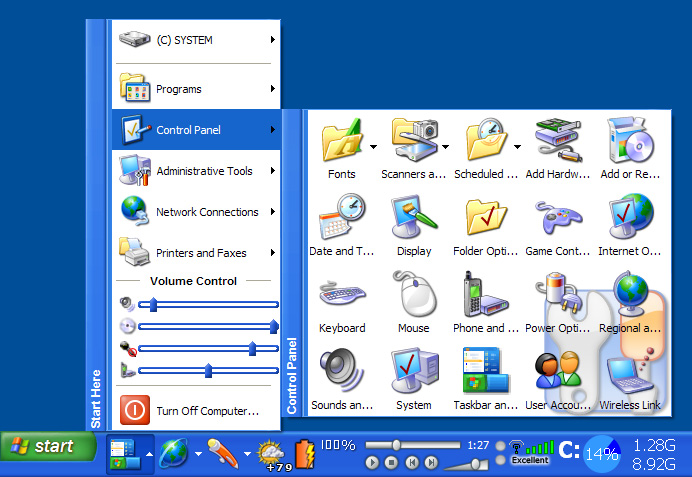
True Launch Bar is a superior replacement for the standard Quick Launch bar. All functions presented in Quick Launch are also in True Launch Bar. However, the True Launch Bar is fully compatible with Quick Launch because it uses the same folder for shortcuts. But there is one huge difference. True Launch Bar allows you to combine your shortcuts into groups. This feature looks like popup menus. This vastly improves the management of your shortcuts and save working space on your desktop. By using True Launch Bar, you speed up the launching of your applications like never before.
Latest Reviews

kstev99 reviewed v7.4 on Jul 2, 2018
I had tried this several years ago and decided to give it another shot. Setup says to remove quicklaunch toolbar, THAT took me a while to get it back the way I wanted it once I decided that this TLB was crap.
If you want a truly portable, FREE, and very customizable personal start menu, try SYMENU. You don't have to install any or all of the Freeware apps from Nirsoft or System internals unless you want to. I chose not to, because I already have them elsewhere and use it strictly as a Start Menu that resides in the System Tray. WAY better than TLB in my opinion anyway. To each his own and I'm sure some are really attached to TLB, but the best I can give it is a TWO.

humbleuser reviewed v7.3.2 Beta on May 28, 2016
Please stop listing software as freeware when it isn't

CyberDoc999 reviewed v7.3.1 Beta on May 5, 2016
way too busy for me

NyaR reviewed v7.1 on Oct 30, 2014
Great launcher, used to pirate it when I was a kid and now I bought it.
I use it to have multiple quicklaunch-like toolbars, which are synced across multiple computers, by the use of megasync (used to do dropbox in the past).
All my shortcuts are 1 click away, or 2 clicks away within a menu folder. No need to search through the start button and no cluttered quicklaunch.

RWW reviewed v6.0 on Jun 20, 2012
One of the first items I add to a new install. You can customize the menus, etc until you are tired of customizing! I have been using it with Windows 8 and it is a perfect fit!

Kipster reviewed v6.0 on Jun 19, 2012
This much more than just a launcher.
I can see CPU usage, network usage, drive activity, etc. at all times.
Unlike gadgets that get hidden when running apps, this info can be displayed at all times on the bottom bar.
On my laptop, I also find it useful to have a volume control slider handy.
Show battery status, key state or many other options.
The launcher is merely just one of many functions this is capable of performing.

HeilNizar reviewed v5.6.3 Beta on Jan 18, 2012
I agree with SineWave,
If you are so desperate to have a launcher then you could at least use Rocketdock.

darkwzrd1 reviewed v5.6.3 Beta on Jan 17, 2012
@SineWave, your a idiot. If your worried about 12mb in this day of age your clearly clueless.

uberfly reviewed v5.3 on Feb 26, 2011
SineWave, Thanks for the useless rant. Here, have a useless retort in return.

SineWave reviewed v5.3 on Feb 26, 2011
12MB for a quicklaunch bar??? Guys, even MicroSoft makes more optimised programs... Besides, I can't understand useless programs that try to invent hot water. People, you have QuickLaunch that can hold 10-20 programs to look reasonable, you have the whole desktop for shortcuts, you can organise by hand your Start menu... what use is yet another place to start your programs with that consumes so much memory and CPU in the background. Mayb e I could understand if it was freeware, but it's not.
Too many people got their hands on tools like Visual Basic and .NET and writing just about any program with these tools takes megabytes instead of kilobytes. What a shame. No stars. Ok, I'll give you one if I must.
Cheers! Try making some more useful program. Sorry, but programming practices today are disgusting, there's no eagerness to optimise the code and get rid of all the bugs, everything should be made as soon as possible and make some money...

kstev99 reviewed v7.4 on Jul 2, 2018
Pros: Lots of Features
Cons: As CyberDoc999 mentioned, WAY too busy. Confusing setup. Nagging Demo button if you are just wanting to try it out.
Bottom Line: I had tried this several years ago and decided to give it another shot. Setup says to remove quicklaunch toolbar, THAT took me a while to get it back the way I wanted it once I decided that this TLB was crap.
If you want a truly portable, FREE, and very customizable personal start menu, try SYMENU. You don't have to install any or all of the Freeware apps from Nirsoft or System internals unless you want to. I chose not to, because I already have them elsewhere and use it strictly as a Start Menu that resides in the System Tray. WAY better than TLB in my opinion anyway. To each his own and I'm sure some are really attached to TLB, but the best I can give it is a TWO.
humbleuser reviewed v7.3.2 Beta on May 28, 2016
Please stop listing software as freeware when it isn't
CyberDoc999 reviewed v7.3.1 Beta on May 5, 2016
way too busy for me
NyaR reviewed v7.1 on Oct 30, 2014
Great launcher, used to pirate it when I was a kid and now I bought it.
I use it to have multiple quicklaunch-like toolbars, which are synced across multiple computers, by the use of megasync (used to do dropbox in the past).
All my shortcuts are 1 click away, or 2 clicks away within a menu folder. No need to search through the start button and no cluttered quicklaunch.
RWW reviewed v6.0 on Jun 20, 2012
One of the first items I add to a new install. You can customize the menus, etc until you are tired of customizing! I have been using it with Windows 8 and it is a perfect fit!
Kipster reviewed v6.0 on Jun 19, 2012
This much more than just a launcher.
I can see CPU usage, network usage, drive activity, etc. at all times.
Unlike gadgets that get hidden when running apps, this info can be displayed at all times on the bottom bar.
On my laptop, I also find it useful to have a volume control slider handy.
Show battery status, key state or many other options.
The launcher is merely just one of many functions this is capable of performing.
HeilNizar reviewed v5.6.3 Beta on Jan 18, 2012
I agree with SineWave,
If you are so desperate to have a launcher then you could at least use Rocketdock.
darkwzrd1 reviewed v5.6.3 Beta on Jan 17, 2012
@SineWave, your a idiot. If your worried about 12mb in this day of age your clearly clueless.
uberfly reviewed v5.3 on Feb 26, 2011
SineWave, Thanks for the useless rant. Here, have a useless retort in return.
SineWave reviewed v5.3 on Feb 26, 2011
12MB for a quicklaunch bar??? Guys, even MicroSoft makes more optimised programs... Besides, I can't understand useless programs that try to invent hot water. People, you have QuickLaunch that can hold 10-20 programs to look reasonable, you have the whole desktop for shortcuts, you can organise by hand your Start menu... what use is yet another place to start your programs with that consumes so much memory and CPU in the background. Mayb e I could understand if it was freeware, but it's not.
Too many people got their hands on tools like Visual Basic and .NET and writing just about any program with these tools takes megabytes instead of kilobytes. What a shame. No stars. Ok, I'll give you one if I must.
Cheers! Try making some more useful program. Sorry, but programming practices today are disgusting, there's no eagerness to optimise the code and get rid of all the bugs, everything should be made as soon as possible and make some money...

tranglos reviewed v4.4.13 RC5 on Sep 10, 2010
Between True Launch Bar and Find and Run Robot I have no need for the Start menu. On the face of it, it may look as though TLB just puts shortcuts in the Quick Launch area (which you can do manually indeed), but that's barely scratching the surface.
TLB is infinitely configurable, allowing you to make it look and behave exactly as is convenient to you. Best of all, it comes with a fantastic support for both keyboard and mouse. I have nine TLB "folders", each with its own icon, and a Win+digit hotkey assigned to each. Win+1 opens the folder I use the most, with office apps, browser, email etc., Win+3 opens my folder with media players, and so on. So most of the time I don't need the mouse to start the app I want. But if you're already mousing around, TLB can open up the folders by just hovering the mouse pointer over them - much easier and faster this way.
TLB is a very carefully thought-out and well-designed application, with just the right set of features. Design-wise, it's way up there with the best like Total Commander and Beyond Compare. It's one of the rare apps that feel just right, and when you think you need a feature, most of the time you find out it's already there for you.
(And if you try TLB, check out the variety of available plugins.)

Raton reviewed v4.4.9 RC1 on May 18, 2010
"Considering that
you can just add a
folder to the TaskBar"
True Launch Bar is far more -and far more convenient- than merely making taskbar icons shortcut to folders. Functionality goes way beyond such a crude expedient !
The PC Rat
uberfly reviewed v4.4.9 RC1 on May 18, 2010
When using the default Win7 start menu, you are very limited when trying to make cascading menus for your own shortcuts (unless you go with the old crusty classic start menu). This is a great solution with a ton of extra functionality. Good stuff.

Balderstrom reviewed v4.4.9 RC1 on May 18, 2010
Considering that you can just add a folder to the TaskBar,
ie: "My Documents"\Shortcuts, or even your "Desktop".
and Shortcuts might contain (folders with .lnk's):
Image\
ColorCop.lnk
IrfanView.lnk
XnView.lnk
Utilities\
TrayMenu.lnk
etc. All Your shortcuts are organized in a folder. You can also do something like this with AutoHotKey, or a plethora of "Menu Tools" like digitalis' ShortPopUp, CLCL (Clipboard utility, that allows for Hotkeys and MenuPop ups) among many others.
I'd have to agree with the value proposition: $20 is highly overpriced. Even my FileManager and Text Editors that are used constantly were only $30-$40 -- and lifetime licenses.
Raton reviewed v4.4.8 Beta on Apr 23, 2010
"True Launch Bar allows you
to combine your shortcuts into
groups for only $19.95! Not
worth the money."
For those of us who are heavy Quick Launch users, it's worth ~every~ penny !
The Computer Rodent
RWW reviewed v4.4.7 Beta on Apr 8, 2010
Excellent! I think some people....wait....I know some people don't really go over all the possibilities of this program.
I install TLB on every machine I set up or clean up for someone and show how easy it is to add a program and take it off the start menu. It is aggravating however the next time I see their machine and all new stuff and half of the old is back on the start menu and icons all over the desktop. It is far from complicated and makes the desktop very usable and clean!

DrTeeth reviewed v4.4.6 Beta on Mar 11, 2010
This is a brilliant bit of software that I use a lot daily and am happy to support. Just go to the site and read the manual for full details of what this baby does. Couple that with a responsive programmer and excellent support and it's a clear winner.
DrT

Entitled American reviewed v4.4.6 Beta on Mar 10, 2010
True Launch Bar allows you to combine your shortcuts into groups for only $19.95! Not worth the money.

HydrantHunter reviewed v4.4.6 Beta on Mar 10, 2010
Truly has no peer. While it *can* replace the Windows Start menu, that is practically the least of its features. Incredibly powerful, though the various settings interfaces are spread about a bit and occasionally feel cluttered. It's very much like the deprecated Windows Quick Launch feature, except on steroids...with rocket launchers...err plug-ins.
The native x64 support is flawless and most plug-ins include x64 versions. It's weakest feature is the update/notification component, which seriously needs some attention.

emanresU deriseD reviewed v4.4.6 Beta on Mar 10, 2010
Although simpletons* who don't even understand what TLB does will never get it, it's a very handy bit of software, with no direct competitor that I know of.
* Take the reviewer above, who says that TLB "allows you to combine your shortcuts into groups". Uh, sure, groups, and menus, and virtual menus, and media control plugins, and weather plugins, and drive space plugins, and 300 other plugins... Point made.
CyberDoc999 reviewed v4.4.4 Beta on Feb 9, 2010
If you want something for windows 7 see
http://classicshell.sourceforge.net/

Young Strider reviewed v4.4.3 Beta on Nov 18, 2009
What a waste of CPU cycles.

kail reviewed v4.4.2 Beta on Nov 3, 2009
I used FLB for many years before purchasing TLB and I have no regrets at all. TLB is a great application that I really cannot do without.. fortunately, since purchasing TLB gets you free upgrades and its development is very active I don't need to. :)
PS The new Beta is very cool under Vista/W7. Nice one Yuri.

darthbeads reviewed v4.4.1 Beta on Nov 2, 2009
True Launch Bar's ability to put folders (both regular folders of shortcuts, and virtual folders linking to other locations) is a desperately missing component in Windows, even in Windows 7 with it's much ballyhooed "jump lists".
True Launch Bar is simply indispensable.
4.4.2 was released yesterday with the following release notes:
Fixed:
- Crash on moving shortcuts into the virtual folder
- Using button label as menu caption
- Moving the virtual folder from the toolbar can move the source folder

Morningdove reviewed v4.4 on Mar 28, 2009
True Launch Bar is one of those unique programs rarely seen in this world of "me too" software. It is a simple concept elegantly executed. It adds nothing to the Windows UI, it merely enhances what is already there: the quick launch tool bar. The multitude of available options allows a toolbar to be built precisely to the user's needs. The program has no competition.
True Launch Bar is a mature program that is still being enhanced. The $20 cost with permanent upgrades is truly a give-away, especially since I use this program on an every day basis.

stisev reviewed v4.3 on Oct 16, 2008
Best launcher ever!

Zero-Point reviewed v4.3 on Oct 16, 2008
Great application. FreeLaunchBar does the basics, and True Launch Bar gives you access to a multitude of plug-ins.
kholdstare: Actually the idea is to let you customize your taskbar to your preference. If you want a lean taskbar, you are capable while having easy access to anything, if you want more visibility and monitoring, you can do that too.

Diam0nd reviewed v4.3 on Oct 16, 2008
Solid program.

outdoor_mn reviewed v4.3 on Oct 16, 2008
I've used the free version of this program (FreeLaunchBar) for quite some time now. It's one of the first programs I install on my computer and I couldn't live without it. Just being able to organize my quick launch area into folders is something I can't figure out why windows doesn't allow. I really can't live without. I could see myself buying the full program, but so far the free version does what I need. But $20 is nothing for a program I'd use every day. Check it out.

Tao2005 reviewed v4.2.7 RC3 on Aug 13, 2008
Well, I aint gonna bad mouth it, but I have two replacements that I know. Favorite Shortcuts, which puts your favorite programs in to the context menu, and the quick launch. VistaStartMenu, which puts it in to tabs. Or, you can do it on your own, by just navigating to the quicklaunch folder, and put a couple folders in there. Works easier then this, but this stops the navigation process. Good program, so are the ones I mentioned above. Enjoy peeps.
Peace..

Belarathon reviewed v4.2.7 RC3 on Aug 12, 2008
An absolute must have. Earth to Mikl - you clearly didn't USE the software, or you'd know it has nothing to do with the start menu. Idiot.

mikel2earth reviewed v4.2.6 RC2 on Jul 3, 2008
looks like..... the Start menu!!!
Diam0nd reviewed v4.2.6 RC2 on Jul 3, 2008
Great!

Undesired Username reviewed v4.2.6 RC2 on Jul 3, 2008
Clutters your task bar? Only if you want it to. You can do just the opposite with it if you like--that is, set it up so that your task bar (more correctly, the Quick Launch area of the task bar) consists of a single button, with menus and/or shortcuts and/or useful plugins off of that.
You know, if you happen to be the type of person with a million brain cells in your skull.

kholdstare reviewed v4.2.6 RC2 on Jul 2, 2008
can't believe people like this thing. it just clutters your taskbar. guess the only people who like this are the same people who have a million icons in there system tray

coover reviewed v4.2.6 RC2 on Jul 2, 2008
Looks like a good application, but $20 is crazy! If the author were to reduce his price to $10, I'm sure he'd more than double his sales. Reduce it to $5, and he'd probably get 10 times the users. Hey author, reduce your price and you might be able to make a living from this. Leave it at $20 and you'll continue to starve.
Diam0nd reviewed v4.2.6 RC2 on Jul 2, 2008
Love it. A must-have tool.
Diam0nd reviewed v4.2.5 RC1 on Apr 30, 2008
As I said below, I really like this one. Has great support, tons of plugins and even a x64 version! Believe me, if you're into using your quick launch, you WILL be impressed.

JeRrYFaR reviewed v4.2.4 RC1 on Apr 24, 2008
Agree completely with the below.
Diam0nd reviewed v4.2.4 RC1 on Apr 24, 2008
If you're into using your tray heavily, this is the grail. One of very few must-haves.
Diam0nd reviewed v4.2.3 Beta on Dec 31, 2007
Diam0nd reviewed v4.2.3 Beta on Dec 31, 2007
Great proggy!

sweathog reviewed v4.2.3 Beta on Dec 31, 2007
@kronix2. PowerPro
http://fileforum.betanew...l/PowerPro/1147363471/1
is a very reliable, more flexible and much less memory resource intensive freeware equivalent. But the learning curve is really steep. True Launch Bar looks prettier out of the box but uses more memory and is more limited in launch customization.
P.S. By the way, anybody know what tags are used here at the FileForum for submission of review comments? I'd like to be able to hide hyperlinks, like above, and just display the program name.
Diam0nd reviewed v4.2.2 Beta on Sep 16, 2007
This is THE program to manage your quick launch IF you got many icons in it. If you dont have that much, most likely you dont need it.
Diam0nd reviewed v4.2.2 Beta on Sep 16, 2007
This is THE program to manage your quick launch IF you got many icons in it. If you dont have that much, most likely you dont need it.
RWW reviewed v4.2.2 Beta on Sep 11, 2007
Cyber Doc: I was talking about the free version. some have gone on to the pay version.
Still excellent!!

kronix2 reviewed v4.2.2 Beta on Sep 11, 2007
This is one of the few commercial apps which doesn't have a free equivalent.
I don't know why Windows isn't able to add menus and widgets to the start bar out of the box.
CyberDoc999 reviewed v4.2.1 Beta on Jul 29, 2007
RWW do you buy it for every computer or do you just share your serial number?
I hate this app... it is just bloat!
RWW reviewed v4.2 on Apr 19, 2007
This app goes on every PC I work on. Nothing on the market does exactly what this one does and configuration is wonderful.
stisev reviewed v4.1.6 RC on Apr 17, 2007
Wonderful app.
I just wish this was an actual APPLICATION (not a plugin) that would write to an .ini file (not to registry) and be completely portable.
Launchy is the next best thing

kicelo reviewed v4.1.6 RC on Mar 29, 2007
sweathog: power pro doesn't compare and looks like a windows 3.1 app (from the screen shots)
TLB is hands down the best app i ever bought, I hardly use my start menu any more.

Bandyt reviewed v4.1.6 RC on Mar 29, 2007
actually this is 4.1.7 RC. excellent work as usual Yuri :) i've never regretted buying this program for a minute.
stisev reviewed v4.1.5 RC on Mar 15, 2007
TLB is within my "top 5 utilities"
A MUST have. Best $$ i've spent!

TwinsDad reviewed v4.1.4 RC on Feb 14, 2007
I have been using TLB for over four years now and find it of immeasurable value in my day-to-day computing. And I don't even come close to using all of its great features. Reasonable memory footprint, solid plugins, very reliable, it is simply wonderful
This should be one of the BN top picks without a doubt.
Diam0nd reviewed v4.1 on Feb 13, 2007
Tatatatata! IM LOVING IT!
Diam0nd reviewed v4.1.3 RC on Feb 13, 2007
By all means a GREAT app!
sweathog reviewed v4.1.2 Beta on Dec 21, 2006
Hate to be a naysayer here. But true launch uses quite a bit of memory compared to, say, to the freeware Power Pro. It exceeds 25K on my PC compared to less than 4k for Power Pro.
On the other hand True Launch is MUCH easier TO configure than Power Pro

mikes1616 reviewed v4.1.2 Beta on Dec 18, 2006
Ask and ye shall received. Posted my request on the forums and the feature was implemented.
Very good product, excellent support. Seems like they care about the user community!
mikes1616 reviewed v4.1.1 Beta on Dec 12, 2006
This is a great launcher.
My only complaint - I like launchers that popup where your cursor is - wherever it is on the screen. This one is locked to your quicklaunch area. If this could be made floating I would be in heaven.
stisev reviewed v4.1.1 Beta on Dec 12, 2006
One of my best software purchases ever made.

m1m3r reviewed v4.1.1 Beta on Dec 4, 2006
Considering how many times a day you use this software it is the best 20 bucks I've ever spent.

oomingmak reviewed v4.1.1 Beta on Dec 2, 2006
I love the fact that the author has been thoughtful eniough to also provide a 64bit version of this excellent utility.
http://fileforum.betanew...it_Edition/1146167618/2

raveren reviewed v4.1.1 Beta on Dec 2, 2006
Lovely! Been using this since the early versions, the truly best in its category in all aspects!

ajua reviewed v4.1.1 Beta on Dec 2, 2006
the best addon to your taskbar. it has lots of plugins and skins. the functionality and the responsiveness is the best of its kind.

QBgreen reviewed v4.1 on Nov 16, 2006
The standard by which all utilities of this kind should be measured, IMHO. Wouldn't be able to work and play on my machine as I do without it.

Deedstyger reviewed v4.1 on Nov 7, 2006
da best alternative among all the others.. you have to find some money though. :)