File Details |
|
| File Size | 1.2 MB |
|---|---|
| License | Open Source |
| Operating System | Windows 2000/9x/Server 2003/XP |
| Date Added | January 12, 2006 |
| Total Downloads | 6,404 |
| Publisher | URUSoft |
| Homepage | ViPlay |
Publisher's Description
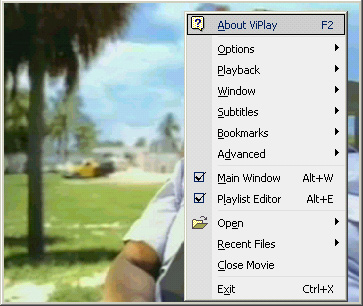
ViPlay is a movie player designed to play the most popular movie types using overlaying technology for a faster and more efficient way of video playback. Features like high performance and visual quality, stability, speed, easy interface with context menu, fully skinnable, support for 53 subtitle formats, Ini files creation, multiple audio streams, custom graph building, aspect ratio, digital zoom, OSD, playlist, etc. make it the definitive movie player available on the Internet.
Latest Reviews

seier reviewed v3.0 Beta 2 on Jan 1, 2006
This seems a lot like a copy of WinAmp that can't play MP3 files. When playing back video the background is light gray vs. black and I don't see any way to change it. That's annoying, because in dark movie scenes you want as little contrast from the background as possible, so the actual dim content will stand out. Pressing Alt+Enter does nothing, it should switch between normal and full-screen, and vice-versa. There also aren't any bookmarking features. The one thing this actually does better than Windows Media Player Classic is it supports video playlists. You can't just click play and it'll go off the current position in your playlist, you actually have to double-click on items in the list. You can't play, pause, and go into / out of full screen via your left mouse button like you can in Media Player Classic. It does have a graphic equalizer (big fat waste of time) if you're into that. I wouldn't recommend this to anyone at this time. It does look cool, but I could care less, without bookmarking and easy play/pause/fullscreen/regular views this app is in my opinion pointless. ViPlay uses 1.9MB of ram when no files are open, MPlayerC uses 7.4MB. However, they both startup in about the same time. I think that's because of the overly graphical interface used by ViPlay. Also if you think MPlayerC is more bloated, when they both have a video loaded, but stopped, ViPlay uses ~32MB of RAM and MPlayerC used 100KB more, so I'm not seeing a lot of advantages here. Also a cutesy interface like that is usually harder to work with, because it's more difficult to identify the location and boundaries of one control from the next. If you do actually like this program, I suggest using WinAMP instead. It's also free and has better usability via keyboard/mouse. VLC Media Player and everything else I've ever tried still shadows in comparison to Media Player Classic for large video playback. If you wanted to play a bunch of small video files in a folder then this might not be a bad option. Although really that light gray background has got to go.
Cheers,
Christian Blackburn

devilrider reviewed v3.0 Beta 2 on Jan 1, 2006
Nice and Open source.
The link is outdates also version. (5. December)
Version 3beta 2x
http://prdownloads.sourc...Play300_2x.zip?download
(25. December)

Brian49 reviewed v3.0 Beta 2 on Jan 1, 2006
Program freezes as soon as I try to launch it. My system is in tip-top shape.

Crono` reviewed v3.0 Beta 1 on Nov 24, 2005
guti, "codecs", or you should say directshow filters, are the way videos are meant to be played in microsoft windows, and it's the best way to do it. Simply learn how to use them, and don't install codec packs. You can only get better results than vlc if you do the right way.

guti reviewed v3.0 Beta 1 on Nov 24, 2005
Good looking player, but it requires external codecs, so it is only a wrapper.
I prefer VideoLAN instead.

anomoly reviewed v3.0 Beta 1 on Nov 23, 2005
Marvelous. Makes mplayerc look handicapped. Just have to learn the default kb layout

cees2000 reviewed v2.09 on Nov 1, 2003
just bloody excellent! ;)

CharredPC reviewed v2.09 on Oct 12, 2003
Amazing! Stupendous! I'm totally impressed. I actually changed my file type association for most media types over to this, and I never do that. Plays all newest divx files fine, default skin looks a bit like Winamp. Uses very little cpu on my lousy 1Ghz/256ram/xp pc here. All the great features you need (color/brightness is a godsend for some dark tv-rips I had) without all the nasty clutter. Simple, but does it all! Perfect for the minimalist who needs functionality.

linmingqiang reviewed v2.09 on Oct 12, 2003
crack! slow! and useless.

kgruber reviewed v2.09 on Sep 27, 2003
Excellent all in one media player (including DVDs) that Microsoft or Intervideo dream of developing. Low CPU usage, and supports DiVX subtitles! Best of all, it's free!

seier reviewed v3.0 Beta 2 on Jan 1, 2006
This seems a lot like a copy of WinAmp that can't play MP3 files. When playing back video the background is light gray vs. black and I don't see any way to change it. That's annoying, because in dark movie scenes you want as little contrast from the background as possible, so the actual dim content will stand out. Pressing Alt+Enter does nothing, it should switch between normal and full-screen, and vice-versa. There also aren't any bookmarking features. The one thing this actually does better than Windows Media Player Classic is it supports video playlists. You can't just click play and it'll go off the current position in your playlist, you actually have to double-click on items in the list. You can't play, pause, and go into / out of full screen via your left mouse button like you can in Media Player Classic. It does have a graphic equalizer (big fat waste of time) if you're into that. I wouldn't recommend this to anyone at this time. It does look cool, but I could care less, without bookmarking and easy play/pause/fullscreen/regular views this app is in my opinion pointless. ViPlay uses 1.9MB of ram when no files are open, MPlayerC uses 7.4MB. However, they both startup in about the same time. I think that's because of the overly graphical interface used by ViPlay. Also if you think MPlayerC is more bloated, when they both have a video loaded, but stopped, ViPlay uses ~32MB of RAM and MPlayerC used 100KB more, so I'm not seeing a lot of advantages here. Also a cutesy interface like that is usually harder to work with, because it's more difficult to identify the location and boundaries of one control from the next. If you do actually like this program, I suggest using WinAMP instead. It's also free and has better usability via keyboard/mouse. VLC Media Player and everything else I've ever tried still shadows in comparison to Media Player Classic for large video playback. If you wanted to play a bunch of small video files in a folder then this might not be a bad option. Although really that light gray background has got to go.
Cheers,
Christian Blackburn
devilrider reviewed v3.0 Beta 2 on Jan 1, 2006
Nice and Open source.
The link is outdates also version. (5. December)
Version 3beta 2x
http://prdownloads.sourc...Play300_2x.zip?download
(25. December)
Brian49 reviewed v3.0 Beta 2 on Jan 1, 2006
Program freezes as soon as I try to launch it. My system is in tip-top shape.
Crono` reviewed v3.0 Beta 1 on Nov 24, 2005
guti, "codecs", or you should say directshow filters, are the way videos are meant to be played in microsoft windows, and it's the best way to do it. Simply learn how to use them, and don't install codec packs. You can only get better results than vlc if you do the right way.
guti reviewed v3.0 Beta 1 on Nov 24, 2005
Good looking player, but it requires external codecs, so it is only a wrapper.
I prefer VideoLAN instead.
anomoly reviewed v3.0 Beta 1 on Nov 23, 2005
Marvelous. Makes mplayerc look handicapped. Just have to learn the default kb layout
cees2000 reviewed v2.09 on Nov 1, 2003
just bloody excellent! ;)
CharredPC reviewed v2.09 on Oct 12, 2003
Amazing! Stupendous! I'm totally impressed. I actually changed my file type association for most media types over to this, and I never do that. Plays all newest divx files fine, default skin looks a bit like Winamp. Uses very little cpu on my lousy 1Ghz/256ram/xp pc here. All the great features you need (color/brightness is a godsend for some dark tv-rips I had) without all the nasty clutter. Simple, but does it all! Perfect for the minimalist who needs functionality.
linmingqiang reviewed v2.09 on Oct 12, 2003
crack! slow! and useless.
kgruber reviewed v2.09 on Sep 27, 2003
Excellent all in one media player (including DVDs) that Microsoft or Intervideo dream of developing. Low CPU usage, and supports DiVX subtitles! Best of all, it's free!