File Details |
|
| File Size | 3.4 MB |
|---|---|
| License | Shareware, $39.00 |
| Operating System | Windows 2000/Server 2003/Server 2008/Vista/XP |
| Date Added | April 15, 2010 |
| Total Downloads | 8,885 |
| Publisher | FirmTools |
| Homepage | eBoostr |
Publisher's Description
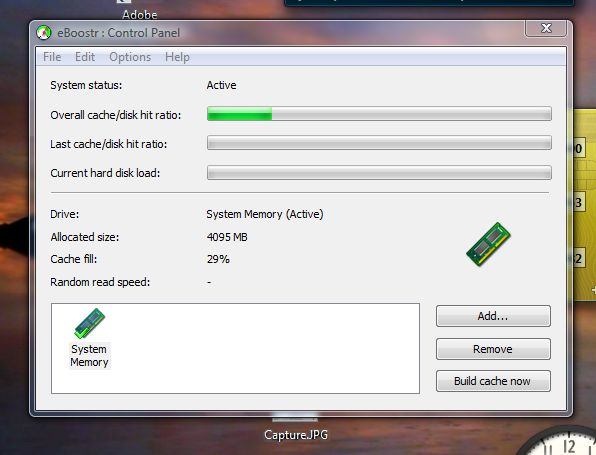
eBoostr allows you to use an additional drive (flash memory or hard disk) as another layer of performance-boosting cache for your Windows XP. Get the benefits of the ReadyBoost technology on your XP system. With the newly developed eBoostr, the booting of your OS and applications startup get much faster thanks to the smart caching mechanism.
Latest Reviews

CyberDoc999 reviewed v4.0 Build 554 on Jun 2, 2012
It is good if you have a lot of ram
I did see it slow down windows 8 however
bad for windows 8
I wish it had a lazy cache write option

anomoly reviewed v4.0 Build 554 on Sep 1, 2010
Actually, regardless of your setup OR how much ram you have, at the very least this will reduce disk usage. I'd rather burn a flash up over time than my mechanical disks. I have read that you can use 2 flash drives together in a type of raid array. I wish I had bought another. Obviously, if ALL your disks are ssd's you would never need this unless you have very little memory.

Zoroaster reviewed v4.0 Build 554 on Aug 31, 2010
Boost is the word. Whatever vector, support, application, even system boot, boosts everything. If you have plenty of RAM (4GB+), keep 1GB for eBoostr and let it handle heavy launches from its memory, if you have little RAM and a USB stick, let eBoostr handle your files and all your system will be 'lifted'. I've tried running the system without it ("I wanna be free!) but noticed immediately a far less responsive machine. I love my beloved but I like eBoostr and hot-dogs.

Nefarious reviewed v3.0 Build 457 Beta on May 13, 2009
@roj:
OK, I can waste $40 on this or spend the $40 on REAL RAM.
And I should buy this why?
THREE stars for a gimmick of dubious value.
Uh it isnt meant to work as substitute ram, it is meant to speed up things that are usually loaded from disk by reducing some of those drastically and in fact it will work better if you get more ram for it. For example my photoshop takes 23 seconds loading after a reboot, with eboostr it's reduced to 4-6 secs instead helping me doing what i want faster. If you have ram to waste use it on a bigger memory cache for eboostr it is really worth it.
I love the way eboostr 3 lets me give priority to apps and specify how much ram or space in flash drives to use unlike the windows Vista solution.

prf reviewed v3.0 Build 457 Beta on Nov 23, 2008
I have the perfect scenario for eBoostr: using Windows XP on a Thinkpad X41 that is maxed out with memory. Initial testing was impressive, with a noticeable speed improvement in start-up, loading most apps, and task switching. However, over time, the system slowed to a crawl. I tried everything -- switching USB drives, disabling write cacheing, rebuilding the swap file. Nothing worked until I uninstalled and reinstalled the program. The same thing happened three times, each over the course of about 3 to 5 days. I contacted eBoostr tech support twice and have received no response at all. I hope they appreciate my money more than I like their software.

SAV2880 reviewed v3.0 Build 457 Beta on Oct 31, 2008
Anyone expecting this program to give them an unrealistic boost in system performance is nuts. It's just not designed to do it. It's designed to give you a way to utilize more of your system resources towards speedier programs, and less equipment wear, and I think it does a good job.
I've been using this on my Aspire One. It helps performance by a small amount, maybe 10% (need a faster SD card), but it also does keep the machine a little cooler and the battery life a little higher. Nothing major, but with a machine that has two SD card slots, using one for this makes a lot of sense.
I am anxious to deck out my home desktop with 8GB of RAM and dedicate some to this program as well. Most of the time, I won't use all the RAM, so having it available to play around with for something like this might work pretty well.

roj reviewed v3.0 Build 457 Beta on Oct 31, 2008
OK, I can waste $40 on this or spend the $40 on REAL RAM.
And I should buy this why?
THREE stars for a gimmick of dubious value.

marrix reviewed v2.0 Build 410 Beta on Mar 13, 2008
Been using this on my XP notebook for about 6 months. Great app, according to Speedfan, my core temp's are 21 degrees Celsius, HD temp 28C. These figures speak for themselves. This machine
runs very cool, even when viewing AVI's, obviously it's going to reduce wear & tear on the HD.
Machine had Intel Core 2 Duo T7700 & GFX are on board Intel GMA X3100, nothing special.

Paridine reviewed v2.0 Build 410 Beta on Mar 13, 2008
Its not goign to make it faster per se.. what it does is cache small, regularly accessed files on to the thumb drive..
Since the Seek time on a Flash drive is MUCH MUCH MUCH faster than your HD.. it will access those files faster. and increasing .. over all smoothness

680424 reviewed v2.0 Build 407 Beta on Feb 21, 2008
I have blue screen after installing this software on WindowsXP SP-3 v.3264 when making cache file on second hard drive.

CyberDoc999 reviewed v4.0 Build 554 on Jun 2, 2012
It is good if you have a lot of ram
I did see it slow down windows 8 however
bad for windows 8
I wish it had a lazy cache write option
anomoly reviewed v4.0 Build 554 on Sep 1, 2010
Actually, regardless of your setup OR how much ram you have, at the very least this will reduce disk usage. I'd rather burn a flash up over time than my mechanical disks. I have read that you can use 2 flash drives together in a type of raid array. I wish I had bought another. Obviously, if ALL your disks are ssd's you would never need this unless you have very little memory.
Zoroaster reviewed v4.0 Build 554 on Aug 31, 2010
Boost is the word. Whatever vector, support, application, even system boot, boosts everything. If you have plenty of RAM (4GB+), keep 1GB for eBoostr and let it handle heavy launches from its memory, if you have little RAM and a USB stick, let eBoostr handle your files and all your system will be 'lifted'. I've tried running the system without it ("I wanna be free!) but noticed immediately a far less responsive machine. I love my beloved but I like eBoostr and hot-dogs.
Nefarious reviewed v3.0 Build 457 Beta on May 13, 2009
@roj:
OK, I can waste $40 on this or spend the $40 on REAL RAM.
And I should buy this why?
THREE stars for a gimmick of dubious value.
Uh it isnt meant to work as substitute ram, it is meant to speed up things that are usually loaded from disk by reducing some of those drastically and in fact it will work better if you get more ram for it. For example my photoshop takes 23 seconds loading after a reboot, with eboostr it's reduced to 4-6 secs instead helping me doing what i want faster. If you have ram to waste use it on a bigger memory cache for eboostr it is really worth it.
I love the way eboostr 3 lets me give priority to apps and specify how much ram or space in flash drives to use unlike the windows Vista solution.
prf reviewed v3.0 Build 457 Beta on Nov 23, 2008
I have the perfect scenario for eBoostr: using Windows XP on a Thinkpad X41 that is maxed out with memory. Initial testing was impressive, with a noticeable speed improvement in start-up, loading most apps, and task switching. However, over time, the system slowed to a crawl. I tried everything -- switching USB drives, disabling write cacheing, rebuilding the swap file. Nothing worked until I uninstalled and reinstalled the program. The same thing happened three times, each over the course of about 3 to 5 days. I contacted eBoostr tech support twice and have received no response at all. I hope they appreciate my money more than I like their software.
SAV2880 reviewed v3.0 Build 457 Beta on Oct 31, 2008
Anyone expecting this program to give them an unrealistic boost in system performance is nuts. It's just not designed to do it. It's designed to give you a way to utilize more of your system resources towards speedier programs, and less equipment wear, and I think it does a good job.
I've been using this on my Aspire One. It helps performance by a small amount, maybe 10% (need a faster SD card), but it also does keep the machine a little cooler and the battery life a little higher. Nothing major, but with a machine that has two SD card slots, using one for this makes a lot of sense.
I am anxious to deck out my home desktop with 8GB of RAM and dedicate some to this program as well. Most of the time, I won't use all the RAM, so having it available to play around with for something like this might work pretty well.
roj reviewed v3.0 Build 457 Beta on Oct 31, 2008
OK, I can waste $40 on this or spend the $40 on REAL RAM.
And I should buy this why?
THREE stars for a gimmick of dubious value.
marrix reviewed v2.0 Build 410 Beta on Mar 13, 2008
Been using this on my XP notebook for about 6 months. Great app, according to Speedfan, my core temp's are 21 degrees Celsius, HD temp 28C. These figures speak for themselves. This machine
runs very cool, even when viewing AVI's, obviously it's going to reduce wear & tear on the HD.
Machine had Intel Core 2 Duo T7700 & GFX are on board Intel GMA X3100, nothing special.
Paridine reviewed v2.0 Build 410 Beta on Mar 13, 2008
Its not goign to make it faster per se.. what it does is cache small, regularly accessed files on to the thumb drive..
Since the Seek time on a Flash drive is MUCH MUCH MUCH faster than your HD.. it will access those files faster. and increasing .. over all smoothness
680424 reviewed v2.0 Build 407 Beta on Feb 21, 2008
I have blue screen after installing this software on WindowsXP SP-3 v.3264 when making cache file on second hard drive.

asaenz reviewed v2.0 Build 407 Beta on Feb 21, 2008
I don't see how flash memory will be faster than a modern hard drive or the type of ram memory in your computer used as cache. Those trying it might experience a placebo effect ... best to try it with a comprehensive disk diagnostics tool and test before and after installation. I tried it for about 30 minutes and didn't notice any appreciable difference. I'd rather use $30 on extra memory.

holy1661 reviewed v2.0 Build 407 Beta on Feb 20, 2008
Giving it a try...
On 2 computers the version 2.0 driver crashes on install. Installing the 1.1 and then installing the 2.0 seems to work ok.

madmike reviewed v2.0 Build 407 Beta on Feb 20, 2008
Tried it, wasnt so impressed and didnt notice much - if any differance. Its about as beleivable as Bill Gates