File Details |
|
| File Size | 3.0 MB |
|---|---|
| License | Shareware, $15.90 |
| Operating System | Windows Server 2003/XP |
| Date Added | September 10, 2008 |
| Total Downloads | 2,918 |
| Publisher | mst Software |
| Homepage | mst Defrag |
Publisher's Description
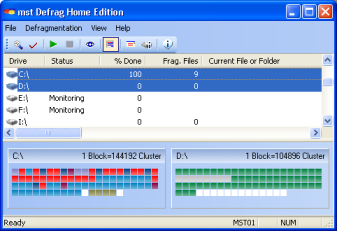
mst Defrag is a proactive defragmentation software that works completely in the background and does not interrupt or disturb the work of users. You will have the maximum performance everytime, not only just after the defragmentation. It is the only solution to eliminate performance bottlenecks and stability problems directly at their beginning.
Latest Reviews

Plumber reviewed v3.0 on Jan 20, 2011
Excellent. Love it. For me it's preferable to all the freeware defraggers, and even the commercial defraggers like PerfectDisk. Simple and effective, and reasonably priced. I use the Workstation Edition, which lets me monitor/defrag other computers on my LAN.

Undesired Username reviewed v3.0 on Dec 17, 2008
I really like O&O, but it's too buggy for me. I like the way mst Defrag works. Simple (very simple), effective, and reasonably priced.
There is a lot of room for improvement. I'd like to have more control over how background defragging is handled. And certainly better documentation.
Raxco is very fond of saying that background defraggers (of which mst Defrag is the original) put undue stress on hardware and resources. That argument doesn't make a whole lot of sense to me. I've used mst Defrag enough to know that it doesn't make the disk churn constantly; it merely defrags files as it needs to, but only when it needs to. When you do things "the Raxco way", you end up moving files around a lot, all at one time. So, all you really do is save up the same amount of "disk churning and resource usage" to occur all at once.

jywalt reviewed v2.0 Beta 2 on Apr 5, 2007
I've used Diskeeper, Perfect Disk, O&O Pro; none reduce your defrag needs to a simple and effective program like this one. The cost factor if you’re a repeat customer makes total sense. I’ve had Magical Defrag and Ultimate Defrag 1.48, and found the later below expectations. I say the hype with Diskeeper and the rest of the name brands might be worth it , but mst Defrag is one of the best defrag programs dollar for dollar that’s available, it’s a gem for $9.99.

comeoffit reviewed v1.9.30.76 on Jul 30, 2006
I couldn't help but fall in love with mst Defrag. I love it for what it is not, even more than for what it is. By this I mean that it is not yet another stupid defrag utility that shouts idiotic-sounding gimmicks at you, like "SuperArrange Technology!" or "Max-Accel Optimization!". It skips all that meaningless crap.
It also skips the part where you're required to set up defrag schedules, or come back to the computer only to find a defrag running, slowing everything down.
mst Defrag won't run when your computer is running on battery power. The I/O Guard feature works; I've tested it. mst Defrag does a good job putting Windows XP boot and startup files at the front of the disk; I've tested it. And if you configure it so (i.e. MoveModifiedFilesToEnd = 1), it correctly moves recently-modified files to the end.
Two points: mst Defrag isn't as good at consolidating free space as PerfectDisk is, and nor does it support offline defrags, like PerfectDisk does. But neither point matters much. For one thing, free space consolidation doesn't matter much when the defrag engine is running at all times. And on the second point, the few bits of NTFS metadata that can't be defragged online don't change much anyway, and defragging them doesn't help performance besides.
Very highly recommended.

Reposed reviewed v1.9.30.76 on Jan 10, 2006
This is the most outstanding defragmentation program I have used.
I've tried Diskeeper and O & O defraggers but found their automatic mode tended to cut in and over-utilised disk access and processor resources at inappropriate times i.e when downloading very large files. This seriouly affected download speeds.
I recently used Dirms and Buzzsaw and while quite effective, this free "on the fly" defragmenter still left fragments and an occasional defragmentation was still necessary.
I installed mst Defrag 10 days ago and have downloaded about 5 gigs of files, deleted about 3gigs, and installed/uninstalled a number of software. Every time I analysed my disk using Windows defrag there were no fragmented files! I'm seriously impressed. And I have not even noticed it running at all - it seems to be a very low resource user.
At $16 for the home edition, I can't see any reason for not recommending it.

precurgent reviewed v1.8.30.67 on Dec 18, 2005
The splash screen can be disabled. Set DisableSplashScreen (DWORD) to 1. This is described in the help file. Agreed that these settings really should be accessible via GUI.

Brian49 reviewed v1.8.30.67 on Dec 1, 2005
The overall score of 3.2/5 definitely undervalues this neat and imaginative program. As others have said, it works perfectly in the background, and with a tiny footprint. One point off for the absence of options in the GUI, and for the non-optional splash screen (I always dislike those).

kapro reviewed v1.8.30.67 on Nov 18, 2005
I have tried them all: O&O, Perfect Disk, Voptxp. I own and use at the moment Diskeeper 9 Home.
MST defragments in the background ( you can also defragment manualy) and does this efficiently (I test this with DK analyses) and safely, this contrary to some of the others. No window error reports. Furthermore it does not slow down my system when working in the background; it is hardly noticable doing its job. It does not conflict with Kaspersky Personal. (Diskeeper’s automatical defrag "set and forget" does not work wit KAV and when running "set and forget" in combination with other AV, DK slows down my system to a crawl).
Some people will feel MST lacks some features. I do not miss bells and whistles I never use.
Martin STiemerling has done a great job. Great product.

httpd.confused reviewed v1.8.30.67 on Nov 17, 2005
First of all, mst Defrag Home Edition is $15.90, not $29.00. The only difference between the Home Edition and the Workstation Edition is that the former lacks network support.
Regarding DIRKES comments: Can you explain what you mean by working "effectively"? I very much doubt it. I assume you are referring to the way that O&O Defrag tries to arrange files by date, name, or whatever, but that is complete nonsense anyway. Arranging files in that manner doesn't speed anything up, but it can make each defrag take much longer, since files have to be moved out of the way due to the change of order.
For example, if your files are arranged like this:
FILE01
FILE03
FILE04
FILE05
And then a new file named FILE02 is created (or an existing file is so renamed), O&O Defrag has to move all files from FILE03 onward, to insert FILE02.
[b]FILE01

DIRKES reviewed v1.8.30.67 on Oct 18, 2005
OO-Defrag works more effectively than 'mst defrag'. Support is available in German and English. The gui from 'mst defrag' does not offer sufficient attitudes, in order to work meaningfully.

Plumber reviewed v3.0 on Jan 20, 2011
Excellent. Love it. For me it's preferable to all the freeware defraggers, and even the commercial defraggers like PerfectDisk. Simple and effective, and reasonably priced. I use the Workstation Edition, which lets me monitor/defrag other computers on my LAN.
Undesired Username reviewed v3.0 on Dec 17, 2008
I really like O&O, but it's too buggy for me. I like the way mst Defrag works. Simple (very simple), effective, and reasonably priced.
There is a lot of room for improvement. I'd like to have more control over how background defragging is handled. And certainly better documentation.
Raxco is very fond of saying that background defraggers (of which mst Defrag is the original) put undue stress on hardware and resources. That argument doesn't make a whole lot of sense to me. I've used mst Defrag enough to know that it doesn't make the disk churn constantly; it merely defrags files as it needs to, but only when it needs to. When you do things "the Raxco way", you end up moving files around a lot, all at one time. So, all you really do is save up the same amount of "disk churning and resource usage" to occur all at once.
jywalt reviewed v2.0 Beta 2 on Apr 5, 2007
I've used Diskeeper, Perfect Disk, O&O Pro; none reduce your defrag needs to a simple and effective program like this one. The cost factor if you’re a repeat customer makes total sense. I’ve had Magical Defrag and Ultimate Defrag 1.48, and found the later below expectations. I say the hype with Diskeeper and the rest of the name brands might be worth it , but mst Defrag is one of the best defrag programs dollar for dollar that’s available, it’s a gem for $9.99.
comeoffit reviewed v1.9.30.76 on Jul 30, 2006
I couldn't help but fall in love with mst Defrag. I love it for what it is not, even more than for what it is. By this I mean that it is not yet another stupid defrag utility that shouts idiotic-sounding gimmicks at you, like "SuperArrange Technology!" or "Max-Accel Optimization!". It skips all that meaningless crap.
It also skips the part where you're required to set up defrag schedules, or come back to the computer only to find a defrag running, slowing everything down.
mst Defrag won't run when your computer is running on battery power. The I/O Guard feature works; I've tested it. mst Defrag does a good job putting Windows XP boot and startup files at the front of the disk; I've tested it. And if you configure it so (i.e. MoveModifiedFilesToEnd = 1), it correctly moves recently-modified files to the end.
Two points: mst Defrag isn't as good at consolidating free space as PerfectDisk is, and nor does it support offline defrags, like PerfectDisk does. But neither point matters much. For one thing, free space consolidation doesn't matter much when the defrag engine is running at all times. And on the second point, the few bits of NTFS metadata that can't be defragged online don't change much anyway, and defragging them doesn't help performance besides.
Very highly recommended.
Reposed reviewed v1.9.30.76 on Jan 10, 2006
This is the most outstanding defragmentation program I have used.
I've tried Diskeeper and O & O defraggers but found their automatic mode tended to cut in and over-utilised disk access and processor resources at inappropriate times i.e when downloading very large files. This seriouly affected download speeds.
I recently used Dirms and Buzzsaw and while quite effective, this free "on the fly" defragmenter still left fragments and an occasional defragmentation was still necessary.
I installed mst Defrag 10 days ago and have downloaded about 5 gigs of files, deleted about 3gigs, and installed/uninstalled a number of software. Every time I analysed my disk using Windows defrag there were no fragmented files! I'm seriously impressed. And I have not even noticed it running at all - it seems to be a very low resource user.
At $16 for the home edition, I can't see any reason for not recommending it.
precurgent reviewed v1.8.30.67 on Dec 18, 2005
The splash screen can be disabled. Set DisableSplashScreen (DWORD) to 1. This is described in the help file. Agreed that these settings really should be accessible via GUI.
Brian49 reviewed v1.8.30.67 on Dec 1, 2005
The overall score of 3.2/5 definitely undervalues this neat and imaginative program. As others have said, it works perfectly in the background, and with a tiny footprint. One point off for the absence of options in the GUI, and for the non-optional splash screen (I always dislike those).
kapro reviewed v1.8.30.67 on Nov 18, 2005
I have tried them all: O&O, Perfect Disk, Voptxp. I own and use at the moment Diskeeper 9 Home.
MST defragments in the background ( you can also defragment manualy) and does this efficiently (I test this with DK analyses) and safely, this contrary to some of the others. No window error reports. Furthermore it does not slow down my system when working in the background; it is hardly noticable doing its job. It does not conflict with Kaspersky Personal. (Diskeeper’s automatical defrag "set and forget" does not work wit KAV and when running "set and forget" in combination with other AV, DK slows down my system to a crawl).
Some people will feel MST lacks some features. I do not miss bells and whistles I never use.
Martin STiemerling has done a great job. Great product.
httpd.confused reviewed v1.8.30.67 on Nov 17, 2005
First of all, mst Defrag Home Edition is $15.90, not $29.00. The only difference between the Home Edition and the Workstation Edition is that the former lacks network support.
Regarding DIRKES comments: Can you explain what you mean by working "effectively"? I very much doubt it. I assume you are referring to the way that O&O Defrag tries to arrange files by date, name, or whatever, but that is complete nonsense anyway. Arranging files in that manner doesn't speed anything up, but it can make each defrag take much longer, since files have to be moved out of the way due to the change of order.
For example, if your files are arranged like this:
FILE01
FILE03
FILE04
FILE05
And then a new file named FILE02 is created (or an existing file is so renamed), O&O Defrag has to move all files from FILE03 onward, to insert FILE02.
[b]FILE01
DIRKES reviewed v1.8.30.67 on Oct 18, 2005
OO-Defrag works more effectively than 'mst defrag'. Support is available in German and English. The gui from 'mst defrag' does not offer sufficient attitudes, in order to work meaningfully.
httpd.confused reviewed v1.8.27.58 Beta 1 on Jul 2, 2005
Jeremy, I'd expect you to know that mst Defrag uses the NT defrag APIs, and is therefore as safe as any other defragger that does. The thing to be nervous about is offline defrags, and as I write this, that's one feature not yet implemented here.
Guti, comparing mst Defrag with PageDefrag makes no sense. PageDefrag does an offline defrag of registry hives, paging file(s), and event logs. That's it.
I rate mst Defrag with a 4 here because they still haven't put a GUI on the damned options, instead forcing the user to edit the registry for every little thing. That's just retarded.

jcollake reviewed v1.8.27.58 Beta 1 on Jun 27, 2005
Decent idea, to defragment in the background as files become fragmented. Poorly implemented. Defragmentation software should be something you place considerable trust in.. and I just don't trust this software in its current state. Hopefully it will get better with time.

guti reviewed v1.8.27.58 Beta 1 on Jun 26, 2005
Pagedefrag from Sysinternals is free.