File Details |
|
| File Size | 18.3 MB |
|---|---|
| License | Freeware |
| Operating System | Windows 2000/Server 2003/Vista/XP |
| Date Added | May 24, 2012 |
| Total Downloads | 29,654 |
| Publisher | Luis Cobian |
| Homepage | Cobian Backup |
Publisher's Description
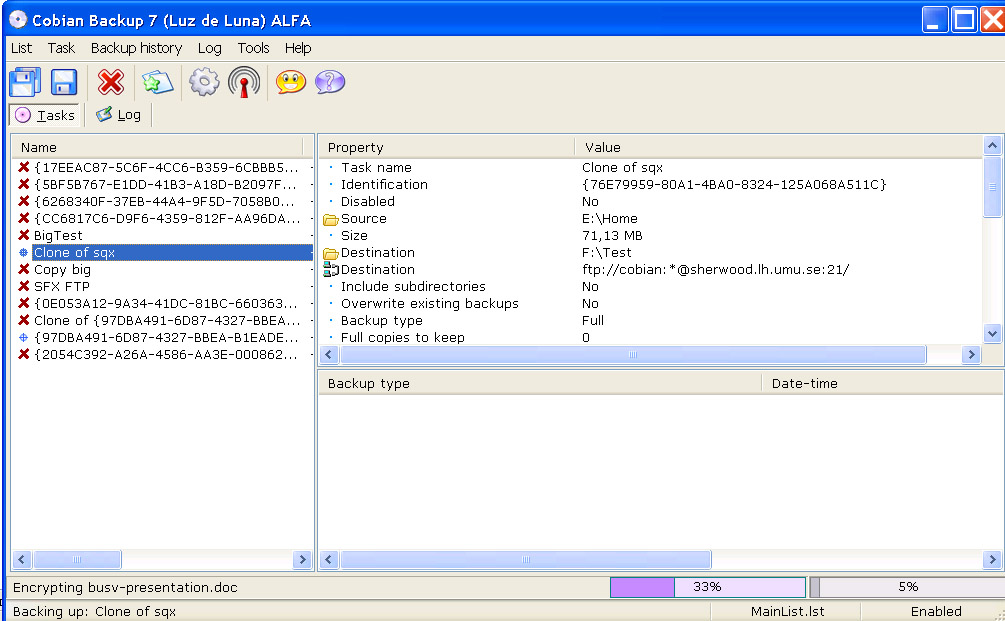
Cobian Backup is a multi-threaded program you can use to backup your files and directories from their original location to other directories/drives in the same computer or other computer in your network.
Latest Reviews

Uriel reviewed v11.2.0.563 on May 24, 2012
It is good for scheduling automatic backups for files and folders so that you don't have to be bothered. The only major drawback that I have is that it can't create a system image backup of a complete partition.

junkcatcher reviewed v10.0.3.743 on Apr 8, 2011
I have used Cobian Backup since the early versions and it has saved my bacon on more than a few occaisions. Week in week out Cobian Backup performs unattended scheduled backups via FTP to a pair of cheap as chips LANS Disks without any hassle.
Only real niggle is I much preffered the look of interface on the early versions.

nbas reviewed v10.0.3.743 on Jan 4, 2011
I'm not sure why so many people are comparing it to file synchronization programs. I guess people are thinking of rsync, robocopy, carbonite and friends. This is for backups, not synchronization. Sure, you could consider them to be one and the same - but I disagree. What if one of your documents gets corrupted, and you don't notice for a couple of weeks? It'd be unlikely that you'd be able to recover the uncorrupted version of the file.
Cobian lets you keep an arbitrary number of copies with differentials as well as multiple locations for backups. Scheduling is quite useful, too - as well as the encryption and compression functions.
I've found it useful for small companies -
set up a fileserver (Windows or unix/linux)
install cobian on all the desktops
set it to back up each user to the fileserver
back up the fileserver

starrouter reviewed v10.0.3.743 on Oct 28, 2010
For a no cost product, this is a rare find. It's full of robust features that you would find only on premium backup software. Scheduling, compression options, encryption, volume shadow copy, client / server options, and a host of other user definable options. I am currently using it in our workplace with a server / client configuration on our network to backup a host of remote user profiles. The product and the excellent support forum are cost free and are dependent on donations from the community so if you like it and use it, let your wallet be your guide and donate generously.

Aegis69 reviewed v10.0.3.743 on Apr 29, 2010
This is the only free backup solution I know of that supports shadow copy on XP, which means it can run 100% in the background and backup running applications like Outlook, Thunderbird and Firefox without getting a 'file in use' error.

asaenz reviewed v10.0.0.699 Beta on Apr 19, 2010
I'm not a fan of programs that require .NET and the newer version requires 3.5. Seems like more overhead and additional complexity that I just don't want to add to my system that I try to keep as lean as I can while maintaining good overall usefulness. I'll continue to use the previous version until I run into something better.

mfarmilo reviewed v10.0.0.547 on Mar 24, 2010
An excellent program, very well supported and does things not many other Backup programs do.

zackattack reviewed v10.0.0.430 Beta on Mar 17, 2010
I have used one of the earlier version, not this specific one, and it was OK. Not a marvel of engineering, a bit heavy as far as the program size goes, but it does what it is claimed to be doing.

anomoly reviewed v10.0.0.394 Beta on Mar 1, 2010
If it works good, keep it. I didn't care for the mirror action myself.
DirSyncPro is now updated on sourceforge and claims to do everything cobian does EXCEPT it is in java so is completely crossplatform compatible in operation and 100% portable to boot.
Haven't tried it yet but gui looks perfect.
http://directorysync.sourceforge.net/

sweathog reviewed v10.0.0.380 Beta on Feb 26, 2010
This program, as well as synkron mentioned below--both of which I've tried and quickly uninstalled--pale in comparison to CopyTo Synchronizer: http://www.kish-d.com. The latter program costs $15 but is worth every penny. It is fast, has an easy to use GUI, scheduled backups, previews, etc. and if you put a short cut in the sendto menu you can simply right click on any Windows folder and chose what you want to sync it to, back it up to or copy it to. Although the last update was 2007 this program was, and remains, years ahead of the competition.

Uriel reviewed v11.2.0.563 on May 24, 2012
It is good for scheduling automatic backups for files and folders so that you don't have to be bothered. The only major drawback that I have is that it can't create a system image backup of a complete partition.
junkcatcher reviewed v10.0.3.743 on Apr 8, 2011
I have used Cobian Backup since the early versions and it has saved my bacon on more than a few occaisions. Week in week out Cobian Backup performs unattended scheduled backups via FTP to a pair of cheap as chips LANS Disks without any hassle.
Only real niggle is I much preffered the look of interface on the early versions.
nbas reviewed v10.0.3.743 on Jan 4, 2011
I'm not sure why so many people are comparing it to file synchronization programs. I guess people are thinking of rsync, robocopy, carbonite and friends. This is for backups, not synchronization. Sure, you could consider them to be one and the same - but I disagree. What if one of your documents gets corrupted, and you don't notice for a couple of weeks? It'd be unlikely that you'd be able to recover the uncorrupted version of the file.
Cobian lets you keep an arbitrary number of copies with differentials as well as multiple locations for backups. Scheduling is quite useful, too - as well as the encryption and compression functions.
I've found it useful for small companies -
set up a fileserver (Windows or unix/linux)
install cobian on all the desktops
set it to back up each user to the fileserver
back up the fileserver
starrouter reviewed v10.0.3.743 on Oct 28, 2010
For a no cost product, this is a rare find. It's full of robust features that you would find only on premium backup software. Scheduling, compression options, encryption, volume shadow copy, client / server options, and a host of other user definable options. I am currently using it in our workplace with a server / client configuration on our network to backup a host of remote user profiles. The product and the excellent support forum are cost free and are dependent on donations from the community so if you like it and use it, let your wallet be your guide and donate generously.
Aegis69 reviewed v10.0.3.743 on Apr 29, 2010
This is the only free backup solution I know of that supports shadow copy on XP, which means it can run 100% in the background and backup running applications like Outlook, Thunderbird and Firefox without getting a 'file in use' error.
asaenz reviewed v10.0.0.699 Beta on Apr 19, 2010
I'm not a fan of programs that require .NET and the newer version requires 3.5. Seems like more overhead and additional complexity that I just don't want to add to my system that I try to keep as lean as I can while maintaining good overall usefulness. I'll continue to use the previous version until I run into something better.
mfarmilo reviewed v10.0.0.547 on Mar 24, 2010
An excellent program, very well supported and does things not many other Backup programs do.
zackattack reviewed v10.0.0.430 Beta on Mar 17, 2010
I have used one of the earlier version, not this specific one, and it was OK. Not a marvel of engineering, a bit heavy as far as the program size goes, but it does what it is claimed to be doing.
anomoly reviewed v10.0.0.394 Beta on Mar 1, 2010
If it works good, keep it. I didn't care for the mirror action myself.
DirSyncPro is now updated on sourceforge and claims to do everything cobian does EXCEPT it is in java so is completely crossplatform compatible in operation and 100% portable to boot.
Haven't tried it yet but gui looks perfect.
http://directorysync.sourceforge.net/
sweathog reviewed v10.0.0.380 Beta on Feb 26, 2010
This program, as well as synkron mentioned below--both of which I've tried and quickly uninstalled--pale in comparison to CopyTo Synchronizer: http://www.kish-d.com. The latter program costs $15 but is worth every penny. It is fast, has an easy to use GUI, scheduled backups, previews, etc. and if you put a short cut in the sendto menu you can simply right click on any Windows folder and chose what you want to sync it to, back it up to or copy it to. Although the last update was 2007 this program was, and remains, years ahead of the competition.
anomoly reviewed v10.0.0.249 Beta on Feb 10, 2010
For whatever reason when mirroring instead of comparing for differences it simply copies everything, which can take entirely too much time. I guess I'll have to stick with synkron which is also portable but does not have ftp capabilities and is sooo much faster

bobad reviewed v10.0.0.236 Beta on Feb 7, 2010
Excellent! If you need a powerful, flexible, reliable backup program that's easy to use, this is it. I use it to back up my library of pictures, documents, and music. If I would lose family pictures, my wife would kill me. That's why I need a very reliable program. It just sits there in the tray and does its thing with no user input. It has saved my bacon on 2 or 3 occasions, and will again in the future.
Believe me, it does many things a simple copy and paste won't do. That was just an ignorant remark.

some guy reviewed v10.0.0.236 Beta on Feb 5, 2010
nothing useful here that a simple copy and paste can't do lol