
File Details |
|
| File Size | 6.0 MB |
|---|---|
| License | Freeware |
| Operating System | Windows (All) |
| Date Added | May 22, 2018 |
| Total Downloads | 43,773 |
| Publisher | Piriform Software Ltd. |
| Homepage | Defraggler |
Publisher's Description
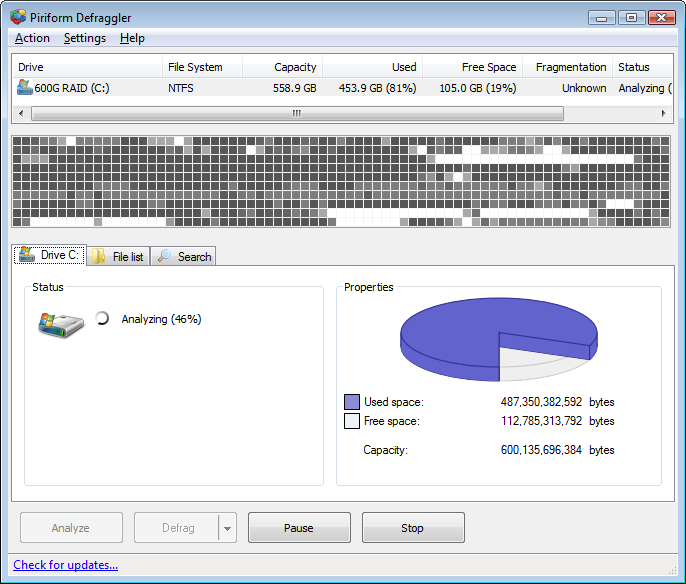
Defraggler is a free file defragmentation tool from the makers of CCleaner and Recuva. It differs from other defrag tools on the market, by enabling you to quickly and simply defrag the files you want to, without having to process the whole drive. Simply run it, select the file and defragment in seconds. No more struggling with the Windows defragmentation tool.
Latest Reviews

ecvogel reviewed v2.19.982 on Mar 12, 2015
I really liked this program. But I am so tired of waiting for it. I decided to go back to Aulogic's Defrag. I was able to turn the priority from normal to high and it is done in under a hour compared to 24 hours.... Both at the slowest, best defrag option.

cltx99 reviewed v2.18.945 on Apr 16, 2014
I'll happily stay with ultra defrag. I'm sure defraggler does a good job, but I'm not getting any younger and i can't wait until my next birthday for it to defrag drive:c And, I dpon't want to waste time picking and choosing files to defrag. Bottom line is that it's remarkably slow. Even "quick defrag" is remarkably not quick. Now, back to Ultra.

gatorfan95 reviewed v2.14.706 on Apr 23, 2013
As with CCleaner by Piriform, you cant miss with this utility.

FatBastard reviewed v2.14.705 on Apr 18, 2013
This is great freeware!
gatorfan95 reviewed v2.12.628 on Dec 12, 2012
A very nice free tool. I have pretty much switched to UltraDefrag for disk "optimization" as it is much faster. Still I would recommend this highly.

some guy reviewed v2.10.424 on Jun 12, 2012
great stuiff

Aegis69 reviewed v2.10.424 on Jun 12, 2012
This is actually good tool, but for me I still prefer ultradefrag.
gatorfan95 reviewed v2.10.413 on May 25, 2012
Used this for a long time. Like all piriform products, it does an excellent job. This version, as advertised, has a fairly significant speed boost. I recommend it highly

Music4Ever reviewed v2.10.413 on May 25, 2012
Good free software ~
Puran also is free & does a good job & has boot defrag ~

Zoroaster reviewed v2.09.391 on Jan 23, 2012
Works fine up to now, even if lacks defrag on boot. I was searching for a free alternative to PerfectDisk (never managed to receive v. 12.5 updated license keys I was entitled to), and I think this is a jackpot in its category. Just defraged system disk, seems to have done a nice job.

ecvogel reviewed v2.19.982 on Mar 12, 2015
I really liked this program. But I am so tired of waiting for it. I decided to go back to Aulogic's Defrag. I was able to turn the priority from normal to high and it is done in under a hour compared to 24 hours.... Both at the slowest, best defrag option.
cltx99 reviewed v2.18.945 on Apr 16, 2014
I'll happily stay with ultra defrag. I'm sure defraggler does a good job, but I'm not getting any younger and i can't wait until my next birthday for it to defrag drive:c And, I dpon't want to waste time picking and choosing files to defrag. Bottom line is that it's remarkably slow. Even "quick defrag" is remarkably not quick. Now, back to Ultra.
gatorfan95 reviewed v2.14.706 on Apr 23, 2013
As with CCleaner by Piriform, you cant miss with this utility.
FatBastard reviewed v2.14.705 on Apr 18, 2013
This is great freeware!
gatorfan95 reviewed v2.12.628 on Dec 12, 2012
A very nice free tool. I have pretty much switched to UltraDefrag for disk "optimization" as it is much faster. Still I would recommend this highly.
some guy reviewed v2.10.424 on Jun 12, 2012
great stuiff
Aegis69 reviewed v2.10.424 on Jun 12, 2012
This is actually good tool, but for me I still prefer ultradefrag.
gatorfan95 reviewed v2.10.413 on May 25, 2012
Used this for a long time. Like all piriform products, it does an excellent job. This version, as advertised, has a fairly significant speed boost. I recommend it highly
Music4Ever reviewed v2.10.413 on May 25, 2012
Good free software ~
Puran also is free & does a good job & has boot defrag ~
Zoroaster reviewed v2.09.391 on Jan 23, 2012
Works fine up to now, even if lacks defrag on boot. I was searching for a free alternative to PerfectDisk (never managed to receive v. 12.5 updated license keys I was entitled to), and I think this is a jackpot in its category. Just defraged system disk, seems to have done a nice job.

Knife70 reviewed v2.08.373 on Nov 28, 2011
I am a MyDefrag acolyte, but I found it quite effective.
Comparing to MyDefrag, this program shines into handling file with some access restrictions (user access rights).
If you don't like the installer (i always saw confirmation to install Chrome), you can always get the portable version.

trapspamhoneypot reviewed v2.08.373 on Nov 14, 2011
Defraggler/Periform has taken a turn that is not acceptable to this user.
In past updates and installs you were given the opportunity to opt-out either in advance setting mode or after the initial install of Defraggler to install or not install Goggle Chrome.
Changed in this version is an additional automatic download in the background of chrome and no chance to say no to this unwanted browser install.
Not only is this unwanted but unacceptable by Piriform to shove this down any users throat and computer pipeline.
I am uninstalling all Piriform products and will not recommend to any of my colleagues, fellow bloggers, and social network friends of many years.
My rating is a one.

dhry reviewed v2.06.328 on Jul 27, 2011
Wow. They've got boot-time defrag in this now. I'm impressed - how many versions did that take to appear? Anyway, Defraggler's free, but there's at least three other programs better than it out there - MyDefrag, Puran, Auslogics. Go with Puran if you want a GUI, MyDefrag if you want everything, and Auslogics if you want something more or less the same as Defraggler, but faster. And PerfectDisk if you want something reliable you can set and forget on your biz servers. We ran PD on our intranet server at work for years without a problem.