File Details |
|
| File Size | 0.4 MB |
|---|---|
| License | Freeware |
| Operating System | Windows (All) |
| Date Added | December 16, 2013 |
| Total Downloads | 686,232 |
| Publisher | viksoe.dk |
| Homepage | GMail Drive |
Publisher's Description
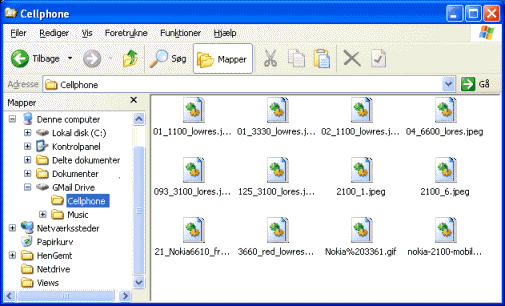
GMail Drive creates a virtual filesystem on top of your Google GMail account and enables you to save and retrieve files stored on your GMail account directly from inside Windows Explorer. GMail Drive literally adds a new drive to your computer under the My Computer folder, where you can create new folders, copy and drag'n'drop files to.
Latest Reviews

Steve1209 reviewed v1.0.18 on Oct 27, 2011
I have to wonder if disabling your GMail account for the sake of 7GB of free storage is worth it? You can buy an 8GB USB thumb drive for less than $15 and *IF* you really need space a 1TB external USB drive can be gotten for $75 (or LESS on sale), that's about 140 times more space than GMail drive, the idea seems good but is it worth it to possibly Lose access to your GMail account, Personally, I think not!

davidtb reviewed v1.0.18 on Oct 27, 2011
To be clear, this doesn't make it a bad thing..but it's not Google: From Wikipedia,
Caveats
GMail Drive is an experimental package that depends on but is not provided by Google. Changes in Google's Gmail system may render GMail Drive temporarily or permanently inoperable.
The current GMail Drive does not support accounts that are with Google Apps. The Gmail Program Policies do not explicitly ban GMail Drive, shell namespace extensions, or the use of Gmail storage space for files other than e-mail.[2] Nonetheless, immoderate use of GMail Drive may trigger Google to temporarily suspend a Gmail account.[3]

WebWarp reviewed v1.0.18 on Oct 27, 2011
It has been around for many years, so relax, and enjoy it.

donmor46 reviewed v1.0.18 on Oct 26, 2011
What a bunch of crap that I have to sign up before I can download.
Crap, crap, crap

theallen reviewed v1.0.17 on Aug 26, 2011
If google's being able to block this tool and even block my gmail account it would be a tragedy for me. I had a lot of important emails and contacts in it. Really worried.

austin00 reviewed v1.0.17 on Aug 26, 2011
A great program, but I do wonder it is legal or not. Using this app violates google terms of use.

Jtaylor83 reviewed v1.0.16 on May 31, 2010
Gmail Drive is just a virtual drive that is connected to your GMail. However you will need to open a Google Account in order to use this software.
Seriously, spambots are spamming betanews (including fileforum) annoys me. Don't click on the spam comment links because they may have malware.
Betanews, please put a CAPTCHA and a "report spam" feature so that we can get rid of these annoying spambots.

SteveJohnSteele reviewed v1.0.16 on May 30, 2010
When this first came out people were looking at Google's 'unlimited storage' for emails and thinking 'I'll have some of that !!!' - they were looking for ways to store anything in their email box..
I can not see the point of this now.
Why store documents in a Google email account when you can store documents, pictures, music etc in Google Docs which can be accessed via a variety of tools.
My favorite is http://www.gladinet.com which puts Google Docs, Microsoft SkyDrive, Box.net (and others) right in 'My Computer'

tannenwheel reviewed v1.0.16 on May 29, 2010
i read a lot about google being able to block this tool anytime,
but what really happens, is that they block your whole gmail account.
that is, if you upload or download too much data in a short period of time. so forgett about uploading your mp3 collection (as the screenshot seems to recommend)
fortunately they blocked my account for only one day. my google acount is too important to me, to play with it.

zuiderling123 reviewed v1.0.15 on Jan 30, 2010
hoi

Steve1209 reviewed v1.0.18 on Oct 27, 2011
I have to wonder if disabling your GMail account for the sake of 7GB of free storage is worth it? You can buy an 8GB USB thumb drive for less than $15 and *IF* you really need space a 1TB external USB drive can be gotten for $75 (or LESS on sale), that's about 140 times more space than GMail drive, the idea seems good but is it worth it to possibly Lose access to your GMail account, Personally, I think not!
davidtb reviewed v1.0.18 on Oct 27, 2011
To be clear, this doesn't make it a bad thing..but it's not Google: From Wikipedia,
Caveats
GMail Drive is an experimental package that depends on but is not provided by Google. Changes in Google's Gmail system may render GMail Drive temporarily or permanently inoperable.
The current GMail Drive does not support accounts that are with Google Apps. The Gmail Program Policies do not explicitly ban GMail Drive, shell namespace extensions, or the use of Gmail storage space for files other than e-mail.[2] Nonetheless, immoderate use of GMail Drive may trigger Google to temporarily suspend a Gmail account.[3]
WebWarp reviewed v1.0.18 on Oct 27, 2011
It has been around for many years, so relax, and enjoy it.
donmor46 reviewed v1.0.18 on Oct 26, 2011
What a bunch of crap that I have to sign up before I can download.
Crap, crap, crap
theallen reviewed v1.0.17 on Aug 26, 2011
If google's being able to block this tool and even block my gmail account it would be a tragedy for me. I had a lot of important emails and contacts in it. Really worried.
austin00 reviewed v1.0.17 on Aug 26, 2011
A great program, but I do wonder it is legal or not. Using this app violates google terms of use.
Jtaylor83 reviewed v1.0.16 on May 31, 2010
Gmail Drive is just a virtual drive that is connected to your GMail. However you will need to open a Google Account in order to use this software.
Seriously, spambots are spamming betanews (including fileforum) annoys me. Don't click on the spam comment links because they may have malware.
Betanews, please put a CAPTCHA and a "report spam" feature so that we can get rid of these annoying spambots.
SteveJohnSteele reviewed v1.0.16 on May 30, 2010
When this first came out people were looking at Google's 'unlimited storage' for emails and thinking 'I'll have some of that !!!' - they were looking for ways to store anything in their email box..
I can not see the point of this now.
Why store documents in a Google email account when you can store documents, pictures, music etc in Google Docs which can be accessed via a variety of tools.
My favorite is http://www.gladinet.com which puts Google Docs, Microsoft SkyDrive, Box.net (and others) right in 'My Computer'
tannenwheel reviewed v1.0.16 on May 29, 2010
i read a lot about google being able to block this tool anytime,
but what really happens, is that they block your whole gmail account.
that is, if you upload or download too much data in a short period of time. so forgett about uploading your mp3 collection (as the screenshot seems to recommend)
fortunately they blocked my account for only one day. my google acount is too important to me, to play with it.
zuiderling123 reviewed v1.0.15 on Jan 30, 2010
hoi

andrewtheart reviewed v1.0.15 on Dec 19, 2009
Can confirm that this does not seem to work on Vista 64 bit

djonet reviewed v1.0.15 on Dec 7, 2009
good

nilst2006 reviewed v1.0.15 on Nov 4, 2009
Google - no thanks ! Pure spying on users !