File Details |
|
| File Size | 11.4 MB |
|---|---|
| License | Freeware |
| Operating System | Windows 7/Vista/XP |
| Date Added | December 1, 2016 |
| Total Downloads | 148,963 |
| Publisher | Microsoft Corp. |
| Homepage | Microsoft Security Essentials |
Publisher's Description
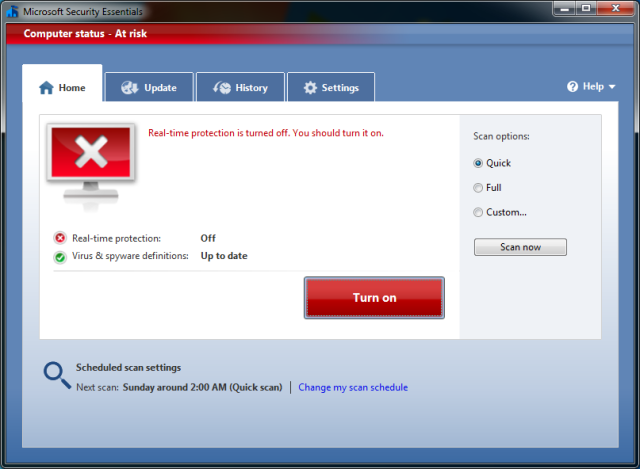
Microsoft Security Essentials provides real-time protection for your home PC that guards against viruses, spyware, and other malicious software. It is a free download from Microsoft that is simple to install, easy to use, and always kept up to date so you can be assured your PC is protected by the latest technology. It’s easy to tell if your PC is secure — when you’re green, you’re good. It’s that simple.
Microsoft Security Essentials runs quietly and efficiently in the background so that you are free to use your Windows-based PC the way you want—without interruptions or long computer wait times.
Latest Reviews

Aegis69 reviewed v4.8.0201.0 Pre-Release on Mar 19, 2015
Lol all the windows 8 machines have this built in now and that Still come into the shop every day with tonnes of viruses on them. The people who hack windows are so far ahead of microsoft that it makes them look like a joke. MS should consider making a new OS based on unix/linux to get their security problems under control once and for all. Apple is a group of complete ret&rds and yet they were smart enough to figure this out over a decade ago. Google decided to build a new OS from scratch and guess what kernel they used, oh ya Linux. Wake the hell up Microsoft you morons.

RogerC reviewed v4.7.0202.0 Pre-Release on Jan 9, 2015
Please note this application does NOT run under Windows XP.

Sven123456789 reviewed v4.7.0202.0 Pre-Release on Dec 15, 2014
Maybe I'm losing my memory these days. But I thought I read earlier this year they were discontinuing this.

Blaxima reviewed v4.6.305.0 on Nov 17, 2014
Poor detection and removal. Slows your computer down far too much as it scans every program you open

AL-Matary reviewed v4.6.305.0 on Sep 21, 2014

nilst2006 reviewed v4.6.0302.0 Pre-Release on Aug 23, 2014
Poor detection of malware/viruses/trojans !

ShahinD reviewed v4.6.0205.0 Pre-Release on Jul 8, 2014
Very Good Antimalware, Light and effective

Zootopia3001 reviewed v4.4.0304.0 on Nov 11, 2013
May be good at guarding the PC,(while slowing it down), but not so good at removing infections, especially the rootkits involved. If you're going to slow your PC down with realtime security software, get something that can also remove what it is guarding against.
Aegis69 reviewed v4.4.207.0 Pre-Release on Sep 10, 2013
This would be great if I still used windows... I don't. Know windows, no security.
Zootopia3001 reviewed v4.2.223.1 on Feb 27, 2013
Have tried this I don't know how many times. Same result: VERY heavy on the PC with its background service running. Besides, realtime A/V software is really only for the internet clueless. I've learned to live without traditional system realtime A/V(spyware and malware) software protection and am doing just fine thank you, and the PC rewards me in return with the utmost speed.
BTW, this software keeps dragging down your system even when you turn off its realtime protection because of its constantly running background service.

Aegis69 reviewed v4.8.0201.0 Pre-Release on Mar 19, 2015
Lol all the windows 8 machines have this built in now and that Still come into the shop every day with tonnes of viruses on them. The people who hack windows are so far ahead of microsoft that it makes them look like a joke. MS should consider making a new OS based on unix/linux to get their security problems under control once and for all. Apple is a group of complete ret&rds and yet they were smart enough to figure this out over a decade ago. Google decided to build a new OS from scratch and guess what kernel they used, oh ya Linux. Wake the hell up Microsoft you morons.
RogerC reviewed v4.7.0202.0 Pre-Release on Jan 9, 2015
Please note this application does NOT run under Windows XP.
Sven123456789 reviewed v4.7.0202.0 Pre-Release on Dec 15, 2014
Maybe I'm losing my memory these days. But I thought I read earlier this year they were discontinuing this.
Blaxima reviewed v4.6.305.0 on Nov 17, 2014
Poor detection and removal. Slows your computer down far too much as it scans every program you open
AL-Matary reviewed v4.6.305.0 on Sep 21, 2014
nilst2006 reviewed v4.6.0302.0 Pre-Release on Aug 23, 2014
Poor detection of malware/viruses/trojans !
ShahinD reviewed v4.6.0205.0 Pre-Release on Jul 8, 2014
Very Good Antimalware, Light and effective
Zootopia3001 reviewed v4.4.0304.0 on Nov 11, 2013
May be good at guarding the PC,(while slowing it down), but not so good at removing infections, especially the rootkits involved. If you're going to slow your PC down with realtime security software, get something that can also remove what it is guarding against.
Aegis69 reviewed v4.4.207.0 Pre-Release on Sep 10, 2013
This would be great if I still used windows... I don't. Know windows, no security.
Zootopia3001 reviewed v4.2.223.1 on Feb 27, 2013
Have tried this I don't know how many times. Same result: VERY heavy on the PC with its background service running. Besides, realtime A/V software is really only for the internet clueless. I've learned to live without traditional system realtime A/V(spyware and malware) software protection and am doing just fine thank you, and the PC rewards me in return with the utmost speed.
BTW, this software keeps dragging down your system even when you turn off its realtime protection because of its constantly running background service.

some guy reviewed v4.139.1036.0 on Oct 31, 2012
score very low in independent test
AV-Comparatives.org

NightFright reviewed v4.139.1036.0 on Oct 31, 2012
This download description is not properly labelled. This is only a definition update for MSE, not a new version of MSE itself (latest is currently 4.1, so 1.x would be quite a step backwards...). Rating is for the scanner itself still, which is a very decent product. There may be better ones out there, but it does the job for those who are happy with an easy-to-use AV that does not require much attention.
Aegis69 reviewed v4.139.1036.0 on Oct 31, 2012
Microsoft obviously bought a product that was doing virus protection right, then branded it. The problem is that this app is very system heavy and memory intensive.
I recommend clamwin + clam sentinel. Light, free, real time open source virus protection.