
File Details |
|
| File Size | 9.6 MB |
|---|---|
| License | Freeware |
| Operating System | Windows 7/8/10/2000/Vista/XP |
| Date Added | May 11, 2024 |
| Total Downloads | 59,112 |
| Publisher | Giorgio Tani |
| Homepage | PeaZip |
Publisher's Description
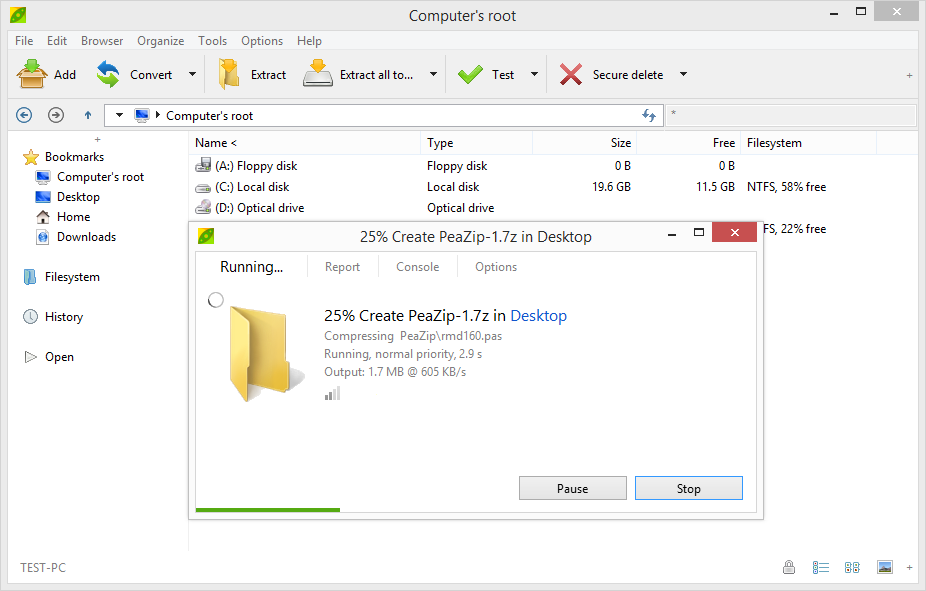
PeaZip is a free, open source, cross platform, portable archiving and compression utility, with encryption and volume split features. It has full for support: 7Z, 7Z-sfx, ARC/WRC, BZ2/TBZ2, GZ/TGZ, PAQ/LPAQ, PEA, QUAD/BALZ, split, TAR, UPX, ZIP. You can open, browse, extract, test: ACE, ARJ, CAB, CHM, COMPOUND (MSI, DOC, XLS, PPT), CPIO, ISO, Java (JAR, EAR, WAR), Linux (DEB, PET/PUP, RPM, SLP), LHA/LZH, NSIS, OOo, PAK/PK3/PK4, RAR, WIM, XPI, Z/TZ, ZIPX files. Other features include split/join files, wipe files (secure deletion), byte to byte compare files, checksum/hash files, system benchmark, bookmark files and folders.
Latest Reviews

AnneF reviewed v8.7.0 on Jul 15, 2022
Peazip offers to let you set a default destination (the documentation SAYS the default destination is the same folder), but will only allow you to TYPE IN a FULL path - it does NOT offer an option for the default path to be in the Original, or same, folder (even when you are using the context menu in that folder). And, if you try to check Original folder as the destination, Peazip insists on ALSO checking (in grey, so you cannot uncheck it) the box that causes EACH target file to create a separate zip file, instead of a combined, single file. For me, that removes the primary use I would make of the program.I'm certain this is not intentional because the online documentation (quoted below) from Peazip specifically says that is DOES perform the function I require:
"By default, the output path of the archive will be the SAME AS THAT OF THE SOURCE OBJECT(S)."

borisf98 reviewed v7.7.0 on Jan 8, 2021
There are some bugs, bu if you need simple, basic, free zip utility that has nice interface it is possible the only option

jerry4dos reviewed v5.9.1 on Jan 12, 2016
Works perfectly with an easy-to-use interface.

umi81 reviewed v5.4.1 on Oct 14, 2014
Good software: lots of useful features, stable and nice GUI. I used portable and installable versions without experiencing any kind of troubles.

nilst2006 reviewed v5.4.1 on Aug 23, 2014
Spread OpenCandy ! Avoid !

B__B reviewed v4.9.2 on Jun 7, 2013
Last version seems more responsive than older ones I used, maybe it is faster because it is compiled for 64 bit Windows, feature set is complete, and it is free.

minklein reviewed v4.8.1 on Feb 4, 2013
Gave it a 1 because it wants to install the candy garbage for windows.

Music4Ever reviewed v4.7 on Aug 15, 2012
Great program & does all you want, maybe bettered by WinRar but for free it's the best. (Beware of the AVG tool-bar on install)
chicgoods541 is a spammer from China flogging nasty fake items & should be banned ~

Landsnes reviewed v4.6 on Jul 11, 2012
Best file archiver!
Have used this for several years now. Best archiver in my opinion, since it uses components from many other open source projects, e.g. 7-zip and FreeArc. It handles all formats I need, plus the obsolete .RAR format.
There's a "plain" version available for download on sourceforge.net without the bundled crapware.

DeadFly reviewed v4.5 on Apr 10, 2012
I like everthing about PeaZip except it's lack of unicode support. I still have to use 7 Zip frequently to deal with unicode filenames and paths.

AnneF reviewed v8.7.0 on Jul 15, 2022
Pros: Works well EXCEPT for the ONE very serious con that prevents me from using it, since it the one function I use the most:
Cons: Peazip 8.7.0 (Windows 11) will NOT create a new zip file IN THE SAME FOLDER where the target files live.
Bottom Line: Peazip offers to let you set a default destination (the documentation SAYS the default destination is the same folder), but will only allow you to TYPE IN a FULL path - it does NOT offer an option for the default path to be in the Original, or same, folder (even when you are using the context menu in that folder). And, if you try to check Original folder as the destination, Peazip insists on ALSO checking (in grey, so you cannot uncheck it) the box that causes EACH target file to create a separate zip file, instead of a combined, single file. For me, that removes the primary use I would make of the program.I'm certain this is not intentional because the online documentation (quoted below) from Peazip specifically says that is DOES perform the function I require:
"By default, the output path of the archive will be the SAME AS THAT OF THE SOURCE OBJECT(S)."
borisf98 reviewed v7.7.0 on Jan 8, 2021
Pros: Simple functions work great.
Free.
Light on resources
You can change icons to liven interface.
Cons: Some bugs when trying to extract files from interface.
Bottom Line: There are some bugs, bu if you need simple, basic, free zip utility that has nice interface it is possible the only option
jerry4dos reviewed v5.9.1 on Jan 12, 2016
Works perfectly with an easy-to-use interface.
umi81 reviewed v5.4.1 on Oct 14, 2014
Good software: lots of useful features, stable and nice GUI. I used portable and installable versions without experiencing any kind of troubles.
nilst2006 reviewed v5.4.1 on Aug 23, 2014
Spread OpenCandy ! Avoid !
B__B reviewed v4.9.2 on Jun 7, 2013
Last version seems more responsive than older ones I used, maybe it is faster because it is compiled for 64 bit Windows, feature set is complete, and it is free.
minklein reviewed v4.8.1 on Feb 4, 2013
Gave it a 1 because it wants to install the candy garbage for windows.
Music4Ever reviewed v4.7 on Aug 15, 2012
Great program & does all you want, maybe bettered by WinRar but for free it's the best. (Beware of the AVG tool-bar on install)
chicgoods541 is a spammer from China flogging nasty fake items & should be banned ~
Landsnes reviewed v4.6 on Jul 11, 2012
Best file archiver!
Have used this for several years now. Best archiver in my opinion, since it uses components from many other open source projects, e.g. 7-zip and FreeArc. It handles all formats I need, plus the obsolete .RAR format.
There's a "plain" version available for download on sourceforge.net without the bundled crapware.
DeadFly reviewed v4.5 on Apr 10, 2012
I like everthing about PeaZip except it's lack of unicode support. I still have to use 7 Zip frequently to deal with unicode filenames and paths.

Uriel reviewed v4.4 on Jan 30, 2012
Yikes. It wants you to support them by installing a shopping toolbar during setup. I didn't care for the context menu options as you have to open the GUI before applying a job. Other than that it's pretty standard.

Sammo reviewed v4.3 on Dec 27, 2011
Currently my favorite. Its come a long way over the years and now offers more features and functions than it used to.

Input Overload reviewed v4.2 on Nov 22, 2011
if you want a free zip program you won't go far wrong with this gem.