File Details |
|
| File Size | 1.0 MB |
|---|---|
| License | Freeware |
| Operating System | Windows 7/2000/Server 2003/Vista/XP |
| Date Added | May 17, 2013 |
| Total Downloads | 105,474 |
| Publisher | Empty Loop LLC |
| Homepage | Unlocker |
Publisher's Description
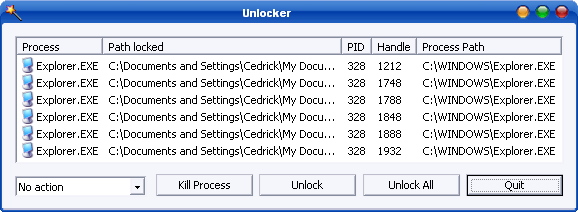
Unlocker is a Windows Explorer extension allowing you with a simple right-click on a file or folder to get rid of error message such as error deleting file or folder, cannot delete folder: it's being used by another person or program. Simply right click the folder or file and select Unlocker. If the folder or file is locked, a window listing of lockers will appear. Select the lockers and click Unlock and you are done.
Latest Reviews

rebeccazoly reviewed v1.9.2 on Jun 3, 2013
I have download Long Path Tool and it is the best solution of your problem.

mynamehere reviewed v1.9.2 on May 17, 2013
@Music4Ever
If you'd have looked, you'd have seen that you DO have the option of not installing the toolbar by choosing "advanced" install and unchecking the "install delta toolbar" tick box.
The problem is that, after reading about the toolbar in the agreement, you have to click 'agree", which seems like you're agreeing to install the toolbar since it's also used as a crapware tactic. This should really be changed.
I've never noticed any problems with unlocker, but here's hoping this update will fix issues that others had.
-1 star for bundled toolbar

Music4Ever reviewed v1.9.2 on May 17, 2013
Installs the Delta toolbar which it neither warns you of unless you read the agreement & you can't opt out so no thanks - Site blocked by Eset ~

Sven123456789 reviewed v1.9.1 on Dec 22, 2012
Haven't had to use this in awhile. I see this newer version makes you go through a bunch of bells and whistles to get to the free download. So I lower the rating a notch. But still a worthy 4. I was stupid to download and try a new pc game. When I removed this game from control panel, It left behind this crap that I couldn't remove no matter what. Well just like the old days, Unlocker removed it. Definitely a mandatory software to have. I'm sure we all have had garbage on our pc's at some point in time that you can't remove. This does it.

johnk119 reviewed v1.9.1 on Aug 2, 2012
Works well for me. Sometimes it cant delete a file, but it does offer an option to delete it upon next reboot... Overall It's good software.

FelixKey reviewed v1.9.1 on Feb 29, 2012
if anyone ask for Suggestion I will suggest for using Long Path Tool for accessing, managing and even renaming files that have more than 255 characters . longpathtool(dot)com

Billyc reviewed v1.9.1 on Feb 27, 2012
Having problem deleting Adobe Reader V (10.1.2). It asks 'the path packages cannot be opened' It appears there is NO handle. Downloded Unlock and cannot delete this program . Also causing frequent computer hang ups . Help would be appreciated

Gisle Vanem reviewed v1.9.1 on Jun 2, 2011
Top-notch program. Kudos to the coder.
I finally got every trace of Adobe Reader removed; the
Adobe\Reader 8.0\Resource\CMap\Identity-H and
Adobe\Reader 8.0\Resource\CMap\Identity-V
etc.
Using SysInternal's 'handle' on those file, didn't reveal who locked the files. I wish 'unlocker' could tell me, but no. At one time I thought "Windows File Protection" was involved, but no. Setting "SFCDisable=1" didn't help.

Psychlone reviewed v1.9.1 on Apr 14, 2011
Only someone like Lysa (Phat Esther) would give 1 star for missing a download link... that's NOT MISSING. That is clearly not a review for a program, it's a sign that Lysa forgot to clear her (his?) cookies and clear cache...
Seriously - someone needs to start a petition to ban intellectually-compromised people like Phat Esther from voting or even posting at all. Nonsensical reviews, broken English and a horrible lack of common sense are all traits that are despised in the real world, but are condoned here for some reason. When I'm God, the B& Hammer will fall hard on people like this.
To everyone else: Just click on Phat Esther's name and read other 'reviews' that they have done for other products. Then you'll see that NO ONE SHOULD REFER TO PHAT ESTHER'S REVIEWS for anything. It's all nonsense and ego-based self-fulfilling prophecy of 1-star reviews that don't make any sense.
As for Unlocker, it works perfectly, just as it always has. The new UI elements are welcome, but not as much as the new ability to remove deep directories. This little program as ALWAYS been a Godsend!
Thank you, Cedrick for creating an excellent program that does exactly what it's supposed to!

Phat Esther reviewed v1.9.1 on Apr 14, 2011
1 star for missing download link, if repaire will delete, until not.

rebeccazoly reviewed v1.9.2 on Jun 3, 2013
I have download Long Path Tool and it is the best solution of your problem.
mynamehere reviewed v1.9.2 on May 17, 2013
@Music4Ever
If you'd have looked, you'd have seen that you DO have the option of not installing the toolbar by choosing "advanced" install and unchecking the "install delta toolbar" tick box.
The problem is that, after reading about the toolbar in the agreement, you have to click 'agree", which seems like you're agreeing to install the toolbar since it's also used as a crapware tactic. This should really be changed.
I've never noticed any problems with unlocker, but here's hoping this update will fix issues that others had.
-1 star for bundled toolbar
Music4Ever reviewed v1.9.2 on May 17, 2013
Installs the Delta toolbar which it neither warns you of unless you read the agreement & you can't opt out so no thanks - Site blocked by Eset ~
Sven123456789 reviewed v1.9.1 on Dec 22, 2012
Haven't had to use this in awhile. I see this newer version makes you go through a bunch of bells and whistles to get to the free download. So I lower the rating a notch. But still a worthy 4. I was stupid to download and try a new pc game. When I removed this game from control panel, It left behind this crap that I couldn't remove no matter what. Well just like the old days, Unlocker removed it. Definitely a mandatory software to have. I'm sure we all have had garbage on our pc's at some point in time that you can't remove. This does it.
johnk119 reviewed v1.9.1 on Aug 2, 2012
Works well for me. Sometimes it cant delete a file, but it does offer an option to delete it upon next reboot... Overall It's good software.
FelixKey reviewed v1.9.1 on Feb 29, 2012
if anyone ask for Suggestion I will suggest for using Long Path Tool for accessing, managing and even renaming files that have more than 255 characters . longpathtool(dot)com
Billyc reviewed v1.9.1 on Feb 27, 2012
Having problem deleting Adobe Reader V (10.1.2). It asks 'the path packages cannot be opened' It appears there is NO handle. Downloded Unlock and cannot delete this program . Also causing frequent computer hang ups . Help would be appreciated
Gisle Vanem reviewed v1.9.1 on Jun 2, 2011
Top-notch program. Kudos to the coder.
I finally got every trace of Adobe Reader removed; the
Adobe\Reader 8.0\Resource\CMap\Identity-H and
Adobe\Reader 8.0\Resource\CMap\Identity-V
etc.
Using SysInternal's 'handle' on those file, didn't reveal who locked the files. I wish 'unlocker' could tell me, but no. At one time I thought "Windows File Protection" was involved, but no. Setting "SFCDisable=1" didn't help.
Psychlone reviewed v1.9.1 on Apr 14, 2011
Only someone like Lysa (Phat Esther) would give 1 star for missing a download link... that's NOT MISSING. That is clearly not a review for a program, it's a sign that Lysa forgot to clear her (his?) cookies and clear cache...
Seriously - someone needs to start a petition to ban intellectually-compromised people like Phat Esther from voting or even posting at all. Nonsensical reviews, broken English and a horrible lack of common sense are all traits that are despised in the real world, but are condoned here for some reason. When I'm God, the B& Hammer will fall hard on people like this.
To everyone else: Just click on Phat Esther's name and read other 'reviews' that they have done for other products. Then you'll see that NO ONE SHOULD REFER TO PHAT ESTHER'S REVIEWS for anything. It's all nonsense and ego-based self-fulfilling prophecy of 1-star reviews that don't make any sense.
As for Unlocker, it works perfectly, just as it always has. The new UI elements are welcome, but not as much as the new ability to remove deep directories. This little program as ALWAYS been a Godsend!
Thank you, Cedrick for creating an excellent program that does exactly what it's supposed to!
Phat Esther reviewed v1.9.1 on Apr 14, 2011
1 star for missing download link, if repaire will delete, until not.

testmenot reviewed v1.9.1 on Apr 13, 2011
I just love Unlocker. Nice to see it is still being improved.

reviewer reviewed v1.9.1 on Apr 13, 2011
Fabulous! Finally I can get risk of those pesky long path in the temp folder. Great update. Unlocker is the best without real competition.
djb247365: All my personal and office machines are Windows 7 and Unlocker works perfectly. And please be serious IOBit Unlocker is a joke, it does not do half the things this program does, and it often crashes. Lame, not even a real alternative. Right click the installer and make sure to install as admin.

war593122 reviewed v1.9.1 on Apr 13, 2011
Awesome, finally the 1 "New feature" I needed to use a few times after installing SP1.
Nicely done!