File Details |
|
| File Size | 0.9 MB |
|---|---|
| License | Freeware |
| Operating System | Windows (All) |
| Date Added | March 4, 2019 |
| Total Downloads | 37,828 |
| Publisher | Eusing Software |
| Homepage | Eusing Free Registry Cleaner |
Publisher's Description
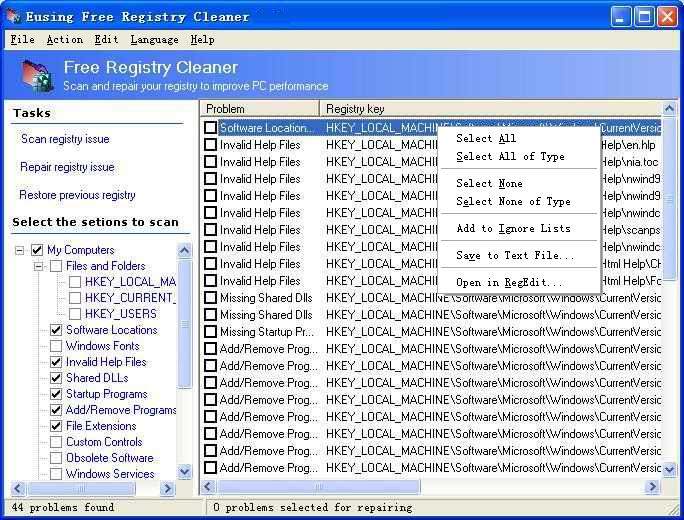
Eusing Free Registry Cleaner will scan your Windows registry for invalid or obsolete information and provide a list of the errors found. After fixing the invalid entries, your system will be more stable and run faster. For maximum safety, Eusing Free Registry Cleaner will make a backup of the repaired entries. You will be able to restore any changes made using the software by choosing Restore registry backup.
Latest Reviews

Music4Ever reviewed v3.6 on Jan 16, 2015
Unneeded & can cause problems & unlikely to make any difference to speed or stability, that's based on 20 years of faffing with the Windows registry, MS have never recommended so called 'registry cleaning'
The latest changes are 'added some ignore keys' - Speaks volumes!

BANDIT- reviewed v3.3 on Nov 14, 2013
## TEST ONLY ##
Grab the Portable Version if you need a dabble..!!
-http://www.eusing.com/Download/RegCleanerSetup.zip
I have a well established & Trusted Registry App which I have used for years, But I can see the pull of these types of Apps, especially to Noobs &
Guys who can't be bothered to study the Registry, So put their Whole System
in the hands of the Unknown..!!
I took a snapshop (RollbackRx). Ran "MY" reg cleaner, then "THIS" one.
YUP..!! You guessed it. Eusing found about 50 keys that mine missed...
ALL these Damn Reg Apps use different Algorithms. DO NOT be taken by Them.
FIND yourself a Reputable Registry cleaner (IF YOU MUST) & stick with It.
Trying Different Reg Apps, & Removing what they find .. WILL .. Screw your System. Stay Away from all these Registry & Sys Tune-up Apps. Grrrrrrr.!!
Will I be Eusing this App.?? .. (No Fkn Way).. Rolled my Sys back (To Normal) ..lol
2* ... For being an Alternative System Killer................. "Stay Safe Guys"

Eeyan reviewed v2.8 on Sep 10, 2011
Been using this great little util for a while now. Managed to fix a few problems too. Well worth downloading.

HeilNizar reviewed v2.8 on Sep 7, 2011
My only problem with it is that its still not portable.
Author, this is the portable age, installation is old fashion, get that fixed and you get the extra 2 stars.

nilst2006 reviewed v2.8 on Sep 7, 2011
Stay away from registrycleaners, they always take away too much in the registry. The more You run them on a system the sooner You have to re-install Your OS. Registrycleaners often destroy the possibility to use systemrestore.......and if You can't clean up the registry manually then You shouldn't use this either ! Use on Your own risk !

reddy.shyam reviewed v2.8 on Sep 7, 2011
The best of its kind for free. I too have used it on xp and 7. Never had any issues. Just does the job. Thanks to the author.

net_junkie reviewed v2.8 on Sep 6, 2011
I personally have used this on Vista and Win7 and have never had an issue. This is my preferred program to clean the registry. Like all cleaners though, you must back up the registry to be safe. I also use Eusing registry defrag after cleaning.

CyberDoc999 reviewed v2.8 on Sep 6, 2011
bad ..... stay away
my dual monitor quit working after this

Hawk44Gent reviewed v2.6.3 on Sep 11, 2010
I've been using the registry cleaners built in to Ccleaner and Advanced System Care 3 for several years now. They usually find several items every month or two when I run them. I installed the Eusing Registry Cleaner to give it a try. After making a backup of my registry, I was very suprised to see that the Eusing found 425 items in what I had assumed was a pretty clean registry. The Esuing scanned very fast and I had zero problems with it. Gotta love it.

AmpFeare reviewed v2.6 on Feb 3, 2010
works fine, no registry cleaner is *unsafe* just take a few minutes of your time to review the results after the scan and dont delete s*** you know nothing about.

Music4Ever reviewed v3.6 on Jan 16, 2015
Unneeded & can cause problems & unlikely to make any difference to speed or stability, that's based on 20 years of faffing with the Windows registry, MS have never recommended so called 'registry cleaning'
The latest changes are 'added some ignore keys' - Speaks volumes!
BANDIT- reviewed v3.3 on Nov 14, 2013
## TEST ONLY ##
Grab the Portable Version if you need a dabble..!!
-http://www.eusing.com/Download/RegCleanerSetup.zip
I have a well established & Trusted Registry App which I have used for years, But I can see the pull of these types of Apps, especially to Noobs &
Guys who can't be bothered to study the Registry, So put their Whole System
in the hands of the Unknown..!!
I took a snapshop (RollbackRx). Ran "MY" reg cleaner, then "THIS" one.
YUP..!! You guessed it. Eusing found about 50 keys that mine missed...
ALL these Damn Reg Apps use different Algorithms. DO NOT be taken by Them.
FIND yourself a Reputable Registry cleaner (IF YOU MUST) & stick with It.
Trying Different Reg Apps, & Removing what they find .. WILL .. Screw your System. Stay Away from all these Registry & Sys Tune-up Apps. Grrrrrrr.!!
Will I be Eusing this App.?? .. (No Fkn Way).. Rolled my Sys back (To Normal) ..lol
2* ... For being an Alternative System Killer................. "Stay Safe Guys"
Eeyan reviewed v2.8 on Sep 10, 2011
Been using this great little util for a while now. Managed to fix a few problems too. Well worth downloading.
HeilNizar reviewed v2.8 on Sep 7, 2011
My only problem with it is that its still not portable.
Author, this is the portable age, installation is old fashion, get that fixed and you get the extra 2 stars.
nilst2006 reviewed v2.8 on Sep 7, 2011
Stay away from registrycleaners, they always take away too much in the registry. The more You run them on a system the sooner You have to re-install Your OS. Registrycleaners often destroy the possibility to use systemrestore.......and if You can't clean up the registry manually then You shouldn't use this either ! Use on Your own risk !
reddy.shyam reviewed v2.8 on Sep 7, 2011
The best of its kind for free. I too have used it on xp and 7. Never had any issues. Just does the job. Thanks to the author.
net_junkie reviewed v2.8 on Sep 6, 2011
I personally have used this on Vista and Win7 and have never had an issue. This is my preferred program to clean the registry. Like all cleaners though, you must back up the registry to be safe. I also use Eusing registry defrag after cleaning.
CyberDoc999 reviewed v2.8 on Sep 6, 2011
bad ..... stay away
my dual monitor quit working after this
Hawk44Gent reviewed v2.6.3 on Sep 11, 2010
I've been using the registry cleaners built in to Ccleaner and Advanced System Care 3 for several years now. They usually find several items every month or two when I run them. I installed the Eusing Registry Cleaner to give it a try. After making a backup of my registry, I was very suprised to see that the Eusing found 425 items in what I had assumed was a pretty clean registry. The Esuing scanned very fast and I had zero problems with it. Gotta love it.
AmpFeare reviewed v2.6 on Feb 3, 2010
works fine, no registry cleaner is *unsafe* just take a few minutes of your time to review the results after the scan and dont delete s*** you know nothing about.

coover reviewed v2.6 on Jan 27, 2010
I'm giving Eusing Free a 5.
I've been installing EFRC on my Win 2000, XP, Vista and Win 7 computers for at least a couple of years and using it periodically (probably every couple of weeks) on each one (I have 6), and I've never had a problem with whatever it removed from the registry. That said, I'm not sure anymore that removing "errors" or bad items from the registry is very important anymore, particularly with the Vista and Win 7 Operating Systems. I suspect that the registry has become so large that subtracting 198 or even 596 out of probably 100s of thousands of items from it will speed up the computer in a noticable way.
But the one thing I really like about Eusing Free can be found on the "File" Menu. On it you will find a "Startup Manager" which is much easier to use than MSCONFIG or a separate software application to manage software startups. Heck, I'd download this software just for the Starup Manager.
Get it. You'll like it. And it is free as long as you are willing to click on the "Skip" button when asked for the "Registration Code".

jjstccean reviewed v2.5.1 on Dec 31, 2009
31/12/09 09:42am SA time. I've just downloaded, installed and run Eusing Free Reg Cleaner - and so far so good.

Stoerpser reviewed v2.5.1 on Jul 2, 2009
@Cris3:
This isn't the registry defrag tool from Eusing SW!
Please rtw (read, think, write).
I give 5 stars because it's the best reg cleaner since years.

Cris3 reviewed v2.5.1 on Jul 1, 2009
This program has been around a good while and I've seen it recommended many times by major geek pros.
I personally like IoBit's Smart Defrag:
http://www.iobit.com/iobitsmartdefrag.html
The whole line of products from IoBit are worth downloading and using.

alex_sporik reviewed v1.8 on Jul 2, 2008
Too basic and unstable.
Does not work well with Vista too. Hope it will be addressed in future versions.
No support too....

tbmbbb@yahoo.com reviewed v1.6 on Oct 16, 2007
This product is great. Fixed many problems with my son's computer without having to rebuild the system. Easy to use and very fast. 5 Stars!

tp reviewed v1.6 on Oct 4, 2007
yep.. not a nagging nag screen.. just skip it.. i like the program.. straight to the point...

burfadel reviewed v1.5 on Apr 5, 2007
Why rate lower for the nag screen? Its not even a time based one, just press skip and you can use the programme! You're getting a great programme for free, whereas other programmes that do the same limit their freatures or is time limited unless you register.
I think its fair, and the progamme works great! Best of all it is free, so keep that in mind! If the nag screen worries you so much pay for the programme and get it registered! It will still be cheaper than buying other programmes that do the same, but this one does a lot better job of doing the 'same thing'!

pcexpert15 reviewed v1.5 Beta on Apr 2, 2007
the rogue remover program says its an false rogue registry program

mesiex reviewed v1.25 on Dec 26, 2006
Good, but would be better without nagscreen.

computershack reviewed v1.25 on Dec 26, 2006
Well it is bloody quick and seems to find a fair deal.
Gets a 4 because although it has a Registry Backup tool, it doesn't give you the option of backing it up automatically before doing any repairs instead only offering to create the behemoth that is a System Restore Point.

aruprc reviewed v1.2 on Oct 29, 2006
Giving it 4 just for the nag screen, I use Reg Seeker and CCleaner and then use Eusing, it still finds many entries left behind by the other two.

nLctr reviewed v1.2 Beta on Sep 28, 2006
Version 1.2b doesn't work for me. Complains about not finding SRClient.dll.
Version 1.1 does work and does a good job. I like the fact that it dosn't do much of an install and uses an ini file for configuration rather than writing more junk to the registry.
The startup nag screen is a bother but not overwhelmingly so.

DudeBoyz reviewed v1.2 Beta on Sep 28, 2006
I use registry cleaners and repairers like Norton WinDoctor (costs money) and EasyCleaner (totally free) and am sold on their ability to help resuscitate my system when things go wonky sometimes.
Before I try a new app like this, I do a Ghost image first, just to be sure.
Nag screens are a horrible pain and I wish every app would remove them. I encourage the author to keep working to make the product more complete, and capable. We can never have too many good free programs, after all, right? :)

shdwstar reviewed v1.2 Beta on Sep 27, 2006
good program it does have that nag screen but it is very effective and efficient.
if your worried about messing up your system, as some of these other people are just create a back up of your registry from the file menu.
over all it's quick and easy... great program

QBgreen reviewed v1.1 on Jul 21, 2006
This is not freeware, it's nagware. It does do a relatively good job, but let's call a spade a spade. It nags for a donation upon every start of the program. No points for deception.

judeal reviewed v1.1b on Jul 1, 2006
At first I was freightened when it listed a total of 348 registries,though I use 5 diferent registry tools regularly. But then I tried it again few days later, when I could afford time for messing up with registry problems that might occur.
But you know what? I took the risk of cleaning those 348 registries and there was no problem what so ever and I have been using it. great piece of tool.

varsity reviewed v1.1b on Jun 14, 2006
I agree with cowgaR. Messing with the registry just to delete what amounts to such a tiny % of its overall size is quite dangerous. And for what? a noticeable performance gain? like he says...no. Only because I have everything backed up along with a ready-to-go imaged replacement drive, I decided to try this out. It does find alot more than, say, ccleaner but the info provided on the entries is lacking in detail. Just for the heck of it I deleted everything (87 entries), rebooted and no hiccups noticed, even after quite some time. I'll give it a 4 because it didn't cripple my machine on the first try, but like all these registry cleaners, it should be used with extreme caution, and probably not at all as long as you aren't constantly installing and uninstalling all kinds of software on a daily basis.
To put things in perspective, it takes only ONE wrong registry deletion in the right place to inflict some serious hurt on your machine.

the_root reviewed v1.1b on Jun 14, 2006
Raven, the last time I used regseeker, it screwed up my ability to use the show desktop function and screwed up some very important file associations.
Eusing shows entries that will recreate themselves and you cannot stop this from happening, which is bad, but the program also catches entries that other cleaners miss.
I use eight reg cleaners from time to time and all will catch things the others miss. I have found no reg cleaner that catches all suspect entries.

Raven Sati reviewed v1.1b on Jun 14, 2006
This little proggie is not ready for prime time.
Reg Seeker is still at the top of the registry manager food chain.

cowgaR reviewed v1.1b on Jun 14, 2006
I have yet to find a nice and handy registry cleaner. Most of time I've been using MS one, then Jv16 powertools one (now renamed) and finally stopped.
It would be nice to find intelligent registry cleaner, which sadly Eusing isn't by far.
Reporting JUST errors, not normal entries in a registry DB. Say you just run it after a CLEAN windows install and it will find errors. No option for IGNORE AND REMEBER THIS (I badly need that option) so that it would not list apparently good entries (the point that some file or extension isn't yet written or on disk doesn't mean it is a bad entry).
I would give just one example. After cleaning my registry RegSupreme(renamed jv16) found around 400 errors. Of which I just needed to delete around 70 entries, all others were good Visual Studio / Firefox / SQL entries. At least I know what I am doing. But I would like to have option to not list this entries the next time, but the author of jv16 is lame enough and this Eusing is even worse, giving just description -> Obsolete. Which just sucks:-)
And last but not least, by deleting values from your registry you won't get stable or fast system by any means! It would gain some benefit on heavily used gaming system with say 5 thousands of entries deleted. Than you would gain something (after deleting empty space with NTRegop). But for knowledgable user (who knows his machine and isn't installing games/spyware on daily bases), messing with registry and deleting maximum 100 entries will gain no benefit.

ahjefri reviewed v1.1b on Jun 14, 2006
Ihave used reg. cleaner before to tell you the truth, they missed up my system, I have tried this one it cought about 700 entries with problems,
I have run NToptimize registry was reduced by 2% then I did pagedefrag to optimize it further,
Now I am waiting if somthing comes up,,
I wish it give more detail about each problem , for example instead of stating obsolete software it should name the software and so on for the rest,

bello reviewed v1.1b on Jun 14, 2006
simply the best registry software !!! i tried a lot of so-called "top rated" registry software but this one is so smart, easy, very safe and absolutely free. after Registry Mechanic i switched to Eusing Free Registry Cleaner and it found hundred errors on my Windows XP Pro system. i've been using it for 2 months now. it does its job just perfect ! unbelievable ! it's just like a miracle in the expensive software world ! so guys you mast have it ! I strongly recommend !

themanhimself reviewed v1.1b on Jun 13, 2006
Brilliant and free.. as for those who slate it, well ok good for yoiu. It does what it says on the tin, it works and helps yer PC.
As forlinux, well thats a debate on a seperate thread not here.

Richardky reviewed v1.1b on Jun 13, 2006
luaghs real hard @t mjm01010101
if any0ne looking for a reg cleaner this does its job and its free.

horsecharles reviewed v1.1b on Jun 13, 2006
This particular app comes "very" well recommended by some of the sharpest people i know-- folks who wouldn't be caught dead using registry cleaners normally.
btw it does have one tiny bug, which the author is on..however it's more of a cosmetic thing: http://discuss.pcmag.com...004322577/ShowPost.aspx scroll down a bit.

AlexBR1974 reviewed v1.1b on Jun 13, 2006
Hey mjm010101... I told you before... Stop being an idiot and stick with Linux. Wanker!

mikeyx11 reviewed v1.1b on Jun 13, 2006
mjm01010101 why did u give it a 2 then?

mjm01010101 reviewed v1.1b on Jun 13, 2006
Reg cleaners have the potential to do far more harm than any good they do. Hence why MS pulled their last one. The "cleaning" this tool does won't speed up your system a millisecond, and only removes functionality.

bellgamin reviewed v1.0 on May 25, 2006
I first heard about Eusing Reg Cleaner on DSL Reports, where it received rave reviews from several users.
Eusing is an *aggressive* registry cleaner. Thus, it will do a more extensive job of cleaning than my other cleaners (Ace Utilities, RegSeeker, RegHealer).
I have used it extensively & have never yet encountered a glitch. As with any registry cleaner, however, you should ALWAYS do a back-up of the registry before making changes. Eusing does include a built-in back-up capability for this essential purpose.

kmrdeva reviewed v1.0 on May 21, 2006
Simple and seems to do what it claims to do. Works nicely together with RegCompact.

DIRKES reviewed v1.0 on Apr 6, 2006
Nice Idea - thx for it.