File Details |
|
| File Size | 0.1 MB |
|---|---|
| License | Open Source |
| Operating System | Windows 7/2000/Server 2003/Server 2008/Vista/XP |
| Date Added | May 30, 2014 |
| Total Downloads | 40,239 |
| Publisher | Jan T. Sott |
| Homepage | xpy |
Publisher's Description
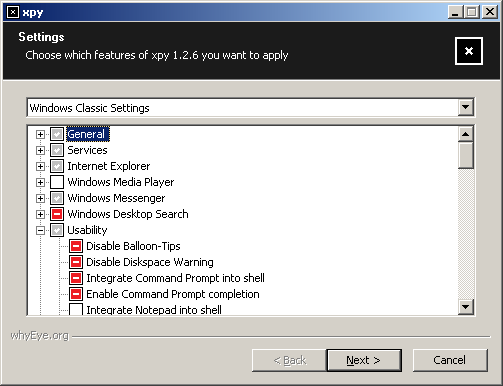
xpy is a small tool which disables the default threats of a Windows 2000, XP, and Server 2003 installations. Besides the classic antispy features, it closes recent security holes like the remote procure call (rpc) service and the distributed component object model (dcom).
Latest Reviews

mikebray reviewed v1.3.7 on Mar 12, 2014
good!

olivergiving reviewed v1.3.7 on Sep 25, 2013
5 stars

paulperry reviewed v1.3.7 on Aug 24, 2013
xpy is solid

Bala7 reviewed v1.3.6 on Jun 22, 2013
Despite all the bad reviews this tiny app is truly excellent. However, it is up to you, the user, too understand the inner workings of your OS. If you're not sure what a field means then do not check that box.

CyberDoc999 reviewed v1.3.5 on May 15, 2013
this is just a bad idea

Poseidyon reviewed v1.1.2.1 on Jul 12, 2011
Once forced me to reinstall . Get XP-Antispy !

Blue Joker reviewed v1.1.2 on May 11, 2011
It can cause some problem .

some guy reviewed v0.6.1 on May 3, 2011
if you run Vista you deserve your computer to blow up!
CyberDoc999 reviewed v0.6 on Apr 28, 2011
there is no real un-do feature
the nice thing about this is the things that you do not check get changed anyway
so like I said before
avoid this crap
by the way I have personally fixed over 5 thousand computers
and have over 18 years experence
Bala7 reviewed v0.5.6.1 on Apr 11, 2011
@Slipped it in
@CyberDoc999,
That's because this app is meant for advanced users or at least those who know something about their OS.

mikebray reviewed v1.3.7 on Mar 12, 2014
good!
olivergiving reviewed v1.3.7 on Sep 25, 2013
5 stars
paulperry reviewed v1.3.7 on Aug 24, 2013
xpy is solid
Bala7 reviewed v1.3.6 on Jun 22, 2013
Despite all the bad reviews this tiny app is truly excellent. However, it is up to you, the user, too understand the inner workings of your OS. If you're not sure what a field means then do not check that box.
CyberDoc999 reviewed v1.3.5 on May 15, 2013
this is just a bad idea
Poseidyon reviewed v1.1.2.1 on Jul 12, 2011
Once forced me to reinstall . Get XP-Antispy !
Blue Joker reviewed v1.1.2 on May 11, 2011
It can cause some problem .
some guy reviewed v0.6.1 on May 3, 2011
if you run Vista you deserve your computer to blow up!
CyberDoc999 reviewed v0.6 on Apr 28, 2011
there is no real un-do feature
the nice thing about this is the things that you do not check get changed anyway
so like I said before
avoid this crap
by the way I have personally fixed over 5 thousand computers
and have over 18 years experence
Bala7 reviewed v0.5.6.1 on Apr 11, 2011
@Slipped it in
@CyberDoc999,
That's because this app is meant for advanced users or at least those who know something about their OS.
CyberDoc999 reviewed v1.0.2 on Jan 10, 2011
everything this does can be done with a single reg file...
and this program is buggy

Slipped it in reviewed v0.5.5 on Feb 24, 2010
This is a very dangerous program and should never be used with any version of Windows. It will cause massive data loss, reduce performance and cause BSOD's. BEWARE!

Lsavagejt reviewed v1.0.1 on Feb 2, 2010
I will use this. It's not as complete as xp-antispy, but then xpy doesn't come with EBAY baked in.

mikeyx11 reviewed v1.0.0 on Aug 26, 2009
This app is great. If you aren't an experienced computer user, please, don't download it, don't use it, and certainly don't rate it badly just because you are an idiot.

thartist reviewed v1.0.0 Beta 4 on Aug 3, 2009
critisisms made to this tool are idiotic.
it's very nice.
CyberDoc999 reviewed v1.0.0 Beta 3.1 on Jun 27, 2009
Worst program ever made!
CyberDoc999 reviewed v0.5 on Apr 7, 2009
This program is a bad joke
and it will mess up your windows installation!
I can do anything and everything I need to with a simple .reg file

Nighted reviewed v1.0.0 Beta on Mar 27, 2009
Awesome! Does exactly what it says and is clear enough in it's functionality for those experienced enough to be using it. It can be run silently and you can write a command script to remove it afterwards. The author is friendly and quick to respond to questions.

Undesired Username reviewed v0.10.9 on Dec 5, 2008
Offers only poor explanations of what changes are to be made, and no undo is provided. (I don't consider a Restore Point an "undo".)
Offers to make changes that don't even apply to the system (e.g. lets you disable time synchronization, even if the Windows Time service isn't installed to begin with).
Leaves behind an INI file. (What idiots will typically do is pretend that I'm making a huge deal about this INI file, rather than simply mentioning it.)
Oh, I understand the program, I just have standards.

iamnotyou reviewed v0.2.8 on Nov 26, 2008
Before I make a change to my computer I make a backup image (Acronis True Image works well for me). If the newly added hardware and/or software doesn't work well for my on my machine or causes a BSOD or other mayhem it get removed/changed until I am happy it works OK.
Vispa (and xpy) can FUBAR things if you don't pay attention to what you are doing. This is not limited to VISPA/xpy but too many other programs as well. Having a working image has saved me many hours of work when things go bad.
Vispa is lacking instructions but you can find the information if you look for it. Don't dance on land mines and complain about the results. READ-LEARN then tweak. Of course, a backup of your computer should be something you do regularly ... it really helps when you don't take the time to understand/know what you are doing.
Also, the software uses code that can be detected as malware ... READ the info given and you will know it's a false positive.
Recommended.

dalmiroy2k reviewed v0.2.8 on Aug 2, 2008
If you know what you're doing, this program is for you.
Novice users should get away though.

yathosho reviewed v0.2.7.1 on Jul 22, 2008
yes, this program can do damage if you randomly select settings or select all of them. in the latter case, the program displays TWO warnings. if you ignore these and your computer doesn't work as desired - blame yourself, sorry!
yathosho reviewed v0.10.7.1 on Jul 22, 2008
yes, this program can do damage if you randomly select settings or select all of them. in the latter case, the program displays TWO warnings. if you ignore these and your computer doesn't work as desired - blame yourself, sorry!

Zee333 reviewed v0.2.7 on Jul 20, 2008
This causes more problems then it helps, it doesn't improve security or performance and it causes severe, critical errors within windows, use at your own risk, but all im saying is i advise against use of this program because you will be sorry and wish you never used this once you do

mflip reviewed v0.2.7 on Jul 19, 2008
All this program seems to do is disable a lot of important features in Windows Vista. Most of the features this program disables are not security threats and doing this will not improve performance. Microsoft already disables all of the services that cause critical security threats during installation (assuming a clean install and not an upgrade is performed). The remaining security threats can't be used to inflict serious harm to a computer.

Stevefarrell reviewed v0.2.7 on Jul 19, 2008
Vispa is not a Virus , Spyware or a Trojan.That is a false positive.

Ribibi reviewed v0.2.7 on Jul 19, 2008
I don't know if it's justified or not, but Agnitum Outpost Security thinks that Vispa is a bad bad boy and blocked it
=> "Packed/Unpack" (sequence)
Agree / Not agree ?

styxchan reviewed v0.2.7 on Jul 19, 2008
totaly agree with pedigree ! This software needs brain 2.0 ;)
* added new features
-restore recycle bin shortcut
-restore my documents shortcut
-restore windows media player shortcuts
-restore windows movie maker shortcut
-restore windows dvd maker shortcut
-restore windows photo gallery shortcut
-restore windows defender shortcut
-restore windows fax and scan shortcut
-restore windows calendar shortcut
-restore windows contacts shortcut
-restore msn shortcut
-restore windows update shortcut
-restore windows media center shortcut
-restore windows meeting space shortcut
* modified destructive elements warning to work on conditions
* removed features
-delete recycle bin shortcut
-delete my documents shortcut
* removed czech translation (temporarily)
* fixed bug in german DelSamplePlaylists translation
* fixed bug in DelWinMail, displaying wrong icon
* fixed bug in DelRecycleBinLnk and DelMyDocumentsLnk in file mode
* fixed bug in installtypes
* fixed bug displaying installtype in restore mode
* fixed spelling mistake in english LabelUnassociateSc string
* improved sourcecode documentation

pedigree reviewed v0.2.7 on Jul 19, 2008
@CyberDoc999 - You are stupid, too stupid to use a PC as you had to reformat after this and xpy? Moron. If youre too stupid to understand how a program works and what it does, you shouldnt use it.
This is a great little app, does what it says and does it well (unless youre a stupid troll)

pforbes reviewed v0.10.6 on Jun 30, 2008
Excellent, and very powerful. Not for newbies!

pihug12 reviewed v0.2.6 on Jun 27, 2008
v0.2.6 (2008-06-27)
* added new features
-remove internet explorer 7
-disable telnet
* fixed bug in input mode, not loading the search engine in verbose mode
* fixed bug in ask and altavista search engine strings
* fixed bug in german DelSamplePlaylists translation
* completed missing german translations
pihug12 reviewed v0.10.6 on Jun 27, 2008
http://xpy.googlecode.com/files/xpy-0.10.6-bin.zip
v0.10.6 (2008-06-27)
* added new features
-remove internet explorer 7
-disable telnet
* fixed bug in input mode, not loading the search engine in verbose mode
* fixed bug in ask and altavista search engine strings
* fixed bug in german DelSamplePlaylists translation
* completed missing german translations

Ain Soph Aur reviewed v0.10.6 on Jun 27, 2008
if you dont understand the programm, DONT USE IT!
the download link is wrong: vispa-0.2.6-bin.zip
CyberDoc999 reviewed v0.10.5 on Jun 21, 2008
I agree this will make a total mess of your computer.
I had to reformat to recover from this program!
I give this program a zero!
CyberDoc999 reviewed v0.2.5 on Jun 21, 2008
I agree this will make a total mess of your computer.
I had to reformat to recover from this program!

war593122 reviewed v0.10.5 on Jun 20, 2008
v0.10.5 (2008-06-20)
* added new features
-disable universal plug and play
-disable upnp discovery service
-disable netmeeting desktop sharing
-delete recycle bin shortcut
-delete my documents shortcut
* added new features for 3rd party applications
-disable apple mobile devices service
-disable ipod service
-disable google updater service
-disable google desktop sac
* added option to abort if restore point failed
* added two new installtypes
* disables WDSDisable if WDSRemove selected
* fixed bug batchfile not setting search engine properly
* fixed bug batchfile not creating restore points
* fixed bug in ServSchedTask
* fixed bug with silent batch files
* fixed bug in restore point failure reporting
* fixed bug saving FirstRun
* fixed bug in german MBDeleteIniWarning string
* improved german translation
* modified language order
iamnotyou reviewed v0.2.5 on Jun 20, 2008
Nice little program ... read the instructions and know what you are doing/affecting and you too will be happy.
iamnotyou reviewed v0.10.5 on Jun 20, 2008
Nice little program ... read the instructions and know what you are doing/affecting and you too will be happy.

jsmorley reviewed v0.2.5 on Jun 20, 2008
Update: To the person who said "read the instructions" - Just exactly what instructions are you talking about? That is one of the worst things about this mess. There ARE NO instructions of any kind. No "help" inside the product. No "readme.txt" with any guidelines. You are just expected to take the guys word for it, pick one of the 4 or so standard setups he thinks are best, and hope your stuff continues to work.
This is just horrible, and I really think it should be taken off the site. It has no flexibility, is completely user-hostile, and just makes a mess of most people's computer. Why would you run a program that has a hundred changes to the way Windows works, with almost no flexibility on what get's changed (scheme A or scheme B, that's about it), all based on ONE GUYS idea of how to run his computer. It's not going to match up with the needs of almost anyone else except his girlfriend and mother, and you ARE going to spend some time recovering from this.

gawd21 reviewed v0.10.5 on Jun 20, 2008
Do not use this! Messes your computer up, if you use IE for anything, and a lot of programs do, Steam and many others can not work correctly. This program gives you little to no improvements over default installs.
gawd21 reviewed v0.2.5 on Jun 20, 2008
Do not use this! Messes your computer up, if you use IE for anything, and a lot of programs do, Steam and many others can not work correctly. This program gives you little to no improvements over default installs.

mmoak reviewed v0.2.5 on Jun 20, 2008
I wish we could get a ruling on this one.
Safe or not?
I'd love to give it a whirl...
Review 3 until determined it is in fact safe.
dalmiroy2k reviewed v0.2.5 on Jun 20, 2008
Important: Some antivirus software might report Vispa as Spyware or a Trojan. Vispa is an executable written and compiled using NSIS, false-positives are unfortunately quite common among NSIS compiled programs. The NSIS development team is aware of this situation and constantly works with software companies to solve such issues.
Nighted reviewed v0.10.4 on Jun 19, 2008
Awesome tool, fantastic support! :)

DKDude reviewed v0.10.4 on Jun 14, 2008
GREAT tool!
Thanks.

arjesus reviewed v0.2.4 on Jun 13, 2008
this app looks ok, BUT WHERE DO I GET THE ENG VERSION?
pihug12 reviewed v0.2.4 on Jun 13, 2008
v0.2.4 (2008-06-13)
* added new features
-disable windows desktop search
-remove windows desktop search
* added /noreboot switch
* re-added czech translation
* re-enabled DelSamplePlaylists
* fixed display bug in GenUnPrefetch
* fixed possible bug in UsabDisableSounds autodetection
* modified batch-mode to run passively
* improved sourcecode configurability
* improved sourcecode documentation
There is no trojan !
It's an open source software. You can check the source !
Ain Soph Aur reviewed v0.10.4 on Jun 13, 2008
the best tool ever!

kmanrox reviewed v0.2.3 on Jun 6, 2008
anyone have any idea how to pull up the control panel for this? i cant find it anywhere on my machine. although i can see it 'working'... even how to uninstall i'd be happy with at this point..
thx i advance
war593122 reviewed v0.10.3 on Jun 5, 2008
v0.10.3 (2008-06-06)
* added lock for unused features in restore mode
* improved silent behaviour
* improved minixpy code
war593122 reviewed v0.2.3 on Jun 5, 2008
Jammerdelray, ever heard of false positives!!
v0.2.3 (2008-06-06)
* added lock for unused features in restore mode
* improved silent behaviour

Jammerdelray reviewed v0.2.3 on Jun 5, 2008
Do not download, siteadvisor lists site as risky, mcafee total protection detects as trojan.
pihug12 reviewed v0.2.2 on May 30, 2008
Vispa 0.2.2.1 is out !
v0.2.2.1 (2008-05-30)
* fixed bug in bitmap-graphics
v0.2.2 (2008-05-30)
* added restore point capability for /file switch
* added custom search engine capability for /file switch
* added commandline support for advanced settings
* added language detection for /lang switch (compile time)
* added /flush switch
* added /shortcuts switch
* added more help switches
* added more switches for conditional sourcecode compilation
* modified restore point default state
* fixed several bugs with /file switch
* upgraded interface to MUI2
pihug12 reviewed v0.2.1 on May 28, 2008
v0.2.1 (2008-05-23)
* added translations for help dialog
* added restore feature for 404 search
* fixed bug in IEUnSearchScope
* fixed bug in UsabUnDisableSounds
* fixed bug in UsabUnClassicLogon
* fixed bug in "all settings" warning
* fixed firefox download link
* fixed windows mail detection
* fixed bug with /lang switch
* fixed spelling mistakes
* modified Windows Classic installtype
v0.2 (2008-05-16)
* added new features
-disable windows security center
-disable 404 search
-create restore point prior to any modification
-reset changed themes
* added proper GUID creation for IE search engines
* added Windows Classic install type
* added second page for detailed settings
* added license switch ("vispa.exe /?")
* added german translation
* modified autodetection
* improved ie7/ie8 handling
* fixed bug in sound disabling when using .vispa file
* fixed bug in delete prefetch folder autodetection
* merged xpy and Vispa source-codes
* code cleanup
* licensed under a bsd license
v0.1.2 (2007-09-19)
* added option to delete prefetch folder
pforbes reviewed v0.10.1 on May 28, 2008
Great. Thank you.
gawd21 reviewed v0.10.1 on May 27, 2008
The Vista version is called Vispa.

x-ray reviewed v0.10.1 on May 27, 2008
What is the name of a tool like this for vista
DKDude reviewed v0.10 on May 17, 2008
Thanks for this GREAT tool.
Keep up the good work.

durden500 reviewed v0.10 on May 16, 2008
This is a good app to have after a fresh install. It does what it says it will do. Like all things computer, if you don't know what you're doing or what the implications of what you might do might be, don't do it!!! You guys who write bad reviews for apps you (YOU) mess with and don't know how to use effectively, you're starting to get annoying. Don't rate something poorly if it's your experience which rates far worse. Remember the bell curve folks!!
pihug12 reviewed v0.1.1 on Jul 2, 2007
v0.1.1 (2007-06-30)
* deletes more default bookmarks
* added safe home setting
* modified windows classic setting
* modified dialogs
* changed license to gpl 3.0
Great software !
I love xpy, I love Vispa ! ;-)

Lawrence01 reviewed v0.9.10 on Jun 22, 2007
I love this program. I ALWAYS shut off automatic updating, I know when "patch Tuesday" is on the second tuesday of every month and can install the updates WHEN I WANT to install them. I always disable the built-in firewall, as there is much better solutions software or hardware-wise. Great product.

tickleonthetum reviewed v0.9.10 on Jun 22, 2007
This just feels like a disaster waiting to happen. Anything that lets the novice simple and casually switch of things like Windows Firewall and Automatic Updating is dangerous in the extreme. This is got to be the most hacker friendly utility out there, with it you could make your PC defenseless! DO NOT USE THIS, unless you are an expert user and know exactly what you are doing and the precautions to take.

animaleecher reviewed v0.9.10 on Jun 22, 2007
not so bad
CyberDoc999 reviewed v0.9.9 on Jun 8, 2007
Very confusing and dangerous! the worst tool ever made! Totally messed up my XP..
it does the opposite of what it should do....

taxis reviewed v0.9.9 on Jun 6, 2007
I agree that extra explanation would further improve the tool. However, it is already great the way it is.
some guy reviewed v0.9.6 on Jun 25, 2006
very nice tweak to get your pc more secure and faster. If your not sure what your doing I would advise not to play with it.

white lightning reviewed v0.9.6 on Jun 24, 2006
Very...very...useful !

bobad reviewed v0.9.6 on Jun 24, 2006
Just too weird. Very confusing and dangerous! There is no choice for "Current Settings", which is the most important. If the program would show you your current settings, then you could immediately see which settings you want to experiment with. Too bad, it's a neat little program otherwise.

Howell reviewed v0.9.5 on Feb 8, 2006
Excellent program but should be used VERY carefully.
More info of what each item does would deserve a 5 rating ;)
Another program of the kind : XP-AntiSpy.

benZin reviewed v0.9.5 on Feb 7, 2006
A great XP secuser.

ArabianNight reviewed v0.9.4 on Dec 27, 2005
Great Program and does what it says.
As a suggestion however, it should add a description of what each option does.
some guy reviewed v0.9.4 on Dec 27, 2005
small compact does what it says
for more info on services you can disable in xp
go here
http://www.jasonn.com/tu..._services_on_windows_xp
or click here
bobad reviewed v0.9.4 on Dec 26, 2005
Great program! Pro's: Extremely small size, no install, runs from a single EXE (portable), lovely simple GUI, no registry or Windows folder bloat. Con's: Confusing! If you hit "Apply" with no options set, will it wipe out all current Windows settings????
Suggestion: Xpy only needs 3 options in the combo box: 1. Detect Current Settings. 2. Xpy Recommended Settings 3. Restore Previous Settings (with date and time for 3 or 4 previous settings).
1 point off for the ambiguous choices and apply button.

eblade reviewed v0.9.3 on Dec 7, 2005
On initial view, it looks like this program pretty darn quickly comes up with some great suggestions for parameters to tune in windows to increase privacy. It doesn't need an installer, and it's entire archive is a whole 84k. This could be thrown onto any tool disk for portable usage, and would be a great thing to have. I am going to be building a toolset disc real soon now, and I think this will be one of many small but action packed utilities that will be included.
A couple of things to question, though: Why disabled Media Sensing for TCP/IP? Either it's doing something other than what it claims, or it's removing the ability to auto-determine if we're dealing with 10Mbit or 100Mbit or 1000Mbit ethernet. Are they using the same name for a different function? I don't see how determining the optimal type of connection could be an issue, and removing it could seriously affect one's network. (If I'm wrong about what this option does, please, someone correct me)
It's definitely something that you need to -review- the settings that it is propsing be changed before actually committing to those changes. Media sense, auto time synch, scheduled tasks, and perhaps others are all things that I do need on my system, and it's suggesting i turn them off.
Not a program for the newbies, but definitely a good 4 rating, as it's free, simple, and has a ton of good stuff.

Mirrebex reviewed v0.9.3 on Dec 5, 2005
i hate these guys that come here ant start talking.. "it´s a good program, but my a** is mutch better" well.. you´re not here to rate your ass!!!! you´re here to rate THIS PROGRAM!!! damn.. this is a fine program.. and i think it deserves a 4..

guevara reviewed v0.9.1 on Oct 17, 2005
XP anti-spy is a much better program

iknowyouknow reviewed v0.8.15 Alpha on Aug 17, 2005
Does what it says on the can, very good tool indeed:)

gkar reviewed v0.8.15 Alpha on Aug 17, 2005
Amazing what Jan crammed into a 50k download. Good Job! I use this with SafeXP for overlapped redundancy.

revo75 reviewed v0.8.15 Alpha on Aug 17, 2005
This is pretty cool a couple of options more than xp antispy and is still in active dev, which is another plus. My only minor compaints is not enough information is provided in the info box, for example I didn't know what rename DVRNFO.htm(spelling) was. The autodetect was a bit off but that didn't matter sicne I know what I'm doing. I give it my 5 stars.
p.s. to those stupid people that don't download the damn program should be banned from this site they are stupid 12 years old and just take up space.

wingo reviewed v0.8.15 Alpha on Aug 17, 2005
i have used this for a while and i find it easy to use. ofcourse you get less action in internet explorer if you disable a few functions but rather safe than sorry.
i have used it on >5 machines with no problems at all.
yathosho reviewed v0.8.15 Alpha on Aug 17, 2005
difficult to understand the posts below, maybe there's just a lack of maturity going on at this site. first of all this software contains no spyware. the source-code is provided and easy enough to figure out that it contains no spyware. additionally it has been certified by various software magazines not to contain spyware. the reason why i prefer this over xp-antispy is, that it comes with more features and can be executed from the commandline (with batch and network features). i also don't understand the post about making money. the software contains no ads at all (actually xp-antispy has ebay ads inbuilt)!

eviljolly reviewed v0.8.14 on Aug 12, 2005
I'm still trying to figure out if Duduman's post was just a joke or not. He capitalized all of his words, wtf? Maybe he's just young? I dunno...
Anyway, this program does blow. As stated, XP anti-spy is a much better program. If you want to make money from your software, charge for it like most people do, don't subject them to 3rd party advertising programs.

DuduMan reviewed v0.8.14 on Aug 12, 2005
Warnning!!!!!!!!!!!!!!!!!!!!!!!!!!!!!!!!
This Is A Melicius Spyware Program And Not Freeware It Locks The Windows Desktop I Used It And After I Reboot My PC The Desktop Was LockedUp And I Couldent Do AnyThing Ive Tried It All Even A Spyware Remover Dont Work On It As Much As I Tried So I Was Forced To ReInstall Windows So Dont Use It Or Youll Be Sorry You Did.

ecjs reviewed v0.8.14 on Aug 10, 2005
It is not clear whether an opt-in means yes or no.

adamlau reviewed v0.8.10 on Apr 29, 2005
Lightweight, single-executable disabler. Couple with XPLite for an installation void of extraneous applications. Highly recommended.
CyberDoc999 reviewed v0.8.9 on Mar 27, 2005
Just say no to this program!
(it will mess up your windows installation)
xp-antispy is much safer and better
http://www.xp-antispy.org/

dzjepp reviewed v0.8.7 on Feb 17, 2005
Hello,
It is not safe to remove the DCOM and RPC Locator service this program facilitates, is it?

Jeavis reviewed v0.8.6 on Jan 21, 2005
Very nice program. Easy, fast, quite a few good options. Only reason it doesn't get a 5 is because you can do this and more with x-setup and a little knowledge.

zenaphex reviewed v0.8.4 on Oct 6, 2004
Nice little program. I think it is best without an uninstaller since it is a real basic program. Needs the ability to show both your current system settings and the Antispy XP settings together so that one may compare and contrast. I would suggest integrating a simple backup/restore of these settings only from an interactive menu or button push rather than on load of program.

allsiante reviewed v0.8.4 on Oct 5, 2004
"You have to be careful with this, because if you just use the defaults a lot of stuff won't work in IE anymore"
Hehe, best app out there ! Get Firefox ! www.spreadfirefox.com

mike_loldrup reviewed v0.8 on Aug 2, 2004
I agree, be careful,
but it is still a very nice little program !!
and settings restore worked very vell for me
If you know what you are doing
this one is very useful
cool

noredspoon reviewed v0.8 on Aug 2, 2004
You have to be careful with this, because if you just use the defaults a lot of stuff won't work in IE anymore. Still, very nice, and I'll still be using it a lot

kronix2 reviewed v0.8 on Aug 2, 2004
This is more comprehensive than Xp-Antispy.
I would prefer an installer, though.