File Details |
|
| File Size | 56.0 MB |
|---|---|
| License | Freeware |
| Operating System | Windows Vista/XP |
| Date Added | June 17, 2017 |
| Total Downloads | 2,789,354 |
| Publisher | Shark007 |
| Homepage | Vista Codec Package |
Publisher's Description
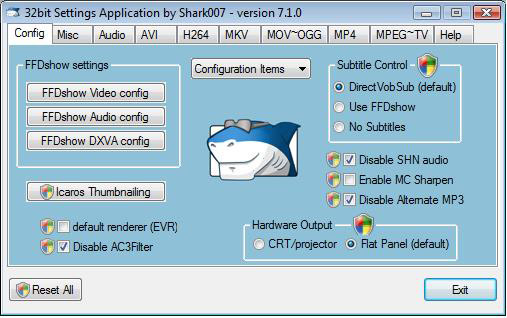
With Vista Codec Package installed, you won't need to install any other codec or filter. Many user suggested default settings are implemented. It does not contain a media player. It does not associates filetypes. With this package installed you will be able to use any media player (limited only by the players capabilities) to play DVD's, movies and video clips of any format. Streaming video (real and quicktime) is supported in web browsers. Visit the homepage to get a 64bit Addon which enables xvid, divx and DVD playback in Vista's MediaCenter.
Latest Reviews

Betanoob reviewed v6.4.0 on Nov 5, 2012
Best part is the free toolbars and spyware!
Oh and this is the worst codec pack in existence.

jetz reviewed v6.1.2 on Dec 14, 2011
Clueless foreigners need to read the license agreemant.
This hijacks your browser and will force install malware infested spyware depending on your locale.

xambik reviewed v6.0.0 on Dec 12, 2011

theshaggyman reviewed v6.0.0 on Sep 19, 2011
Well, while installing it *asked* me whether I wanted to install
1. the ask toolbar
2. weatherbug
both of which I de-selected, and I got no junk on my system. Maybe the people blindly clicking on "accept" or "agree" to everything ought to be more careful while installing.
I certainly don't look upon this kind of program behaviour as spyware.
It does what it claims, only negative for me was, contrary to its' author's words, it changed all associations to open with media player upon opening the control panel for the first time.
To the author: State clearly what you are doing! you state on your website "It does not install a player program and does not associate filetypes" - latter part of the assertion is no longer true.
Three stars for the above.

sararocs reviewed v6.0.0 on Sep 17, 2011
Installs unwanted spyware and on many systems even though you opt out, it installs anyway and their stuff is not easy to remove.
jetz reviewed v5.9.8 on Aug 2, 2011
Forced spyware!
Do not install this system hijacker!

CyberDoc999 reviewed v5.9.6 on May 8, 2011
adware

joeshmoe7 reviewed v5.9.3 on Apr 7, 2011
Well sorry to say, for the latest version, i got a big surprise of ASK Toolbar all over my browsers (firefox and IE8). And no notification or warning or choice during install. I guess times are tough and all, but i can't recommend any installer that does stealth install of junk like ASK toolbars, injecting them into both IE and FIREFOX (who knows maybe chrome if you have that installed)
Now, I was able to remove them and continue using the codec pack. And to the author's credit, he does give instructions on how to prevent it on the official forums. Still, i have decided to say so long, uninstall, and move on. In my line of work (which includes a lot of malware and junk-software removal), i just can't recommend it. I'll still give it 1 extra star over minimum, for the codec pack itself is quite good and useful.
joeshmoe7 reviewed v5.7.8 on Jul 8, 2010
Works great here on old XP.
I just tweak settings to my own needs, this pack + MPC-Homecinema is a WIN
Only one thing bad i could say is, by default = ffdshow audio mixer is on headphone virtual surround??? But easy enough to switch off. Probably just one of those, you know, matter of taste things, i like it pure with no virtual s***ual.

radiomaffia reviewed v5.6.2 on Feb 26, 2010
good, better, best! No more codecs problems after this also for xp platform. Has some nice progs in the install, every codec can be removed if desired...Use it for years now.

Betanoob reviewed v6.4.0 on Nov 5, 2012
Best part is the free toolbars and spyware!
Oh and this is the worst codec pack in existence.
jetz reviewed v6.1.2 on Dec 14, 2011
Clueless foreigners need to read the license agreemant.
This hijacks your browser and will force install malware infested spyware depending on your locale.
xambik reviewed v6.0.0 on Dec 12, 2011
theshaggyman reviewed v6.0.0 on Sep 19, 2011
Well, while installing it *asked* me whether I wanted to install
1. the ask toolbar
2. weatherbug
both of which I de-selected, and I got no junk on my system. Maybe the people blindly clicking on "accept" or "agree" to everything ought to be more careful while installing.
I certainly don't look upon this kind of program behaviour as spyware.
It does what it claims, only negative for me was, contrary to its' author's words, it changed all associations to open with media player upon opening the control panel for the first time.
To the author: State clearly what you are doing! you state on your website "It does not install a player program and does not associate filetypes" - latter part of the assertion is no longer true.
Three stars for the above.
sararocs reviewed v6.0.0 on Sep 17, 2011
Installs unwanted spyware and on many systems even though you opt out, it installs anyway and their stuff is not easy to remove.
jetz reviewed v5.9.8 on Aug 2, 2011
Forced spyware!
Do not install this system hijacker!
CyberDoc999 reviewed v5.9.6 on May 8, 2011
adware
joeshmoe7 reviewed v5.9.3 on Apr 7, 2011
Well sorry to say, for the latest version, i got a big surprise of ASK Toolbar all over my browsers (firefox and IE8). And no notification or warning or choice during install. I guess times are tough and all, but i can't recommend any installer that does stealth install of junk like ASK toolbars, injecting them into both IE and FIREFOX (who knows maybe chrome if you have that installed)
Now, I was able to remove them and continue using the codec pack. And to the author's credit, he does give instructions on how to prevent it on the official forums. Still, i have decided to say so long, uninstall, and move on. In my line of work (which includes a lot of malware and junk-software removal), i just can't recommend it. I'll still give it 1 extra star over minimum, for the codec pack itself is quite good and useful.
joeshmoe7 reviewed v5.7.8 on Jul 8, 2010
Works great here on old XP.
I just tweak settings to my own needs, this pack + MPC-Homecinema is a WIN
Only one thing bad i could say is, by default = ffdshow audio mixer is on headphone virtual surround??? But easy enough to switch off. Probably just one of those, you know, matter of taste things, i like it pure with no virtual s***ual.
radiomaffia reviewed v5.6.2 on Feb 26, 2010
good, better, best! No more codecs problems after this also for xp platform. Has some nice progs in the install, every codec can be removed if desired...Use it for years now.

Shark007 reviewed v5.6.1 on Feb 23, 2010
The MSN Bar's inclussion is an obvious effort at trying to make a few pennies because I realize not everyone is in a postion to donate to FREE projects. It is not blindly or installed in any hidden manner unless you are clicking next next next without reading anything. The toolbar offer occupies an entire installation screen immediately after the EULA presentation. Uninstalling it immediately afterwards negates the install and i receive nothing. You would at least need to try it out for a few days for me to receive anything from its install.
I know I work hard at maintaining and improving my software, so I also rate it at 5

jay46 reviewed v5.6.1 on Feb 22, 2010
What's with the MSN toolbar?
Sure it uninstalls ok, but if there was an opt out somewhere during install, it was small enough for me to miss. Stills get a 5!

imoso reviewed v5.5.6 on Feb 4, 2010
very good
Shark007 reviewed v5.4.7 on Oct 21, 2009
IakovK, there is nothing rude about informing you that the fact that you choose to turn off UAC is causing your issue. It is your computer and your choice.
ERROR 1152: When a compressed network image (single compressed setup.exe) is launched, the files compressed within it will be extracted to the TEMP folder and launched from that location. If one or more files cannot be extracted, then error 1152 occurs.

IakovK reviewed v5.4.7 on Oct 21, 2009
this product doesn't work for me at all: when running its installation file (VistaCodecs_v547.exe), the cryptic error appeared - described in the product forum:
http://shark007.net/foru...ead-Error-1152?pid=4311
but the broken download is not my case. I reported it in that topic and got some rude responses from the author - none of them had any hint about the issue.
So, I wasn't able to use the product.

cerveza reviewed v5.4.0 on Aug 27, 2009
This Codec package works like a champ on your Legacy and New machines.
I tried that pack with the letter K. K must be for Krash.
Uninstalled and replaced with the Vista pack and never ran into any
problems again.
The Vista Codec package is installed in every machine image I build.
Keep up the great work!

coover reviewed v5.3.7 on Aug 13, 2009
Re: Recent Reviews from Sbexin
Click on his name below and take a look at his recent reviews for other applications. You will find that his reviews are Spam. For some unknown reason he is actually advertising for other applications.
Vista Codec is very good and deserves a 5.

Galifray reviewed v5.3.5 on Jul 23, 2009
Overall, this is a good package though I wonder about some of the choices of settings. For example, ever since 5.3.x I've had problems with opening folders with incompletely downloaded video files. Explorer cpu usage would shoot up to 99 and all manner of freezes and crashing would happen. Fortunately, I figured out the problem is Xvid. It tries to create thumbnails and since the file is incomplete, it fails causing the Explorer issues. But I can disable Xvid and use the other demuxers just fine. So I will give it a five for having failsafe measures.
Shark007 reviewed v5.3.4 on Jul 15, 2009
Mike, the included Settings Application and some of its supporting files are built using the awesome programming language known as AutoIt. AntiVirus makers, McAfee and NOD32, hav been tagging these AutoIt built applications with False Positives. I have worked with McAfee to resolve the issue and they now update thier virus definitions to exclude my applications within 24hrs of each new release. Eset on the otherhand, the makers of NOD32, can't seem to get a handle on the situation and therefore are still tagging it with False Positives. Users of NOD32 need to add my installation folder to thier exclussion list.

Mike reviewed v5.3.4 on Jul 14, 2009
alexander_mundy: you're information is just plain false. I've been using this codec pack for well over a year now and it's been nothing but awesome. There are no trojans or viruses whatsoever. If you happened to get one, you probably downloaded it from 3rd party repackager.

statm1 reviewed v5.3.3 on Jul 13, 2009
These idiots don't know what they are talking about.. There is nothing wrong with the Vista Codec Package. I've literally been using it since around the version 3 days.. This IS a trusted pack and IS just as popular as Klite or CCCP..
Try this for yourself and don't listen to the idiots trying to advertise for their own codec packs on the competitors review section..
Shark007 reviewed v5.3.1 on Jun 26, 2009
Thank god for people like alexander_mundy.
With his report of a FALSE POSITIVE out in the open,
the package creator can no longer find out your shoe size.
Mcafee is working with me towards a solution. Nod32 is still blinded.
Most other antivirus companies already have this issue under control.

alexander_mundy reviewed v5.3.1 on Jun 24, 2009
Do not, I repeat do not download this program. They boast that it is a free codec program, but with the codecs you also get a free trojan_downloader. This has happened to me more than once. Pass along the word, because scams like this have to be stopped somehwere. I wish there was a regulatory agency for online companies, but there isn't so this is the only way to get the word out. The internet is full of scams, it should be regulated somehow and scamming companies should be closed.
Shark007 reviewed v5.2.9 on Jun 1, 2009
Galifray, FLV thumbs was the source of crashes for some, but not all people. For stability, I have disabled FLV thumbs by default and have also enabled the user to turn them on through the Settings Application.
Have a look in the MISC TAB.
Galifray reviewed v5.2.9 on Jun 1, 2009
I wonder if this update (5.2.9) is really more stable, it does not seem to be, as it has lost the ability to generate thumbnails for Flash Video (.flv) files. It plays them just fine, but even changing the display options won't correct the issue.

wonderthru reviewed v5.2.2 on May 3, 2009
Thank You, Thank You.
This is a Fix in Windows Vista when the
COM Surrogate Has Stopped Working

ramday reviewed v5.2.2 on May 1, 2009
Thanks for the Fix install Error 2753 Mr. Shark007. You rule.

Virtual_ManPL reviewed v5.2.0 on Apr 25, 2009
4/5
for me missing are simply encoders like h264, DivX or Xvid...
and DivX decoder (for files encoded by DivX) - provide sometimes better error resilience and postprocessing than Xvid...
good development with dev team attention to problems and updates...
P.S. Why can it be only one pack from XP, Vista and 7 like KLCP which I'm using now ?
@ VistaUser - you are too n00by to use KLCP, simple...
but NVM, this is not comment about KLCP...
stop ****ing KLCP about your problems...
both pack are good if you know what you want to install, not olny click "NEXT" & "NEXT"...
you can easy install any s*** like trojan or virus on your PC...
Shark007 reviewed v5.1.6 on Mar 25, 2009
marion90210 . . .
http://shark007.net/troubleshooting.html

marion90210 reviewed v5.1.6 on Mar 25, 2009
Hello to everyone,I have currently vcp 502 in my system and whenever I try to run this version or any other I get the following message:DATA BASE TRANSFORM:CANNOT UPDATE ROW THAT DOES NOT EXIST,TABLE DIRECTORY.
Does anyone know what this means.Please help,thank you in advance

mat99 reviewed v5.1.4 on Mar 8, 2009
Thank you Shark007. You're Angel.

VistaUser reviewed v5.1.4 on Mar 7, 2009
OMG! a blue screen!
I bet the software detected Klite on your system
and immediately choked on the fact that some people are still using that crap.
All you have to do is avoid Klite and your system will function fine.

knekk reviewed v5.1.4 on Mar 5, 2009
Bluescreen upon install.
Avoid this one.

gonwk reviewed v5.1.3 on Feb 22, 2009
GREAT CODEC PACKAGE.
Problems that I reported earlier with 5.1.0 and 5.1.1 ... actually there was NO PROBLEM ... the program is just too metaculous ... so it was trying to clean up my individually installed mess of Codecs.
Anyway ... Shark007, author of "Vista Codec Pack" ... Continues to produce an Exceptional Codec Pacakge ... and continually updates it and adds great tools to it. Also, Shark007 provides Great Support on his Forum answering questions.
I am giving this Codec Pack a 10 out of 10.
G!:)
VistaUser reviewed v5.1.3 on Feb 20, 2009
This codec pack is excellent. It does what it needs to do very well and is highly flexible.
I help many people to fix their computers and always recommend this pack when my customers have trouble playing videos. I frequently get e-mails from very satisfied users thanking me for giving that recommendation.
The author is very knowledgeable and always helpful with providing a fix in case of problems. If you got a problem, go to the MSFN support forums and you will get a solution very quickly.
I highly recommend this pack.
CyberDoc999 reviewed v5.1.3 on Feb 19, 2009
Worst Codec Package ever made..... creates too many problems

pcexpert reviewed v5.1.3 on Feb 18, 2009
This pack has many flaws. The installer is awful. My recommendation is to avoid this like the plague.
gonwk reviewed v5.1.1 on Feb 3, 2009
I tried installing VCP 5.1.0 & 5.1.1 on my laptop with Vista Home Prem., SP1, 64-Bit ... and the VCP choked at about 50% and my CPU fan kicked in high gear since "WerFault.exe" started ... VCP installtion never finalized ... Choked at 50% and on top of that it would NOT allow me to stop theinstall or close it ... I had to use Restore Point to get my laptop back to Normal. To me VCP Stinks!

dietrkk reviewed v5.0.6 on Dec 31, 2008
Absolutely awesome software, thanks man.

minklein reviewed v5.05 on Dec 11, 2008
This version may work. I installed both 32 & 64 bit on Vista 64 and mp4 plays OK in Media Player. Early release 5 update broke it.

picsoetje reviewed v5.04 on Dec 2, 2008
I have had nothing but problems with VCP since version 5.
It is off my system now, and it will never get back onto it.
CyberDoc999 reviewed v5.03 on Nov 28, 2008
I will never use this or any other codec package ever again....
they are only for noob's!
VideoLAN will play anything that you can not play with Neuview Media Player
Gotta love the Neuview Media Player
Shark007 reviewed v5.0.1 on Nov 12, 2008
I'm not exactly sure where the public servers are getting the distro file from but everyone is serving 5.0 and calling it 5.0.1
The filename should be: VistaCodecs_v501.exe

horsecharles reviewed v5.0.1 on Nov 12, 2008
Perusing the various review comments:
1. Have never had any problems over the years & on all Win versions with KLite.
2. Vista Codec Package is not as large as KLite.
3. Try installing by Running As Admin(right-click installer executable for this option).

jeffdeck reviewed v5.0.1 on Nov 11, 2008
Great program, but still having a problem installing ogg codec with version 5.01. Have an Error 1904 message when installing.

griever665 reviewed v5.0 Beta 3 on Nov 6, 2008
Fixed my COM Surragate crashing problem.
cerveza reviewed v5.0 Beta 3 on Oct 28, 2008
Great Codec pack!
I tried the K-Lite packs and had nothing but problems and crashes on various systems.
Switched back to ONLY using the Vista Codec
pack. I have had NO issues on any system
I have installed them on.
Keep up the great work!

anarkhy reviewed v5.0 Beta 2 on Oct 21, 2008
I play all my videos with just ffdshow installed, so what is the point of all these packages?

Pixelsmack reviewed v5.0 Beta 2 on Oct 21, 2008
Wonder if Bluray support is possible? At least for profile 1.1 (java).
Shark007 reviewed v4.7.3 on Aug 18, 2008
haskins69, I'm sorry version 4.7.2 was such a crappy release. I've corrected those issues and am confident that 4.7.3 will have you smiling again. Since you mentioned Aug 20 and it is only a few days away, thought I'd mention thats my birthday also,

haskins69 reviewed v4.7.2 on Aug 9, 2008
I've used vista codec pack since I got my system 8/20/2007 with no complants !! just problems with my ASUS striker series motherboards, and because of these problems I've had to re-install my OS many times, updating the codec pack each time to stay current well with version 472 I've had nothing but trouble mainly the dreaded"com surrogate stopped working error "and I tried all the on-line answers from turn off thumb nail veiw {it worked but of course I lost the option which I feel is un-acceptable] to using a command line order to dis able D.E.P.[this caused IE7 plus many other programs to stop working, ending in a fresh install of OS again,....so I not thinking it was a codec issue installed vista codec 472 again and checked after install and before I installed all other programs and guess what ??....vista codec 472 was the problem !!!!! I looked for older versions of vista codec and couldn't find them so I tried K- lite Mega code pack410 and the com surrogate issue was gone !!!!! now I'm saying this because as I said I have used vista codec pack since I got Vista with no trouble......til ver. 472....and would use It again if and when they work out this bug....and it would be nice if they added a few more codecs to the pack,with k-lite I didn't need to add mpg-4 or ffdshow to my system and I've had to with vista codec so it would play all media
again I've been happy in the past with vista codec, but I now find it sadly lacking and buggy, and thats sad to say from a programer that has done such good work in the past !!!

soco7 reviewed v4.7.2 on Jul 29, 2008
Working flawlessly for me. After opening my videos folder following the install, I actually paused for a few moments; it's like I didn't know what to do with myself now that there was no COM surrogate error to annoy me. Finally, no more dealing with that. Thank you!

alo23 reviewed v4.7.2 on Jul 26, 2008
Cyberdoc999 - how can it overwrite your good codecs? it installs to its own directory, and if your codecs were good, why install this anyway? Un-install problem? need to have installed it to be able to uninstall it. Re-format? should have done this BEFORE installing this great package, then you would not be having any problems at all.
I have used this package for almost 2 years now without any problems what-so-ever.
CyberDoc999 reviewed v4.7.2 on Jul 24, 2008
over wrote my better codec's
and would not un-install
so I had to re-format... what a POS

anonymous_user reviewed v4.7.1 on Jul 14, 2008
The best codec pack just keeps on improving.

bevan reviewed v4.6.9 on Jun 14, 2008
it is very effective on vista(32bit)

dkahaniman reviewed v4.6.9 on Jun 14, 2008
Great codec pack, works great i had no problems in installtion.

inton67 reviewed v4.6.9 on Jun 13, 2008
confusing ,isn't it? K-Lite compared to Vista codec,wfat's the different ? ? anyway this codec package are free what else can i say,hehehehehehe you'll love this

Mad_Griffith reviewed v4.6.9 on Jun 13, 2008
If only it supported .part files from eMule, that would be awesome. As of now, I'm forced to install VideoLan, while I would like to use Windows Media Player only.

bourgeoisdude reviewed v4.6.3 on Apr 15, 2008
This one does well. I've used this one on another machine and it seemed fine--haven't found anything left out yet, although I've heard it is not quite as comprehensive as K-Lite which also works fine on my main PC. (both run Vista FYI)

comeoffit reviewed v4.6.3 on Apr 15, 2008
I would say its better, smaller, and plays whatever you throw at it.

preinterpost reviewed v4.6.3 on Apr 15, 2008
How does this compare to K-Lite?

sefik66 reviewed v4.6.3 Beta 1 on Apr 1, 2008
Yes it did work. Finally I can play my personal video files on WMP on Vista.

slaydrian11 reviewed v4.6.2 on Mar 30, 2008
fixed my problems with not playing content i download but now avi files i created myself with sony vegas editing programs now play back with thin black lines through it and lowered quality. fixed one problem and created another. can anyone help????!!!!
coover reviewed v4.6.2 on Mar 21, 2008
Picsoetje,
No, you're not doing anything wrong. This set of Codecs will not open Real and a few others, but it will open most and in doing that, is still very, very good. In fact, I doubt if you'll find any Codec pack which will open all of them. And almost all of them will not open Real. For that, download "Real Alternative". You still won't be able to open Real files in the Windows Media Player (WiMP), but you will have a player which will play those files without the bloat of the Real Player.
picsoetje reviewed v4.6.2 on Mar 21, 2008
I must be doing something wrong but installing this package does not solve any of my my problems :
There are plenty of media files (Real Media, Apple, etc...) that I cannot play with Windows Media Player: not before, nor after the installation of this package.

Vimes reviewed v4.6.0 Beta 2 on Mar 8, 2008
Works well and seems to have no problems using it on XP 32.

arossetti reviewed v4.5.9 on Feb 25, 2008
Latest version causes an explorer crash when an .hdmov or .mov file is highlighted. Stick with 4.5.8 for now. Otherwise, an excellent package.
statm1 reviewed v4.5.7 on Jan 28, 2008
He released this and ffdshow comes out with rev1821 the same day..

alanpalmer reviewed v4.5.6 on Jan 16, 2008
The installer tells you to deselect installation of RealMedia files if you have RA. I installed Vista CP because WMP seemed to think AVIs were audio files; at least, I got sound and the sound controls but no pictures. This fixed it. I tried it with a few other filetypes and they all worked fine.

paulm reviewed v4.5.6 Beta on Jan 1, 2008
Installed 4.5.5 release to enable audio in WMP 11 when playing DVD's on XP. This now works fine.
Only issue was that when selecting the Favorites menu from within IE7 the Favorites dropdown list flashed/flickered like crazy. Had to reboot the PC 3 times before this issue cleared. I was about to uninstall and try the K-Lite package. Seems OK at the moment. A possible bug that the developer may need to look into?
Vimes reviewed v4.5.5 on Dec 21, 2007
In help to AlphaBetaGamma.
I too find this but at least the codec pack no longer corrupts a PC with RM already installed.
I found that I have always need to install the Real Alternative codec on a machine to have the Firefox RM plugin that works. The real alternative codec is currently at version 1.70.
With the above added it then works fine, as you have noted.
coover reviewed v4.5.4 on Nov 30, 2007
A 5 . This just works.
Quick note to Photonboy. UAC might be a "good thing", but it isn't needed, particularly if only one user uses the computer. That is the case here. I like Vista without UAC, and I dislike it with it. UAC is disabled at my house.

Adrian79 reviewed v4.5.4 Beta 1 on Nov 26, 2007

AlphaBetaGamma reviewed v4.5.3 on Nov 18, 2007
OK when it works. This has nice codecs that reduce my CPU usage in WinXP when using Windows Media Player. But it did not install the RealPlayer plugin for Firefox, and I don't see any instructions for it. One one of my PCs, I had a previous installation of RealPlayer, and that continued to work. But on another PC without a previous RealPlayer installation, no plugin was installed and hence it did not work in Firefox at all.
statm1 reviewed v4.5.3 on Nov 17, 2007
Been following this package for awhile and can't find one fault with it. Great software.
p.s. Here here, UAC is not evil!
Vimes reviewed v4.5.3 Beta on Nov 9, 2007
Top marks for a top package that does what it claims, oh and it maintained my realmeadia preferences when using Firefox to watch streaming video.

photonboy reviewed v4.5.2 on Nov 8, 2007
Based on the number of codec packages that are available, I believe a codec package should receive a solid 5 if you can get your AVI/MKV/MP3/AC3/OGG files etc to actually work.
I'm also a big fan of programs that use internal codecs in programs like KMPlayer (the Windows program not the Linux one).
Don't forget to go to the homepage and read the Installation instructions. And yes, UAC is a good thing.

synthetix reviewed v4.5.2 on Nov 2, 2007
I downloaded this and it seems that WMP11 in vista is recognizing all my files it wouldnt before.
However, whenever i log into Windows Media Center on my 360 attached to my wired d-link homenetwork, it crashes the media center connect when i select videos.
I believe this is directly related to my instillation of the codec pack, however, it seems that others aren't having this issue.
any thoughts?

bleron reviewed v4.5.2 Beta 2 on Oct 29, 2007
wat u need to do is try running the program (the .exe file) as an administrator ...that helped me :)

Favret reviewed v4.5.2 Beta 1 on Oct 20, 2007
Need help here, i've already downloaded like 4 times this package and every time i try to install it it gives me a 7-Zip error, what should i do to correct problem?, pleas advise, thanks in advance.
Favret

Mick Leong reviewed v4.5.1 on Oct 11, 2007
This is great. I have used ffdshow xvid etc - they all install fine but for some reason they all have incorrect settings and winamp and media player does not play mp2 mpeg4 etc. In fact many settings in ffdshow are incorrect so the codec is useless to many players. Only this codec package solves the problem.

donpacman reviewed v4.5.1 on Oct 9, 2007
Must Have! for Vista users.

godzila reviewed v4.5.1 on Oct 9, 2007

serendipityguy reviewed v4.5.1 Beta 2 on Oct 5, 2007
With Vista Codec Package installed, you won't need to install any other codec or filter..
With Vista, this has proven over & over again.

NuImage reviewed v4.5.0 on Sep 30, 2007
BAM! Worked like a charm. Great package.

MidnightWatcher reviewed v4.5.0 on Sep 7, 2007
improvelence, you don't know what you're talking about. This is a godsend to any Vista user, and is highly recommended. This is easily a 5/5.

improvelence reviewed v4.4.9 on Aug 24, 2007
Codec packs are a bad idea unless you are an extreme novice. Only use this if you have no knowledge of codecs and filters whatsoever.

hell0 reviewed v4.4.9 Beta 2 on Aug 20, 2007
MPC was never included with Vista Codec Package, you can download it separately from the homepage.
Anyways this beta is working great for me.

XZAVER reviewed v4.4.9 Beta 2 on Aug 20, 2007
What happened to the god old support for .RM files ?
Was Media Player Clasic removed for this version ?

siryak reviewed v4.4.9 Beta 2 on Aug 20, 2007
Great codec pack that gets better and better with every release!
hell0 reviewed v4.4.8 on Aug 19, 2007
The best codec pack just keeps getting better. Keep up the excellent work Shark007.

H4cko reviewed v4.4.8 on Aug 15, 2007
It't very good, but I think that would be better if Media Player Classic was included in this package.
coover reviewed v4.4.9 Beta 1 on Aug 2, 2007
Radiomaffia --
One of the previous versions fixed the installation package of this program so that it is now unnecessary to uninstall the previous version of Vista Codecs prior to installation of the new version. You may now install the new version on top of the old without consequence.
A 5, pure and simple.
CyberDoc999 reviewed v4.4.8 on Jul 29, 2007
good
MidnightWatcher reviewed v4.4.8 on Jul 28, 2007
Love it. I installed the x64 components though, MKV videos seem to be playing too slow. But keep up the good work Shark007!
radiomaffia reviewed v4.4.8 Beta 2 on Jul 23, 2007
High 5 and well reconmended :-)
Solved my problems with the crash in Directory Opus with videofiles and you can easily uninstall codecs afterwards. Just install this one and don't bother anymore. You have to uninstall earlier versions before installing this one.
siryak reviewed v4.4.8 Beta 1 on Jul 12, 2007
Great codec pack that eliminates the need to install other players!!!
siryak reviewed v4.4.7 on Jul 2, 2007
Just keeps getting better. Still wish there was an updater of sorts, but I guess since this is just a package of codecs and not an actual program that would probably be difficult.
siryak reviewed v4.4.7 Beta 4a on Jun 21, 2007
"What's bloating about this software?"
Yah really. How can it be bloated whenever it is just a bunch of files for your media player to use? Not like it uses your system resources or anything.

-Wanted- reviewed v4.4.7 Beta 3a on Jun 20, 2007
What's bloating about this software?
siryak reviewed v4.4.7 Beta 3a on Jun 19, 2007
Great package. This allows you to play the different codecs like xvid, divx, etc. in WMP without the need to install other players on your computer.

muka3d reviewed v4.4.7 Beta 3a on Jun 19, 2007
Silliness, bloated.
All you need is GOM Player (all codecs built-in, no bloat) or ffdshow (decodes most everything). In fact, this package includes ffdshow, which is all you need, and the added bloat is unneeded. You don't need 3+ DivX decoders.
siryak reviewed v4.4.6 on Jun 15, 2007
Great codec package. Install it and your ready to watch just about anything. The ONLY complaint I have is I wish it had an updater instead of having to download a new install file every time.

Verdauga Greeneyes reviewed v4.4.6 on Jun 15, 2007
Great package, and Shark007 really goes out of his way to please everyone: to anyone with problems, just post in the msfn topic.
Pixelsmack: as taken from the first post in the topic:
- If you're having COM_Surrogate errors, remove any Nero products and contact them for support.
The above information also applies to DivX products. If for some reason you have installed XviD on your own other than the version included in this package may also be reason for issues as described above.
However since Shark007 is working to resolve issues with said products anyway you may want to post in the MSFN topic and explain your situation.
Pixelsmack reviewed v4.4.6 on Jun 15, 2007
Getting a error message after successfully playing a video--after updating.
"COM SURROGATE" failure is the message. This is under Vista Ultimate.
VistaUser reviewed v4.4.6 on Jun 14, 2007
Thanks for the update, but all my video's were working fine before and still play fine after I updated. Keep up the excellent work.
alo23 reviewed v4.4.5 on Jun 3, 2007
This codec pack has worked flawlessly for me and I highly recommend it to anyone getting started with Vista. CyberDoc999, be sure you fix that short between the seat and the keyboard before you install windows again.
CyberDoc999 reviewed v4.4.5 on Jun 2, 2007
this broke my Vista computer.... I had to re-format!
VistaUser reviewed v4.4.5 on Jun 2, 2007
Best darn codec package ever made. Like someone else said on here, the greatest part of the update releases to this package is that there wasnt anyting wrong in the 1st place. All my vids work.
MidnightWatcher reviewed v4.4.5 on Jun 1, 2007
It it were not for the Vista Codec Package and the x64 components then Vista would not be as enjoyable as it is for me. I can now watch the hi-def quicktime movie trailers and Xvid/Divx files in Vista Media Center x64, as well as .mkv and .m2v files. Kudos to the the sharkman, good job and keep up the excellent work.
siryak reviewed v4.4.4 on May 22, 2007
Arg...If there are going to be updates this often this program needs an updater. Until it does it will be getting a 4!
Shark007 reviewed v4.4.2 on May 18, 2007
Pixelsmack, thank you for the kind words.
The difficulty you are experiencing with DivX 5 playback can be corrected in VCP with the change of one setting. The setting just isnt the prefered default for most users. Open the Video decoder configuration icon from the startmenu and change the setting for DivX 4/5/6 to read libavcodec.
The VCP Homepage exists on a chat forum.
Issues are often resolved alot quicker there.
@ -Lord- VLC is a great media player and there is no denying that but almost in the same breath you mention downloading huge codec packs. VLC can't play QuickTime and RealMedia formats but by installing VCP it allows both of these formats to be played in almost any player along with a multitude of video/audio formats that are also enabled to be played in any player. Take notice that VCP is a mere 20MB - this is far from huge for what it can do for you and there is no need to install the bloated QT and RM players.
The Vista Codec Package is not shipped with a player and does not associate filetypes allowing the user to choose whatever player they prefer.
Pixelsmack reviewed v4.4.2 on May 10, 2007
Continues to impress as every version, seemingly, as flawless as the previous. The best thing about the updates is they don't seem to do anything. Which is a good thing really. Shows how stable the installation is.
The only thing stopping me from giving it a "5" yet again is that it still cannot play certain DIVX 5.05 movies. For some reason you have to use the actual DIVX PLAYER from Divx.
I don't know if this is a flag in the encoded file that commands this or not. Still, whatever the reason, it's frustrating.
VistaUser reviewed v4.3.9 on Apr 28, 2007
I had K-Lite on Windows XP for quite a while and bought a new laptop with Vista on it a few weeks ago. I couldn't get Windows Media Player to play all my stuff anymore. A couple of guys at work said to give this one a try instead because it was working great for them. I just came back to say thanks. This does it all for me. Everything is working perfectly now.

-Lord- reviewed v4.3.9 on Apr 27, 2007
I agree with pixelsmack. So, I use VLC player. Google it. It plays everything without having to download and install huge packs of codecs. they're all built into the player.
If you want to use Vista to do it for you, then this pack is for you.
Pixelsmack reviewed v4.3.8 on Apr 22, 2007
I truly think this one of the best hassle free CODEC bundles out there. Clean install, no nags, nothing to do really at all after install.
My only bug and it's not just the fault of this package but many, is that a lot of DIVX 5.05 movies won't play in any player except their own. Which blows.
siryak reviewed v4.3.8 on Apr 21, 2007
Great Codec package!!!

Sully9663 reviewed v4.3.8 on Apr 21, 2007
Rocks. All you need.

alphatrigon reviewed v4.3.8 on Apr 20, 2007
so far this is the only thing I use....so I'd have to give it a 5, it might not be perfect, but is so for me, lol.
As for installation issues, should be pretty straightforward...if you can't download and have it install successfully, read the homepage. That's it.

V.A reviewed v4.3.7 on Apr 8, 2007
I really don't know why it does not work for me, but it just doesn't.
That's why I went back to the K-Lite Mega pack and Media Player Classic - that works OK on my Vista machine.
A pitty I'd say, because I'd like this promising one would work for me as well.
Maybe I do something wrong during the set-up, but there is so little info available about what should be done exactly that I gave up at last.
Shark007 reviewed v4.3.7 on Apr 6, 2007
drumcat says: Still breaks mpeg.
I have no idea what codecs you have installed on your system but ever since the release of version 4.3.5 all MPEG and MPG files are decoded by the native video codec, Microsoft MPEG-2 Video Decoder.
This can be verified by anyone using a free Microsoft program called graphedit easily found and downloaded from the internet. Just drop any mediafile onto graphedt.exe and it will display the codec being used to play the file.
Maybe its time you cleanup your system from the garbage left behind from other codecpacks.
siryak reviewed v4.3.7 on Apr 6, 2007
Great and easy to use codec package.

drumcat reviewed v4.3.7 on Apr 6, 2007
Still breaks mpeg. -- And actually, it was this codec pack, smart guy.

Wintings reviewed v4.3.6 on Apr 1, 2007
This Codec package makes life very easy. Highly recommended.

BIg_DD reviewed v4.3.6 on Mar 31, 2007
elopez17, since when do media codecs contain support for motherboard chipsets?
I have used this package for a few months already and it just keeps getting better. I am thankful to the developers and my donation is sent.

elopez17 reviewed v4.3.6 on Mar 31, 2007
Still no Nvidia Nforce3 support

c4p0ne reviewed v4.3.6 on Mar 31, 2007
This sh*t keeps getting better and better!! What a relief not to have to deal with the installation of 500 million g** codecs! Oh, and NICE one on the firfox QT plug fix, that was a really annoying one as we've banned IE on our networks.
Shark007 reviewed v4.3.5 on Mar 19, 2007
AnthonySPT, just wanted to thank you for taking the time to make a detailed posting. Please give my latest revision a try. I think you'll like the results of your post.

TheJosher reviewed v4.3.5 on Mar 19, 2007
Great. The new version works perfectly and keeps all the existing (built-in) MPEG2 codecs. Has all the codecs I need, and haven't experienced any compatibility problems yet.

saininja reviewed v4.3.4 on Mar 16, 2007
at moment i use 4.31 and i will update to 4.34 but don`t work i became error windows ?
"Database: Transform: Cannot update row that does exist. Table:Feature "
Installshield breaks
Jenny
Pixelsmack reviewed v4.3.4 on Mar 16, 2007
I have to ask, does uninstalling it restore the Vista native codecs?
horsecharles reviewed v4.3.4 on Mar 15, 2007
A request for next upgrade:
include in it the replaced Vista codecs and then roll them back ...or at least a detailed process to manually accomplish the roll back.
Shark007 reviewed v4.3.4 on Mar 15, 2007
The HomePage exists on a chat forum.
Uninstalling it restores the vista native codecs.
Windows uses a merit system to decide which codec to use. The most recently installed is usually prefered by the system. The native vista codecs ARE NOT deleted or overwritten, they just have a lower merit. Removing the codec package restores their merit.
For the next release (v4.3.5), the Vista native codecs will retain their merit and continue to be the systems prefered codecs to use for AC3 and MPEG2.
The next release is currently being BETA tested.
Shark007

AnthonySPT reviewed v4.3.4 on Mar 15, 2007
This is a nice attempt at bundling a lot of open codecs for Vista.
However, be warned, that it also includes Codecs that are ALREADY in Vista, like AC3 and MPEG2, replacing the Vista based codecs.
This may not seem like a huge problem, but with ATI and NVidia drivers, they use the internal Vista codecs to accelerate video, and when these codecs from this package are installed, you lose Mpeg acceleration for movies.
Now again, this may not seem big, since most people don't care about CPU usage when watching Videos, but if you are an Ultimate user and are using animated or Video desktop backgrounds, it is a massive performance difference.
For example on a low/medium end system using an MPG for a background will eat 5% of the CPU, and even then it does yield nicely. However, if you install the Vista Codec Package, you will find your CPU usage at 50-80% usage just to have an animated desktop video wallpaper.
I wish the person putting together this codec package would step back and look at the codecs ALREADY in Vista and make the ones that overwrite the Vista codecs an 'option' that is off by default for novice users.
Even with AC3, the Vista codec version is designed with the new Vista audio subsystem in mind and therefore it does a better job handling the conversion to Dolby Stereo and Dolby Pro Logic than the free AC3 codec in the package. With the free AC3 codec, unless you have a 5.1 or up sound system, the voice can get lost and the sound volume is greatly reduced.
So I applaud the effort of getting a lot of these codecs into one package, but the fact they will lower your quality and performance for standard things like DVD and HD DVD playing is bad.
So be warned, especially Vista Ultimate users that like having an animated desktop with little to no CPU usage for it.

Defcon79 reviewed v4.3.1 on Mar 6, 2007
This is a well put together codec package with everything thats needed. I'm giving it 4 rather than 5 because the QT version included in QT alternative (and thus KLite packs) allows saving movies viewed in the browser to disk, whereas this does not.

TechNoWeb reviewed v4.2.9 on Mar 2, 2007
the best codec package i've ever installed on both xp and windows vista i don't like haveing to install quicktime on my computer becuase it's all ways calling the mother ship and then haveing to find codec's for other file formats this works and works well i give it a big thumbs up
BIg_DD reviewed v4.2.8 on Feb 23, 2007
This is the best codec package I have ever installed. I like all the options available and even better, after it is installed, you can still customize it, WTG! and free too :)
I have not had any problems with anyhing ever since I started using this package.
I'd recommend this to everyone looking for a solid installation that works right the 1st time.
dietrkk reviewed v4.2.8 on Feb 23, 2007
EXCELLENT PACKAGE. Thank you.
Everything work perfectly in Vista x64
Good job.

dean56 reviewed v4.2.7 on Feb 17, 2007
yes, it works fine with Vista for me!!
MidnightWatcher reviewed v4.2.7 on Feb 16, 2007
The x64 Components (2/16/2007) seem to work better now with Vista 64-bit. I can now watch the Xvids I have using Media Center x64. Keep the updates coming!
MidnightWatcher reviewed v4.2.6 on Feb 6, 2007
Keeps getting better :)

carstereos reviewed v4.2.5 on Jan 29, 2007
4.2.3 broke my flash, but 4.2.5 fixed it again, now I give it five stars
statm1 reviewed v4.2.4 on Jan 23, 2007
Finally theres a working codec pack that lets me watch whatever I please..

crowbar82 reviewed v4.2.3 on Jan 19, 2007
Works perfect with Windows Media Player 11 on Vista!

ajua reviewed v4.2.3 on Jan 18, 2007
instead of complaining, its better to know what you need. example, i use xvid, ffdshow and coreavc. with this i play all video formats possible. no need to download codec packs. the codec packs i like are the ones that only install xvid, aac, ffdshow, divx, this are the ones that people really need. one pack i can remember is XP Codec Pack. for vista, well, i need to try i see wich codec works and wich dont.
the effort of this codec is pack is fine but i think there are too many components that are useless and some that are useful.

shdwstar reviewed v4.2.3 on Jan 18, 2007
like the previous version of this, i prepared myself for doom when clicking install.
after about 10 minutes of ignore, retry or abort b.s., i decided this program wanted to overwrite many files that appear to be useful to windows... such as explorer.exe. fearing that it was too late , that i had already infested my computer with more junk and popups i tried to restore back. but my fears had been correct. this crap fingered my machine all to hell and i was forced to do a fresh install of windows. words for the wise, stick with something else.. maybe klite codec pack

dolcesculacciare reviewed v4.2.2 on Jan 17, 2007
The installer for vista is broken... can't uninstall the old version or use this version to upgrade or clean install... it wants to read the temp directory and can't, even when run as administrator...

microFawad reviewed v4.2.2 on Jan 15, 2007
Yes the file size is little bit bigger but it gives full support for all the formats that I wanna play.
Awesome! 5 Stars

vcorvinus reviewed v4.2.2 on Jan 15, 2007
Yet another bloated codec pack that will cause you nothing but grief. Don't download codec packs, download only the codecs you know you need, and the correct versions.
carstereos reviewed v4.2.2 on Jan 14, 2007
The CODEC pack worked fine in XP, but upon removal it breaks iTunes7. The only way to fix that was to reinstall Vista Codec Package.
shdwstar reviewed v4.2.2 on Jan 13, 2007
before installing this I went to the closet and pulled out daddy's old shotgun. I knew it was going to be needed after reading previous reviews. I inserted it right into my kidney. clicking install as I pulled the trigger I realized I was on the right path. As the blood sprayed onto my freshly painted white wall, my system began to take on new colors. The icons became disfigured just like my wound. Needless to say the hole in my stomache turned out to be alot less pain then installing this crap. So I give it a 1... make sure u got your restore dvd handy or a 10 lb. hammer.. you'll be needing it.

mep reviewed v4.2.2 on Jan 13, 2007
"If any MS employee is reading this, PUT MORE STUFF make it as bloated as you can."
Exactly...more for your money ;p
statm1 reviewed v4.2.2 on Jan 13, 2007
You people that complain about crap being bloated.. Would you like MS to just go back to selling the very first version of Windows that was released back in the eighties that didnt have ANYTHING in it. So you can complain that its bloated? I for one dont think Vista is bloated enough. If any MS employee is reading this, PUT MORE STUFF make it as bloated as you can. I LIKE BLOATED software!
And this codec pack is great because you can use other players other than VLC IF you want..

madcats reviewed v4.2.1 on Jan 11, 2007
As I said, it's okay; but now I'm using "VLC Media Player" at http://www.videolan.org/vlc/features.html
Maybe you won't want a large codec pack either.Check it out to reduce Vista's already bloated op. system.
madcats reviewed v4.2.0 on Dec 23, 2006
I found this is better than K-Lite for Vista, it works nicely with the the "Media Player" addon at:
http://www.msfn.org/boar...dex.php?showtopic=66826

daver18qc reviewed v4.2.0 on Dec 5, 2006
The codecs by themselves are ok, but the way the installer replace all the icons of the media files and the uninstaller that couldnt uninstall anything, that was unacceptable for me. i had to manually find the registry keys with regseeker and delete them all to restore my icons. i cant rate it more than 2, there are so many better alternatives to this pack, and the way it screw all the filters and make wmv decoded by some other codec is just not right.
arossetti reviewed v4.2.0 on Dec 4, 2006
Up through 4.19, it was a 5. For some reason, v. 4.20 has led to the return of the dreaded COM Surrogate error. Uninstall and reversion to 4.19 fixed the problem.
BIg_DD reviewed v4.2.0 on Dec 1, 2006
Happy it is working for XP. All perfect since i start using this Thanx :)
alo23 reviewed v4.2.0 on Dec 1, 2006
I just tried it on Vista and everything is working great. To install it i had to rightclick on the file and choose run as administrator.

cip2kro reviewed v4.2.0 on Dec 1, 2006
Worst codec pack ever. Not even Vista ready or vista related. The name is just for "eyecandy" and makes ppl thinks this is a cool package for vista. But no! It fails to install under vista and on xp its plain garbage and all codecs are broken. Stay with k-lite.
dietrkk reviewed v4.1.9 on Nov 28, 2006
Great product and works well. Thanx
@ mitchelln you need to learn Vista.
User Account Control is stopping your install.

mitchelln reviewed v4.1.9 on Nov 28, 2006
Fails to install under Vista RTM. I get an error saying I have insufficient privileges even though I'm logged in as Adminsitrator. I suspect the MSI is not right. Other low level stuff such as Nero install fine, so I don't think it's my account.

anomoly reviewed v4.1.9 on Nov 27, 2006
Vista's problem is driver compatibility, not codecs. It took ms 20 years to improve the gui. sad

markww reviewed v4.1.9 on Nov 27, 2006
The Codec Package does not work at all, every time it sees a program that needs to run on the system the program can't find the right CODEC to run,even though you go to the file and run the CODEC won't work
Mark

Bagobie reviewed v4.1.9 on Nov 25, 2006
yes, "some guy", let's rate a codec package poorly because you don't like the OPERATING SYSTEM ITS FOR

eyv reviewed v4.1.9 on Nov 24, 2006
Excellent!

iamanon reviewed v4.1.8 on Nov 19, 2006
Excellent codec pack that does its job well.

Bu1wink1e reviewed v4.1.8 on Nov 15, 2006
Some Guy do you even read the description of programs you review??? This is a CODEX!
I have to say I've tried all the other packages out there and I like this one the best its the least intrusive and I've not experience and nasty surprises.

some guy reviewed v4.1.8 on Nov 15, 2006
shrugs! Vista who would install that over resourced useing OS>?
BIg_DD reviewed v4.1.6 on Nov 4, 2006
This pack works with my XP. After removing Klite megapack and installing this one i get REAL working online with firefox again. thanx :)

cyberloner reviewed v4.1.6 on Nov 4, 2006
No regret to use this latest pack + mpc... it rocks =)

midnighter_9999 reviewed v4.1.6 on Nov 4, 2006
Can We Just Update The New Files Or Do We Have To Download The Full File?

Fred Garvin reviewed v4.1.6 on Nov 3, 2006
In my instance, I couldn't get Real Audio to work...not even with the Media Player Classic add-on. Otherwise, I like it, but it needs a FLAC (or at least a FLAC splitter to work with FFD audio), WavPak, and Monkey Audio decoder to be the complete all-in-one solution that K-lite Mega Codec pack is.
dietrkk reviewed v4.15 on Oct 28, 2006
Now i have good all in 1 codec that does handle all my vid and work my language. Keep up good job
alo23 reviewed v4.15 on Oct 28, 2006
nice work - thnks for this

Wesmosis reviewed v4.14 on Oct 27, 2006
thanx shark, you da man

the artist reviewed v4.14 on Oct 25, 2006
haha, version 4 and Vista ain't released yet???
they'll be Version 11.2 by release time, hehe!

1uk3 reviewed v4.14 on Oct 25, 2006
Nice to see a Vista codec pack - had problems with some others. K-Lite Codec Pack also works though (not K-Lite Mega though).

LegalBeagle reviewed v4.1.1 on Oct 8, 2006
Great Product....does what it says on the tin

zhengx reviewed v4.1.1 on Oct 8, 2006
Good.
But this newer version comes out too soon.
Just 4 days.

ricktendo64 reviewed v4.1.0 on Oct 4, 2006
Sweet!!! Shark007 Rocks, I really dig his Installers