
File Details |
|
| File Size | 87.9 MB |
|---|---|
| License | Shareware, $49.95 |
| Operating System | Windows 7/8/10/11 |
| Date Added | September 20, 2022 |
| Total Downloads | 129,424 |
| Publisher | Poikosoft |
| Homepage | EZ CD Audio Converter |
Publisher's Description
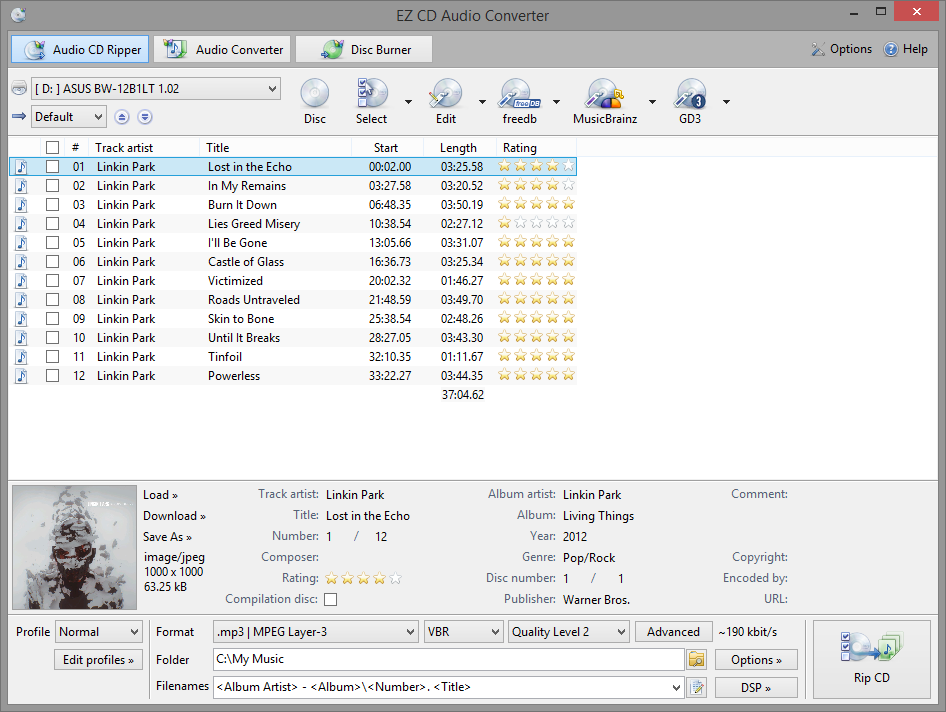
EZ CD Audio Converter is music converter software designed to provide highest quality audio format conversions. Easy to use, the most comprehensive audio file format converter trusted by home users, audio enthusiasts, professionals, studios, and radio stations worldwide.
Convert and encode audio files to/from FLAC, AAC, xHE-AAC, MP3, M4A, DSD, WAV, Opus, Apple Lossless, Vorbis and many more audio file formats. Download music information from 6 metadata services. Edit metadata of audio files with the integrated metadata editor. Keep all the metadata between audio file conversions.
Convert music in highest quality with the ultra-precise (64-bit floating point) audio engine. Sample rate conversions are performed in highest fidelity with the professional quality audio sample rate converter. Convert between PCM and DSD formats with the professional quality DSD converter. All audio conversions are performed in bit-exact accuracy.
Latest Reviews

Oskar69 reviewed v9.0.4 on Oct 29, 2019
Best music converter

DragonSlayer666 reviewed v8.0.5 on Jan 30, 2019
For the money this really can't be beat IMHO. I've tried the free ones but they just can't compare. The closest I've found for Free Is Fre:AC and it still isn't nearly as configurable as EZ CD Audio Converter. This has all the bells and whistles put in a package that even most novices will find intuitive and practical. The resulting rips/conversions are of the utmost quality and free upgrades for life make this a true blessing for audiophiles and casual listeners alike.

legion reviewed v7.0.1 on Sep 23, 2017
Good piece of soft.

Bullwinkle J Moose reviewed v7.0 on Sep 5, 2017
Version 7.0
TOTAL FAIL!
What am I missing?
Version History and bug fixes look like they are the same in each version
Where are the old version history's and bug fixes at your website to compare with this version?
Did you actually change anything or did you just say you did?
Why do you have a new version every few days with no real improvement?
Went to "Advanced" and turned on CRC error protection, then changed quality from "high" to "highest"
Scratched test disk now sounds worse than leaving the settings at stock position (high / no CRC error correction)
Free software at stock settings gives better results than this
Here is my Earlier Review of 6.1 for comparison>
EZ CD Audio Converter v6.1 is CRAP!
1. EZ CD Audio Converter was the worst at correcting errors on a scratched test disk
(NCH Express Rip was FAR Better at correcting errors on my test disk)
2. EZ CD Audio Converter shows "Unknown Artist" on every track of test disk
(NCH Express Rip shows the correct name for each artist on my test disk)
3. EZ CD Audio Converter has an annoying delay at startup
(NCH Express Rip does not have an annoying delay at startup)
4. EZ CD Audio Converter costs $29.95 @ website (why is it listed @ $40 here?
(NCH Express Rip is FREE for non-commercial use)
I DARE YOU to compare NCH Express Rip directly with EZ CD Audio Converter
Heck, I DOUBLE Dare ya!
Bullwinkle J Moose reviewed v6.1 on Aug 23, 2017
EZ CD Audio Converter v6.1 is CRAP!
1. EZ CD Audio Converter was the worst at correcting errors on a scratched test disk
(NCH Express Rip was FAR Better at correcting errors on my test disk)
2. EZ CD Audio Converter shows "Unknown Artist" on every track of test disk
(NCH Express Rip shows the correct name for each artist on my test disk)
3. EZ CD Audio Converter has an annoying delay at startup
(NCH Express Rip does not have an annoying delay at startup)
4. EZ CD Audio Converter costs $29.95 @ website (why is it listed @ $40 here?
(NCH Express Rip is FREE for non-commercial use)
I DARE YOU to compare NCH Express Rip directly with EZ CD Audio Converter
Heck, I DOUBLE Dare ya!

jowtron reviewed v6.0.2 on May 18, 2017
Still the best choice for bulk audio conversion.

FatBastard reviewed v2.2.2 on Nov 12, 2014
This is a very nice program.

mizkitty reviewed v2.2.1.0 on Aug 27, 2014
Not free...

infectiphibian reviewed v15.3.0.1 on Oct 19, 2011
New features:
- New Dolby Pulse AAC / HE AAC encoder
- LAME 3.99 MP3 encoder
- Automatic ReplayGain calculation
- ReplayGain "2.0": Original ReplayGain algorithm replaced with ITU-R BS.1770 (new standard, more accurate, faster)
- Ogg Vorbis codec improved and updated
- Internal sample rate converter set to highest quality mode
- Changes in Audio Converter internal behavior, making it faster in certain conditions
- Fixed AAC/HE AAC encoding problem in multi thread Audio Converter
- Updated Amazon Cover Art Search protocol to the latest version (old version will stop working on Feb 2012)
jowtron reviewed v15.2.5.1 on Aug 29, 2011
This is the best program out there for audio conversion/CD ripping. New version supports multi threading for modern processors and it has the best codec support. The developer is really on the ball with regard to feature requests and it is frequently updated. Well worth the money.

Oskar69 reviewed v9.0.4 on Oct 29, 2019
Pros: Very good audio quality and wide support for audio file formats.
Cons: I wish there would be video converter as ezcd audio file converter
Bottom Line: Best music converter
DragonSlayer666 reviewed v8.0.5 on Jan 30, 2019
Pros: It's great! Does everything one could imagine with audio. Rips, Converts, Tags, Burns, etc... This little gem can even extract audio from video files. This has all of the major and some less known codecs. The audio quality is better than any other audio software I've tried.
Cons: None.
Bottom Line: For the money this really can't be beat IMHO. I've tried the free ones but they just can't compare. The closest I've found for Free Is Fre:AC and it still isn't nearly as configurable as EZ CD Audio Converter. This has all the bells and whistles put in a package that even most novices will find intuitive and practical. The resulting rips/conversions are of the utmost quality and free upgrades for life make this a true blessing for audiophiles and casual listeners alike.
legion reviewed v7.0.1 on Sep 23, 2017
Pros: Functions
Interface
Cons: Hangs sometimes
Bottom Line: Good piece of soft.
Bullwinkle J Moose reviewed v7.0 on Sep 5, 2017
Pros: What Pro's?
Oh yeah, the price here now reflects the price at the website!
Cons: Too many to count
Overpriced.....
Complicated (compared to the competition) and no actual improvements in sound quality when you set it for best quality and error correction
Bottom Line: Version 7.0
TOTAL FAIL!
What am I missing?
Version History and bug fixes look like they are the same in each version
Where are the old version history's and bug fixes at your website to compare with this version?
Did you actually change anything or did you just say you did?
Why do you have a new version every few days with no real improvement?
Went to "Advanced" and turned on CRC error protection, then changed quality from "high" to "highest"
Scratched test disk now sounds worse than leaving the settings at stock position (high / no CRC error correction)
Free software at stock settings gives better results than this
Here is my Earlier Review of 6.1 for comparison>
EZ CD Audio Converter v6.1 is CRAP!
1. EZ CD Audio Converter was the worst at correcting errors on a scratched test disk
(NCH Express Rip was FAR Better at correcting errors on my test disk)
2. EZ CD Audio Converter shows "Unknown Artist" on every track of test disk
(NCH Express Rip shows the correct name for each artist on my test disk)
3. EZ CD Audio Converter has an annoying delay at startup
(NCH Express Rip does not have an annoying delay at startup)
4. EZ CD Audio Converter costs $29.95 @ website (why is it listed @ $40 here?
(NCH Express Rip is FREE for non-commercial use)
I DARE YOU to compare NCH Express Rip directly with EZ CD Audio Converter
Heck, I DOUBLE Dare ya!
Bullwinkle J Moose reviewed v6.1 on Aug 23, 2017
Pros: There are No Pro's found in EZ CD Audio Converter v6.1
Cons: Cons
1. EZ CD Audio Converter was the worst at correcting errors on a scratched test disk
(NCH Express Rip was FAR Better at correcting errors on my test disk)
2. EZ CD Audio Converter shows "Unknown Artist" on every track of test disk
(NCH Express Rip shows the correct name for each artist on my test disk)
3. EZ CD Audio Converter has an annoying delay at startup
(NCH Express Rip does not have an annoying delay at startup)
4. EZ CD Audio Converter costs $29.95
(NCH Express Rip is FREE for non-commercial use)
Bottom Line: EZ CD Audio Converter v6.1 is CRAP!
1. EZ CD Audio Converter was the worst at correcting errors on a scratched test disk
(NCH Express Rip was FAR Better at correcting errors on my test disk)
2. EZ CD Audio Converter shows "Unknown Artist" on every track of test disk
(NCH Express Rip shows the correct name for each artist on my test disk)
3. EZ CD Audio Converter has an annoying delay at startup
(NCH Express Rip does not have an annoying delay at startup)
4. EZ CD Audio Converter costs $29.95 @ website (why is it listed @ $40 here?
(NCH Express Rip is FREE for non-commercial use)
I DARE YOU to compare NCH Express Rip directly with EZ CD Audio Converter
Heck, I DOUBLE Dare ya!
jowtron reviewed v6.0.2 on May 18, 2017
Still the best choice for bulk audio conversion.
FatBastard reviewed v2.2.2 on Nov 12, 2014
This is a very nice program.
mizkitty reviewed v2.2.1.0 on Aug 27, 2014
Not free...
infectiphibian reviewed v15.3.0.1 on Oct 19, 2011
New features:
- New Dolby Pulse AAC / HE AAC encoder
- LAME 3.99 MP3 encoder
- Automatic ReplayGain calculation
- ReplayGain "2.0": Original ReplayGain algorithm replaced with ITU-R BS.1770 (new standard, more accurate, faster)
- Ogg Vorbis codec improved and updated
- Internal sample rate converter set to highest quality mode
- Changes in Audio Converter internal behavior, making it faster in certain conditions
- Fixed AAC/HE AAC encoding problem in multi thread Audio Converter
- Updated Amazon Cover Art Search protocol to the latest version (old version will stop working on Feb 2012)
jowtron reviewed v15.2.5.1 on Aug 29, 2011
This is the best program out there for audio conversion/CD ripping. New version supports multi threading for modern processors and it has the best codec support. The developer is really on the ball with regard to feature requests and it is frequently updated. Well worth the money.

Input Overload reviewed v15.0.0.1 on Jun 9, 2011
CDx does a pretty good job for me & it's free.
Hey I'm a poet!

QQFarmer reviewed v2011.3 on May 3, 2011
Someone mentioned Exact Audio Copy. I tried it and I was not a bit impressed. The damn program wanted me to locate lame.exe in my system. How the hell could I know where that was? Of course I was kidding. I knew where lame.exe was. It's somewhere in the ECDE's installation folder! Easy CD-DA Extractor didn't ask me to do anything after I forked over 47 USD. I like that.

jan norway reviewed v2011 on Apr 8, 2011
I am extremely pleased with the program. However, I tried to get a free program recommended in this tread "Exact Audio Copy ". I pressed the download and ended up nearly to install a program called FoxTab. I stopped in the last second. I even donated 10 $ to this seemingly scam site.
I tryed Easy CD-DA to convert my files from WMA lossless to MP3 320 mbit. It worked super, and I paid the fee to buy it.
Beware of some of the so called free programs, as they may be dangerous.
Input Overload reviewed v2011 Beta 2 on Mar 16, 2011
Go for one of several free programs that do the job as well as this & maybe better.
missyup, I'm annoyed that your SPAM site is using a piccy of me at the bottom of your SPAM site. There must be a hidden camera in my bedroom that took a shot of me changing to go to the pub. :-)
FatBastard reviewed v2011 Beta 2 on Mar 15, 2011
This is a good program but why use it when there a several free programs that do the same thing?

jorgosch reviewed v2011 Beta 2 on Mar 14, 2011
Just a rip-off of Exact Audio Copy which does the same thing for free.

mike59 reviewed v2010.4 on Aug 4, 2010
Definatly a great program. Just keeps getting better.
Not affiliate converter spam :D

beelzebub360 reviewed v2010 on Mar 27, 2010
A very good program, supports majority of the formats
& boasts sum unique features

catchpole reviewed v2010 on Mar 27, 2010
Getting better all the time. Actually one of the few apps that i have been buyed lately.

emanresU deriseD reviewed v12.0.4 on Oct 14, 2009
Yes, yes, I know that I can do it in two steps. I don't want to do it that way. If I'm converting/burning many files, I want to start a single convert/burn process and let the software convert/burn all at once. I don't want to let it convert only to come back and have to burn the newly-converted files, and then wait again.
Did you see how I wrote that I wanted this software to "automatically convert [the APE files] to MP3 in order to create an MP3 data disc"? You failed to realize that by saying "automatically convert", I meant that I wanted the software to "prevent me from having to do it in two steps".
If you don't understand the point someone is making, you shouldn't blame the author; blame yourself.
By the way, other software can do this (e.g. MediaMonkey).

Artem S. Tashkinov reviewed v12.0.4 on Oct 14, 2009
2emanresU deriseD:
You could at first convert APE files to the MP3 format, then burn mp3 files in any burner application.
If you don't understand how to use a program you shouldn't blame its author, blame yourself.
emanresU deriseD reviewed v12.0.1 on Jul 9, 2009
All I wanted this software for was to take my existing APE files, and automatically convert them to MP3 in order to create an MP3 data disc. The web site clearly indicates that this is possible: Under "CD/DVD Creator", it says "Burn ... MP3 CD/DVD" and then immediately below that it says "Supports ... Monkey's Audio (APE)".
Yet when you install the program and select the "CD/DVD Creator" tab, you find that you can drag APE files to the "Audio CD" sub-tab, but NOT to the "MP3 CD/DVD" sub-tab.
So, despite what the inaccurate web site says, Monkey's Audio is NOT supported for making "MP3 CD/DVD". The files have to already be in MP3 format. The program automatically converts APE files to CDA format (i.e. for audio CD creation), but not to MP3 format (for MP3 CD/DVD creation). What a joke.
I sent an email to the author, just to make sure I wasn't missing something. I was ignored. Now, you'd think that the author would care about winning over prospective customers, but apparently not. I work for a software vendor who bends over BACKWARDS addressing questions like that. (But then again, he's a hard worker and is not arrogant.) Annoying.
By the way, MediaMonkey can handle this task, even if this guy can't figure out how to.

Ciolouse reviewed v11.9.9 Build 800 on Oct 25, 2008
I have build 801 installed.
Awesome software !

bobthegoat2001 reviewed v11.9.9 Build 701 on Oct 16, 2008
I've tried free alternatives and I keep coming back to this one. It's the easiest and I like all the configurations.
I don't think it costs too much, you get unlimited free updates for life. The price changes though, currently at the writing of this post, it's $31.95. I only paid $28 even for it.

TGB72 reviewed v11.9.9 Build 680 on Oct 13, 2008
Very well done app but too expensive, shouldn't cost more than 10 bucks, with foobar + imgburn you can do all that this app does and much more.
jowtron reviewed v11.6.0 Build 3 on Aug 15, 2008
This is an excellent application and I am happy to pay for it's continued development. None of the free alternatives come close to its quality and usability. It it very regularly updated to the latest codecs and once you have a licence it lasts indefinitely.

terve reviewed v11.6.0 Build 3 on Aug 8, 2008
ailef, are you working for Poikosoft?

ailef reviewed v11.6.0 Build 3 on Aug 7, 2008
not agree, this is a very good app with a lifetime licence and the price is not expensive.

Terracotta reviewed v11.6.0 Build 3 on Aug 7, 2008
You shouldn't pay software like this, and certainly not THAT much...

Metshrine reviewed v11.6.0 Build 3 on Aug 7, 2008
This is one of those programs which does what it says and does it well. I have used it on numerous occasions to rip my CD collection to my hard drive and just the plethora of options makes it invaluable in my book. I can choose which format, download artwork and cd info, and convert/burn in one easy to use program. I cannot recommend this enough. For the market, this is hands down the best program available.
ailef reviewed v11.5.3 on Jun 12, 2008
great software, lifetime licence is why i bought it.
versions get better with all options needed to rip/encode your music the best way.
what i don't like is that i saw on the website i have to pay 5 euro if i want to change my email or recover my key.
that's why i give a 3 cause to pay 5 euro to change my email is not normal. i paid for this soft and if i need to change my email cause of new isp or use my email domain so what's next?
change lifetime licence to 1 year licence?
i'm not agree to pay to change my email.
i got pro licence and new versions included options like drive settings with lot of codec, the audio converter, make this app a very good choice.
i don't use burning tool.
i know there are freewares that can replace it but i just like this app. i used it for a long time.
i never noticed any big troubles using it on xp or vista.
one thing i don't like is the cd player, they should work on it to give a good cd player with more options to change time track, and a faster usage. the player reactivity is really too slow.
make a real fast player looking like a cd player with time option to see the full time track at the start and go to zero or the inverse.
can play via soundcard, got a lynx L22,
audio processing adjust volume gives a lot of power to some non lossless sound.
the app is easy to use, and with a good player u can recover scratched cds that give errors with some other one. got a nec burner that rips really bad as some dvd toshiba player gives no errors.
i always use mode 1#,
with scratched cds the mode 2 gives me too many synch errors. i can get data errors but if there are no read or synch errors, the sound is always ok.
that's what i noticed, even with data errors, if there's no synch errors, i can rip a really old scratched cd.
the app is simple enough without tones of options and give good results.
i used EAC but there are so many options, i think a prog has to find the right middle options possibilities, and that's not the case of eac. i wonder if people get all options this prog offers.
and the fact that easy cd-da is all in one is a plus.
just install it and it's ok, u'll rip or convert anything easy.
do other app rip better so u can ear the difference on a high end sound system?
the lynx is connected to a mxi2080 with zays 222 speakers and it sounds good in kernel streaming.
if u want easy way to get good rip, easy cd-da is a good solution, if u need tons of options to rip music cause u're a perfectionnist, u'll use probably other apps but the end result could be the same.
I updated my rating to give a 4, the developer deleted the option to change your email for 5 euro,that's a good new. :-)
and the support is correct, u don't have to wait for days to get a mail reply.

xer0 reviewed v11.5.2 on Jun 4, 2008
deXter, what pops/cracks are you talking about?
I've never heard any on my rips

DudeBoyz reviewed v11.5.2 on Apr 25, 2008
Good, but a little expensive when you consider that you can download Bonk Encoder and do most of the same things for no cost.
I think $19.99 would be a better price point and make it much more of a value even compared to free offerings.
![[deXter]](https://www.gravatar.com/avatar/228cde722f0fa085f3ff9a4709a93060?s=16)
[deXter] reviewed v11.5 on Apr 20, 2008
One of the best quality AAC encoders I've ever come across. Good speed, great quality.
Unfortunately, the so-called AccurateCDDA(tm) isn't able to remove pops and clicks generated by ripping tracks from CDs.
Ciolouse reviewed v11.0.3 on Jan 27, 2008
New version out ! :)
(25/01/2008)
11.1
Updated AAC and aacPlus Codecs
- Audio quality improvements
Updated MP3 Codec
- Bug fixes
Improved Internet disc database search
- Full support for MusicBrainz
- Manual MusicBrainz search
- Adjustable search priority (freedb vs. MusicBrainz)
Improved CD/DVD-burning
- Burn from disc image (ISO, IMG, BIN)
Improved user interface
- Improved functionality
- Improved the looks
- Improved performance of the Windows Explorer style controls

donpacman reviewed v11.0.3 on Dec 27, 2007
It's been updated again.
Easy CD-DA Extractor 11.0.3 Build 2

CyberDog reviewed v11.0.2 Build 1 on Dec 7, 2007
The tool itself is extremely useful; feature rich and an awesome set of 'they just work' up to date codecs. I only use the ripper portion, but it's well worth the money by itself.
On the few occasions where I've needed support, the author has been very helpful and responsive (from a couple years back to just earlier this month).
terve reviewed v11 on Nov 14, 2007
Getting worse all the time!

Methsrine reviewed v11 Beta 1 on Nov 7, 2007
Getting better all the time!

plumlipstick reviewed v10.5.1 on Aug 31, 2007
This is a program that produces crisp, clean sound quality in all of its supported formats. It also seems to handle CDs with scratches better than CDex. It's perfect for a family with several different media devices because it can handle multipe formats well. The only drawback is that it's interface takes some getting used to because setting up file naming requires you to learn how to use its syntax. It's got a detailed help file though, so it's doable.

tinkerdill reviewed v10.5 on Jul 16, 2007
Simply the best.
bobthegoat2001 reviewed v10.5 on Jul 16, 2007
I keep trying out the free rippers since there free, but I keep coming back to this one. This one supports more codecs and is 'easier' to use than the free one's out there. This is by far the best ripper and converter out there. The best things out there isn't free. I like to support good programs too.
Even though it's not free you do get free unlimited updates. So when a new version comes out you can get it for free. He'll sometimes lower the price temporarally too. I got mine for only $25. Which I think is good with free updates.
I like to rip my CD's to Flac for the computer and then convert them to Ogg for my MP3 player. That way if I ever need to convert to MP3 or something different I can just do them all at once without needing to rip each cd again. My CD doesn't get scratched that way either.
This with MP3tag make a good combination.
Don't look at the total review score. It's low because of a couple users keep giving it a low rating and keeps repeting the same thing; they keep saying the support is bad. But in actuality it's pretty good, you just have to use the forums and if you have any problems he'll respond pretty quickly and other people will too.

tuneslover reviewed v10.5 on Jul 16, 2007
Best software. I love it. But it doesn't support mp3PRO & aacPlus yet. I am waiting for these features. When it will support these features it will be the number one "Converting Suit"

RSMurphy reviewed v10.2.1 on Jun 19, 2007
Couldn't ask for better than this. Excellent at what it does which it does with flexibility and style.
Freeware that does the same? Just because something is free doesn't make it the ideal tool for it's intended task.
An excellent investment for a program that continues to grow with quality and not useless bloat.

xtool reviewed v10.2 on Jun 18, 2007
Simply the Best! Register your copy of Professional version! Why? This amazing program keeps getting better and better with free updates. Easy CD-DA Extractor will make your CD Ripping hassle free!

bufftbone reviewed v10.1 on May 31, 2007
eh, it's ok. works fine.

mbreslin reviewed v10.0.6 on Mar 27, 2007
Excellent software, well worth the price.
tinkerdill reviewed v10.0.5 on Feb 8, 2007
Hey JEdwardP, The program supports a large list of lossy and lossless formats including MP3, Ogg Vorbis, WMA, APE, FLAC, AAC, and 3GP. and it copies copy protected cd's. so f y.

Brian49 reviewed v10.0.5 on Feb 5, 2007
An amazing program - converted my collection of 1,600+ audio files from one format to another smoothly and effortlessly in three hours or so (7.5 seconds per track), and with excellent results.
As has been said many times before, giving software a low rating just because it isn't free is silly. The cost becomes an issue only when it's excessive for what you get, which certainly isn't the case here.
The fact that this excellent program has an aggregate score of only 3.9 seems to be almost entirely due to repeated negative ratings by just two individuals.

Rebell reviewed v10.0.3 on Dec 1, 2006
THE BEST OUT THERE!!!
Metshrine reviewed v10.0.3 on Nov 30, 2006
I can believe this is worth the cost. For one, it has a much more attractive and well designed interface compared to the freeware alternatives. While programs like EAC are ok, they lack the polish I am used to in my software. Yes, if you want to compromise usability, then the freeware will work, but I prefer a good GUI and the extra features/functions that EZ-CD gives me. 5/5

JEdwardP reviewed v10.0.3 on Nov 30, 2006
Another one of those programs that, though it works, is seemingly pointless in contrast it its high-quality, freeware competition.
How on Earth can the author believe this program is actually worth $35, when at least TWO excellent rippers, EAC and CDex, are completely free?
CyberDog reviewed v10.0.2 on Sep 4, 2006
Fantastic program! A true swiss army knife of digital audio ripping. Also, for the record, I've had nothing but good experiences on the couple occasions I needed support - the author himself responded quickly and positively regarding the issues. Worth the money I paid for it, no question.

george_towns67 reviewed v10a on Aug 5, 2006
Brilliant. Best solution for complete handling of my media library. The new cover art feature is awesome! Professional interface and excellent support (I had a little problem with the software first, but the author quickly responsed and got me going).

Dirk van Hoofen reviewed v10a on Aug 3, 2006
@Okafor:
Yes, that is what i mean.
As soon as problems arise and you need help from the author, he not answer.
You can write and write via e-mail, it leaves you untouched alone in the rain.
tinkerdill reviewed v10 on Jul 27, 2006
as it says :
program supports a large list of lossy and lossless formats including MP3, Ogg Vorbis, WMA, APE, FLAC, AAC, and 3GP
(and by the way, it's really easy to use)

lordgibbness reviewed v10 on Jul 27, 2006
"Improved volume normalization (Options for Peak Level and RMS Power normalization)"
Normalisation isn't really a good idea. It would be preferable to use Replaygain really. Not a bad program overall, but considering EAC and CDex are free I don't see much point in using this (unless you have already paid perhaps!).

günther reviewed v9.1.3 on Jun 6, 2006
Dirk Van Hoofen: Your biggest concern has been missing words from the german translation and the fact that this software is not freeware and contains a trial period.
Maybe the author did not want your german translation because there already is official translator for each language ?
Bachalor: Wants freeware - misses words from german translation - and don't like the fact that trial versions do expire.
It looks like 'Dirk Van Hoofen' and 'Bachalor' are the same and only person. A jealous fellow developer from germany that don't like the fact that someone makes a better product, perhaps ?
THIS IS QUALITY SOFTWARE!! The fact that even the minor problems get solved shows me that the authors of the product really cares about their customers.

lexus_gs450h reviewed v9.1.2 on Jun 3, 2006
You can't except to get support if you haven't registered the software. You will not get support from Mercedes if you don't own one.
The ezcd software is one man show, the developer probably doesn't have time to answer to all the queries of all trial hoppers.
In my opinion both the product and support has been excellent, I haven't had problem so far. This is one of the best programs I have purchased from the Internet.

dynospectrum reviewed v9.1.1 Build 6 on Jun 1, 2006
Bachalor, what the hell are you trying to say lol? Your review makes no sense at all, but that isn't surprising considering you even misspelled your own nick. Easy CD-DA Extractor is a great app and has everything you need in one nice package. These builds every other day are ridiculous though, hopefully this is the last build for awhile!

pyridox reviewed v9.1.1 Build 6 on Jun 1, 2006
I think the author pushed this version out the door too soon, having to update/fix twice weekly. Yes, he is fixing the problems though.
I really used to like this program, back when it was a CD ripper only. It was a very accurate ripper. Now the program has gotten bloated. I don't nead the CD burning part of the program, I already have a CD burning program that burns MP3's to audio CD. Most CD burning programs do this, why have redundancy.

Bachalor reviewed v9.1.1 Build 6 on Jun 1, 2006
Hi tinkerdill:
WHAT get better and better here?
That is nevertheless - only a small improvement. But not really somewhat new.
If I build something, later I correct my own errors or mistakes - where is there development?
Also the behavior, that he not react to e-mails is not straight positively.
tinkerdill reviewed v9.1.1 Build 6 on Jun 1, 2006
Getting better & better!

Carlospr reviewed v9.1.1 Build 5 on May 31, 2006
A few bugs is acceptable when new features are added or old ones are improved. But they are being fixed quickly. I really like it to rip my CDs and to convert some files.

DIRKES reviewed v9.1.1 Build 4 on May 29, 2006
A check, that the problem is desolved, was not possible, because you cannot test it again.
The author write not back, we contact several times ( few e-mails), however never an answer.
Support -> absolute down !
pyridox reviewed v9.1.1 Build 4 on May 28, 2006
Very buggy lately, seems there is a new build weekly with this version. :-\
I only use it for the CD ripper. I burn\create the audio CD's with Nero.
You may want to check these out:
For the most accurate CD ripper, Exact Audio Copy (EAC) (which is free) is available:
http://fileforum.betanew..._Audio_Copy/933567414/1
One that is easy to use, and works very well, there's Audiograbber:
http://fileforum.betanew...udiograbber/934244651/1
or CDex:
http://fileforum.betanew...detail/CDex/930285642/1
A nice "shareware" one, that is nice, which I also own ($23.00):
IMTOO CD Ripper
http://www.imtoo.com/cd-ripper.html
tinkerdill reviewed v9.1.1 on May 25, 2006
I Use EAC also, but this program supports lossy and lossless formats including MP3, Ogg Vorbis, WMA, APE, FLAC, AAC, and 3GP

ZenoLabs reviewed v9.1.1 on May 24, 2006
EAC does a better job for free.
RSMurphy reviewed v9.1.1 on May 24, 2006
Fantastic for what it does! It's a pleasure to have a program be easy enough to not force me to wade through a myriad of Help screens and still be quality enough to generate the output I expect.
And for the twits delving out a low rating because of shareware protection . . . What do you expect? Unlimited evaluation? Would you rather see it functionally cippled? I doubt it.
Stop and think for just a moment, do you rate a car on the quality of ride it provides or the quality of service the gas station provided when you filled the gas tank?
Rate the program based on what it's purpose is and if you use it and like it then buy it.
Bachalor reviewed v9.1 Beta 1 on Apr 14, 2006
Software create problems with 'renewing' the trialperiod, because the sharewareprotection was created with digitalrivers "Armadillo".
This is a known problem which the author also knows!
DIRKES reviewed v9.1 Beta 1 on Apr 13, 2006
A further problem exist:
If you want install a newer testversion of 'Easy CD-DA Extractor', the trialversion not start again.
Therefore it is not possible, to check whether bugs or problems are removed.
Once installed, you do not have a change to test further new releases.
This is refused to the tester.
How we can test now newer versions ?????
The author refuses this possibility to us.

benZin reviewed v9.1 Beta 1 on Apr 12, 2006
Oooh yeah. Now that's a good software.

lilmegz reviewed v9.0.2 Build 2 on Feb 19, 2006
I used to use AudioGrabber on my old old PCs to get my audio discs ripped to listen to on my computer. Easy CD-DA Extractor is very wonderful. If you get ANY version, the Professional Edition is THE ONE!

Blackhole8746 reviewed v9.0.2 Build 2 on Feb 11, 2006
Wonderful software extremley simple, but I suppose there should be more formats included in the coverting tab, like .rm, .ram, .mov, .flac, .aac and whatever

OSuser reviewed v9.0.2 on Jan 26, 2006
I've purchased Easy CD-DA Extractor a long time ago and I am glad and happy that I did. It's very fast with friendly user interface. The price is very reasonable with free updates and now even more formats keeping up todate with the media scenes. Try the free basic copy and you will see why.

dknovick reviewed v9.0.2 on Jan 26, 2006
good, clean, fast ripper. The fee is ONE TIME, free update for life. Supports ogg and FLAC. Sony DRM protected? No problems.

poiko reviewed v9.0.1 on Dec 24, 2005
Right.

christoofar reviewed v9.0.1 on Dec 13, 2005
A little nicer/more useful GUI than, say Audiograbber, but AG (&eac) are freeware.
So not sure if added convienience is worth the $$ to buy it...

anomoly reviewed v9.0.0 on Dec 7, 2005
may be the easiest but certainly not the best, which is eac, which is also free

Klusternisse reviewed v9.0 on Nov 29, 2005
the easiest and most powerful ripper i've use :)
DIRKES reviewed v9.0 on Nov 29, 2005
My problem described at that time exists further. The author does not react to improvement suggestions
donpacman reviewed v9.0 on Nov 28, 2005
The is the best ripper\encoder out there.
benZin reviewed v8.2.4 on Nov 2, 2005
We have to pay for this one! Excellent job!

ZombieREA reviewed v8.2.4 on Nov 2, 2005
This's a great CD Extractor that i know !

Boolah reviewed v8.2.4 on Nov 1, 2005
This program does a lot more than EAC. EAC is a great program but this does way more.

onestar reviewed v8.2.4 on Nov 1, 2005
It's a good, solid program. I used it for awhile, and I had no problems with it.
It is shareware, though. If you're looking for freeware, Exact Audio Copy is a better bargain.

Mystenes reviewed v8.2.4 on Nov 1, 2005
This is a perfect example why we should use Exact Audio Copy ;-)
benZin reviewed v8.2.2 on Sep 24, 2005
Simply EXCELLENT!!

kadavrul reviewed v8.2.1 on Jul 23, 2005
Great! I'm using this because it has many useful settings and you can make anything you wish with a cda file
Dirk van Hoofen reviewed v8.2.1 on Jun 26, 2005
Please note:
Dutch & German translation are not complete and contain a few mistakes.
DIRKES reviewed v8.2.1 on Jun 26, 2005
It works, this is undisputed. But the petition of the MP3 sampling rate isn't checked for validity.
Example:
You can enter a Min.-Bitrate from 24 kbit/s and a Max Rate from 320 kbit/s the programm accept this values.
Then you start the "rip" process - EASY CD-DA Extractor create a message "CD-Drive error".
But this is a misleading message. Here you must bugfix this problem, because "beginners" cannot interpret this report at all.
One should better adapt/change the MP3 menu so, that only VALID values can be entered.
Carlospr reviewed v8.2.1 on Jun 25, 2005
I really liked it! It has all the features that I need to properly rip an audio CD (even copy protected ones). The ID3 tag integration is great too. It's worth to try!
Klusternisse reviewed v8.2.1 on Jun 25, 2005
the best program gets even better :)
Bachalor reviewed v8.1.4 Updated on May 6, 2005
Update - but what's really new now ?
I miss here a revisionslist.
DIRKES reviewed v8.1.4 Updated on May 6, 2005
Problem with The MP3 selection exist again.
Easy CD-DA Extractor create a error, if you select the "invalid" value of the MP3 menue.
Normaly it must react directly, but Easy CD-DA Extractor start the extraction, then it create a error like "general file error".
A newcomer don't know now, what for a problem occur.
The error must be specified more exactly!
[deXter] reviewed v8.1.4 Updated on May 5, 2005
It Works
And EAC for starters, doesn't support many codecs, for eg, AAC. I mean, cmon, who still uses MP3 anyways? We all know that MP3 is an inefficient inferior codec as compared to AAC / HE-AAC.
Besides AAC, ECDDAE also INCLUDES lots of codecs like APE, FLAC, MPC, OGG, WMA, M4A, MP4, HE-AAC, Musepack and supports many more external codecs too!
Now THATS worth buying, I'd say. If you want a free MP3 only ripper, then EAC is for you. However if you want a ripper that includes lots of high-quality codecs like He-AAC that will save you the trouble of buying Nero, MP3 - He-AAC Converters etc, then go for ECDDAE!

cowticket reviewed v8.1.4 on Apr 28, 2005
A top notch program for what it does. This program is simple to the point with all the necessary features so you get the best rip possible. This program always has and always will be on my computer.

afg81 reviewed v8.1.2.2 on Apr 17, 2005
It rips & encodes to MOST of todays most popular & standard formats played on CDs or portable players. It has access to the Public Database so as long as you're connected to the net it'll get CD, Artist & Track info (pretty common today) but it also supports really scratched disks & cutting silence from songs. One of my favorite things are context menus! If you're like me & you cannot stand Windows Explorer you'll love that it works with other File Managers. It has the ability to rip in whatever naming format you want & it's NOT Bloat Ware like so many Windows software (& Windows itself), it's PACKED with so many features AND it supports FLAC (Free Lossless Audio Compression) so you lose NO Quality!
I've tried EAC but it wasn't for me...THIS IS A MUST!
anomoly reviewed v8.1.2.2 on Apr 17, 2005
As soon as they allow it the use of Lame's 3.97 alpha 10 (the latest), i.e. externals, it will be acceptable. Until then EAC

DLX reviewed v8.1.2.2 on Apr 16, 2005
Tried it. Disappointed. Once again, I fail to see, why anyone would want to use (and buy) CD-audio ripper when Exact Audio Copy (http://www.exactaudiocopy.de/) is free, rips much with higher quality (less mistakes, better error correction) and packs much nicer features.
DIRKES reviewed v8.0.2 on Apr 4, 2005
If you want create MP3 files and you select a varible bitrate with invalid values, e.g minimum 28, Easy CD-DA extractor want create, then you see a message "Driver error".
But Easy CD-DA Extractor do not explain for "beginners", that your selection is NOT VALID.
I looked for the error for a long time, until which I had this idea.
Better, that CD-DA Extractor check your entry for valid values, Before the extract process starts.

august l reviewed v8.0.2 on Apr 3, 2005
Awesome program. Definitely worth to download!!
Dirk van Hoofen reviewed v8.0.2 on Mar 15, 2005
I think, that a "new" revision must renew the sharewareperiod too. I have problems with it, because a "Armadillo" fault was explain to me. Now I can't start it again.

jatamm reviewed v8.0.2 on Mar 6, 2005
Mr. Bachalor; Trial versions expire.
I had used my 30-day trial period, and then bought the software, because its worth it.
The continuous development of this software has been great, and I look forward to see what they have in their pocket for the next versions.
Bachalor reviewed v8.0.2 on Mar 2, 2005
VERSION 8.0.2:
The old german language file was not complete translated. Now I want use the new version Easy CD-DA Extractor 8.02, but a installation don't renew the shareware trial-period. Now I can not test this version again.
Must I now install WINDOWS again - only for test this program again ???
lordgibbness reviewed v8.0.2 on Mar 1, 2005

lyunya reviewed v8.0.2 on Mar 1, 2005
what would be a good freeware program to burn cd's?
pyridox reviewed v8.0.1.2 on Feb 12, 2005
Nice program. However if you don't need a ton of extra bells & whistles, save some money, there are a few nice free & "open source" programs that will do the job.
Check these out:
CDDA Ripper
http://www.milix.net/cddarip
Audiograbber (once Shareware - Now Free)
http://www.audiograbber.com-us.net/
Exact Audio Copy:
http://www.exactaudiocopy.de/
CDex
http://cdexos.sourceforge.net/
Klusternisse reviewed v8.0.1.2 on Feb 12, 2005
very easy to use , fast and powerful, does what it says to do , me like
Bachalor reviewed v8.0.1 on Feb 11, 2005
Oh nice, that a multilanguage "surface" is now avaible. A please to the author; can you not create a freeware version for students with the "multi language" function? That's fine, if it is possible - thanks.
DIRKES reviewed v8.0.1 on Feb 11, 2005
Hello Mr. Poikolainen,
please call me not a "Bulls***" Reviewer.
And I am not a jealous shareware author, I'm a worker in a factory in holland and I use my pc as a tool - I make not fake or money with it.
My problems are real and not invented.
Please, don't represent me as liars.
I find fault, is it not allow, that I wrote it down here?
Your program ist ok, otherwise I make not registered and I not order the fullversion.
But I found it not ok, that you "blackoutet" my key. That is fact, sorry.
You must accept also negative impressions, the support is an example for it.
lilmegz reviewed v8.0.0.2 on Feb 8, 2005
AWESOME program!!!!! It tags my songs exactly the way I want it to and everything else I want it to do. I give this program the highest rating it can get because of its reliability and overall use!
poiko reviewed v8.0.0.2 on Feb 8, 2005
Answer to review of "DIRKES":
"DIRKES" is a so-called bulls*** reviewer (a jealous shareware competitor?.
All such requests are answered, and all software upgrades are free for users who have purchased any Easy CD-DA Exractor version in the past.
Don't believe everything you read. There are many many satisfied Easy CD-DA Extractor users who can prove the "DIRKES" is a fake.
DIRKES? To which e-mail address did you write? Try the contact form at http://www.poikosoft.com/support.html
Dirk van Hoofen reviewed v8.0.0.2 on Feb 8, 2005
Please do not "shout" with DIRKLES. If I can read what he mean, the author understand it,too.
The ripper works fine now, only the support must be improved strongly - if it is true, what DIRKLES wrote.

ibod reviewed v8.0.0.2 on Feb 7, 2005
New keys are available from the website. You have to remember the email address you used to register but that isn't too difficult is it?
The email arrives within seconds.
This program is great at what it does. Though there are plenty of updates, the core programming is sound and I've never had any problems. So upgrading for me has been more for new features.

FailedCRC reviewed v8.0.0.2 on Feb 7, 2005
maybe he didn't understand your poor english and childish behaviour?
this is one of the more reasonable shareware rippers.
Bachalor reviewed v8.0.0.2 on Feb 7, 2005
I miss now only, which functions are new.
What is the difference between the version 7 and 8 exactly ???
DIRKES reviewed v8.0.0.2 on Feb 7, 2005
I have a serious problem.
I am registered user of the version 7.xx..Since the version 8 my key doesn't work any more.
EASY CD-DA Extractor means, that my key was not ok, now it switch to the shareware version.
I wrote a few emails to the author, but I don't receive any answer.
I have paid for a program now - teh author promised for lifelong complete versions - nothing happens, however.
What kind of behavior is this? I am in the rain as an honest customer now.
Bachalor reviewed v7.7.1.2 on Jan 24, 2005
The software works, but the support is not ok.
I wote 2 times to the author, but he never answer.
Therefore I think, that this software is not a call value.

björne reviewed v7.7.1.2 on Jan 17, 2005
This is the best in this category. Indeed. I tried it, loved it, and bought it.
The customer service is great. I've no problems with them.
By the way; Software protection is used to keep piracy software users (as "Peter van Hooven" obviously) from using the software, so that the rest of us, who actually pay for their software, can enjoy of new features and updates. ;)
jatamm reviewed v7.7.1 on Jan 11, 2005
Never seen such well written shareware before. Why didn't I hear about it before? This is definitely #1 CD-Ripper and the extras are great!

iwod reviewed v7.7.1 on Jan 11, 2005
I don't understand why the Review below still withstand?
Window is totally useless because there is Linux?
Nothing is totally useless in this world. And nothing is perfect either.
Easy CD DA does offer Cdex and Exact Audio Copy 's secure error free ( or less error prone ) correction copying. But Out of the 3 Easy CDDA is easily the best UI design by far.
And that is why i use it. Because i like it.
Nope it is not free. But people have different stand on that. Download and try for yourself.

kyrpajooseppi reviewed v7.7 on Jan 10, 2005
The new Cue Sheet writing support rocks!! Now it's easy to burn those CD images downloaded from net.

jarkkomann reviewed v7.7 on Jan 10, 2005
Excellent piece of software.
Best shareware I've ever seen.

kzoostr reviewed v7.5.2 on Dec 29, 2004
"Swiss Army Knife of digital audio"
This excellent piece of software does it all. It converts any format you can think of to any other format you can think of or you may rip from your cds to any of many lossless or compressed formats. You can burn cds (with cd text) as well.
The support is better than I get from the BIG companies, althought there's only one dude behind the Poikosoft.
About the previous post of using illegal cracks; I've done that in the past but this proggy is definitely worth of actually buying it. It's nice to support these small companies making great software rather than the giant multi-billion $$$ companies like Micro$oft.

roj reviewed v7.5.2 on Dec 15, 2004
No complaints - just the fact that you can get all this functionality and more for *free* so why pad someone's pockets unnecessarily? I mean, there are a lot of rippers / taggers / media converters / burners out there and they're small, fast and don't cost a cent.
The tales told here of a lack of support aren't encouraging either. The only reason to pay for something like this *is* for support of some kind (why one would need support if the app was written properly is another issue entirely) and it doesn't seem to be forthcoming.
Get smart. Do a Google search. Save your money.

neilmunn reviewed v7.5.2 on Dec 15, 2004
I don't know what all these people are complaining about. I have used this for years and it has always works perfectly. I purchased a full copy last week, I love it!
christoofar reviewed v7.5.0.2 on Nov 17, 2004
Nothing different to offer (besides a "prettier" GUI) that you can't have with EAC or Cdex for free.

matgmail reviewed v7.5.0.2 on Nov 17, 2004
well, i have been using this little app for ages. i remember when i encoded some mp3 and played in the risft version of winamp.
this app has been developed for years, and works surprinsingly excellent. i love this app, and he author updates it from time to time, it's always on the lead! CDex and others cant compete with this.
i cant say that i didnt have problems in the past, but the author corrected this.
i really recommend this program.
100/100

fourte3n reviewed v7.5.0.1 on Nov 12, 2004
"Between CDex and EAC, I really fail to see the reason to use this, let alone pay for it"
Because it is a sh*t load better....
roj reviewed v7.5.0.1 on Nov 12, 2004
Between CDex and EAC, I really fail to see the reason to use this, let alone pay for it. Why pay when you can get all of this and more for free? I see the program finally caught up to the competition vis a vis Windows SPTI and cue sheets - EAC has had both for years. Not a bad app - but a total waste of money. A neutral three stars for yet another one of the host of rippers coming out today that one shouldn't pay for.
fourte3n reviewed v7.1.1 on Sep 14, 2004
Love it... if it was free no one would use anything else. so it only gets 4 stars.

blackcherry reviewed v7.1.1 on Sep 13, 2004
a nice program, but it doesn't offer much more than WMP10's own built-in mp3/WMA encoder. why should we have to pay for this?
FailedCRC reviewed v7.1.1 on Sep 13, 2004
not the worst, but there are better, freer alternatives

ManfredFuchs reviewed v7.1 on Aug 4, 2004
Some freeware like CDEx (you can convert with CDEx :) ) or EAC much better

svidud reviewed v7.0.9 on Jul 24, 2004
An answer to xcorpio: Easy CD-DA Extractor is so much more than the CDEX you suggested. The Audio CD Ripper of Easy CD-DA Extractor outperforms the CDEX easily, but Easy CD-DA Extractor also contains Audio File Format Converter, and Audio CD Burner.
Easy CD-DA Extractor also supports 14 different audio formats and can copy Copy-Protected CD's!

Robbie1967 reviewed v7.0.8 on Jun 28, 2004
A very good program
I am using it for years now.
There is only one thing i don't like
There are too many servicepacks and updates for this program

distinguished reviewed v7.0.7 on Jun 26, 2004
It's the opposite for me.

Dapumkins reviewed v7.0.7 on Jun 25, 2004
Great software. I just wish they wouldn't change the key code every 5 minutes. Why don't they just ban known pirated codes? All it takes is google to find them. I guess it's the key generators that they are trying to get around.

darthbeads reviewed v7.0.7 on Jun 24, 2004
Yes, Exact Audio Copy is free, but it is also mind-bogglingly slow.
Easy CD-DA is fast, intuitive and powerful. I have no problems spitting up some shells for such a great peice of software.
distinguished reviewed v7.0.6 on Jun 20, 2004
There's free applications to do the same such as Exact Audio Copy.

GlobalMaster 2002 reviewed v7.0.6 on Jun 15, 2004
There is no better programm for ripping an AudioCD. Very good work guys!

Assim reviewed v7.0.6 on Jun 15, 2004
Wow! Great program. Have not had one problem with it! They seem to have fixed a few bugs since the last release also. Worth every penny!

rx330 reviewed v7.0.5.4 on Jun 11, 2004
This program is absolute brilliant. I don't know what people are saying about the support. I think the support rocks, not even large companies can offer support this small one does; I had a small problem with the program, so I contacted Poikosoft, and they answered within matter of minutes and solved the problem.
One day in Trial period was enough for me, I've never used such good written shareware, so I went and bought it and I'm 100% satisfied with it.
Rock on!

kebabi reviewed v7.0.5.4 on May 24, 2004
Who's gonna need this kind of crap?
No-one is happy when using this program!

pvolk reviewed v7.0.4 on Apr 5, 2004
I dont know what you all are talking about because i still love this program. You dont need a stupid registration number or anything you just wait the 5 seconds or so at the startup and go right ahead and evaluate it. Still a great program, keep up the good work.

joske reviewed v7.0.4 on Apr 3, 2004
same thing here

FXSoftware reviewed v7.0.3 on Apr 1, 2004
Hang on startup since v6.

NappyHead reviewed v7.0.3 on Mar 30, 2004
The ripper I know, when ripping a compilation CD will seperate the Artist and title from freedb. All other will join bothe thgether. This sucks when it comes to reading the tags.
joske reviewed v7.0 on Mar 25, 2004
can't see anything redefined and i hate the comic sans font. duh
christoofar reviewed v6.5.5 on Feb 10, 2004
Correction : Audiograbber is now freeware. Now even less of a reason to pay for a CD-ripper these days.
christoofar reviewed v6.5.3 on Feb 5, 2004
Not sure I see a reason to use this program, not with both EAC & Cdex freely available, and Audiograbber for $10 less.
Plus the comments on lack of tech support is further troubling
Bachalor reviewed v6.5.3 on Feb 4, 2004
Maybe this programm is good, OK. But forget SUPPORT!! I wrote 4 Emails to the author Jukka Poikolainen. But NEVER i receive a answer. Now, sorry, but what software uses, if you don't receive any answer for it ??? - Sorry, I wouldn't like to support this customer unfriendly way.

Dark reviewed v6.5.2 on Feb 4, 2004
Incredibly easy to use and it encodes into a wide variety of formats. Excellent for ripping my CD collection to my PC.

BoNeLeSS reviewed v6.5.1 on Jan 28, 2004
Not bad program, but I like EAC much more...

GeneralLeoFF reviewed v6.5 on Jan 20, 2004
I generaly prefer cdex over this but realy either or is just as good. I only use cdex over this out of habit not becose it's better. 5 stars for a great program.
NappyHead reviewed v6.5 Beta 1.1 on Jan 17, 2004
I've always liked this program, and use it to do all my ripping. However since installing this beta, my ripping speed has gone from 7x to .90x. Not sure why this is, and I've installed it on 3 different computers, with the same result.

ChepA reviewed v6.2.1 on Jan 14, 2004
The best mp3 encoder, that i have ever seen!!!
P.S. I*ve used it for 3 years!!! - and it*s the best!

osbumlets reviewed v6.2.1 on Oct 23, 2003
I downloaded the current version posted (6.2.1) and got 6.2.0 instead. 6.2.0 DOES NOT support .m4a/itunes format. I checked the website and it says 6.2.1 is for paid users only. Otherwise I enjoy this program and use it until the trial runs out.

Pizda reviewed v6.2.1 on Oct 22, 2003
Author got greedy, revoked "lifetime updates" agreement, jacked up the price. Program is good, but there are better alternatives: EAC.
pvolk reviewed v6.1 Beta 1 on Sep 25, 2003
An excellent prog and replacement for music ripping writing and format changing software. Very nice!

dereferenced reviewed v6.0.0 on Jul 5, 2003
Uggg. They decided to change the license agreement from "lifetime upgrades" to "dot releases only," screwing all of their current customers out of the agreement they thought they had. New price is ridiculous too. They blame it on MP3 and AAC licensing costs. Fine, offer a version of fee free codecs. At least talk to your customers first. I'll be using EAC or Bonk now, I s'pose. Too bad...

pddt57 reviewed v6.0.0 on Jul 3, 2003
I've been working with the 5.7.1 version, and it worked good until yesterday, the program seems not to recognize my CD-ROM drives, I have 2, One is a DVD drive, and the other a CD/R-RW drive, I don't know what happened, I have't changed anything, if you know what could be the reason for that, I would really appreciate your help.
I have no complaints yet but I'm still trying to find out wher the problem is....
Dirk van Hoofen reviewed v5.1.0 on Apr 26, 2003
Very bad support!
I have written 3 e-mail for altogether, not received any answer to this day.
The author seems to be very impolite!
money collect-YES, but if you want help-NO ANSWER !!!

MyMaster reviewed v5.0.7 Build 4 on Apr 8, 2003
new in Build 5.0.7b4: the program tries to connect to the internet and communicate with web2.slb.jippii.net [62.142.11.2], port 80 when launched. wonder what for. can you say invasion of privacy? spyware? or some new method to try to stop piracy? in any case is not right and is a bad business practice.
Dirk van Hoofen reviewed v5.0.7 Build 2 on Mar 24, 2003
Oh no - no more servicepacks....what's new here in this version ??

l_p_4_7 reviewed v5.0.7 on Mar 6, 2003
Best CD Ripper/Audio file converter available!

manni reviewed v5.0.7 on Mar 3, 2003
I'm not even trying to download this piece of s***. I'm been using Exact Audio Copy for years. Quality freeware.
Dapumkins reviewed v5.0.7 on Mar 3, 2003
Great for ripping mp3s!
Dirk van Hoofen reviewed v5.0.6a on Feb 18, 2003
I use the GermanyXEncoder - its freeware and the author answer of all questions. I have write a few translate suggestions to "POIKOSOFT", but he don't answer. That was not fine for the user.

b-2 reviewed v5.0.6a on Feb 18, 2003
very nice program, nothing more to say about that.

akulich reviewed v5.0.5 on Nov 2, 2002
This is an excellent program. I am a registered user and this continues to be greatly improved. Buy this one, it is worth the very small price!!!
Dapumkins reviewed v5.01 on Aug 21, 2002
This is a great program. Ogg 1.0 is at the homepage as well as many MP3 codecs. I might actually buy this.

aarste reviewed v5.01 on Aug 6, 2002
Has it got OGG 1.0 included?

bluemomentbass reviewed v5.01 on Aug 6, 2002
A++++++ I have been using this program for over a year now and I love it. I highly recommend it, it is worth the registration!

byrddawg reviewed v5.0 on Jul 7, 2002
Sweeeeeeeeeeeet!!! Very sweet. Forget Roxio. Roxio who? Peace
Dapumkins reviewed v5.0 on Jul 7, 2002
Night Knight and Sulk, how can you sit there and review the the program when you didn't even download it? When I go to download it's version 4.72. Obviously this isn't 5.0. The authors site shows 5.0 on the initial download page, but he doesn't even have 5.0 up on the tucows download page. As far as I can tell, he doesn't have it up anywhere.

Night Knight reviewed v5.0 on Jul 7, 2002
I personaly think its a good program, But i cant find something special in the program that other programs dont have, so, it might be good for other users (and im not saying its a bad program) but i personaly prefer other programs, still, the program is good...

sulk reviewed v5.0 on Jul 7, 2002
very good program but I still enjoy Exact audio copy more
and EAC is freeware so....

heave reviewed v5.0 on Jul 7, 2002
Been using this for years AAA+++ Shame on Roxio trying to sue him !!
bluemomentbass reviewed v4.6.9 on Feb 7, 2002
I have been using this program for about a year now and it is great, but I can't get around having to manually make folders for the rips. All suggestions are welcomed:)

itsumo reviewed v4.6.9 on Feb 6, 2002
This app gets a 5/5 because System of a Down ROCKS!
Heh, nice program too :P

Microsniff reviewed v4.6.1 Build 100 on Feb 1, 2002
This is by far the best ripper I've ever used. Kicks the crap out of MusicMatch (which does support all the way to 320kbps) but the mp3's sound better when you rip them with Easy CD-DA Extractor(not to be confused with Adaptec/Roxio's Easy CD Creator, which makes a coaster for about 1 out of every 5 cds (on a good day)).

kizer reviewed v4.6.1 on Nov 17, 2001
Rips from cd to wav,mp3 and so forth.. has built in file name formating removing them ugly spaces. cbbd support. I used music match in the past, but why when you can use this and go way beyond the 128k limit. one word "awesome"

svzurich reviewed v4.6.0 on Oct 13, 2001
4.6 is sweet! I registered this program over 2 years ago and it is constantly improving by leaps and bounds! It has Monkey's Audio (lossless), WMA 8, AIFF, WAV, VQF, uses LAME for MP3, and has my favorite Ogg Vorbis! It also can convert files between formats, rips and encodes quickly, and works better than MusicMatch Jukebox. Jukka's work is impressive! He outdid himself!

YinCh reviewed v4.5.0 on Jul 12, 2001
The best ripper ever :)

divadiow reviewed v4.3.3 Build 8 on Jun 25, 2001
how you guys can stand anything other than 256/320 mp3's I'll never know. You are pardoned if you are deaf/hard of hearing. Luckily I am anal enough to have most of my collection in virgin PCM.

drgsoft reviewed v4.3.3 Build 5 on Jun 19, 2001
The best for mp3 ripping is ALWAYS using LAME VBR Highest Quality 192kbps (or more)
CBR is s*** stop using that guys

PakkMann reviewed v4.3.3 Build 5 on Jun 18, 2001
no....the best for quality if you're going to be taking up that much space anyway (192+bitrate isn't justified) then just use waves if you're going to be that anal. :) Good program btw, from what I've seen. I'm happy about the wma support!

mrp- reviewed v4.3.0 Beta 1 on Oct 13, 2000
This is a very nice MP3 ripper, I used it when I had a really bad CD-ROM drive an no other application could rip MP3s correctly. It has many features, and a nice interface.

hjs reviewed v4.2.0 on Jun 20, 2000
The best for mp3's use the LAME encoder at a minimum of 192 kpbs / high quality
