File Details |
|
| File Size | 57.3 MB |
|---|---|
| License | Shareware, $49.99 |
| Operating System | Windows 7/8/10/Vista/XP |
| Date Added | May 17, 2019 |
| Total Downloads | 68,836 |
| Publisher | AVG Technologies |
| Homepage | AVG TuneUp Utilities |
Publisher's Description
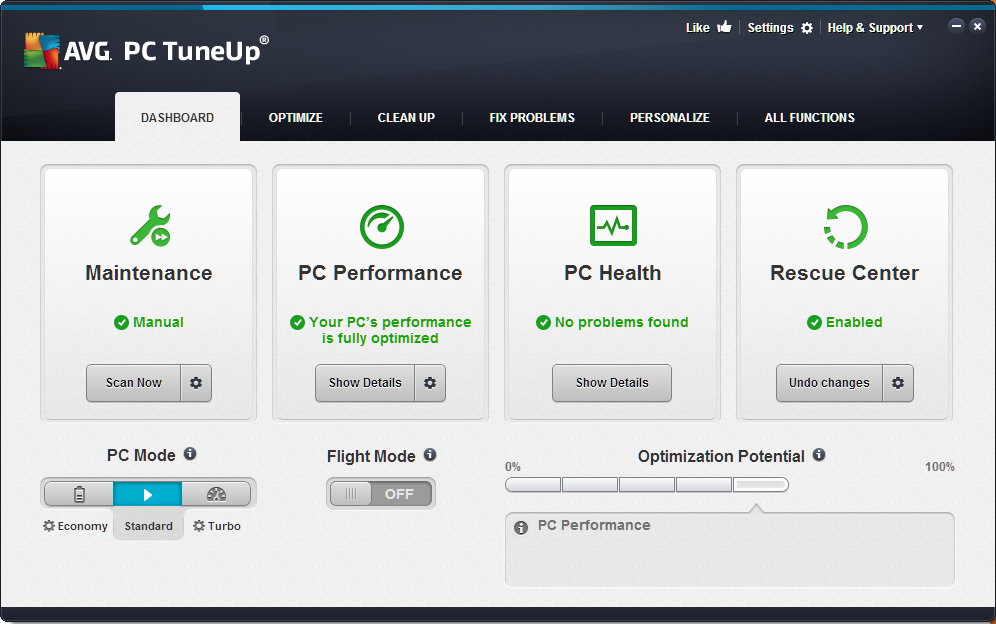
AVG TuneUp Utilities makes Windows faster, more secure, and comfortable. All important aspects of system configuration, security, cleaning and maintenance are combined under a modern graphical user interface.
Latest Reviews

gsteele reviewed v2017 on Mar 11, 2017
Overpriced for what it does. There are lots of freeware and lower cost programs that do a better job.

AthleticLatino reviewed v2014 14.0.1000.145 on Oct 26, 2013
I purchased the 2014 version and now regret it. My Windows 8.1 computer got BSODs consistently after installing and running it. I had to reset my OS several times as a result and the option to refresh did not work. The two things I disliked the most was the fact that it installs itself to run at startup and offers no way to terminate once its running. It also caused some installs and programs to not run without any alerts asking you if you wish to continue. Once I got this uninstalled my system became stable once more and ran normally. I regret that I wasted money on this.

Uriel reviewed v2013 13.0.3020 on Feb 8, 2013
Screwed my computer up and when I managed to uninstall it using JV16 Powertools and Revo Uninstaller Pro together, my computer started to work normally again.

Music4Ever reviewed v2013 13.0.3020 on Feb 7, 2013
Download CCleaner & a free defragger, if need be use the winapp2 add-on & you don't need this software which will probably at some point mess your day up.

numbersjim reviewed v2013 13.0.3000.138 on Jan 31, 2013
This is the worst program ever!!!! I am surprised that Betanews has ads to buy it. The phone number for tech support NEVER gets answered. When you leave a message they never call you back. When you submit a request on line, you get an email saying they will contact you, but that never happens. Even after you purchase the product, you will get 20 pop ups a day to buiy it. Is there anyway to completely unistall every trace of it? Rating is -10!

paul83 reviewed v13 on Oct 29, 2012
A simple advice Do NOT install the trial version on any computer! As they will force you to purchase as you cannot deinstall it

HeilNizar reviewed v13 on Sep 18, 2012
Nose-ware
Music4Ever reviewed v2012 12.0.3500.14 on Apr 14, 2012
Beware of any program that has 'utility' in it's name ~ There once was a place for this sort of program 10 - 15 years ago ~ Now unneeded & can do more harm than good.

roj reviewed v2012 12.0.3000.140 on Feb 7, 2012
Back in the days of XP64, this was a worthwhile product because several features were included in it that the OS did not supply and could not be reliably obtained via freeware.
That was a long time ago, the Windows OS now includes many of the features built into this package and the rest are available via reliable open source or freeware applications.
Any claims made about speeding up the OS are out-and-out false and cannot be substantiated via credible metrics. The Windows OS is self-tuning and requires no aid in optimizing itself.
There is absolutely no necessity to waste money on this product and paying for it is analogous to lighting your money on fire.
I have to agree with Input Overload in his assessment: this is a con job at best, preying on ignorance.
I'll give it ONE star because that's the lowest this site supports.

itsallgood reviewed v2012 12.0.2160.11 on Jan 9, 2012
We recently installed the 2012 version on several of our office computers. We were using the program for some issues on 1 PC in particular and decided to try and speed up the others. 1 of the worst mistakes we ever made. This program has caused all 3 PC's to have serious issues. I have had to have a company come in to fix all 3 PC's. We have tried on numerous occasions to contact their customer support here in the US. No one answers the phone. They ask you to leave a contact # to return your call. After 3 messages in 3 1/2 weeks still no return call.
I WOULD NOT RECOMMEND THIS SOFTWARE TO ANYONE. IF FOR NOTHING ELSE JUST THEIR CUSTOMER SERVICE

gsteele reviewed v2017 on Mar 11, 2017
Overpriced for what it does. There are lots of freeware and lower cost programs that do a better job.
AthleticLatino reviewed v2014 14.0.1000.145 on Oct 26, 2013
I purchased the 2014 version and now regret it. My Windows 8.1 computer got BSODs consistently after installing and running it. I had to reset my OS several times as a result and the option to refresh did not work. The two things I disliked the most was the fact that it installs itself to run at startup and offers no way to terminate once its running. It also caused some installs and programs to not run without any alerts asking you if you wish to continue. Once I got this uninstalled my system became stable once more and ran normally. I regret that I wasted money on this.
Uriel reviewed v2013 13.0.3020 on Feb 8, 2013
Screwed my computer up and when I managed to uninstall it using JV16 Powertools and Revo Uninstaller Pro together, my computer started to work normally again.
Music4Ever reviewed v2013 13.0.3020 on Feb 7, 2013
Download CCleaner & a free defragger, if need be use the winapp2 add-on & you don't need this software which will probably at some point mess your day up.
numbersjim reviewed v2013 13.0.3000.138 on Jan 31, 2013
This is the worst program ever!!!! I am surprised that Betanews has ads to buy it. The phone number for tech support NEVER gets answered. When you leave a message they never call you back. When you submit a request on line, you get an email saying they will contact you, but that never happens. Even after you purchase the product, you will get 20 pop ups a day to buiy it. Is there anyway to completely unistall every trace of it? Rating is -10!
paul83 reviewed v13 on Oct 29, 2012
A simple advice Do NOT install the trial version on any computer! As they will force you to purchase as you cannot deinstall it
HeilNizar reviewed v13 on Sep 18, 2012
Nose-ware
Music4Ever reviewed v2012 12.0.3500.14 on Apr 14, 2012
Beware of any program that has 'utility' in it's name ~ There once was a place for this sort of program 10 - 15 years ago ~ Now unneeded & can do more harm than good.
roj reviewed v2012 12.0.3000.140 on Feb 7, 2012
Back in the days of XP64, this was a worthwhile product because several features were included in it that the OS did not supply and could not be reliably obtained via freeware.
That was a long time ago, the Windows OS now includes many of the features built into this package and the rest are available via reliable open source or freeware applications.
Any claims made about speeding up the OS are out-and-out false and cannot be substantiated via credible metrics. The Windows OS is self-tuning and requires no aid in optimizing itself.
There is absolutely no necessity to waste money on this product and paying for it is analogous to lighting your money on fire.
I have to agree with Input Overload in his assessment: this is a con job at best, preying on ignorance.
I'll give it ONE star because that's the lowest this site supports.
itsallgood reviewed v2012 12.0.2160.11 on Jan 9, 2012
We recently installed the 2012 version on several of our office computers. We were using the program for some issues on 1 PC in particular and decided to try and speed up the others. 1 of the worst mistakes we ever made. This program has caused all 3 PC's to have serious issues. I have had to have a company come in to fix all 3 PC's. We have tried on numerous occasions to contact their customer support here in the US. No one answers the phone. They ask you to leave a contact # to return your call. After 3 messages in 3 1/2 weeks still no return call.
I WOULD NOT RECOMMEND THIS SOFTWARE TO ANYONE. IF FOR NOTHING ELSE JUST THEIR CUSTOMER SERVICE

Input Overload reviewed v2012 12.0.2110.9 on Nov 23, 2011
I'm no Troll, I've been using IBM clones since DOS only 286's & everything in this suite can be got for free without the resource hungry junk. Enable GOD mode & most of these facilities are there already in the Windows install.
No Stars
Aucune étoile

GibMonkey reviewed v2012 12.0.2040.9 on Nov 8, 2011
Yeah I don't honestly understand all the hating. I purchase this and install this for everyone's system that doesn't know enough about computers to keep them from getting internet HIV. This and a decent antivirus program of course. This just kind-of no-brains what I can do manually. It's super easy and super effective. Don't believe all the 1 star trolls.

tomcat77 reviewed v10.0.4310.27 on Aug 15, 2011
i had very good experience with this in XP, but it was only a useless heavy load on Win 7 on my super laptop.
slows down every simple single task!! my system had never frozen before (for 9 months) before installing TuneUp Utilities!!
definitely not recommended for Win 7.

GrailKnight reviewed v10.0.4310.27 on Jul 21, 2011
TuneUp well a nice tool in the old WinXP days has not cut it on Win7.
Bloat, OS functions becoming unstable with TuneUp installed, and it is IMO just as easy to tweak Win7 manually or with one of the free tweak programs out there.
Input Overload reviewed v10.0.4200.101 on Jun 15, 2011
I have to say that with Windows 7, pay for utilities are no longer needed. Maybe 15 years ago they were a must but now they can do more harm than good. You are wasting your money.
If you want to change something there is sure to be a free application to do the job.

thaghost101 reviewed v10.0.4200.101 on Jun 14, 2011
I don't know what all of you are hating on, I've been using this program for years and it works great, Especially on older computers that need a quick speed up
Uriel reviewed v10.0.4010.20 on Apr 12, 2011
My laptop would not shut down automatically. I had to hold the button down to force it to shut off. I Uninstalled this bloatware and problem instantly went away. This software in NOT recommended.

Bala7 reviewed v10.0.4010.20 on Apr 12, 2011
Back in the 6.0 and 8.0 days this utility was great...
now it is a monstrosity. Installs services always running in the background, limited system tweaks, a giant bloated package.

niknetpc reviewed v10.0.2011.65 on Nov 12, 2010
Another yet slowdown jink,heavy to load and make more disaster than before,turbo mode can't work as described.Waste time and money if buy. Simple free apps do it much better.

ballyhairs reviewed v2011 10.0.2011.65 on Oct 31, 2010
Another good software that became junk.

baki_princ reviewed v2011 10.0.2011.65 on Oct 30, 2010
well it does not optimize anything for ssd, it will defragmant it even thats not good for ssd. its not like a they are new.
niknetpc reviewed v2011 10.0.2011.65 on Oct 30, 2010
This version also sucks like a previous,slow,very heavy to load,and make more slowdown.My PC before is running faster.Waste time and money if buy, simple free programs do it faster and much better.

robertmc8 reviewed v2011 10.0.2011.65 on Oct 29, 2010
Beta News Please updated your screen shot on this program last screen shot was taking 2008 lol 2-3years ago. I used System Mechanic 10 now :) so far loving it.

Nischi reviewed v2010 9.0.4700.23 on Oct 6, 2010
I agree mostly with everyone else, it does the job, but there are other free alternatives. However, I bought my own license a little bit more than 2 years ago, and I can allege that I'm satisfied, it helped me through the rough period of vista, and now in windows 7. If you like it, then it might be worth it for you, if not, look for the free alternatives.

Terijan reviewed v2010 9.0.4500.27 on Aug 18, 2010
Very nice tuning program. It cleaned, defragmented registry and did not caused any problems, other tunnings works fine too. Thats a good sign. I think it is even slightly better than Windows 7 manager, though TuneUp utilities 2010 is expensive, so i give 4 stars instead of 5. But i hope in future they will add some more features so price will be reasonable.

terryjackson reviewed v9.0.4200.54 on May 13, 2010
All its components are available as much better performing freeware.
What a bunch of expensive garbage.
roj reviewed v9.0.4200.54 on May 11, 2010
Very valid in the days of XP64 because nothing else offered what it did.
Rather pointless today in the Windows 7 era in light of apps like Ultimate Windows Tweaker and other freeware gems.
This app no longer has relevance.
THREE stars.

jcollake reviewed v9.0.4100.17 on Apr 27, 2010
@ballyhairs: It is classic feature bloat and/or meddling of 'professional' project managers. I haven't used this product, so won't comment on it specifically. I just wanted to comment on your statement about products going downhill. It does happen, all too frequently. Either a developer just goes overboard, or these managers come in and start directing things. Naturally, by this time, the company has high powered PCs, and doesn't even think about all those people with older PCs. Also, its easier to develop bloated apps than slim ones. In fact, my personal efforts to write slim software (I'm the author of Process Lasso) have sometimes caused little bugs and such that wouldn't have otherwise existed if I just took the 'easy and dumb' approach. Of course, little bugs get fixed, and in the end the slim software is what people like.

YStevaert reviewed v9.0.4100.17 on Apr 26, 2010
3 tiny freeware apps can do 1000x more and better than this junk.

gawd21 reviewed v9.0.4100.17 on Apr 26, 2010
Freaking junk! There is nothing in here that you can't do in a few seconds on your own! Heft services, and BS. Boycot this crap!

xsnred reviewed v9.0.4020.33 on Feb 27, 2010
Of no use to anyone that knows what he or she is doing on a PC. roj is right in his review stating this software is for beginners who need to be hand held. This should be freeware at best. I've rated it before at -10 but now I will give it -20 for the ridiculous price.
Input Overload reviewed v9.0.4020.33 on Feb 26, 2010
Going downhill, I suggest using an older version if you can.
ballyhairs reviewed v9.0.3100.22 on Feb 17, 2010
Hey guys, did you see that it has THREE monsters running in (Services)? lol
Just one question:
WHY is it always the same issue for most software makers, they start fine and impressive and they end up making garbage? WHY?

Skite reviewed v9.0.3000.136 on Jan 3, 2010
Utterly useless.
I recently downloaded the trial which has all the features of the full version. A routine cleanup removed music file. Luckily, these had been backed-up. It has also made my computer slower than it ever had been before.
I wouldn't touch this company's products again with a barge pole. I'm only giving 1 star because there is no option to give zero.

CyberDoc999 reviewed v9.0.3000.136 on Dec 23, 2009
Waste of money lots of bugs....
you can get all of this for free....

frites reviewed v9.0.3000.136 on Dec 22, 2009
Complete junk compared to the great 2004 to 2008 versions. Interface is confusing and everything seems designed to run without much user intervention. AVOID THIS VERSION or try it if you liked previous versions, youll be as disappointed as i was.
roj reviewed v9.0.2010.11 on Nov 16, 2009
When 64-bit was less mainstream and tweaks were all accomplished by reg hacks and other weirdness, TuneUp was there providing a decent (albeit convoluted) interface to accomplish what was easy and taken for granted in the 32-bit world.
This is the 21st century. It is no longer required that someone actually know anything about the inner workings of an OS to effectively tune a computer (linux throwbacks to the contrary). That's why we no longer have carbs tuned by a screwdriver in cars. The dinosaurs who cling steadfastly to "the old ways" are only showing how pointlessly resistant to change they are - and how useless they have become in the modern era of computing.
I've been a techie for 20 YEARS (yeah people, I stared with DOS 3) and I'd recommend this product to an average user who needs to he handheld.
FIVE stars

morrig reviewed v9.0.2010.11 on Nov 16, 2009
So lets see M/S spends 3 years on pairing down Vista,and then this starts adding them.If it ain't broke don't fix it!

Inniosoft reviewed v9.0.2010.11 on Nov 15, 2009
I don't see how this is worthless junk. TuneUp Utilities isn't for everyone. It's designed to keep the average computer running smoothly.
As far as I'm concerned, its Defrag utility is the best on the market.
TuneUp keeps my PC 110% clean. Now with version 2010, I'm more than satisfied.
xsnred reviewed v9.0.2010.11 on Nov 15, 2009
This software, and others like it, is for people who know nothing about computers and don't want to know anything except check their e-mail and play solitaire. Should be worthless crap to anyone who reads BetaNews. Minus 10 stars if it was there.
CyberDoc999 reviewed v9.0.2010.11 on Nov 15, 2009
Worthless junk !

andy2004 reviewed v9.0.2010.11 on Nov 14, 2009
ballyhairs instead looking for startup manager directly through tuneup, look in the subfolder all functions.
the booster is funny, it basically only turns of services they you do not need or require, yes i did run it, problem is everything it said it would disable i've already disabled through services.msc, it does add another service to your machine. however unlike the other poster who said his got 5, i only seem to have 3
tuneup defrag, tuneup theme and tuneup utilities service. and i only have theme enabled.
I would also say this is a minor upgrade over the 2009 edition. not worth the price, but i guess its major if it only works on windows 7 and the 2009 doesnt. Hence the misely 3 rating.

thartist reviewed v9.0.2010.11 on Nov 14, 2009
Tools like this should NEVER add services in the background NOR release crappy versions just to cash on you when they are out of ideas.
Punishment.
ballyhairs reviewed v9.0.2000.16 on Nov 3, 2009
3 Stars for the new version because:
-Startup manager is no longer there, at least I can't find it, in the older version you could see a list of startup programs, enable, disable or add to them.
-There is a process running in the background claiming that it will increase performance while it uses itself memory to do so, how ironic!
For the rest it's a good product.

buckshee reviewed v9.0.2000.16 on Oct 31, 2009
This was probably released because the 2009 vrsion didn't work on Windows 7. If I was still using Vista or XP I wouldn't bother.
I have had no problem with registry cleaning except in the case of 1 program which also other reg cleaners erased the same entries, but TU Utilitiest can be set to ignore registry entries

Morningdove reviewed v9.0.2000.16 on Oct 30, 2009
TuneUp Utilities 2010 is still a 5 star program, but updating from 2009 was disappinting. Admittedly, I have not examined each individual module in detail, but an overview reveals nothing to merit a major version upgrade. The only signifigant difference appears to be the Integrator face lift which offers no advantage over 2009. As for the new turbo mode, I really see no real value in this feature.
This version also adds a new service, which makes a grand total of five! Setting the service to Manual helps, but it continues to run after the program is exited. A scheduled task was also added even though all automated features are disabled.
IMO this is a minor update at best; not a $30 major upgrade. This version will co-exist with TU 2009, so test driving the 30 day trial is highly recommended.

New Doraemon reviewed v9.0.2000.16 on Oct 30, 2009
I just tried the brand new 2010 release in my Windows 7 Ultimate RTM x64. I have to say that there are lots of changes if you compare the suite to the previous years releases. But I have to admit that I still find it to be very unreliable. The registry cleaning and defragmenting tools have proved to be very dangerous in the past releases and I see that the core registry apps look exactly the same as in the 2009 and previous editions.
I've tried jv16 2008 and 2009 and I find it also to be very unreliable.
For me, there are a couple of nice suites: Ace Utilities (still waiting for a Windows 7 revamp) and Raxco's PerfectSpeed 2.0. I have yet to see any damages from these two.
Sooo... In conclusion, I give it a 4 for the innovative tools but just a 2 for the unreliability.

craigun reviewed v8.0.3100.31 on May 2, 2009
One of the best programs of it type! Just a bit expensive.

SueAmma reviewed v8.0.3100.31 on May 2, 2009
If you are using this program with automatic maintenance turned off, be careful when updating to this current version. The updater turns it back on and after a required reboot it begins executing. An extra icon in the system tray is the only notification.

utilities 2008 reviewed v8.0.2000 on Mar 9, 2009
hello, i tried this new version and it did not work . i preffer the last one 2008 its better

ALR1 reviewed v8.0.2000 on Jan 12, 2009
Aloha,
I am very impressed. This is the first time that I have used the software. I have Vista 64 bit O.S. On a new PC and I am using the (free trial version with a 30 day timeout). It seems to have done a excellent job of picking up a ton of the errors, and fixes that I inadvertently put on the system. They were all true errors and the suggestions were all valid. NO bogus errors to make the software look like it has worked hard... Just looking for a coupon or a discount and I will buy :)
frites reviewed v8.0.2000 on Dec 23, 2008
This once great suite of tools has gone right downhill and is now a bloated blob of its former sleek useful self.

PGorski reviewed v8.0.2000 on Dec 20, 2008
Won't install properly. I have contacted the author and they say there may be a conflict with NIS 2009. Suggestion: disable Norton. Temporarily disabling Norton does not solve the problem. I keep getting a TUNEUP is not properly installed...please reinstall. I have Norton loading at boot so....I think TuneUp must be trying to write something to the boot area...but I am not sure. Anybody else?

legion reviewed v8.0.2000 on Dec 13, 2008
Very good optimize pack.

Jammerdelray reviewed v8.0.2000 on Dec 12, 2008
This new version is bloated and reminding me of System Mechanics problems.

Adrian79 reviewed v8.0.2000 on Dec 12, 2008
the best of its kind.

Baldrick reviewed v8.0.1100.43 on Nov 23, 2008
Hey frites
Concentrate on reviewing TuneUp Utilities and try to avoid comparisons and criticisms of other similar programs. They are in appropriate and uncalled for.
Have tried out the latest version of TU and whilst I find it competent I have to say that I do not find that much has changed when compared to TU 2008. All the functions are capable but nothing to write home about. This is IMHO one of the better such utilities out there and a worthwhile investment (although my allegiance lies elsewhere at the moment and what I see here does not prompt me into going through a change process)
frites reviewed v8.0.1100.43 on Nov 22, 2008
Oh Dear..
I think they have ruined this once wonderful app.
Whats with the crappy Problems found dialog ? Thats like the awful System Mechanic.
Now if you dont want one click youre left with nice yellow exclamation marks !!! Hey Tuneup !! I dont need to be told whats up, i can do it myself thank you.
Back to 2008 for me.

T_LOKZz reviewed v8.0.1100.43 on Nov 21, 2008
Love there software how it makes keeping your computer clean a one click job and even does everything else you could want to manage computer problems.
SueAmma reviewed v8.0.1100.43 on Nov 21, 2008
@Pfurri: This is a software review forum. It is not a personal attack forum. If you want to flame, try a chat room.
Morningdove reviewed v8.0.1100.43 on Nov 21, 2008
The price is $49.95 at the TuneUp Online Shop, not $39.95 as stated here. The cost to upgrade when the next annual edition is released is $29.95.
The utilities are great but not for $30 a year to stay current.
I also question the legality of buying and selling serial numbers on eBay.

amnar reviewed v7.0.8007.0 on Aug 30, 2008
Super utility suite!
And for those reviewers that have balked @ its price... check out ebay. There's plenty of licenses listed for around $8. I just got a one year license for $4.99 :)
roj reviewed v7.0.8007.0 on Aug 24, 2008
Normally I don't go for utilities like this because freeware can fill most of the gaps but on XP64, this one is worth it. I do think the price is ridiculous though - $25 would be far more reasonable.
EDIT:
I'm going to revise my review. After really getting into this product, the convenience of the One-Stop-Shopping makes it well worth the price, ESPECIALLY if you're running a 64-bit OS where utilities are hard to come by.
FIVE stars.

PatrickDeSutter reviewed v7.0.8007.0 on Jun 20, 2008
FREE tools can do all that, and even better.
craigun reviewed v7.0.8007.0 on Jun 20, 2008
It's a nice program, but not for 39.99! Lots of free stuff out there that are just as nice.

bigmama reviewed v7.0.8007.0 on Jun 20, 2008
nice (combine it with ccleaner for best results)

miteshanand1729 reviewed v7.0.8005.0 on May 26, 2008
When i download this is ver. is 7.0.8004 not ver-7.0.8005.

MadHead reviewed v7.0.8005.0 on May 23, 2008
this is 7.0.8004 !
Adrian79 reviewed v7.0.8005.0 on May 23, 2008
been using this since "tuneup 2004"

ravemanson reviewed v7.0.8005.0 on May 22, 2008
The only tweak utility i've ever been able to say i like every single function of, including the awesome interface, and which also happen to do one hell of a job in all areas.
legion reviewed v7.0.8005.0 on May 22, 2008
Very good pack, defragment function is great.

jeffreybt2 reviewed v7.0.8004.0 on Apr 30, 2008
Nice little tool to centralise common "tweaks"
for that ill give it a decent rating
However the price on the website is $53 Canadian, that's insane I only paid $125 for Vista Ultimate (OEM) there is no way in hell id pay that much for so little.
Program's like this should cost $5-$10 at most
they would sell allot more that way.

Blaxima reviewed v7.0.8004.0 on Apr 23, 2008
There are freeware programs that can do what this does and better too.
This does a decent job at what it tries to do but the new layout is awful
Honestly its better to have a few programs that do a better job rather than shell out the ridiculous price for this which tries to be an all in one
Jammerdelray reviewed v7.0.8004.0 on Apr 23, 2008
Very good at keeping windows running with peak performance. Only downside is conflicts with valves steam, when steam is set to startup on boot. Compared this with Ashpampoo Win Optimizer 5 and this beats the pants off it, in terms of features, easy of use etc.

the artist reviewed v7.0.8004.0 on Apr 23, 2008
After myst was cleared a bit I found out that this software, in the end, is a collection of pretty but mediocre applications that you can get often much better and free elsewhere. Styler is weet, yes. I like that you can change your boot screen out of any picture.
What I personally care about can be sum up as AdvancedWindows Care and CCleaner. Yes, there are the monitoring tools, the aesthetic tools, that defragmenter and stuff but they don't do anything relevant though i like that you can change your boot screen out of any picture...
Not much worth the 40 to me, but it's ok for packing an easy and acceptable all-in-one for noobs.
@Haaglander: very idiotic comparison, you know the world doesn't make sense that way. Vista should cost $400,000, or this one just coins? In fact, you see there how the whole OS is 1000 times cheaper than TUU under your calculations. You come up with it. ;)

Haaglander reviewed v7.0.8002 on Mar 17, 2008
$39.99 for buying this program? That's about 25% of a Vista Home Premium license but it's code is about 0.1% compared to the amount of the Vista code.
I call it a rip-off.

sixara reviewed v7.0.8002 on Mar 2, 2008
Its a great all around program. Not a ripoff either. It does as it says. However, I think they went overboard with the redesign of the GUI. Makes it confusing as where everything is hence my vote of 4. 2007 GUI was better as it was more straightforward.

midfingr reviewed v7.0.8002 on Mar 1, 2008
I think of this program as what Norton Utilities should have become. A light weight all-in-one package, with customizations for the user interface thrown in. The included TuneUp Styler has a lot to offer, making that part of the program worth the price alone.
In Windows Vista, I found it to work just fine, making it easier to delete old Windows update backups, thumbnail cache, check disk fragments, and so on. The 1-Click Maintenance is handy too, which can be scheduled to run whenever you specify.
This program even has it's own built-in uninstaller, displaying the size on the disk, plus the date a program was installed, with an option to delete an already removed program from the uninstall list.
I realize there are free applications, very good ones at that, you can use. However, for the convenience of having a ton of utilities in one package, makes this a nice addition to any Windows install.

Registered reviewed v7.0.8002 on Mar 1, 2008
very good, has excellent options, and the program does getter better with each release, windows XP only, do not use Vista so i can't comment,
i don't like the defragger, and not sure why the company went down this way, most good programs are devoted entirely to defragmentation, and yet now this program includes it, any one who does defragment software has to go all in, well this defragger doesn't support offline defragment, so scores -1 point,however, because of the rest of the software that does do excellent jobs, and the amount of research that had to be done to give us "The users" a all in one suite of tools at our disposal, well i have to give MAX points,
but for the record, i think the company has run into the inevitable problem that can not be solved, this software has reached it's maximum potential "Windows XP users anyway" and there's not many more things that they can add to justify paying the upgrade fees they ask for, and personaly speaking, i think they should do a "Windows Vista" program seprately, to windows xp users, because to me, seeing defragmentation abilities with this software sounds like they know there running out of things this software can do,
all programs at some point must come to an end, some sooner then others, but no program can keep being upgraded, year after year, even MS Office as we know it, will become un-upgradable, and a whole new office what we don't know now, will one day be born,
i just hope i don't see tuneup utilities 2009 for windows XP users, (Unless they have many more inovative ideas up there sleeve which i doubt)
at least Vista is out now, give them 2 more seasons at least, not sure what they will do come 2010 though, hehehe.

Jerrymiah reviewed v7.0.8002 on Mar 1, 2008
The TuneUp Utilities 2008 web page says that both Windows Vista 32 and 64 are supported by this product. Why not include them on your site
ballyhairs reviewed v7.0.8002 on Mar 1, 2008
The best is getting better, never had a problem with it, and now they have a defragmenter, good job.

Winkler reviewed v7.0.8002 on Feb 29, 2008
i agree. 2007 was much better. Almost like what happened to adaware.

rburly reviewed v7.0.8002 on Feb 29, 2008
Screw the people at Beta News who won't allow my review of this piece of crap. I don't know what's worse, not allowing me to warn others or allowing (not Beta) pieces of crap like this software.
frites reviewed v7.0.7991 on Dec 26, 2007
This latest version suxx, back to 2007 its awful.

gate1975mlm reviewed v7.0.7991 on Dec 21, 2007
Cool the best gets better :)
ballyhairs reviewed v6.0.2311.0 on Dec 16, 2007
The best of its kind
Adrian79 reviewed v6.0.2311.0 on Aug 12, 2007
changelog plz?

oasiscraze reviewed v6.0.2200.0 on May 1, 2007
VERY good program for what it is. Excellent User Interface; supports Vista x64 as well! This program is probably superior to the mighty jv16 Powertools of the past as jv16 doesn't support OS's using 64 bit processors. Definately worthy of a 5.
Only 2 major downsides
a) the registry cleanup utility could be a little faster (as compared to jv16 powertools)
b) possibly doesn't detect every error in registry. Nevertheless, it is probably safer that it didn't.
Regardless of these two factors, this program definatley sped up my computer. Grab it!

luhirs reviewed v6.0.2200.0 on Apr 29, 2007
I found this..
New vista updates in the new version
http://www.tune-up.com/p...ews/?page=windows-vista

merlin666 reviewed v6.0.2200.0 on Apr 28, 2007
What is new in this release. I cannot find a changelog.

shrink57 reviewed v6.0.2200.0 on Apr 27, 2007
One of the best in it's class. Even has some nice XP skinning and icon management tricks up its sleeve.

White_Flame reviewed v6.0.2200.0 on Apr 27, 2007
Wow, this thing has some powerful defragmenting capabilities. i purposefully ripped things apart so i could see it go back together with ease. one of the most amazing products ive ever owned

iamtux reviewed v6.0.2200.0 on Apr 27, 2007
Interesting tweaking utility. I downloaded it just today, its got lots of good stuff in it. I just may end up buying this!
ballyhairs reviewed v6.0.2200.0 on Apr 27, 2007
Very good.

dan44762000 reviewed v6.0.1255.0 on Dec 31, 2006
brilliant piece of software

jofin reviewed v6.0.1255.0 on Dec 21, 2006
This is an excellent program and I continue to rate it very highly. However, I have just updated to 2007 and am very disappointed in how little has changed from the previous version. My advice if you already have 2006 is to keep using it and save your money.

Avion Airplane reviewed v6.0.1255.0 on Dec 21, 2006
I love this program ! I install it on all my computers
http://www.townoflaplata.com

cannie reviewed v6.0.1255.0 on Dec 21, 2006
Excellent.

zridling reviewed v6.0.1255.0 on Dec 21, 2006
Love this program and have used it many versions, but the last major upgrade was just in April, which means I've paid $50 in 2006 to upgrade TuneUp — crap man! Oh well, it works, and has a clean UI.

jspratjr reviewed v6.0.1255.0 on Dec 20, 2006
Ditto on what erolyavuz stated.

erolyavuz reviewed v6.0.1255.0 on Dec 20, 2006
I love this software so it has 5 star for me.

id242 reviewed v6.0.1255.0 on Dec 20, 2006
TuneUp Utilities 2007 includes many new features
http://www.tune-up.com/p...ilities/news/?page=text
TuneUp Disk Doctor:
Performs a thorough check of hard drives – automatically corrects errors in the file system and drive sectors to keep your data secure.
TuneUp Disk Space Explorer:
Uses a targeted approach to identify which files and file groups are taking up valuable disk space on your hard drives.
Expanded TuneUp System Control:
Offers expanded configuration options for Internet Explorer 7, Firefox 2 and Office 2007.
Improved 1-Click maintenance:
Allows you to perform even more thorough system checks and error correction with a single click.
Improved TuneUp DiskCleaner:
Finds additional unnecessary file types and gives you more free disk space.
Improved TuneUp RegistryCleaner:
Targets unnecessary entries in the Windows registry using an improved scan technology and removes them.
Designed for future use with Windows Vista™:
Gives you a free online update to TuneUp Utilities 2007 for Windows Vista™.

bodean reviewed v6.0.1255.0 on Dec 20, 2006
Whats new? Why do you have to be so lazy. Go google the app, go to the website, and use your 2nd grade education and READ about it, gimp.
Great App btw.
merlin666 reviewed v6.0.1255.0 on Dec 20, 2006
what's new in this release?

oompoop reviewed v5.3.2343 on Oct 25, 2006
I got it on my birthday (56) from my dad (84) ;-))
Please run first the 1-click-service, and if it says "all problems fixed" try 1. CCLEANER [free] and 2. REGSUPREME [Share] ...
Adrian79 reviewed v5.3.2343 on Oct 7, 2006
wow it's been a year since they updated!
zridling reviewed v5.3.2343 on Oct 7, 2006
Better than any other when it comes to customizing Windows. When combined with TweakUI, you can make XP work and look any way you want.

ranasrule reviewed v5.3.2343 on Oct 6, 2006
simply the best along with jv16
erolyavuz reviewed v5.3.2343 on Oct 6, 2006
It is excellent.

Cris3 reviewed v5.3.2343 on Oct 6, 2006
I've been running this program for a few years now and I've grown to depend on it being there when I need it. It's versatile and handy like a crescent wrench in your toolbox. I don't know why support would be an issue with it. Never had to use support for this program.
The Welcome Screen and system components icon changer are easy to use functions that adds some personal touch to the interface. Mormegil icons (on web)have a classy look that you can install with this program.

callisto reviewed v5.0.2331 on Oct 6, 2006
excelent program

bringshu reviewed v5.0.2331 on Oct 23, 2005
Excellent software for optimization. But for registry cleaner I'd suggest to try out WinASO which is more thorough or RegCleaner(NOT TWEAKNOW version) for advanced users.
Otherwise I'd rate it as an aweware (awesome software)!!

na6car reviewed v5.0.2331 on Oct 5, 2005
Love the program, but hate the support... Oh, did I say support? There is no such thing as support from TuneUp Utilities...
I sent them three email requests for help so far, and still no response, so if you have a working copy, good for you, but if you need help, forget it!

Chazwazza reviewed v5.0.2331 on Sep 29, 2005
Uhhhh, it is listed on their site. :P
http://www.tune-up.com/products/tuneup-utilities/
Excellent program btw.
zridling reviewed v5.0.2331 on Sep 24, 2005
I like TuneUp Utilities because it's one of the easiest and most effective tweaking utilities alongside Microsoft's TweakUI.
PS. Where is the 2006 version? It is not listed anywhere on TuneUp's site. It's pretty amazing that FileForum has the latest version, but TuneUp does not.

Carlospr reviewed v5.0.2331 on Sep 23, 2005
I still use TuneUp 2004 for some tasks.
But, I have to agree with Inray. It lacks depth.
The new version seems to be just fancy since:
- The Uninstall Manager is still the same: no cache (for fast loading), no exclusion list (for faster loading), no real icons. Little to manage...
- The Registry Editor lacks a backup feature: not a .reg copy but a hive copy (like in Registry WorkShop). A .reg backup can be made with Windows' Regedit...
- The StartUp Manager does not show Windows services (yet) just a link to services (c'mon!).
The tools I use most are just the same. "No depth at all". That's why just 3.

Argente reviewed v4.1.2318 on Sep 2, 2005
Ya esta disponible TuneUp Utilies 2006 5.0.2327!!
Muy bueno!!
salu2!!

tre_rosor reviewed v4.1.2318 on Feb 10, 2005
I like this program a lot, since I'm not an advanced user and the interface is really simple to use. I have not had any trouble then I correct the problems found by the program. Instead it corrected a lot (hundreds) of problem on my computer which impressed me so much that I bought one copy.

Raven Sati reviewed v4.1.2318 on Dec 21, 2004
Inray is correct about this one. Maybe you will have some harm and they want you to pay them to do it to you.

httpd.confused reviewed v4.1.2318 on Nov 19, 2004
I agree. Real utilities are like a trip to the hardware store--you get the individual best tool for each need. TuneUp Utilities is like a trip to the toy store, culminating in the purchase of a child's toy, made to look cute, and include everything in one bag, with nothing working well enough for serious use.

Inray reviewed v4.1.2311 on Sep 20, 2004
Just a mediocre utility under a really nice user interface.
Sorry to disagree with many Tuneup fans, but i cannot call this as System utility.
Disk cleaning is really a joke. No user control on every aspect of searching and deletion. No user configurable file and path selectors, just a few hardwired filters, like tmp, bak, log etc. No exclusion lists, no folder addition, no nothing.
Registry cleaning is useless and dangerous. Most keys it finds, especially those in CLSID branch, are needed by the system and should not be removed. Tuneup, cannot even detect and remove most known MRU values. Even worst, it has no exclusion lists and user have to uncheck dangerous keys manually after scanning. That's a shame.
System optimizer ? Don't make me laugh.
I will not mention tweaking features, it really has many but who cares. That doesn't make Tuneup a good utility, just another colored tweak toy for newbees.
So i cannot rate it with more than 2. Sory folks, Tuneup utilities has nice "German" user interface, but no depth at all.
ranasrule reviewed v4.1.2311 on Apr 2, 2004
zippo is to cigarette lighters as TuneUp Utilities 2004 is to ......... system maintenance utilities......watch out for this one in future SATs

Bachalor reviewed v4.1.2311 on Apr 2, 2004
Easy for work, german interface....This tool remove also invalid .lnk files (Shortcuts), other programs deny the service or can't find these faults at all.

sflorack reviewed v3.1.2004 on Feb 12, 2004
Very good suite of applications. The icon engineer is the link weak in the suite as it seemed to mess up my registry. (It removed my ability to view videos as icons in Windows Explorer; had to repair the problem by editing each extension seperately.) Otherwise, a very full-rounded package.